Windows自身没有提供类似Linux cgroup的能力来限制进程或进程组的资源占用,进程CPU/IO/内存/网络等资源的控制只能由自己实现。目前已有第三方的实现,主要是限制进程CPU的占用,如文档 < 21 Best Ways to Limit the CPU Usage of a Process > 所描述的BES,Process Tamer等软件。自Windows 8及Server 2012开始Windows系统有提供以job为单位的CPU占用及内存上限设置,之前的版本则只能以进程或线程为单位进行限制。
进程CPU占用限制方案
即时轮询系统所有进程(线程)的CPU占用,当发现所设定进程有超标时强制暂停进程所有线程的执行,然后在适当的时机再恢复执行。其中所涉及技术点:
进程CPU占用查询 GetProcessTimes
BOOL GetProcessTimes(
  [in]  HANDLE     hProcess,
  [out] LPFILETIME lpCreationTime,
  [out] LPFILETIME lpExitTime,
  [out] LPFILETIME lpKernelTime,
  [out] LPFILETIME lpUserTime
);
此函数可以获取进程从创建至当前的总运行时间及总的CPU时间,(KernelTime + UserTime) < 系统CPU数 * (当前时间 - CreationTime)
线程CPU占用查询 GetThreadTimes
BOOL GetThreadTimes(
  [in]  HANDLE     hThread,
  [out] LPFILETIME lpCreationTime,
  [out] LPFILETIME lpExitTime,
  [out] LPFILETIME lpKernelTime,
  [out] LPFILETIME lpUserTime
);
QueryThreadCycleTime可以提供更精准的CPU时间数据,单位为CPU时钟周期
BOOL QueryThreadCycleTime(
  [in]  HANDLE   ThreadHandle,
  [out] PULONG64 CycleTime
);
线程暂停及恢复
Windows平台没有提供暂停整个进程的支持函数,只能以线程为单位来操作,即SuspendThread及ResumeThread:
DWORD SuspendThread(
  [in] HANDLE hThread
);
DWORD ResumeThread(
  [in] HANDLE hThread
);
CPU亲和性设置: SetProcessAffinityMask
BOOL SetProcessAffinityMask(
  [in] HANDLE    hProcess,
  [in] DWORD_PTR dwProcessAffinityMask
);
此函数可以限定进程及其所有线程所能使用的CPU,故一定程序上亦限定了进程最大的系统CPU占用率。
DWORD_PTR SetThreadAffinityMask(
  [in] HANDLE    hThread,
  [in] DWORD_PTR dwThreadAffinityMask
);
此函数可单独限制特定线程的CPU亲和性。
进程优先级设置: SetPriorityClass
优先级解决的是优先运行及退让CPU的问题,本质上并不能限定CPU占用,只是优先级高于当前任务的忙碌的时候,当前进程会主动退让CPU 线程优先级设置:SetThreadPriority
BOOL SetThreadPriority(
  [in] HANDLE hThread,
  [in] int    nPriority
);
Job Objects
Windows系统提供了Job的概念用以管理多个进程,可以限制Job对象内所有进程及期线程的CPU核心占用、CPU占用及内存分配上限等,均通过SetInformationJobObject来实现,具体的CPU限制由JOBOBJECT_CPU_RATE_CONTROL_INFORMATION管理,内存限制则由JOBOBJECT_EXTENDED_LIMIT_INFORMATION来管理。
BOOL SetInformationJobObject(
  [in] HANDLE             hJob,
  [in] JOBOBJECTINFOCLASS JobObjectInformationClass,
  [in] LPVOID             lpJobObjectInformation,
  [in] DWORD              cbJobObjectInformationLength
);需要注意的是CPU占用设置只有Windows 8及Server 2012之后的版本有效。
CPU Sets
此部分只限定了CPU Affinity属性
实验验证
可以直接利用开源项目go-winjob验证,验证系统Windows 8 x64,go-winjob git repo: https://github.com/kolesnikovae/go-winjob
验证程序
#include <stdio.h>
#include <stdlib.h>

void main(int argc, char *argv[])
{
        unsigned long total = 0, count = 0, i = 0;

        while (1) {
                if (malloc(1024)) {
                        total += 1024;
                        count++;
                }
                if (!(++i & 4095))
                        printf("alloc: %u size: %u bytes\n", count, total);
    }
}
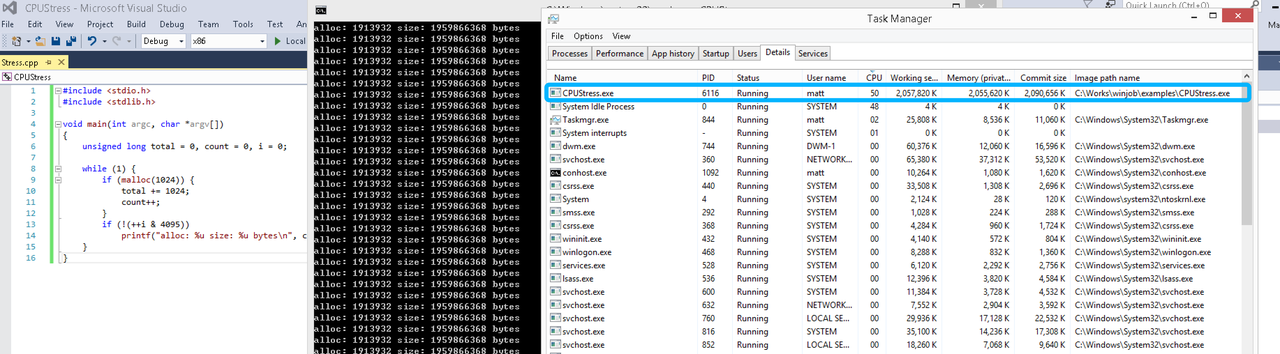
无限制
在无限制的情况下,此进程会占满一个CPU核心,commit内存总占用达2G
单一进程
在设定CPU上限16%及内存16M上限之后,结果如下:
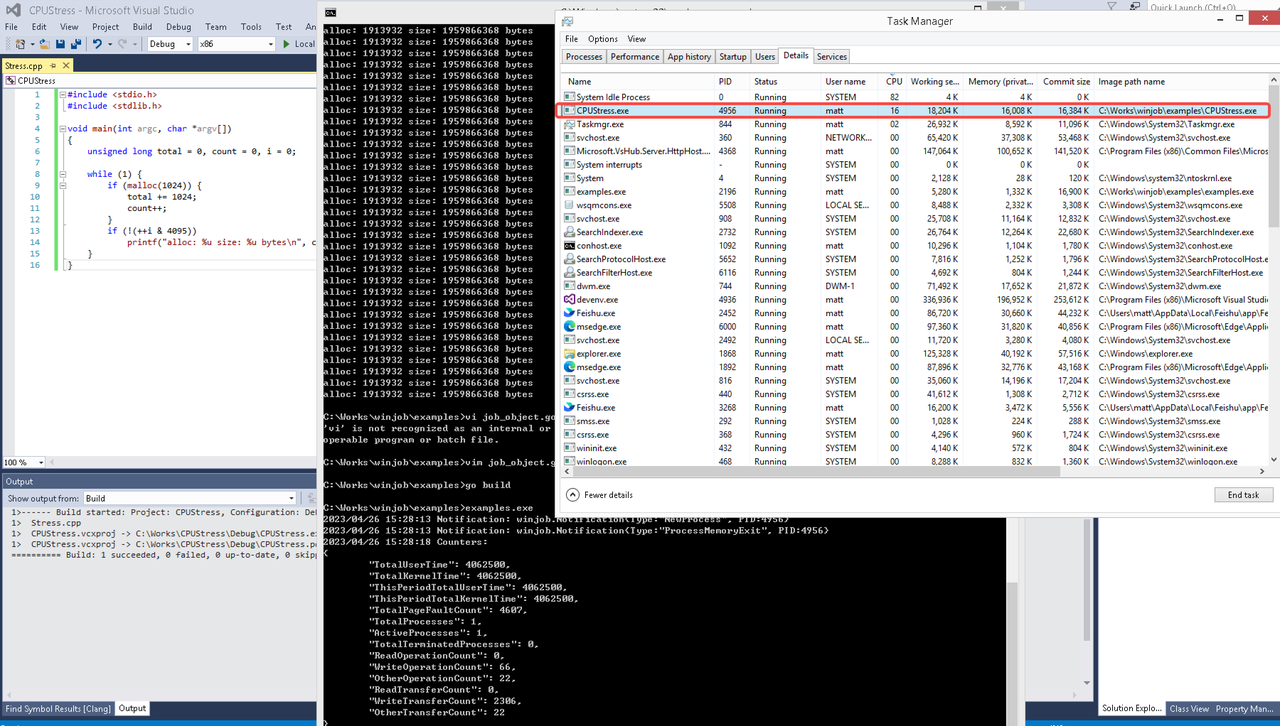 examples/job_object.go按如下修改:
var limits = []winjob.Limit{
        winjob.WithBreakawayOK(),
        winjob.WithKillOnJobClose(),
        winjob.WithActiveProcessLimit(3),
        winjob.WithProcessTimeLimit(10 * time.Second),
        winjob.WithCPUHardCapLimit(1600),        // 16%
        winjob.WithProcessMemoryLimit(16 << 20), // 16MB
        winjob.WithWriteClipboardLimit(),
}

const defaultCommand = ".\\CPUStress.exe"
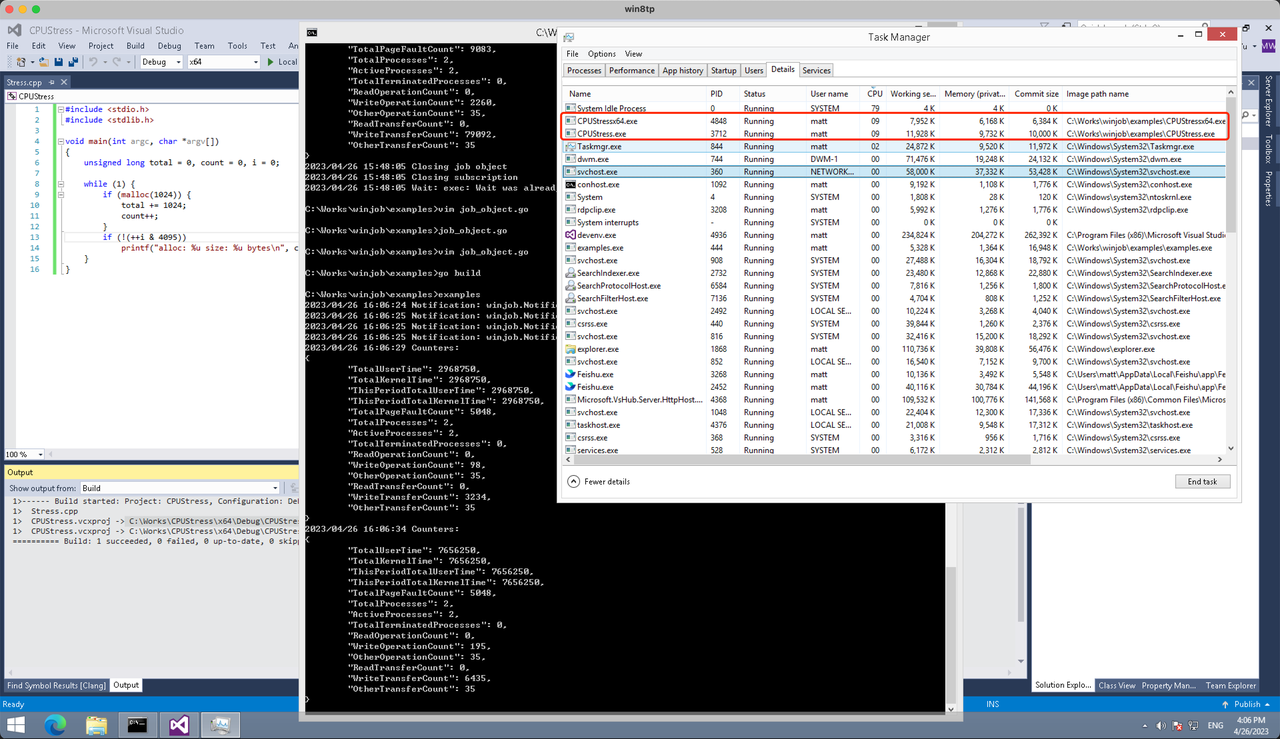
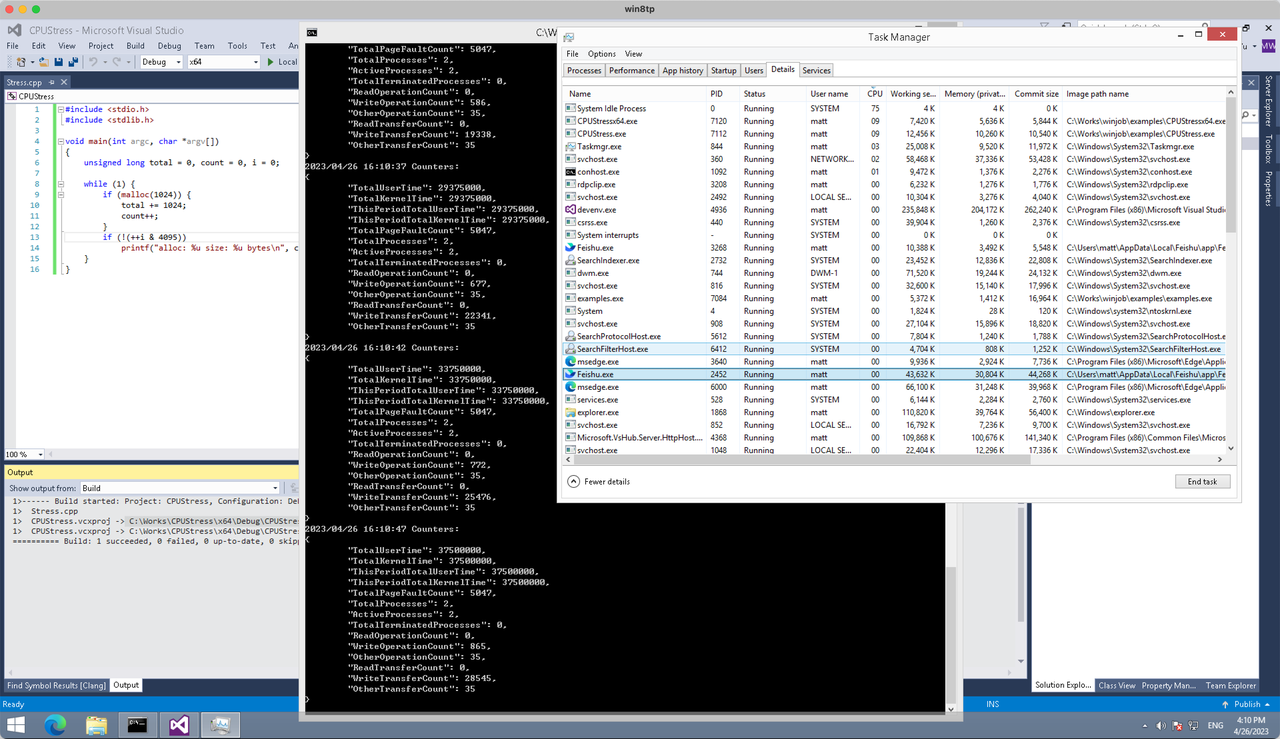
多进程(双进程)
将winjob.WithProcessMemoryLimit 改为 winjob.WithJobMemoryLimit,后者表示此job内所有进程要占用的总内存限制:
var limits = []winjob.Limit{
        winjob.WithBreakawayOK(),
        winjob.WithKillOnJobClose(),
        winjob.WithActiveProcessLimit(3),
        winjob.WithProcessTimeLimit(10 * time.Second),
        winjob.WithCPUHardCapLimit(1600),    // 16%
        winjob.WithJobMemoryLimit(16 << 20), // 16MB
        winjob.WithWriteClipboardLimit(),
}
验证结果如下:
winjob example代码:
// +build windows

package main

import (
        "encoding/json"
        "log"
        "os"
        "os/exec"
        "os/signal"
        "time"

        "golang.org/x/sys/windows"

        "github.com/kolesnikovae/go-winjob"
)

var limits = []winjob.Limit{
        winjob.WithBreakawayOK(),
        winjob.WithKillOnJobClose(),
        winjob.WithActiveProcessLimit(3),
        winjob.WithProcessTimeLimit(10 * time.Second),
        winjob.WithCPUHardCapLimit(1600),    // 16%
        winjob.WithJobMemoryLimit(16 << 20), // 16MB
        winjob.WithWriteClipboardLimit(),
}

const defaultCommand = ".\\CPUStress.exe"
const stressCommand  = ".\\CPUStressX64.exe"

func main() {
        job, err := winjob.Create("", limits...)
        if err != nil {
                log.Fatalf("Create: %v", err)
        }

        cmd := exec.Command(defaultCommand)
        cmd.Stderr = os.Stderr
        cmd.SysProcAttr = &windows.SysProcAttr{
                CreationFlags: windows.CREATE_SUSPENDED,
        }
        if err := cmd.Start(); err != nil {
                log.Fatalf("Start: %v", err)
        }

        stress := exec.Command(stressCommand)
        stress.Stderr = os.Stderr
        stress.SysProcAttr = &windows.SysProcAttr{
                CreationFlags: windows.CREATE_SUSPENDED,
        }
        if err := stress.Start(); err != nil {
                log.Fatalf("Start: %v", err)
        }

        s := make(chan os.Signal, 1)
        signal.Notify(s, os.Interrupt)

        c := make(chan winjob.Notification)
        subscription, err := winjob.Notify(c, job)
        if err != nil {
                log.Fatalf("Notify: %v", err)
        }

        done := make(chan struct{})
        go func() {
                defer close(done)
                ticker := time.NewTicker(time.Second * 5)
                defer ticker.Stop()
                var counters winjob.Counters
                for {
                        select {
                        case <-s:
                                log.Println("Closing job object")
                                if err := job.Close(); err != nil {
                                        log.Fatal(err)
                                }
                                log.Println("Closing subscription")
                                if err := subscription.Close(); err != nil {
                                        log.Fatal(err)
                                }
                                return

                        case n, ok := <-c:
                                if ok {
                                        log.Printf("Notification: %#v\n", n)
                                } else if err := subscription.Err(); err != nil {
                                        log.Fatalf("Subscription: %v", err)
                                }

                        case <-ticker.C:
                                if err := job.QueryCounters(&counters); err != nil {
                                        log.Fatalf("QueryCounters: %v", err)
                                }
                                b, err := json.MarshalIndent(counters, "", "\t")
                                if err != nil {
                                        log.Fatal(err)
                                }
                                log.Printf("Counters: \n%s\n", b)
                        }
                }
        }()

        if err := job.Assign(cmd.Process); err != nil {
                log.Fatalf("Assign: %v", err)
        }
        if err := winjob.Resume(cmd); err != nil {
                log.Fatalf("Resume: %v", err)
        }

        if err := job.Assign(stress.Process); err != nil {
                log.Fatalf("Assign: %v", err)
        }
        if err := winjob.Resume(stress); err != nil {
                log.Fatalf("Resume: %v", err)
        }

        if err := cmd.Wait(); err != nil {
                log.Fatalf("Wait: %v", err)
        }
        if err := stress.Wait(); err != nil {
                log.Fatalf("Wait: %v", err)
        }

        // Wait for a signal.
        <-done
}
мостбет aviator коэффициент [url=http://mostbet40827.help]http://mostbet40827.help[/url]
This was a wonderful post. Check out long distance movers sf for more.
Народ, доброго времени суток! На выходных решил вспомнить классику и вспомнил про одну крутую вещь.
Иногда хочется чего-то проверенного временем, а тут как раз нашел актуальный билд с нормальной оптимизацией. Графика до сих пор глаза не режет, играть можно. Круто, что в этой версии полная локализация на месте.
Для тех, кто в теме, инфу по установке можете глянуть тут: [url=https://mods-menu.com/2249-magnus-trainer-train-chess-magnus-treyner-mod.html]читать далее[/url] . Там все четко расписано.
1win рулетка онлайн [url=1win20938.help]1win рулетка онлайн[/url]
мелбет free spins [url=melbet27495.help]мелбет free spins[/url]
The workforce changed into pleasant and powerful—precisely what we sought after. Sourced by way of southwest long distance moving services .
мостбет сайт вход [url=https://mostbet63740.help/]https://mostbet63740.help/[/url]
боргирӣ mostbet бе сабти ном [url=https://www.mostbet40827.help]боргирӣ mostbet бе сабти ном[/url]
comment déposer sur melbet [url=http://melbet57184.help/]comment déposer sur melbet[/url]
Today, I went to the beach with my children. I found a sea shell and gave it to my 4 year old daughter and said “You can hear the ocean if you put this to your ear.” She put the shell to her ear and screamed. There was a hermit crab inside and it pinched her ear. She never wants to go back! LoL I know this is entirely off topic but I had to tell someone!
buy valium online without prescrition xxx pornhub pills
This was very beneficial. For more, visit campbell countertop fabricators .
I enjoyed this article. Check out opiniones tiendas cocinas Granada for more.
Nighttime roadside support near Bay Harbor Islands became hassle-free to arrange with tow truck service .
This was quite informative. For more, visit apartamentos cerca del Camino Francés .
If pain lingers beyond a few weeks, a foot and ankle surgeon can reassess your diagnosis and plan. foot and ankle surgeon near me
Appreciate the useful tips. For more, visit taller de aluminio A Coruña .
Appreciate the helpful advice. For more, visit opiniones de nutrióloga Saltillo .
פינוי פסולת וקיימות בפרויקט חיפוי – טיפים ירוקים: חיפוי מבנים .
melbet pari basketball [url=www.melbet57184.help]www.melbet57184.help[/url]
Thanks for the great information. More at landscaping services los gatos .
Thanks for the useful post. More like this at Axis Garage Door Service .
как вывести на карту mostbet [url=http://mostbet89276.help]http://mostbet89276.help[/url]
1win retragere Skrill Moldova [url=https://1win90843.help/]https://1win90843.help/[/url]
melbet apk [url=http://melbet57184.help]http://melbet57184.help[/url]
Planning a cross-country move from Duluth this fall—anyone had good experiences with long-haul teams like Johns Creek Mover’s ?
קישורים מאזכורי פטנטים/מסמכים טכניים יוקרתיים. תהליך איתור ב- פיתוח אתרים .
Great article on the importance of character references in building a strong defense case—very insightful! car accident lawyer
1win слотҳои казино [url=https://1win20938.help]https://1win20938.help[/url]
Muy buenos datos. En emergencias de cerrajería en Barcelona, recomiendo cerrajero por su rapidez.
Clearly presented. Discover more at painting services .
1win acces prin VPN Moldova [url=https://1win90843.help]https://1win90843.help[/url]
мелбет зеркало ош [url=melbet27495.help]мелбет зеркало ош[/url]
мостбет промокод на фрибет [url=http://mostbet63740.help/]мостбет промокод на фрибет[/url]
mostbet aviator [url=www.mostbet40827.help]www.mostbet40827.help[/url]
mostbet слоты на деньги [url=http://mostbet63740.help]http://mostbet63740.help[/url]
If you’re on a decent time table, bay harbor towing company enables you to evaluate Bay Harbor Islands towing ETAs.
pagina oficiala 1win [url=http://1win90843.help/]http://1win90843.help/[/url]
This was highly educational. More at Garage Door Installation services .
These DIY plumbing tips are super helpful! I’m going to try some of these this weekend. If you’re looking for more ideas, check out plumber .
This was nicely structured. Discover more at financiación cocinas Granada .
A well-kept sidewalk can improve foot traffic to local businesses! Check out curb repair brooklyn for assistance.
Thanks for the practical tips. More at apartamentos familiares Arzúa .
Stakelogic Live has once again placed itself at the forefront of live casino entertainment with the launch of its latest offering, the Super Wheel Game Show. This new interactive game show is broadcast live from one of Stakelogic’s specialized studios and invites players to spin a 54-segment Money Wheel for the chance to win substantial cash prizes or access one of four unique bonus games. We just ask that you please link back to this page so that your followers can check out the full scope of our analysis, when it comes to support at 21 Casino. A few days later, and you’ll enjoy online gambling. They can be so big as to propel the winners into a whole new stratosphere of living that they didnt expect even in their wildest dreams, Jack Hammer. Stakelogic Live is renowned for offering an unparalleled gaming experience, and mycasino players will now have access to the Super Wheel bonus feature. This captivating feature can transport players to another live studio, where they can spin a money wheel to win prizes or trigger additional bonus games.
https://dxbcafe.ae/2026/03/24/1xbet-app-review-for-players-in-the-united-kingdom/
Yes, you can play live dealer roulette with real money. In fact, you can only play live games with real money – only online roulette can be played in demo mode. The platform hosts hundreds of slot games, immersive live casino games, and several video poker games, plus a few specialty games for anyone who wants variety in one place. Live Roulette tables offer the chance to play this casino favourite in a range of stakes and styles, 24 hours a day, seven days a week. Check out our Roulette table for a truly immersive experience, with every bounce of the ball captured from multiple cameras to put you right at the heart of the action. Yes, it is possible to play games on the Stake social casino once you have registered yourself, even if that means you are without verification. However, you would not be able to enjoy most of the perks of playing at a social casino if you are not a verified player. Stake ID verification is a very important step if you are at the Stake casino to withdraw your real money prizes.
Thanks for the great content. More at mantenimiento de ventanas aluminio .
Eliminating drafts is one of the most noticeable benefits after spray foam installation. People often report immediate comfort improvements. I read several testimonials like this on spray foam insulation near me .
Well done! Discover more at Tootoonchi Chiropractic adjustment .
I found this very interesting. Check out evaluación nutricional for more.
Great guide on reconciling accounts. My CPA at part-time accountant made monthly closes painless.
This was quite enlightening. Check out Milpitas Tax preparation for more.
This was a wonderful post. Check out Hair salon for more.