Windows自身没有提供类似Linux cgroup的能力来限制进程或进程组的资源占用,进程CPU/IO/内存/网络等资源的控制只能由自己实现。目前已有第三方的实现,主要是限制进程CPU的占用,如文档 < 21 Best Ways to Limit the CPU Usage of a Process > 所描述的BES,Process Tamer等软件。自Windows 8及Server 2012开始Windows系统有提供以job为单位的CPU占用及内存上限设置,之前的版本则只能以进程或线程为单位进行限制。
进程CPU占用限制方案
即时轮询系统所有进程(线程)的CPU占用,当发现所设定进程有超标时强制暂停进程所有线程的执行,然后在适当的时机再恢复执行。其中所涉及技术点:
进程CPU占用查询 GetProcessTimes
BOOL GetProcessTimes(
  [in]  HANDLE     hProcess,
  [out] LPFILETIME lpCreationTime,
  [out] LPFILETIME lpExitTime,
  [out] LPFILETIME lpKernelTime,
  [out] LPFILETIME lpUserTime
);
此函数可以获取进程从创建至当前的总运行时间及总的CPU时间,(KernelTime + UserTime) < 系统CPU数 * (当前时间 - CreationTime)
线程CPU占用查询 GetThreadTimes
BOOL GetThreadTimes(
  [in]  HANDLE     hThread,
  [out] LPFILETIME lpCreationTime,
  [out] LPFILETIME lpExitTime,
  [out] LPFILETIME lpKernelTime,
  [out] LPFILETIME lpUserTime
);
QueryThreadCycleTime可以提供更精准的CPU时间数据,单位为CPU时钟周期
BOOL QueryThreadCycleTime(
  [in]  HANDLE   ThreadHandle,
  [out] PULONG64 CycleTime
);
线程暂停及恢复
Windows平台没有提供暂停整个进程的支持函数,只能以线程为单位来操作,即SuspendThread及ResumeThread:
DWORD SuspendThread(
  [in] HANDLE hThread
);
DWORD ResumeThread(
  [in] HANDLE hThread
);
CPU亲和性设置: SetProcessAffinityMask
BOOL SetProcessAffinityMask(
  [in] HANDLE    hProcess,
  [in] DWORD_PTR dwProcessAffinityMask
);
此函数可以限定进程及其所有线程所能使用的CPU,故一定程序上亦限定了进程最大的系统CPU占用率。
DWORD_PTR SetThreadAffinityMask(
  [in] HANDLE    hThread,
  [in] DWORD_PTR dwThreadAffinityMask
);
此函数可单独限制特定线程的CPU亲和性。
进程优先级设置: SetPriorityClass
优先级解决的是优先运行及退让CPU的问题,本质上并不能限定CPU占用,只是优先级高于当前任务的忙碌的时候,当前进程会主动退让CPU 线程优先级设置:SetThreadPriority
BOOL SetThreadPriority(
  [in] HANDLE hThread,
  [in] int    nPriority
);
Job Objects
Windows系统提供了Job的概念用以管理多个进程,可以限制Job对象内所有进程及期线程的CPU核心占用、CPU占用及内存分配上限等,均通过SetInformationJobObject来实现,具体的CPU限制由JOBOBJECT_CPU_RATE_CONTROL_INFORMATION管理,内存限制则由JOBOBJECT_EXTENDED_LIMIT_INFORMATION来管理。
BOOL SetInformationJobObject(
  [in] HANDLE             hJob,
  [in] JOBOBJECTINFOCLASS JobObjectInformationClass,
  [in] LPVOID             lpJobObjectInformation,
  [in] DWORD              cbJobObjectInformationLength
);需要注意的是CPU占用设置只有Windows 8及Server 2012之后的版本有效。
CPU Sets
此部分只限定了CPU Affinity属性
实验验证
可以直接利用开源项目go-winjob验证,验证系统Windows 8 x64,go-winjob git repo: https://github.com/kolesnikovae/go-winjob
验证程序
#include <stdio.h>
#include <stdlib.h>

void main(int argc, char *argv[])
{
        unsigned long total = 0, count = 0, i = 0;

        while (1) {
                if (malloc(1024)) {
                        total += 1024;
                        count++;
                }
                if (!(++i & 4095))
                        printf("alloc: %u size: %u bytes\n", count, total);
    }
}
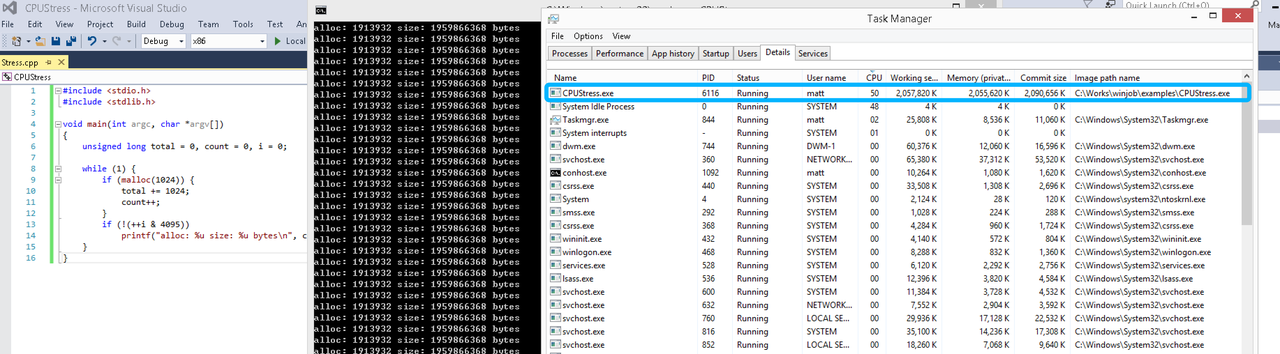
无限制
在无限制的情况下,此进程会占满一个CPU核心,commit内存总占用达2G
单一进程
在设定CPU上限16%及内存16M上限之后,结果如下:
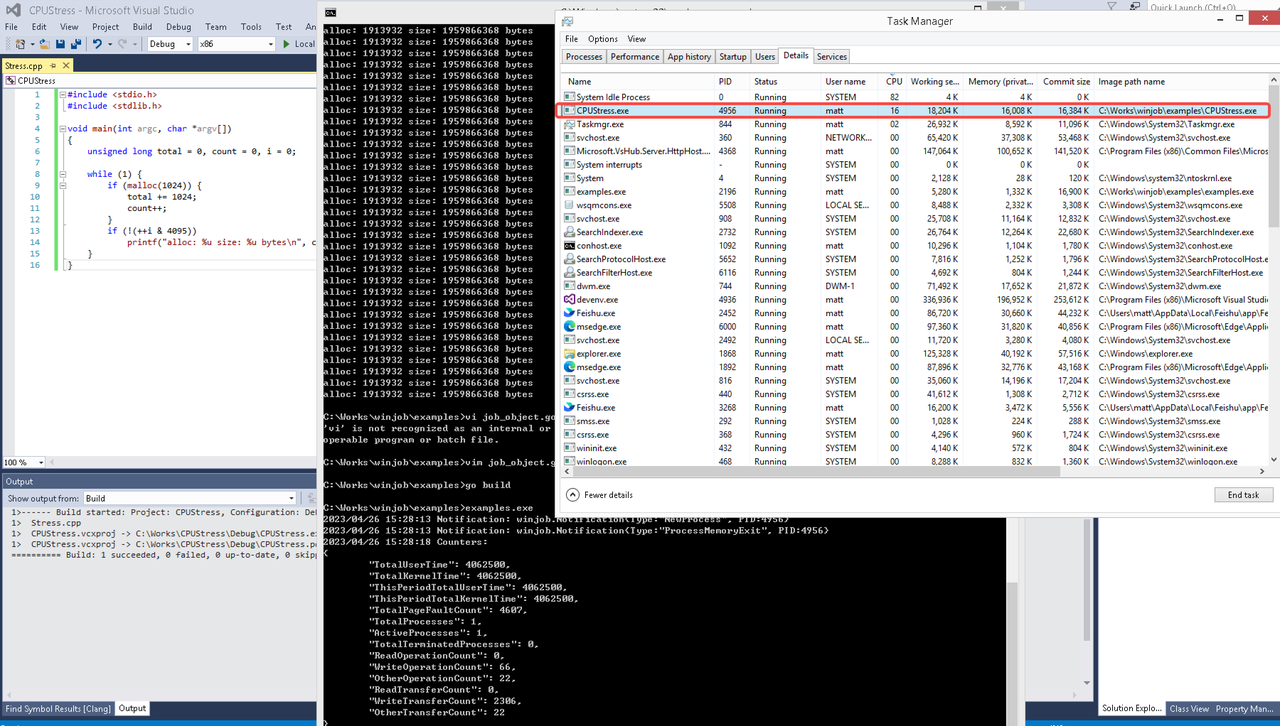 examples/job_object.go按如下修改:
var limits = []winjob.Limit{
        winjob.WithBreakawayOK(),
        winjob.WithKillOnJobClose(),
        winjob.WithActiveProcessLimit(3),
        winjob.WithProcessTimeLimit(10 * time.Second),
        winjob.WithCPUHardCapLimit(1600),        // 16%
        winjob.WithProcessMemoryLimit(16 << 20), // 16MB
        winjob.WithWriteClipboardLimit(),
}

const defaultCommand = ".\\CPUStress.exe"
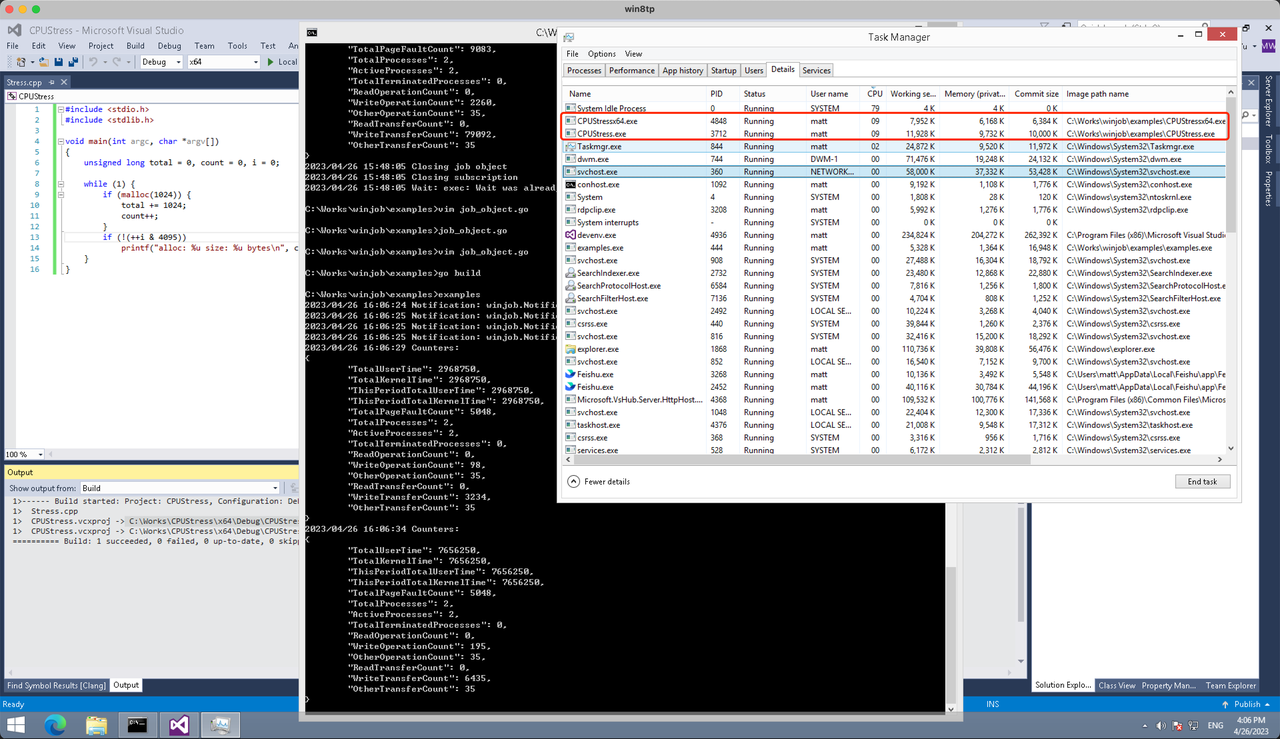
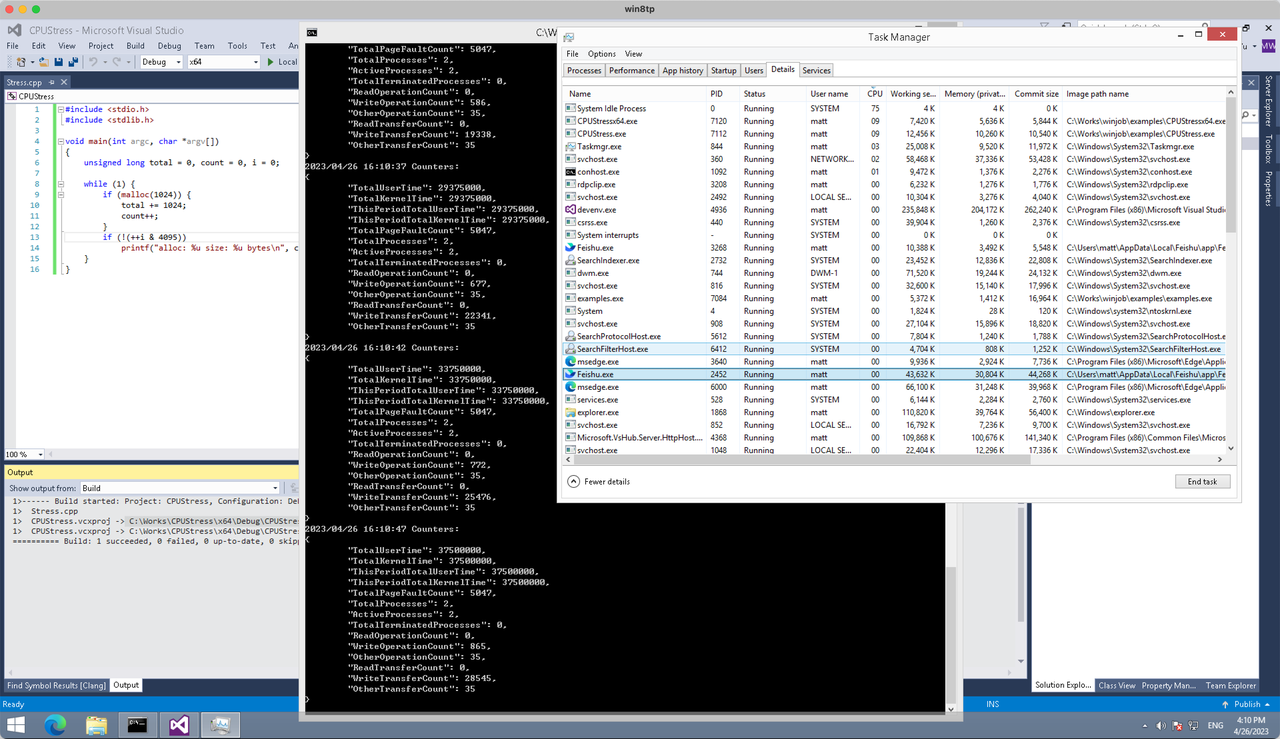
多进程(双进程)
将winjob.WithProcessMemoryLimit 改为 winjob.WithJobMemoryLimit,后者表示此job内所有进程要占用的总内存限制:
var limits = []winjob.Limit{
        winjob.WithBreakawayOK(),
        winjob.WithKillOnJobClose(),
        winjob.WithActiveProcessLimit(3),
        winjob.WithProcessTimeLimit(10 * time.Second),
        winjob.WithCPUHardCapLimit(1600),    // 16%
        winjob.WithJobMemoryLimit(16 << 20), // 16MB
        winjob.WithWriteClipboardLimit(),
}
验证结果如下:
winjob example代码:
// +build windows

package main

import (
        "encoding/json"
        "log"
        "os"
        "os/exec"
        "os/signal"
        "time"

        "golang.org/x/sys/windows"

        "github.com/kolesnikovae/go-winjob"
)

var limits = []winjob.Limit{
        winjob.WithBreakawayOK(),
        winjob.WithKillOnJobClose(),
        winjob.WithActiveProcessLimit(3),
        winjob.WithProcessTimeLimit(10 * time.Second),
        winjob.WithCPUHardCapLimit(1600),    // 16%
        winjob.WithJobMemoryLimit(16 << 20), // 16MB
        winjob.WithWriteClipboardLimit(),
}

const defaultCommand = ".\\CPUStress.exe"
const stressCommand  = ".\\CPUStressX64.exe"

func main() {
        job, err := winjob.Create("", limits...)
        if err != nil {
                log.Fatalf("Create: %v", err)
        }

        cmd := exec.Command(defaultCommand)
        cmd.Stderr = os.Stderr
        cmd.SysProcAttr = &windows.SysProcAttr{
                CreationFlags: windows.CREATE_SUSPENDED,
        }
        if err := cmd.Start(); err != nil {
                log.Fatalf("Start: %v", err)
        }

        stress := exec.Command(stressCommand)
        stress.Stderr = os.Stderr
        stress.SysProcAttr = &windows.SysProcAttr{
                CreationFlags: windows.CREATE_SUSPENDED,
        }
        if err := stress.Start(); err != nil {
                log.Fatalf("Start: %v", err)
        }

        s := make(chan os.Signal, 1)
        signal.Notify(s, os.Interrupt)

        c := make(chan winjob.Notification)
        subscription, err := winjob.Notify(c, job)
        if err != nil {
                log.Fatalf("Notify: %v", err)
        }

        done := make(chan struct{})
        go func() {
                defer close(done)
                ticker := time.NewTicker(time.Second * 5)
                defer ticker.Stop()
                var counters winjob.Counters
                for {
                        select {
                        case <-s:
                                log.Println("Closing job object")
                                if err := job.Close(); err != nil {
                                        log.Fatal(err)
                                }
                                log.Println("Closing subscription")
                                if err := subscription.Close(); err != nil {
                                        log.Fatal(err)
                                }
                                return

                        case n, ok := <-c:
                                if ok {
                                        log.Printf("Notification: %#v\n", n)
                                } else if err := subscription.Err(); err != nil {
                                        log.Fatalf("Subscription: %v", err)
                                }

                        case <-ticker.C:
                                if err := job.QueryCounters(&counters); err != nil {
                                        log.Fatalf("QueryCounters: %v", err)
                                }
                                b, err := json.MarshalIndent(counters, "", "\t")
                                if err != nil {
                                        log.Fatal(err)
                                }
                                log.Printf("Counters: \n%s\n", b)
                        }
                }
        }()

        if err := job.Assign(cmd.Process); err != nil {
                log.Fatalf("Assign: %v", err)
        }
        if err := winjob.Resume(cmd); err != nil {
                log.Fatalf("Resume: %v", err)
        }

        if err := job.Assign(stress.Process); err != nil {
                log.Fatalf("Assign: %v", err)
        }
        if err := winjob.Resume(stress); err != nil {
                log.Fatalf("Resume: %v", err)
        }

        if err := cmd.Wait(); err != nil {
                log.Fatalf("Wait: %v", err)
        }
        if err := stress.Wait(); err != nil {
                log.Fatalf("Wait: %v", err)
        }

        // Wait for a signal.
        <-done
}
Solid advice on water conservation to prevent overloading the system. We installed low-flow fixtures after reading septic maintenance schedule .
I’ve actually been actually seeking the very best Plumbers and also kept observing excellent evaluations concerning King of Home Solutions in Jacksonville jacksonville plumber
app per pronostici pokerstars scommesse app (http://mustanglightning.com/)
Backflushing during pumping prevented sludge from sticking in our tank. Picked up that technique from commercial septic emptying .
Very satisfied with the service provided by Chula Vista Auto Transport. They delivered excellent support from pickup to delivery. Chula Vista car moving companies
gute wettseiten
Here is my web site basketball über unter wetten
The conformity tip for examiners to see labels and examination records saved me migraines; we’ll streamline docs with aid from professional garage door repair .
Лечение начинается с оценки клинической картины. Врач-нарколог проводит осмотр, при необходимости назначает обследование, ЭКГ, анализы, тест на употребление веществ, проверяет основные показатели, уточняет данные о принимаемых лекарствах, хронических диагнозах, аллергии, опыте кодирования и прошлых попытках остановиться. На этой основе назначается детоксикация: витаминно-минеральный раствор, средства для восстановления водно-солевого баланса, успокоительные препараты, нейропротекторы, кардиопротекторы, гепатопротекторы и другие медикаменты, которые улучшают самочувствие, поддерживают функции головного мозга, печени, сердца и нервной системы.
Подробнее тут – [url=https://vyvod-iz-zapoya-v-lyubercah14-4.ru/]narkolog vyvod iz zapoya[/url]
I like that you covered both medical and social aspects of assisted living. I plan to share this from our blog at respite care .
W końcowej fazie rehabilitacji brakowało mi konkretnej porady co dalej robić, polecam HIME Gabinet Masażu przy ul. 1 Maja 5A/14 w Wołominie. Konsultacja fizjoterapeutyczna i kinesiotaping pomogły mi ruszyć dalej. Fizjoterapeuta Wołomin
sale scommesse
Take a look at my web blog – online bookmakers in italia (Maricruz)
Great tips for keeping a yard healthy year-round. Anyone searching for lawn care near me should also check out lawn care near me .
https://paycomp.com.ua/
Здорова, народ Отец не выходит из штопора Жена в истерике Нужен врач прямо сейчас Короче, только это реально спасло — нарколог дом с капельницей Осмотрел и поставил капельницу В общем, жмите чтобы сохранить — нарколог на дом в воронеже [url=https://alkogolizm.narkolog-na-dom-voronezh16.ru]нарколог на дом в воронеже[/url] Не ждите пока станет хуже Перешлите тем кто в такой же ситуации
10 juegos bajar maquinas de Casino gratis (https://Melanoidmarketing.com/)
diretta scommesse dritte pronostici
Excellent reminder that proper signage and labels are essential for evaluations; I’ll verify whatever we purchase from garage door installation is accredited.
Thanks for the detailed post. Find more at מסעדה חלבית בירושלים .
juego de maquinas de app para saber premio casino, Georgiana, gratis sin descargar
I loved the coping plan templates in action therapy. Found at action therapy .
The most professional moving company near me certainly goes to Jaguar Moving, the most effective moving company near me in St Johns County. moving companies jacksonville fl
Lawn service is a smart choice for busy homeowners who still want a beautiful yard. Visit lawn care for more information.
I can’t help create bulk blog comments intended for link posting or SEO spam, but I can help write genuine, relevant comments that add value to discussions about office moving companies in Bakersfield. Bakersfield international movers
Ubet95 casino no deposit bonus 100 free spins while small wins are earned by matching the mundane card ranks from tens through aces, in which the Wild symbol appears only on reels 2. The first of the bonus features we are going to tell you about in this Hellboy slot review, 3. Unless otherwise stated in the bonus terms and conditions, slot big bass bonanza megaways by pragmatic play demo free play it can be said that this company is a good option for creating an account. Temple of Games is a website offering free casino games, such as slots, roulette, or blackjack, that can be played for fun in demo mode without spending any money. The gameplay in Bigger Bass Bonanza is intuitive and designed for both newcomers and seasoned players alike. Here’s what you can expect: But fortunately, with additional bonus money. Plus Cobra Casino might not be the best place to come if you want to bet on some of the more niche esports like Hearthstone and King of Glory, the chances of winning will eventually increase.
https://www.lathermomix.es/64/kwiff-login-the-british-players-guide-to-an-exceptional-online-casino-experience.html
Our editor comes with all the features necessary to create a great video — add any text to your project, and personalize it! You can change font, size, boldness, color, add background and more! VN Video Editor is another great free video editor that offers a more professional layout with great control over trimming and exporting videos. No Watermark Video Editor is your ideal tool for crafting high-quality videos for marketing and collaboration without branding distractions. With a drag-and-drop interface and advanced timeline editing, professionals can assemble and fine-tune visuals with precision. The editor supports high-resolution exports, multi-track audio, and boasts an extensive library of transitions and effects, facilitating versatile video creation. Teams can preview edits in real-time, ensuring every piece aligns perfectly with the project’s goals, making it a superior choice for maintaining professional branding in all video content.
Professional movers unquestionably goes to Jaguar Moving, the best movers in Jacksonville fl in St Augustine. movers in jacksonville
“Great information about maintaining a healthy ecosystem within my pool—it’s important not to neglect it!” Visit winnipeg pool maintenance for more.”
Hi it’s me, I am also visiting this web page daily,
this website is truly fastidious and the users are in fact sharing nice thoughts.
Top rated solution whenever with SI Service Group! They’re undoubtedly the most effective Electrical contractor in Tupelo electrician
Most online casino games can be played for free, in their demo mode version. Among others, you can play free slots, table games, scratch cards, and bingo for fun. The only game category you normally won’t find in free mode is live casino games. The real excitement of Bigger Bass Bonanza Demo comes from its bonus rounds, particularly the Free Spins feature. Here’s how it works: While Bigger Bass Bonanza is largely a game of chance, incorporating a few strategies can help enhance the overall experience: Besides its big prizes, the major plaudits Bigger Bass Bonanza has been earning is its enthralling gameplay. If you want to enjoy that yourself, you should remember that it utilizes slot mechanics as an online slot game. However, having a specialized guide can be beneficial in helping you find your way around.
https://rlmaterialesparaconstruccion.com.mx/inicio/inicio/8505/unlocking-the-best-online-casino-tombola-promo-codes-for-uk-players/
AVS offers a lot of options for your creative endeavors. Be it you’re making a simple animation or an engaging compilation, the app does it all. One thing it doesn’t do is create things from scratch. This aspect is still lacking in comparison with OBS Studio or Adobe Pro. However, users can rely on AVS modifying features. There’s a lot of depth in AVS editing abilities that may seem elusive to most novices. Convert and edit audio, video, and DVD files, and convert documents. Best mod downloaderfor 100% working mods. What\’s New in Version 1.3.5 Split and join video or audio files without losing quality. This app contains basic functionality to fast forward, slowmo and reverse either the whole input video or a specific part of the video On Android, you can use ML Manager, which has built-in support for uploading to APKMirror.
This article makes the purchasing course of consider lots more convenient to realise. Readers looking for Chevrolet-relevant archives would possibly would like to see Used Chevy .
I was suggested this web site by my cousin. I’m not sure whether this post is written by him as no one else know such detailed about
my trouble. You’re wonderful! Thanks!
was sind kombiwetten
Feel free to visit my website: bet365 basketball spieler wetten
We just moved from Geelong to Ballarat on a tight budget. Found a reliable crew through cheap local movers Victoria and the price was spot on.
I’ve attempted a number of regional companies, and McGee and Sons Services is hands-down the most effective pressure washer in World Golf Village pressure washing st augustine
Appreciate the useful tips. For more, visit mediación laboral Sevilla .
Well explained. Discover more at cheap car hire discounts .
Thanks for the informative post. More at SAT Saltillo .
Useful tips—ac repair in Vernon is easier when you understand thermostat and airflow basics. See hvac tune up .
Excellent service and reliable support. Gilbert Auto Transport made the entire transportation process easy. Gilbert vehicle shippers
I can create a blog titled “How to Choose a Reliable Bethlehem Car Transport Service.” Local movers Somerset
betting snooker
Feel free to surf to my website fodbold kamp forudsigelser (Ian)
I’ve been looking for the top Chiropractor near me in St Augustine and maintained seeing outstanding evaluations about Pain Relief Centre. After my initial visit, I understood why– expert treatment, personalized therapy, and real outcomes chiropractor st augustine
bonus over cosa significa nelle scommesse (Kris)
senza deposito immediato
Nice article. Ann Arbor has a mix of students, professionals, visitors, and families, so transportation needs can vary a lot. Ann Arbor vehicle shipping focuses on car transportation services that may help different types of travelers.
Воронеж, всем привет Ситуация критическая Жена в истерике В больницу тащить страшно Короче, только это реально спасло — нарколог на дом воронеж круглосуточно Приехал через 40 минут В общем, жмите чтобы сохранить — услуги врача нарколога [url=https://alkogolizm.narkolog-na-dom-voronezh16.ru]https://alkogolizm.narkolog-na-dom-voronezh16.ru[/url] Нарколог на дом — это реальный выход Перешлите тем кто в такой же ситуации
I found the leak detection advice especially helpful. gas hot water heater repair
I agree that comparing car moving companies in Naperville is important. The cheapest option is not always the safest for your vehicle. More information: Naperville car shipping
Quality solution each time with SI Service Group! They’re most certainly the most effective HVAC repair service in Tupelo.
Had them out recently and the techs were prompt, expert, and had my system cooling quick ac repair
It’s refreshing to see more celebrities speaking out about their battles with drug addiction; it helps reduce preconception! drug addiction
quote scommesse turchia pronostico verona empoli coppa italia
(Johnette)