Windows自身没有提供类似Linux cgroup的能力来限制进程或进程组的资源占用,进程CPU/IO/内存/网络等资源的控制只能由自己实现。目前已有第三方的实现,主要是限制进程CPU的占用,如文档 < 21 Best Ways to Limit the CPU Usage of a Process > 所描述的BES,Process Tamer等软件。自Windows 8及Server 2012开始Windows系统有提供以job为单位的CPU占用及内存上限设置,之前的版本则只能以进程或线程为单位进行限制。
进程CPU占用限制方案
即时轮询系统所有进程(线程)的CPU占用,当发现所设定进程有超标时强制暂停进程所有线程的执行,然后在适当的时机再恢复执行。其中所涉及技术点:
进程CPU占用查询 GetProcessTimes
BOOL GetProcessTimes(
  [in]  HANDLE     hProcess,
  [out] LPFILETIME lpCreationTime,
  [out] LPFILETIME lpExitTime,
  [out] LPFILETIME lpKernelTime,
  [out] LPFILETIME lpUserTime
);
此函数可以获取进程从创建至当前的总运行时间及总的CPU时间,(KernelTime + UserTime) < 系统CPU数 * (当前时间 - CreationTime)
线程CPU占用查询 GetThreadTimes
BOOL GetThreadTimes(
  [in]  HANDLE     hThread,
  [out] LPFILETIME lpCreationTime,
  [out] LPFILETIME lpExitTime,
  [out] LPFILETIME lpKernelTime,
  [out] LPFILETIME lpUserTime
);
QueryThreadCycleTime可以提供更精准的CPU时间数据,单位为CPU时钟周期
BOOL QueryThreadCycleTime(
  [in]  HANDLE   ThreadHandle,
  [out] PULONG64 CycleTime
);
线程暂停及恢复
Windows平台没有提供暂停整个进程的支持函数,只能以线程为单位来操作,即SuspendThread及ResumeThread:
DWORD SuspendThread(
  [in] HANDLE hThread
);
DWORD ResumeThread(
  [in] HANDLE hThread
);
CPU亲和性设置: SetProcessAffinityMask
BOOL SetProcessAffinityMask(
  [in] HANDLE    hProcess,
  [in] DWORD_PTR dwProcessAffinityMask
);
此函数可以限定进程及其所有线程所能使用的CPU,故一定程序上亦限定了进程最大的系统CPU占用率。
DWORD_PTR SetThreadAffinityMask(
  [in] HANDLE    hThread,
  [in] DWORD_PTR dwThreadAffinityMask
);
此函数可单独限制特定线程的CPU亲和性。
进程优先级设置: SetPriorityClass
优先级解决的是优先运行及退让CPU的问题,本质上并不能限定CPU占用,只是优先级高于当前任务的忙碌的时候,当前进程会主动退让CPU 线程优先级设置:SetThreadPriority
BOOL SetThreadPriority(
  [in] HANDLE hThread,
  [in] int    nPriority
);
Job Objects
Windows系统提供了Job的概念用以管理多个进程,可以限制Job对象内所有进程及期线程的CPU核心占用、CPU占用及内存分配上限等,均通过SetInformationJobObject来实现,具体的CPU限制由JOBOBJECT_CPU_RATE_CONTROL_INFORMATION管理,内存限制则由JOBOBJECT_EXTENDED_LIMIT_INFORMATION来管理。
BOOL SetInformationJobObject(
  [in] HANDLE             hJob,
  [in] JOBOBJECTINFOCLASS JobObjectInformationClass,
  [in] LPVOID             lpJobObjectInformation,
  [in] DWORD              cbJobObjectInformationLength
);需要注意的是CPU占用设置只有Windows 8及Server 2012之后的版本有效。
CPU Sets
此部分只限定了CPU Affinity属性
实验验证
可以直接利用开源项目go-winjob验证,验证系统Windows 8 x64,go-winjob git repo: https://github.com/kolesnikovae/go-winjob
验证程序
#include <stdio.h>
#include <stdlib.h>

void main(int argc, char *argv[])
{
        unsigned long total = 0, count = 0, i = 0;

        while (1) {
                if (malloc(1024)) {
                        total += 1024;
                        count++;
                }
                if (!(++i & 4095))
                        printf("alloc: %u size: %u bytes\n", count, total);
    }
}
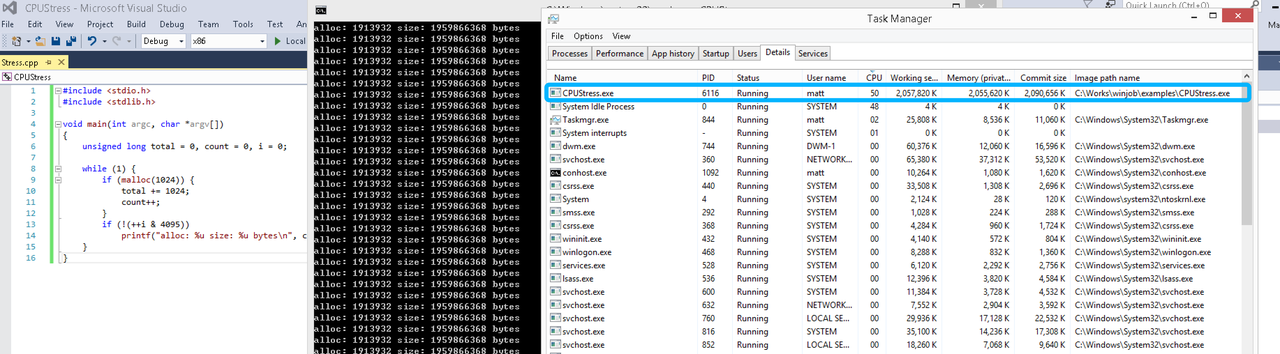
无限制
在无限制的情况下,此进程会占满一个CPU核心,commit内存总占用达2G
单一进程
在设定CPU上限16%及内存16M上限之后,结果如下:
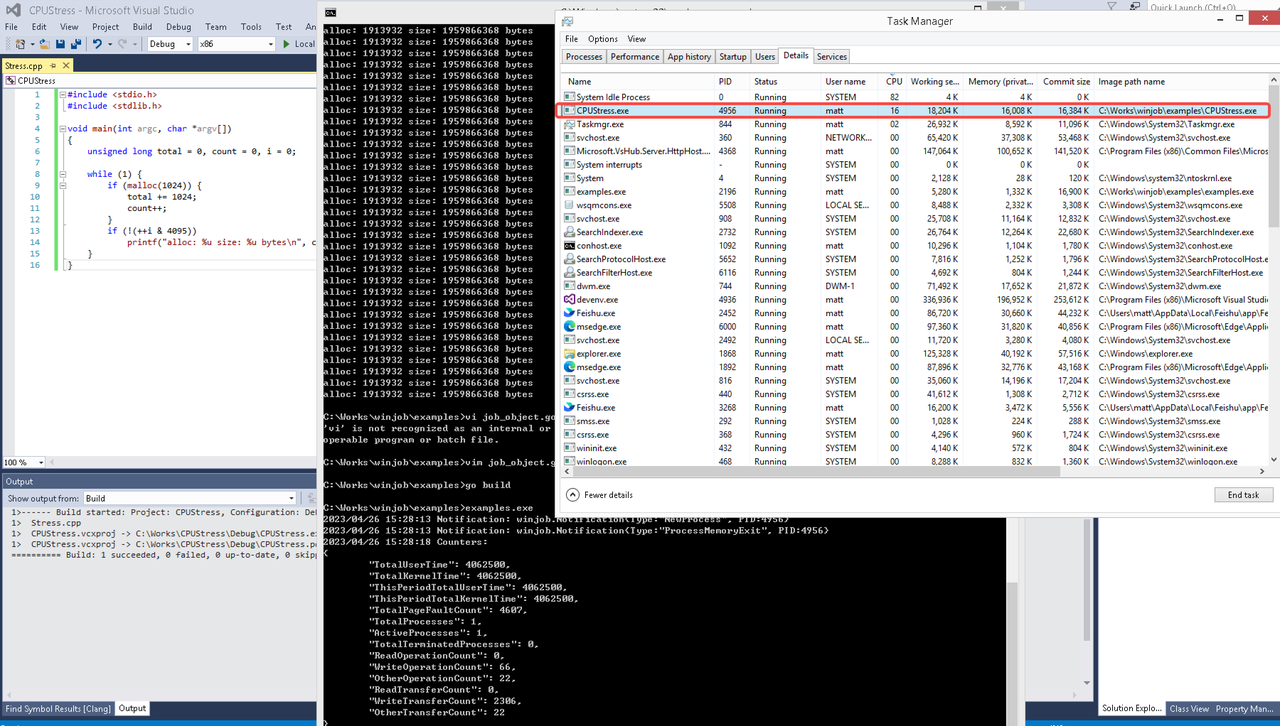 examples/job_object.go按如下修改:
var limits = []winjob.Limit{
        winjob.WithBreakawayOK(),
        winjob.WithKillOnJobClose(),
        winjob.WithActiveProcessLimit(3),
        winjob.WithProcessTimeLimit(10 * time.Second),
        winjob.WithCPUHardCapLimit(1600),        // 16%
        winjob.WithProcessMemoryLimit(16 << 20), // 16MB
        winjob.WithWriteClipboardLimit(),
}

const defaultCommand = ".\\CPUStress.exe"
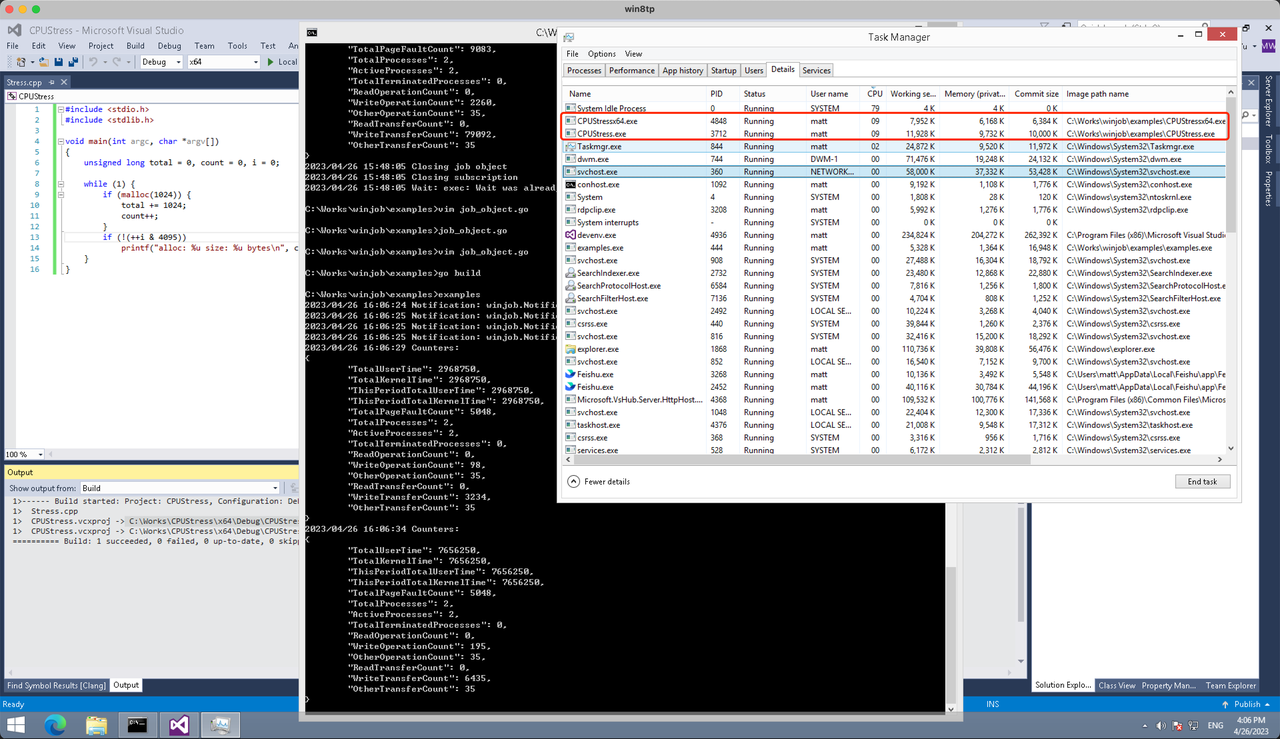
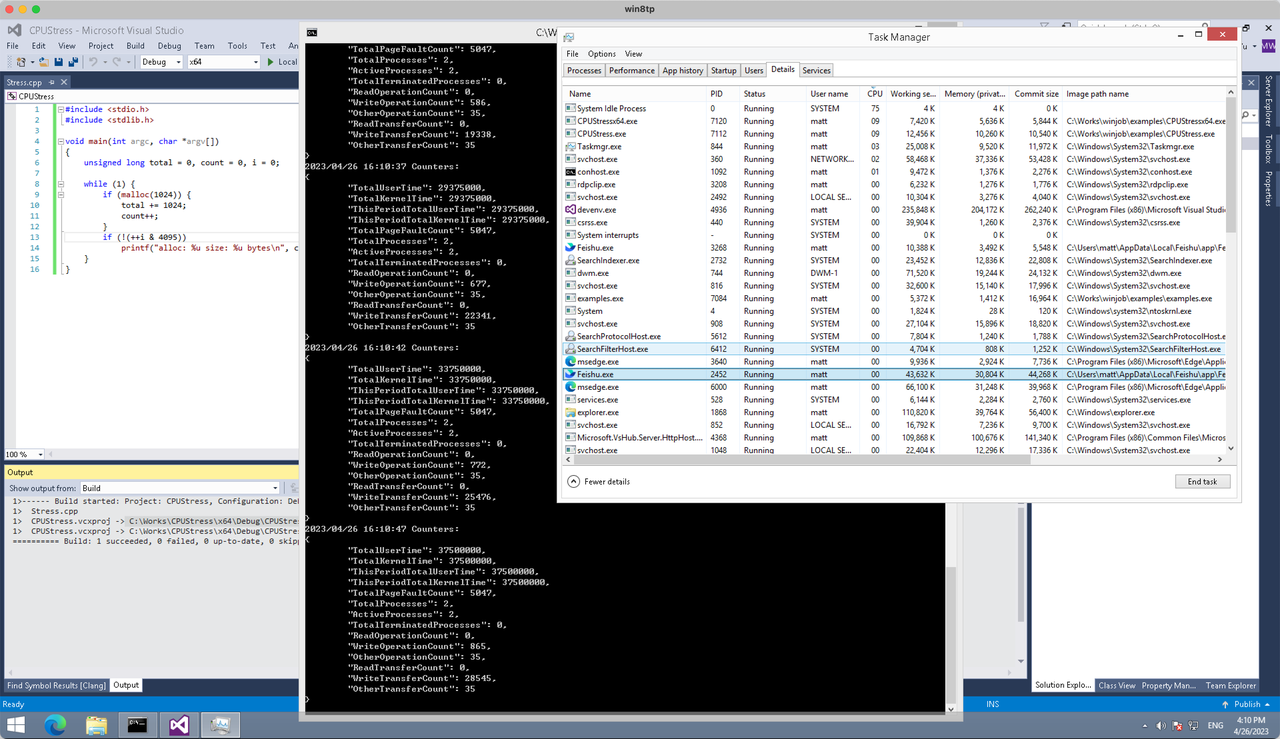
多进程(双进程)
将winjob.WithProcessMemoryLimit 改为 winjob.WithJobMemoryLimit,后者表示此job内所有进程要占用的总内存限制:
var limits = []winjob.Limit{
        winjob.WithBreakawayOK(),
        winjob.WithKillOnJobClose(),
        winjob.WithActiveProcessLimit(3),
        winjob.WithProcessTimeLimit(10 * time.Second),
        winjob.WithCPUHardCapLimit(1600),    // 16%
        winjob.WithJobMemoryLimit(16 << 20), // 16MB
        winjob.WithWriteClipboardLimit(),
}
验证结果如下:
winjob example代码:
// +build windows

package main

import (
        "encoding/json"
        "log"
        "os"
        "os/exec"
        "os/signal"
        "time"

        "golang.org/x/sys/windows"

        "github.com/kolesnikovae/go-winjob"
)

var limits = []winjob.Limit{
        winjob.WithBreakawayOK(),
        winjob.WithKillOnJobClose(),
        winjob.WithActiveProcessLimit(3),
        winjob.WithProcessTimeLimit(10 * time.Second),
        winjob.WithCPUHardCapLimit(1600),    // 16%
        winjob.WithJobMemoryLimit(16 << 20), // 16MB
        winjob.WithWriteClipboardLimit(),
}

const defaultCommand = ".\\CPUStress.exe"
const stressCommand  = ".\\CPUStressX64.exe"

func main() {
        job, err := winjob.Create("", limits...)
        if err != nil {
                log.Fatalf("Create: %v", err)
        }

        cmd := exec.Command(defaultCommand)
        cmd.Stderr = os.Stderr
        cmd.SysProcAttr = &windows.SysProcAttr{
                CreationFlags: windows.CREATE_SUSPENDED,
        }
        if err := cmd.Start(); err != nil {
                log.Fatalf("Start: %v", err)
        }

        stress := exec.Command(stressCommand)
        stress.Stderr = os.Stderr
        stress.SysProcAttr = &windows.SysProcAttr{
                CreationFlags: windows.CREATE_SUSPENDED,
        }
        if err := stress.Start(); err != nil {
                log.Fatalf("Start: %v", err)
        }

        s := make(chan os.Signal, 1)
        signal.Notify(s, os.Interrupt)

        c := make(chan winjob.Notification)
        subscription, err := winjob.Notify(c, job)
        if err != nil {
                log.Fatalf("Notify: %v", err)
        }

        done := make(chan struct{})
        go func() {
                defer close(done)
                ticker := time.NewTicker(time.Second * 5)
                defer ticker.Stop()
                var counters winjob.Counters
                for {
                        select {
                        case <-s:
                                log.Println("Closing job object")
                                if err := job.Close(); err != nil {
                                        log.Fatal(err)
                                }
                                log.Println("Closing subscription")
                                if err := subscription.Close(); err != nil {
                                        log.Fatal(err)
                                }
                                return

                        case n, ok := <-c:
                                if ok {
                                        log.Printf("Notification: %#v\n", n)
                                } else if err := subscription.Err(); err != nil {
                                        log.Fatalf("Subscription: %v", err)
                                }

                        case <-ticker.C:
                                if err := job.QueryCounters(&counters); err != nil {
                                        log.Fatalf("QueryCounters: %v", err)
                                }
                                b, err := json.MarshalIndent(counters, "", "\t")
                                if err != nil {
                                        log.Fatal(err)
                                }
                                log.Printf("Counters: \n%s\n", b)
                        }
                }
        }()

        if err := job.Assign(cmd.Process); err != nil {
                log.Fatalf("Assign: %v", err)
        }
        if err := winjob.Resume(cmd); err != nil {
                log.Fatalf("Resume: %v", err)
        }

        if err := job.Assign(stress.Process); err != nil {
                log.Fatalf("Assign: %v", err)
        }
        if err := winjob.Resume(stress); err != nil {
                log.Fatalf("Resume: %v", err)
        }

        if err := cmd.Wait(); err != nil {
                log.Fatalf("Wait: %v", err)
        }
        if err := stress.Wait(); err != nil {
                log.Fatalf("Wait: %v", err)
        }

        // Wait for a signal.
        <-done
}
Winnipeg locals swear by mexican restaurant for legit taco cravings.
Thanks for breaking down the budgeting tips clearly! I’m curious though—how do deposit limits typically affect players who want to switch between different games or platforms? Are there common withdrawal rules that might catch people off guard after they no wagering requirements meaning
I loved your analysis of the card-table scene in “Molly’s Game.” The way the lighting subtly highlights each player’s expression really amps up the tension. But I wonder if the chip sound was actually necessary—it felt a bit too amplified for my taste poker face acting
Заявку можно оставить в любое время, специалист быстро сориентирует по дальнейшим действиям.
Ознакомиться с деталями – [url=https://vyvod-iz-zapoya-v-anape3.ru/]вывод из запоя на дому в анапе[/url]
Great insights on the importance of placement context in UK marketing compliance for regulated industries. It’s so easy to overlook how the surrounding content can impact message perception and regulatory scrutiny marketing compliance pricing UK
Great article! I recently installed a mini split myself and was surprised how much easier it was than I expected. One thing—did you find working with 115V units simpler than 230V? I stuck with 115 to avoid electrician fees and it worked fine https://u5m86.stick.ws/
I had no idea that the nap direction on baize significantly affects ball movement—that detail really stood out to me. It makes sense that such a subtle factor would influence gameplay so much. You mentioned maintaining humidity between 40-60% worsted vs woolen billiard cloth
Войдите в приложение Instagram на мобильном телефоне. Перейдите на страницу профиля и нажмите значок меню в верхнем правом углу.
Outstanding movers in Jacksonville certainly goes to Jaguar Moving, the very best movers in Jacksonville fl in St Augustine. movers jacksonville fl
I really appreciate the clarity on how 35x wagering on £50 equals £1,750—it’s eye-opening how quickly those requirements can add up. The 60-second withdrawals sound impressive too more info
After seeing a relative in a crowded nursing home, I’m convinced that small assisted living homes offer more humane support with personal care. respite care has been a helpful research tool.
Long-distance moving takes planning, organization, and reliable help. If you’re searching for long distance movers Anchorage, it’s also smart to check resources like Anchorage full service movers .
This article really helped me understand the importance of setting deposit limits before I even start playing. One thing I’m curious about is how often withdrawal rules change without much notice https://www.protopage.com/laura.barnes95#Bookmarks
I loved as much as you’ll receive carried out right here.
The sketch is tasteful, your authored subject matter stylish.
nonetheless, you command get got an nervousness over that you wish be delivering the following.
unwell unquestionably come more formerly again as exactly the same nearly a
lot often inside case you shield this increase.
Oyster Bay is a beautiful place to live, but moving in the area can require careful coordination. This article offers solid advice. Another useful moving resource is Oyster Bay movers .
Слушайте кто сталкивался Отец не выходит из штопора Дети напуганы Нужна срочная помощь на дому Короче, только это реально спасло — вывод из запоя на дому срочно Приехали через 40 минут В общем, телефон и цены тут — вывод из запоя нарколог 24 [url=https://lechenie.vyvod-iz-zapoya-na-domu-sankt-peterburg.ru]вывод из запоя нарколог 24[/url] Звоните прямо сейчас Перешлите тем кто в такой же ситуации
I do not even know how I ended up here, but I thought this post was great.
I don’t know who you are but definitely you are going to a
famous blogger if you aren’t already ;) Cheers!
I like the focus on preparation. A moving checklist can keep the entire process organized. Las Vegas apartment movers
I have actually attempted a number of regional firms, and McGee and Sons Services is hands-down the best pressure washer in St. Augustine pressure washing st augustine
The most reputable moving company undoubtedly goes to Jaguar Moving, the most effective moving company near me in St Johns County. moving companies jacksonville fl
sportwetten Online bonus bonus paypal
This post normalizes anxiety about detox; dual diagnosis addiction treatment breaks steps into workable parts.
Can I simply say what a comfort to find somebody that genuinely understands what they’re talking about on the web. You certainly know how to bring an issue to light and make it important. More people must look at this and understand this side of your story. I can’t believe you aren’t more popular because you surely possess the gift.
It is reassuring to know that emergency dentists can help with many urgent issues, from broken teeth to abscesses. Emergency Dentist Los Angeles CA
Quality service every single time with SI Service Group! They’re definitely the very best Electricians near me in Tupelo electrician tupelo
beste bettingsider
Feel free to visit my blog; levere tipping åLesund
One point that often gets overlooked is how benefit plans can support employee retention, not just recruitment. Harrisburg employee benefits for small business
For new drivers, PPF pays off. My teen’s car got film from ceramic coating and it shrugged off parking lot scuffs.
С пациентом работают профильные специалисты, которые оценивают состояние и подбирают безопасный план помощи.
Выяснить больше – [url=https://vyvod-iz-zapoya-v-koroleve14-2.ru/]вывод из запоя круглосуточно[/url]
I recently had a pest problem in my home, and I was amazed by the effective solutions offered by local services. It’s crucial to choose a knowledgeable pest control provider in Puyallup to ensure a pest-free environment Puyallup Rat Exterminator
Great insights on planning a commercial move in Chicago. Having a reliable team makes a huge difference when relocating offices, equipment, and business furniture. global movers Chicago
These are great points for anyone moving apartments in Toledo. Professional movers can help with heavy lifting, packing, and transportation: Toledo commercial movers
Illinois workers increasingly expect benefits that support health, financial security, and flexibility. Employers who recognize this can build stronger teams. Illinois employee benefit plans
Great write-up on keeping systems running efficiently. For hvac tune up in Penticton, visit ac installation .
Thanks for the great explanation. Find more at painting contractor near me .
Elgin is a great place to live, and moving within the area should be as simple as possible. Choosing dependable movers can help make the process smooth from start to finish. Visit Elgin apartment movers .
I found this really useful—hot water heater repair in Vernon requires the right diagnosis. Check emergency plumber near me .
Здорова, народ Голова раскалывается Нужно что-то серьёзное Короче, нашел реально работающий способ — капельница от запоя с витаминами Приехали через 30 минут В общем, не потеряйте контакты — капельница от алкоголя на дому цена [url=https://alkogolizm.kapelnicza-ot-pokhmelya-ekaterinburg.ru]https://alkogolizm.kapelnicza-ot-pokhmelya-ekaterinburg.ru[/url] Не мучайтесь рассолами Перешлите тем кто в такой же ситуации
This is a great topic for families navigating attention and behavior concerns. For ADHD testing in Denver, visit ADHD testing Denver .
This article really clarified how RTP and house edge impact my chances when playing slots https://wiki-quicky.win/index.php/Why_Do_Betting_Systems_Collide_With_Table_Limits%3F
I never realized how ingrained gambling is in holiday traditions like the Dec 22 Spanish Christmas draw Homepage
Thanks for breaking down RTP and volatility so clearly! It was eye-opening to see how a 96% RTP still means an average loss of about 80p on every £1 spin https://sergiosbestnews.cavandoragh.org/how-do-i-turn-rtp-into-house-edge-fast
Top rated service whenever with SI Service Group! They’re undoubtedly the very best ac repair near me in Tupelo.
Had them out last week and the technologies were prompt, professional, and had my system cooling down fast ac repair tupelo
This article offers a clear look into live casino engineering, especially the role of WebSockets in maintaining real-time communication. I’m curious about how latency is managed during peak traffic times to ensure a smooth player experience WebSocket scaling strategies
Septic distribution boxes need to be level for even flow. Ours was reset by aggregates and balanced perfectly.
I found the mention of the December 22 Spanish Christmas draw really interesting. It’s such a unique tradition compared to other holiday gambling events. I wonder how much the festive atmosphere influences people’s decision to participate more generously Discover more here
I have actually been looking for the best Chiropractor near me in St Augustine and kept seeing great reviews regarding Pain Relief Centre. After my very first go to, I understood why– professional treatment, personalized treatment, and real outcomes chiropractor st augustine
Lakewood residents looking for innovative pain relief treatments may find this useful: ESWT Lakewood CO
This article really helped clarify things for me! I didn’t realize that with a 96% RTP, I’m expected to lose about 80p on every £1 spin in the long run https://ada-smith01.raindrop.page/bookmarks-73398082
Weekend emergency appointment saved my Saturday, could not believe how quickly they responded to my call. Emergency Dentist Near Me