Windows自身没有提供类似Linux cgroup的能力来限制进程或进程组的资源占用,进程CPU/IO/内存/网络等资源的控制只能由自己实现。目前已有第三方的实现,主要是限制进程CPU的占用,如文档 < 21 Best Ways to Limit the CPU Usage of a Process > 所描述的BES,Process Tamer等软件。自Windows 8及Server 2012开始Windows系统有提供以job为单位的CPU占用及内存上限设置,之前的版本则只能以进程或线程为单位进行限制。
进程CPU占用限制方案
即时轮询系统所有进程(线程)的CPU占用,当发现所设定进程有超标时强制暂停进程所有线程的执行,然后在适当的时机再恢复执行。其中所涉及技术点:
进程CPU占用查询 GetProcessTimes
BOOL GetProcessTimes(
  [in]  HANDLE     hProcess,
  [out] LPFILETIME lpCreationTime,
  [out] LPFILETIME lpExitTime,
  [out] LPFILETIME lpKernelTime,
  [out] LPFILETIME lpUserTime
);
此函数可以获取进程从创建至当前的总运行时间及总的CPU时间,(KernelTime + UserTime) < 系统CPU数 * (当前时间 - CreationTime)
线程CPU占用查询 GetThreadTimes
BOOL GetThreadTimes(
  [in]  HANDLE     hThread,
  [out] LPFILETIME lpCreationTime,
  [out] LPFILETIME lpExitTime,
  [out] LPFILETIME lpKernelTime,
  [out] LPFILETIME lpUserTime
);
QueryThreadCycleTime可以提供更精准的CPU时间数据,单位为CPU时钟周期
BOOL QueryThreadCycleTime(
  [in]  HANDLE   ThreadHandle,
  [out] PULONG64 CycleTime
);
线程暂停及恢复
Windows平台没有提供暂停整个进程的支持函数,只能以线程为单位来操作,即SuspendThread及ResumeThread:
DWORD SuspendThread(
  [in] HANDLE hThread
);
DWORD ResumeThread(
  [in] HANDLE hThread
);
CPU亲和性设置: SetProcessAffinityMask
BOOL SetProcessAffinityMask(
  [in] HANDLE    hProcess,
  [in] DWORD_PTR dwProcessAffinityMask
);
此函数可以限定进程及其所有线程所能使用的CPU,故一定程序上亦限定了进程最大的系统CPU占用率。
DWORD_PTR SetThreadAffinityMask(
  [in] HANDLE    hThread,
  [in] DWORD_PTR dwThreadAffinityMask
);
此函数可单独限制特定线程的CPU亲和性。
进程优先级设置: SetPriorityClass
优先级解决的是优先运行及退让CPU的问题,本质上并不能限定CPU占用,只是优先级高于当前任务的忙碌的时候,当前进程会主动退让CPU 线程优先级设置:SetThreadPriority
BOOL SetThreadPriority(
  [in] HANDLE hThread,
  [in] int    nPriority
);
Job Objects
Windows系统提供了Job的概念用以管理多个进程,可以限制Job对象内所有进程及期线程的CPU核心占用、CPU占用及内存分配上限等,均通过SetInformationJobObject来实现,具体的CPU限制由JOBOBJECT_CPU_RATE_CONTROL_INFORMATION管理,内存限制则由JOBOBJECT_EXTENDED_LIMIT_INFORMATION来管理。
BOOL SetInformationJobObject(
  [in] HANDLE             hJob,
  [in] JOBOBJECTINFOCLASS JobObjectInformationClass,
  [in] LPVOID             lpJobObjectInformation,
  [in] DWORD              cbJobObjectInformationLength
);需要注意的是CPU占用设置只有Windows 8及Server 2012之后的版本有效。
CPU Sets
此部分只限定了CPU Affinity属性
实验验证
可以直接利用开源项目go-winjob验证,验证系统Windows 8 x64,go-winjob git repo: https://github.com/kolesnikovae/go-winjob
验证程序
#include <stdio.h>
#include <stdlib.h>

void main(int argc, char *argv[])
{
        unsigned long total = 0, count = 0, i = 0;

        while (1) {
                if (malloc(1024)) {
                        total += 1024;
                        count++;
                }
                if (!(++i & 4095))
                        printf("alloc: %u size: %u bytes\n", count, total);
    }
}
无限制
在无限制的情况下,此进程会占满一个CPU核心,commit内存总占用达2G
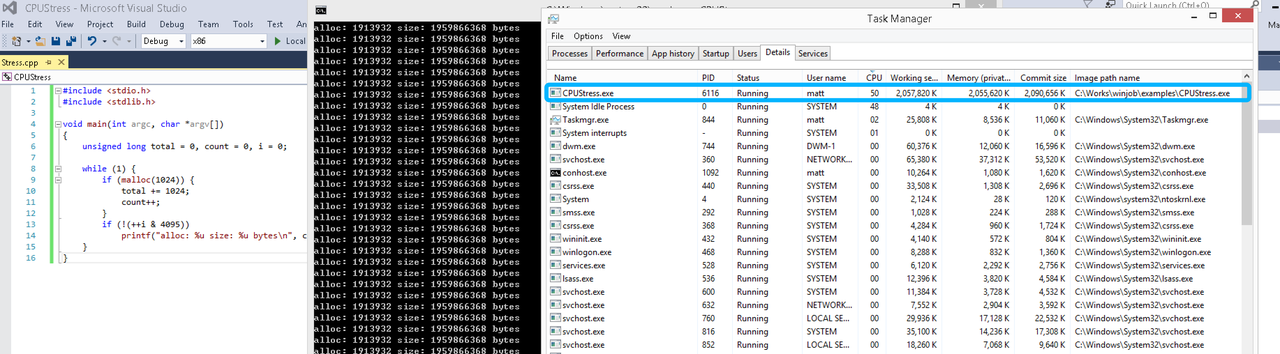
单一进程
在设定CPU上限16%及内存16M上限之后,结果如下:
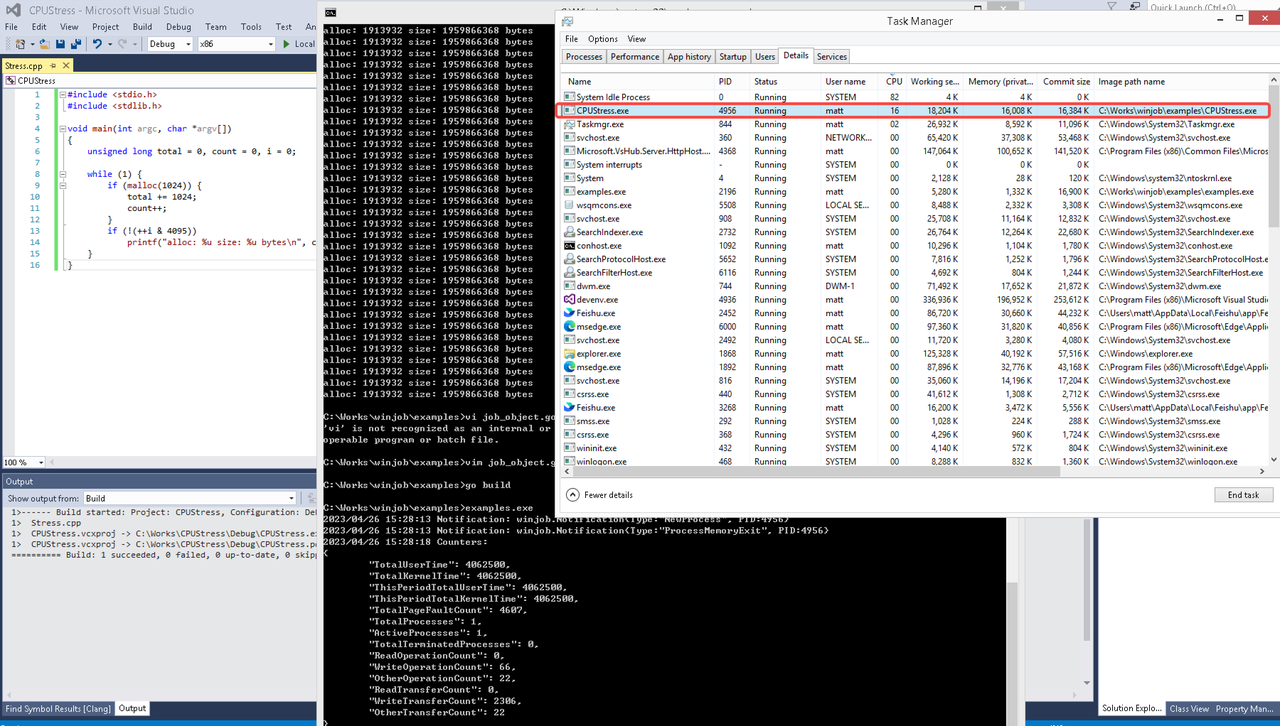 examples/job_object.go按如下修改:
var limits = []winjob.Limit{
        winjob.WithBreakawayOK(),
        winjob.WithKillOnJobClose(),
        winjob.WithActiveProcessLimit(3),
        winjob.WithProcessTimeLimit(10 * time.Second),
        winjob.WithCPUHardCapLimit(1600),        // 16%
        winjob.WithProcessMemoryLimit(16 << 20), // 16MB
        winjob.WithWriteClipboardLimit(),
}

const defaultCommand = ".\\CPUStress.exe"
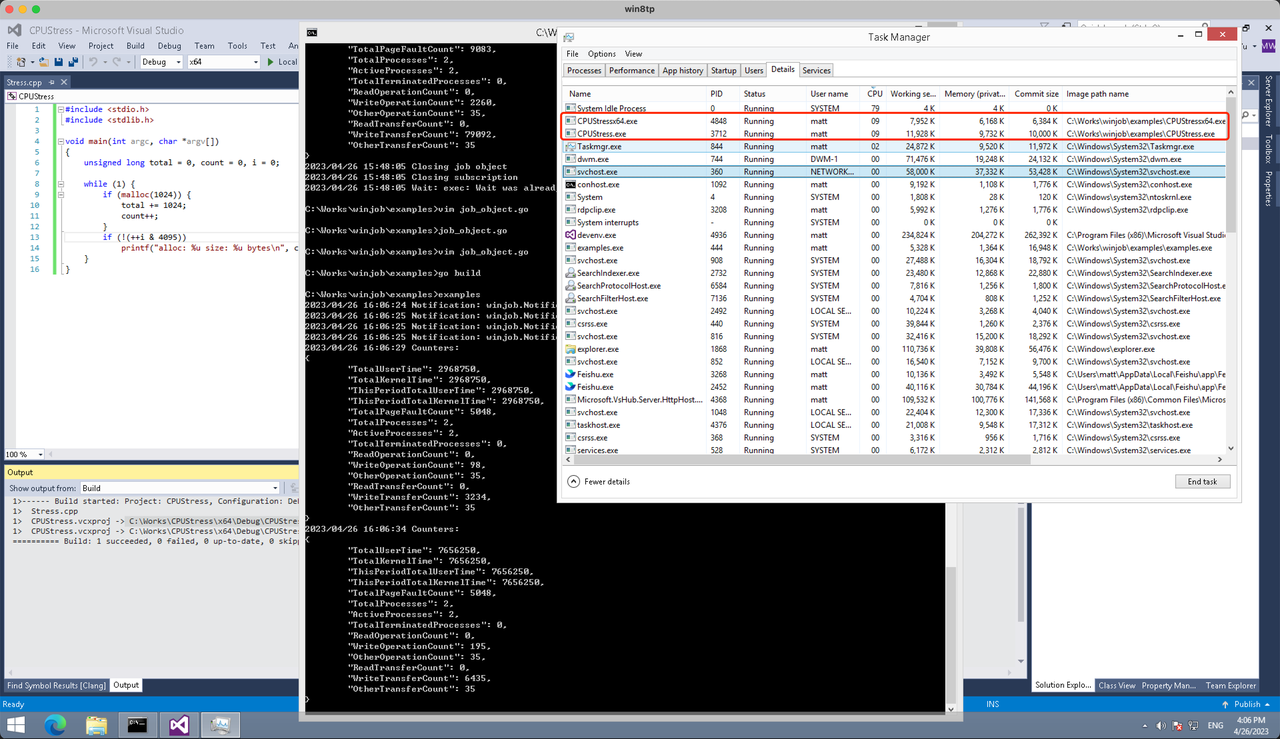
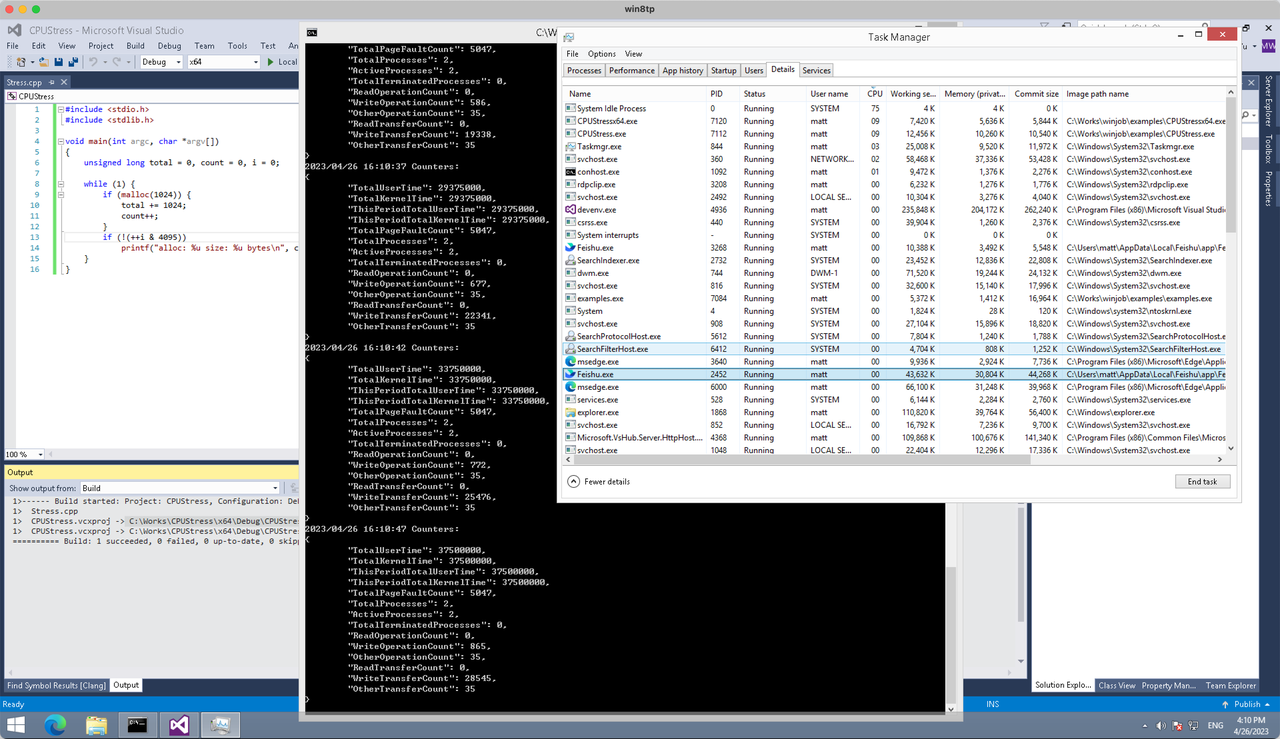
多进程(双进程)
将winjob.WithProcessMemoryLimit 改为 winjob.WithJobMemoryLimit,后者表示此job内所有进程要占用的总内存限制:
var limits = []winjob.Limit{
        winjob.WithBreakawayOK(),
        winjob.WithKillOnJobClose(),
        winjob.WithActiveProcessLimit(3),
        winjob.WithProcessTimeLimit(10 * time.Second),
        winjob.WithCPUHardCapLimit(1600),    // 16%
        winjob.WithJobMemoryLimit(16 << 20), // 16MB
        winjob.WithWriteClipboardLimit(),
}
验证结果如下:
winjob example代码:
// +build windows

package main

import (
        "encoding/json"
        "log"
        "os"
        "os/exec"
        "os/signal"
        "time"

        "golang.org/x/sys/windows"

        "github.com/kolesnikovae/go-winjob"
)

var limits = []winjob.Limit{
        winjob.WithBreakawayOK(),
        winjob.WithKillOnJobClose(),
        winjob.WithActiveProcessLimit(3),
        winjob.WithProcessTimeLimit(10 * time.Second),
        winjob.WithCPUHardCapLimit(1600),    // 16%
        winjob.WithJobMemoryLimit(16 << 20), // 16MB
        winjob.WithWriteClipboardLimit(),
}

const defaultCommand = ".\\CPUStress.exe"
const stressCommand  = ".\\CPUStressX64.exe"

func main() {
        job, err := winjob.Create("", limits...)
        if err != nil {
                log.Fatalf("Create: %v", err)
        }

        cmd := exec.Command(defaultCommand)
        cmd.Stderr = os.Stderr
        cmd.SysProcAttr = &windows.SysProcAttr{
                CreationFlags: windows.CREATE_SUSPENDED,
        }
        if err := cmd.Start(); err != nil {
                log.Fatalf("Start: %v", err)
        }

        stress := exec.Command(stressCommand)
        stress.Stderr = os.Stderr
        stress.SysProcAttr = &windows.SysProcAttr{
                CreationFlags: windows.CREATE_SUSPENDED,
        }
        if err := stress.Start(); err != nil {
                log.Fatalf("Start: %v", err)
        }

        s := make(chan os.Signal, 1)
        signal.Notify(s, os.Interrupt)

        c := make(chan winjob.Notification)
        subscription, err := winjob.Notify(c, job)
        if err != nil {
                log.Fatalf("Notify: %v", err)
        }

        done := make(chan struct{})
        go func() {
                defer close(done)
                ticker := time.NewTicker(time.Second * 5)
                defer ticker.Stop()
                var counters winjob.Counters
                for {
                        select {
                        case <-s:
                                log.Println("Closing job object")
                                if err := job.Close(); err != nil {
                                        log.Fatal(err)
                                }
                                log.Println("Closing subscription")
                                if err := subscription.Close(); err != nil {
                                        log.Fatal(err)
                                }
                                return

                        case n, ok := <-c:
                                if ok {
                                        log.Printf("Notification: %#v\n", n)
                                } else if err := subscription.Err(); err != nil {
                                        log.Fatalf("Subscription: %v", err)
                                }

                        case <-ticker.C:
                                if err := job.QueryCounters(&counters); err != nil {
                                        log.Fatalf("QueryCounters: %v", err)
                                }
                                b, err := json.MarshalIndent(counters, "", "\t")
                                if err != nil {
                                        log.Fatal(err)
                                }
                                log.Printf("Counters: \n%s\n", b)
                        }
                }
        }()

        if err := job.Assign(cmd.Process); err != nil {
                log.Fatalf("Assign: %v", err)
        }
        if err := winjob.Resume(cmd); err != nil {
                log.Fatalf("Resume: %v", err)
        }

        if err := job.Assign(stress.Process); err != nil {
                log.Fatalf("Assign: %v", err)
        }
        if err := winjob.Resume(stress); err != nil {
                log.Fatalf("Resume: %v", err)
        }

        if err := cmd.Wait(); err != nil {
                log.Fatalf("Wait: %v", err)
        }
        if err := stress.Wait(); err != nil {
                log.Fatalf("Wait: %v", err)
        }

        // Wait for a signal.
        <-done
}
I appreciated this article. For more, visit VTC privados Santiago de Compostela aeropuerto .
goksite 50 euro storten
My blog – bingo Gratis Spins
The article’s emphasis on expert tracking throughout severe withdrawal is essential. alcohol detox in san antonio
Motivational piece! For anyone ready to begin, medication-assisted addiction treatment lists close-by treatment resources.
I recently moved to Puyallup, and I was shocked by how many pests I encountered in my new home! After doing some research on pest control options, I found that local services are crucial for effective solutions Puyallup Rat Exterminator
Thanks for the great explanation. More info at sitio web sobre mascotas .
Eligibility for personal loans can vary by lender, so it’s wise to avoid applying blindly to multiple options. In New Orleans, fewer applications with better-fit criteria may reduce paperwork and confusion cash advances new orelans
Appreciate the thorough information. For more, visit calculo de impuestos Saltillo .
spilltips fotball
my blog: nye sportsbonus (Rosemary)
This was quite useful. For more, visit reclamación de horas extra Sevilla .
Нижний Новгород, всем привет Отец не встаёт с кровати Родственники в полном отчаянии Платная клиника просит бешеные деньги Короче, врачи стационара реально вытащили — вывод из запоя в наркологическом стационаре с палатой Положили в палату В общем, не потеряйте контакты — запой вывод клиника [url=https://narkolog.vyvod-iz-zapoya-v-staczionare-nizhnij-novgorod-vby.ru]https://narkolog.vyvod-iz-zapoya-v-staczionare-nizhnij-novgorod-vby.ru[/url] Стационар — это единственный выход Перешлите тем кто в беде
online live casino klarna
Here is my website – bingo betalen met Visa
bet on betting tips for tomorrow horse racing (https://Www.homesincapeverde.com/developing-a-structured-approach-to-wheel-betting/) racing today
wettanbieter deutschland bonus
Here is my blog post: sportwetten kombi tipps [Candy]
win place show bet horse racing
racing sites not on gamstop
Принимаем заявки круглосуточно, уточняем состояние и подбираем безопасный формат помощи.
Ознакомиться с деталями – [url=https://narkolog-na-dom-v-lyubercah14-2.ru/]vrach-narkolog-na-dom[/url]
über unter wette strategie
Feel free to surf to my page Basketball Live Wetten
I appreciate the practical focus on contracts and policies. I’ll be sharing this as a resource link on elder care .
Слушайте кто знает Голова раскалывается Нужно что-то серьёзное Короче, единственное что реально спасает — прокапаться от алкоголя цена адекватная Голова прошла и тошнота ушла В общем, вся инфа по ссылке — капельница от похмелья [url=https://alkogolizm.kapelnicza-ot-pokhmelya-ekaterinburg.ru]капельница от похмелья[/url] Не мучайтесь рассолами Перешлите тем кто в такой же ситуации
אהבתי במיוחד את השילובים בין מתוק למלוח—זה באמת מגוון ומיוחד. מסעדה חלבית כשרה
Слушайте кто сталкивался Близкий человек уже несколько дней в запое Соседи стучат в стену Таблетки не помогают Короче, врачи приехали и поставили систему — капельница после запоя цена фиксированная Сняли ломку и стабилизировали состояние В общем, жмите чтобы сохранить — цена капельницы нарколога [url=https://pomosch-alkogolizm.kapelnicza-ot-zapoya-ekaterinburg-nmx.ru]https://pomosch-alkogolizm.kapelnicza-ot-zapoya-ekaterinburg-nmx.ru[/url] Не ждите пока станет хуже Перешлите тем кто в такой же ситуации
Like we mentioned in the beginning of this article, creating a foundational storyboard is essential for great animation. If you’re looking for the best tool to create your storyboard, check out our list of the best storyboard softwares available online. Animation Desk is the perfect animated video creator to get started with creating awesome animated videos for YouTube. Check out our blog post about onion skinning – it’s a great complement to this guide and it’ll put you on the path to creating amazing content for your viewers. For beginners, Pencil2D and TupiTube are great places to start, offering user-friendly interfaces and essential tools for 2D animation. If you’re ready to tackle more complex animations, Blender and Synfig Studio provide robust features for 3D and vector-based animations. Whatever your creative vision, these free tools will help you bring your ideas to life without the need for costly software
https://ameliacoffee.com/index.php/2026/05/14/manekicasinouk-casino-online-a-thorough-review-for-players-in-the-united-kingdom/
Do I own the rights on my videos? VideoScribe’s AI is a set of AI-powered tools designed to help you create stunning, engaging videos faster and easier. With AI-driven script generation, image generation, and voice-over capabilities, you can streamline your video creation process while maintaining creative control. Discover more about our AI here. We’ve looked at dozens of free animation makers for Mac or PC, as well as free animation websites that make it easy for users to create stunning animated videos. AI Sketch Generator Drag & drop to upload your images Powtoon’s extensive template library is thoughtfully organized to cater to various needs, from business explainer videos and marketing materials to educational content and personal projects. These templates are designed to be user-friendly, offering a straightforward path to content creation. To start, simply choose a template, personalize it with your text, images, and music, and fine-tune the colors, fonts, and animations to match your brand.
We stumbled over here coming from a different page and thought I
may as well check things out. I like what I see so
i am just following you. Look forward to checking out your web
page again.
Врач учитывает симптомы, риски, анамнез и семейную ситуацию, чтобы предложить подходящую программу.
Получить больше информации – [url=https://vyvod-iz-zapoya-v-statsionare-v-gelendzhike2.ru/]быстрый вывод из запоя в стационаре геленджик[/url]
The maximum you can win in the Free Spins bonus is 2,100x your bet. Should you reach this, the feature will end immediately, any wins will be awarded and your remaining spins will be forfeited. Whether you’re a seasoned angler in the world of slots or just dipping your toes in, Big Bass Bonanza is an unmissable catch. With an RTP of 96.71%, Big Bass Bonanza floats above the average found in many other popular online casino games. Its high volatility, rated 4 out of 5, means wins may be less frequent but more rewarding when they hit. This money game perfectly balances risk and excitement, making it a must-try for gambling enthusiasts in the UK and high rollers specifically! News Group Newspapers Limited does not permit the access, collection, text or data mining of any content from our Service by any automated means whether directly or through an intermediary service. This is stated in our terms and conditions.
https://allmynursejobs.com/author/gagrasecor1976/
However, the app doesn’t allow you to trim your clips which makes this more of a video maker app or video assembly app rather than a traditional video editing app, but it still has some exciting features. From easily extracting audio to adding text, Splice is one of our top apps for its array of video-enhancing tools. Download our free eBook to get on the right track and create a video to be proud of. Learn how to make a travel video that captures your audience. 12 tips that will earn you likes and shares on social media. Create exciting travel videos for 2021. It’s been a while since I got to analyze a video on the App Store, but to say it isn’t a perfect fit here would be difficult. If you have a video editor, a video showing it in action is a must. Before I even begin my project Splice makes me select the aspect ratio for my video. Options include TikTok, Instagram reel, Instagram story, and YouTube. This is HUGE because I can edit my video knowing that the format is already compatible with the platform I choose to publish to.
I never realized how important the nap direction of baize is for a smooth game—makes total sense now why it affects ball roll so much! Also, the fact that a billiard table weighs over a tonne blew my mind https://www.4shared.com/office/XgzRcj0Iku/pdf-35455-78291.html
Great article! I just installed a mini split myself and it took me about a full weekend with no prior HVAC experience https://www.mediafire.com/file/80nx459pimvnabx/pdf-5009-80742.pdf/file
Great points about the importance of placement context in UK marketing compliance. In regulated industries, even the best-intended campaigns can backfire if ads appear in unsuitable environments Committee of Advertising Practice guide
Снятие запоя – это не только прекращение приема спиртных напитков, но и целый комплекс мероприятий, включающий очищение и восстановление организма, а также нормализацию общего состояния больного. В современных условиях наркологическая клиника может предложить вывод из запоя на дому, лечение запоя в стационаре, капельницу, детоксикацию, медикаментозный курс, психологическую поддержку, кодирование, реабилитацию и дальнейшее сопровождение семьи. Такой подход позволяет не просто вывести человека из тяжелого состояния, а определить причины зависимости, подобрать индивидуально эффективное лечение алкоголизма и снизить вероятность повторного срыва.
Подробнее можно узнать тут – [url=https://vyvod-iz-zapoya-v-anape4.ru/]вывод из запоя клиника в анапе[/url]
Great insights on setting up live-stream studios! From my experience as a landlord, clear height and dedicated risers make a huge difference for cable management and equipment flexibility https://www.mediafire.com/file/gcgen67qjscb7am/pdf-14523-17486.pdf/file
I really enjoyed your analysis of the card-table scene in “The Sting.” The way they used the soft chip sound really pulled me into the tension of the game Philip Seymour Hoffman Owning Mahowny
Здорова, народ Тошнит, трясёт, сил нет Поилки и таблетки не помогают Короче, врачи приехали и поставили систему — капельница после запоя цена фиксированная Через час состояние нормализовалось В общем, вся инфа по ссылке — капельница от алкоголя цена [url=https://alkogolizm.kapelnicza-ot-pokhmelya-ekaterinburg.ru]https://alkogolizm.kapelnicza-ot-pokhmelya-ekaterinburg.ru[/url] Не мучайтесь рассолами Перешлите тем кто в такой же ситуации
Вывод из запоя в стационаре — это профессиональная наркологическая помощь, которая проводится под медицинским наблюдением и с учетом физического состояния человека. Такой формат выбирают, когда домашнего лечения уже недостаточно, когда запой длится несколько дней, появились тремор, страх, бессонница, скачки давления, нарушения со стороны сердца, печени, жкт или нервной системы. В стационаре врач проводит осмотр, оценивает тяжесть интоксикации, подбирает препараты, контролирует пульс, давление, сон, уровень жидкости и общее самочувствие.
Получить дополнительную информацию – [url=https://vyvod-iz-zapoya-v-statsionare-v-gelendzhike3.ru/]наркология вывод из запоя в стационаре[/url]
В Новороссийске вывод из запоя – это курс лечения, помогающий полностью снять симптомы похмелья и алкогольной ломки. Пациенту просто необходимо выведение алкогольных токсинов из организма, потому что именно их присутствие способствует появлению стойкого желания выпить. Поэтому детоксикация является первым этапом помощи, а полноценное лечение алкоголизма включает медикаментозную терапию, кодирование, психологическую поддержку, реабилитацию, работу с мотивацией, профилактику срыва и восстановление нормального образа жизни.
Подробнее – [url=https://vyvod-iz-zapoya-v-novorossijske3.ru/]нарколог вывод из запоя[/url]
Thanks for breaking down the budgeting tips for real-money online gaming. I’m curious about how deposit limits work across different platforms https://www.slideserve.com/eogernrhbu/how-do-i-stop-general-card-spending-from-hiding-my-entertainment-costs
I never realized how important nap direction is when laying baize on a billiard table! It makes sense that aligning the nap with play would affect ball movement so much card table with counter wells
Great article! I recently installed a mini split myself and it took me about a full weekend solo https://wiki-room.win/index.php/How_Quiet_Is_a_Mini_Split_Indoors%3F_Is_26_dB_Realistic%3F
Great article highlighting the challenges of marketing compliance in regulated industries. The point about balancing effects versus intent really resonated with me contextual targeting compliance
If your crawlspace is damp, add exterior drainage and grade fixes. We consulted excavation for a holistic approach.
I really appreciate how you broke down the 35x wagering on a £50 bonus equaling £1,750—that’s a huge bar for most players! The 60-second withdrawal promise sounds like a game-changer, though https://www.mediafire.com/file/t2dvk7ggkpiojlh/pdf-78751-35011.pdf/file
live-über unter wetten basketball
This is an important reminder that addiction treatment is available and addiction treatment near me can be found. addiction treatment
The concentrate on safety, support, and long-term recovery is what makes this post so important. drug detoxification
Everyone’s experience with drug addiction is unique, and we should respect their individual journeys to healing! drug addiction
Great insights on leasing for live-stream studios! From my experience as a landlord, having dedicated risers for cabling is a total game changer—it keeps everything organized and reduces downtime https://list-wiki.win/index.php/A_Gym_Moved_in_Next_Door_-_Does_That_Kill_a_Studio_Lease%3F
I loved how the article highlighted the card scene in “Molly’s Game.” The use of rack focus really drew me into the tension at the table, especially as the chips moved around check here
This article really clarified how critical latency is in live casino experiences https://www.4shared.com/office/Kb-yrIV2jq/pdf-51104-48506.html
Expert alcohol detox assistance can be life-altering, and alcohol detox near me helps individuals discover treatment near to home. alcohol detox
This article really opened my eyes to the importance of setting deposit limits in online gaming. I never thought about how easy it could be to overspend without realizing it fee transparency gambling sites
Great post! I recently installed a mini split myself and it took me about a full weekend from start to finish. One thing I worried about was kinking the lineset when bending it around corners https://jasperotbu571.iamarrows.com/how-long-does-a-concealed-duct-mini-split-install-take