Windows自身没有提供类似Linux cgroup的能力来限制进程或进程组的资源占用,进程CPU/IO/内存/网络等资源的控制只能由自己实现。目前已有第三方的实现,主要是限制进程CPU的占用,如文档 < 21 Best Ways to Limit the CPU Usage of a Process > 所描述的BES,Process Tamer等软件。自Windows 8及Server 2012开始Windows系统有提供以job为单位的CPU占用及内存上限设置,之前的版本则只能以进程或线程为单位进行限制。
进程CPU占用限制方案
即时轮询系统所有进程(线程)的CPU占用,当发现所设定进程有超标时强制暂停进程所有线程的执行,然后在适当的时机再恢复执行。其中所涉及技术点:
进程CPU占用查询 GetProcessTimes
BOOL GetProcessTimes(
  [in]  HANDLE     hProcess,
  [out] LPFILETIME lpCreationTime,
  [out] LPFILETIME lpExitTime,
  [out] LPFILETIME lpKernelTime,
  [out] LPFILETIME lpUserTime
);
此函数可以获取进程从创建至当前的总运行时间及总的CPU时间,(KernelTime + UserTime) < 系统CPU数 * (当前时间 - CreationTime)
线程CPU占用查询 GetThreadTimes
BOOL GetThreadTimes(
  [in]  HANDLE     hThread,
  [out] LPFILETIME lpCreationTime,
  [out] LPFILETIME lpExitTime,
  [out] LPFILETIME lpKernelTime,
  [out] LPFILETIME lpUserTime
);
QueryThreadCycleTime可以提供更精准的CPU时间数据,单位为CPU时钟周期
BOOL QueryThreadCycleTime(
  [in]  HANDLE   ThreadHandle,
  [out] PULONG64 CycleTime
);
线程暂停及恢复
Windows平台没有提供暂停整个进程的支持函数,只能以线程为单位来操作,即SuspendThread及ResumeThread:
DWORD SuspendThread(
  [in] HANDLE hThread
);
DWORD ResumeThread(
  [in] HANDLE hThread
);
CPU亲和性设置: SetProcessAffinityMask
BOOL SetProcessAffinityMask(
  [in] HANDLE    hProcess,
  [in] DWORD_PTR dwProcessAffinityMask
);
此函数可以限定进程及其所有线程所能使用的CPU,故一定程序上亦限定了进程最大的系统CPU占用率。
DWORD_PTR SetThreadAffinityMask(
  [in] HANDLE    hThread,
  [in] DWORD_PTR dwThreadAffinityMask
);
此函数可单独限制特定线程的CPU亲和性。
进程优先级设置: SetPriorityClass
优先级解决的是优先运行及退让CPU的问题,本质上并不能限定CPU占用,只是优先级高于当前任务的忙碌的时候,当前进程会主动退让CPU 线程优先级设置:SetThreadPriority
BOOL SetThreadPriority(
  [in] HANDLE hThread,
  [in] int    nPriority
);
Job Objects
Windows系统提供了Job的概念用以管理多个进程,可以限制Job对象内所有进程及期线程的CPU核心占用、CPU占用及内存分配上限等,均通过SetInformationJobObject来实现,具体的CPU限制由JOBOBJECT_CPU_RATE_CONTROL_INFORMATION管理,内存限制则由JOBOBJECT_EXTENDED_LIMIT_INFORMATION来管理。
BOOL SetInformationJobObject(
  [in] HANDLE             hJob,
  [in] JOBOBJECTINFOCLASS JobObjectInformationClass,
  [in] LPVOID             lpJobObjectInformation,
  [in] DWORD              cbJobObjectInformationLength
);需要注意的是CPU占用设置只有Windows 8及Server 2012之后的版本有效。
CPU Sets
此部分只限定了CPU Affinity属性
实验验证
可以直接利用开源项目go-winjob验证,验证系统Windows 8 x64,go-winjob git repo: https://github.com/kolesnikovae/go-winjob
验证程序
#include <stdio.h>
#include <stdlib.h>

void main(int argc, char *argv[])
{
        unsigned long total = 0, count = 0, i = 0;

        while (1) {
                if (malloc(1024)) {
                        total += 1024;
                        count++;
                }
                if (!(++i & 4095))
                        printf("alloc: %u size: %u bytes\n", count, total);
    }
}
无限制
在无限制的情况下,此进程会占满一个CPU核心,commit内存总占用达2G
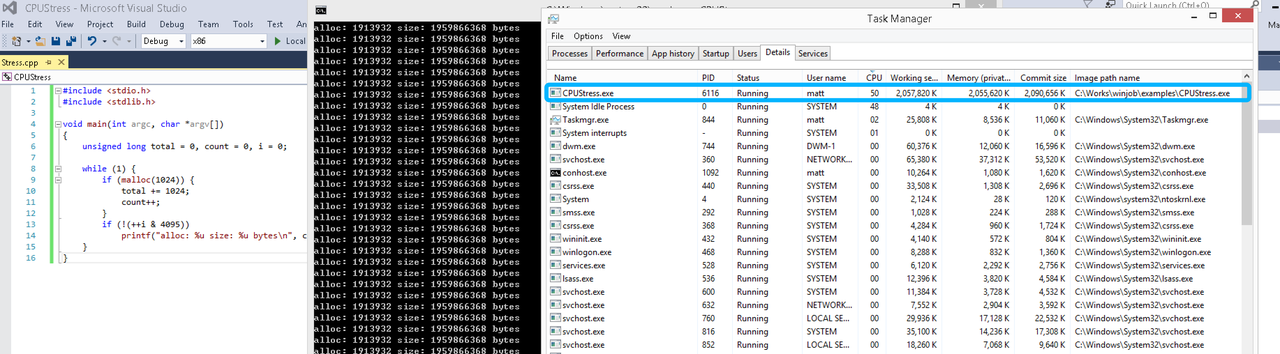
单一进程
在设定CPU上限16%及内存16M上限之后,结果如下:
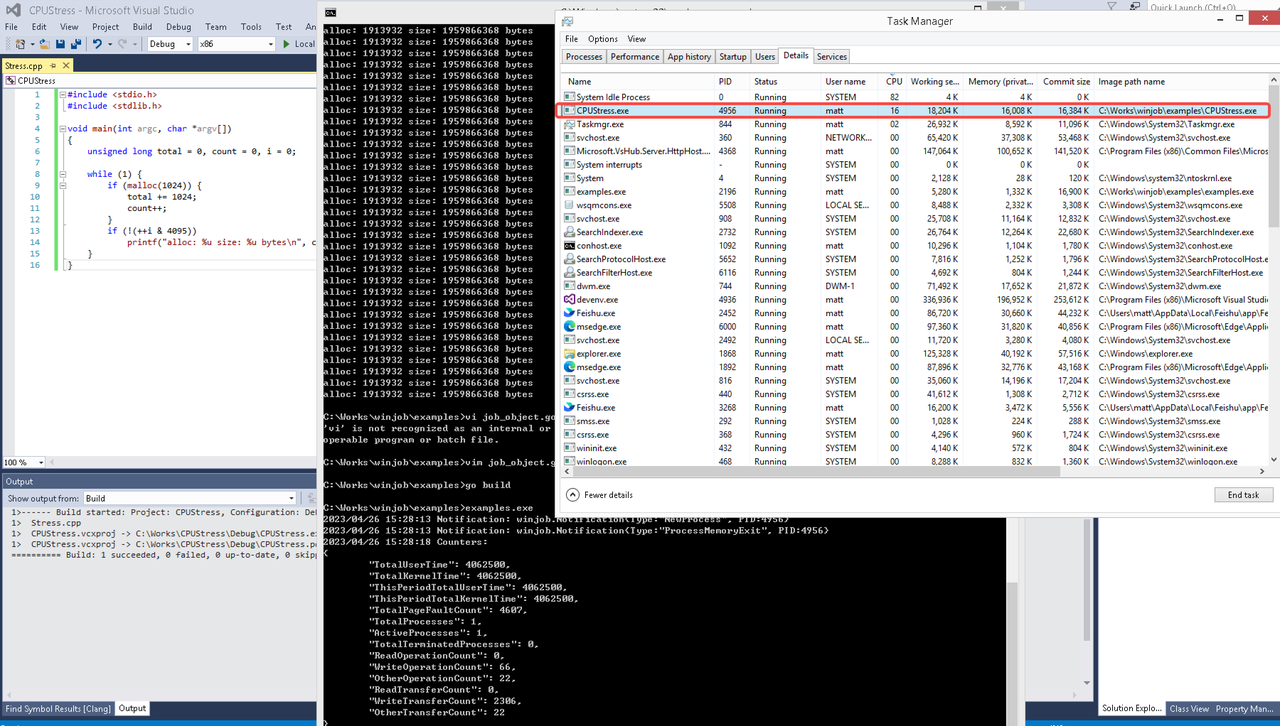 examples/job_object.go按如下修改:
var limits = []winjob.Limit{
        winjob.WithBreakawayOK(),
        winjob.WithKillOnJobClose(),
        winjob.WithActiveProcessLimit(3),
        winjob.WithProcessTimeLimit(10 * time.Second),
        winjob.WithCPUHardCapLimit(1600),        // 16%
        winjob.WithProcessMemoryLimit(16 << 20), // 16MB
        winjob.WithWriteClipboardLimit(),
}

const defaultCommand = ".\\CPUStress.exe"
多进程(双进程)
将winjob.WithProcessMemoryLimit 改为 winjob.WithJobMemoryLimit,后者表示此job内所有进程要占用的总内存限制:
var limits = []winjob.Limit{
        winjob.WithBreakawayOK(),
        winjob.WithKillOnJobClose(),
        winjob.WithActiveProcessLimit(3),
        winjob.WithProcessTimeLimit(10 * time.Second),
        winjob.WithCPUHardCapLimit(1600),    // 16%
        winjob.WithJobMemoryLimit(16 << 20), // 16MB
        winjob.WithWriteClipboardLimit(),
}
验证结果如下:
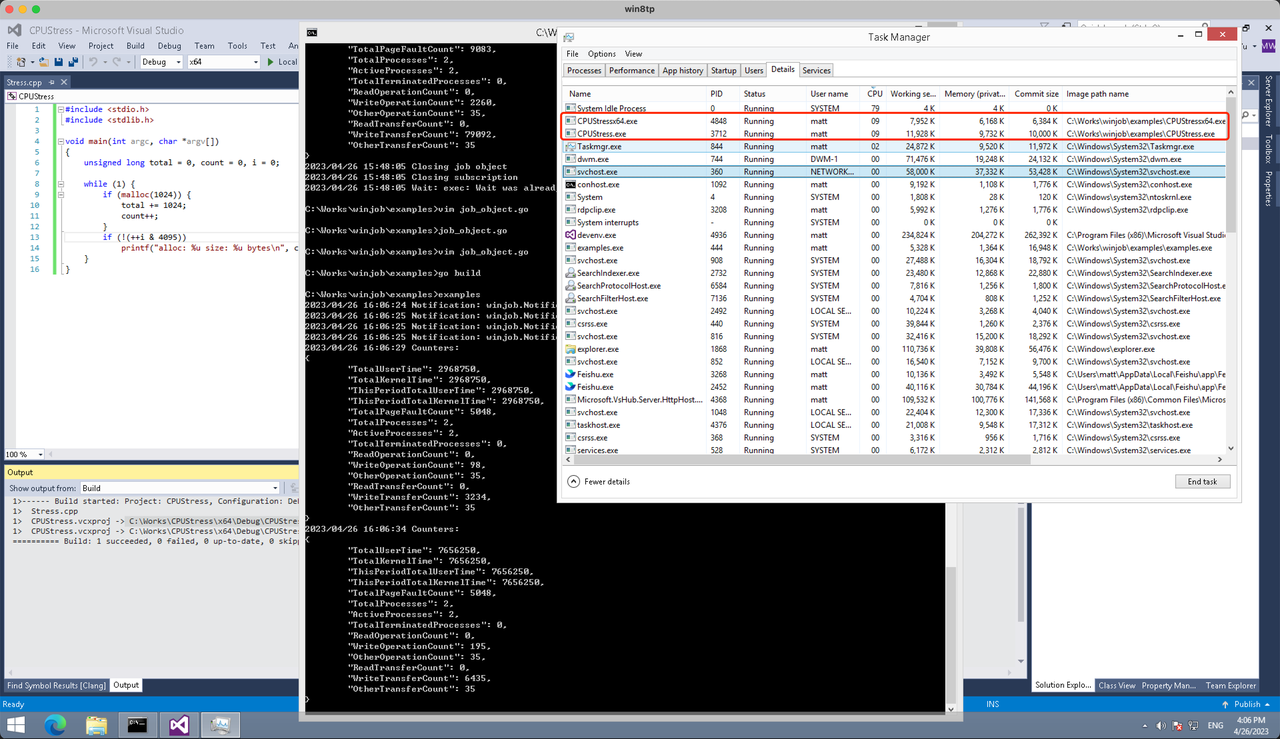
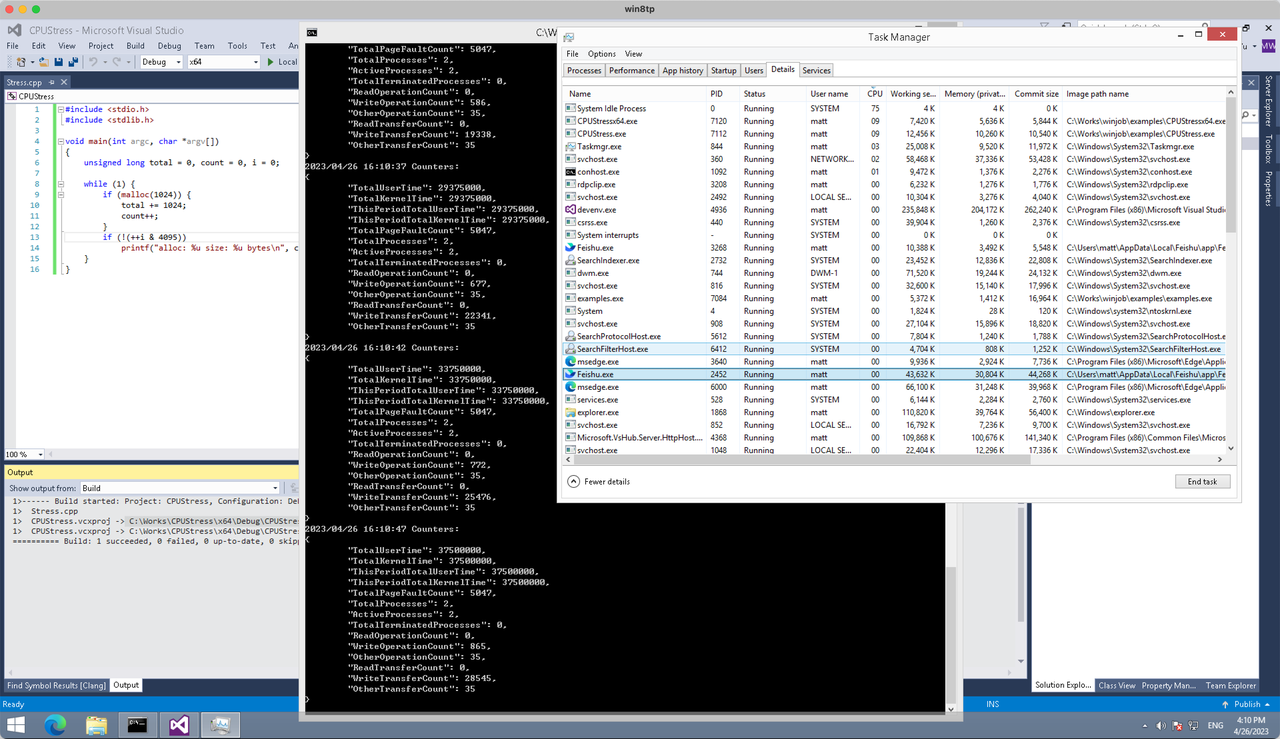
winjob example代码:
// +build windows

package main

import (
        "encoding/json"
        "log"
        "os"
        "os/exec"
        "os/signal"
        "time"

        "golang.org/x/sys/windows"

        "github.com/kolesnikovae/go-winjob"
)

var limits = []winjob.Limit{
        winjob.WithBreakawayOK(),
        winjob.WithKillOnJobClose(),
        winjob.WithActiveProcessLimit(3),
        winjob.WithProcessTimeLimit(10 * time.Second),
        winjob.WithCPUHardCapLimit(1600),    // 16%
        winjob.WithJobMemoryLimit(16 << 20), // 16MB
        winjob.WithWriteClipboardLimit(),
}

const defaultCommand = ".\\CPUStress.exe"
const stressCommand  = ".\\CPUStressX64.exe"

func main() {
        job, err := winjob.Create("", limits...)
        if err != nil {
                log.Fatalf("Create: %v", err)
        }

        cmd := exec.Command(defaultCommand)
        cmd.Stderr = os.Stderr
        cmd.SysProcAttr = &windows.SysProcAttr{
                CreationFlags: windows.CREATE_SUSPENDED,
        }
        if err := cmd.Start(); err != nil {
                log.Fatalf("Start: %v", err)
        }

        stress := exec.Command(stressCommand)
        stress.Stderr = os.Stderr
        stress.SysProcAttr = &windows.SysProcAttr{
                CreationFlags: windows.CREATE_SUSPENDED,
        }
        if err := stress.Start(); err != nil {
                log.Fatalf("Start: %v", err)
        }

        s := make(chan os.Signal, 1)
        signal.Notify(s, os.Interrupt)

        c := make(chan winjob.Notification)
        subscription, err := winjob.Notify(c, job)
        if err != nil {
                log.Fatalf("Notify: %v", err)
        }

        done := make(chan struct{})
        go func() {
                defer close(done)
                ticker := time.NewTicker(time.Second * 5)
                defer ticker.Stop()
                var counters winjob.Counters
                for {
                        select {
                        case <-s:
                                log.Println("Closing job object")
                                if err := job.Close(); err != nil {
                                        log.Fatal(err)
                                }
                                log.Println("Closing subscription")
                                if err := subscription.Close(); err != nil {
                                        log.Fatal(err)
                                }
                                return

                        case n, ok := <-c:
                                if ok {
                                        log.Printf("Notification: %#v\n", n)
                                } else if err := subscription.Err(); err != nil {
                                        log.Fatalf("Subscription: %v", err)
                                }

                        case <-ticker.C:
                                if err := job.QueryCounters(&counters); err != nil {
                                        log.Fatalf("QueryCounters: %v", err)
                                }
                                b, err := json.MarshalIndent(counters, "", "\t")
                                if err != nil {
                                        log.Fatal(err)
                                }
                                log.Printf("Counters: \n%s\n", b)
                        }
                }
        }()

        if err := job.Assign(cmd.Process); err != nil {
                log.Fatalf("Assign: %v", err)
        }
        if err := winjob.Resume(cmd); err != nil {
                log.Fatalf("Resume: %v", err)
        }

        if err := job.Assign(stress.Process); err != nil {
                log.Fatalf("Assign: %v", err)
        }
        if err := winjob.Resume(stress); err != nil {
                log.Fatalf("Resume: %v", err)
        }

        if err := cmd.Wait(); err != nil {
                log.Fatalf("Wait: %v", err)
        }
        if err := stress.Wait(); err != nil {
                log.Fatalf("Wait: %v", err)
        }

        // Wait for a signal.
        <-done
}
Thanks for the thorough analysis. Find more at albergue Palas de Rei .
playtech casinos usa, fastest paying pa online casino real money no deposit bonus – Catharine, usa and uk casino 10 no deposit,
or casino in christchurch new zealand
https://www.snabco.ru/
Online casino kontoauszug casino ab 100 euro ethereum
Greetings from California! I’m bored to death at work so I decided to
check out your site on my iphone during lunch break. I love the info you present here
and can’t wait to take a look when I get home. I’m shocked at how
quick your blog loaded on my phone .. I’m not even using WIFI, just
3G .. Anyways, amazing blog!
найти это [url=https://vodka-bet.kz/]водкабет официальный сайт[/url]
I appreciated this article. For more, visit mejor pensión en Arzúa .
This was very beneficial. For more, visit albergue en Palas de Rei .
Weed problems can quickly spread if they are ignored. Regular inspections and targeted treatments are key to long-term control. Our company shares related tips here: weed control company
I agree that regular lawn care is much easier than trying to fix a major weed problem later. lawn care offers helpful support for weed control needs.
Having read this I believed it was really enlightening.
I appreciate you taking the time and effort to put
this article together. I once again find myself spending a
significant amount of time both reading and leaving comments.
But so what, it was still worthwhile!
saturday wolverhampton racing results
Look at my site … https://Horse-betting.com/
בדקנו את מבנה העמלות בחשבון— יועץ פיננסי מומלץ למשפחה הציעו צעדי התייעלות.
Great post about pest issues. Anyone looking for pest control near me can also check this out: lawn care near me
https://electrotehnica.ru/
horse towcester greyhound racing fixtures live betting
I’ve been comparing different lawn care near me options, and this was really helpful. For anyone looking for more local lawn care info, check out pest control near me .
It’s really very difficult in this full of activity life to listen news on TV, thus I only use the web for that purpose, and obtain the latest information.
This was a helpful read. Tree pruning is definitely something that should be done carefully, especially with mature trees. If anyone is looking for expert tree service support, weed control company can help.
I agree that lawn care should be consistent to get the best results. A reliable lawn service can make yard maintenance much easier. Visit weed control company
в этом разделе [url=https://bett-vodka.com]вотка бет[/url]
Appreciate the thorough insights. For more, visit albergue privado Palas de Rei .
This was a fantastic read. Check out reservar pensión en Arzúa for more.
после вашего обращения наш врач приезжает по указанному адресу с медработниками в гражданской форме и на машине без опознавательных символов, проводит осмотр, собирает историю болезни (анамнез).
Подробнее тут – [url=https://vyvod-is-zapoya-sochi24.ru/]vyvod-is-zapoya-sochi24.ru/[/url]
ניהלו משא ומתן מול הבנקים בשמנו. אתר: תנאי משכנתא לגיל השלישי
Provides the option to add on NewBlue TotalFX, featuring 1,500 presets in 177 video plugins in one comprehensive toolbox. You’ll find titling, stabilisation, transitions, filters, background generators, and dozens of video effects. $ CapCut, developed by ByteDance (the creators of TikTok), is one of the most popular video editing apps. It’s well-loved for its simplicity and powerful tools that cater to both beginners and experienced editors. Don’t be afraid to download a couple of the free app options and test video editing on a short project to see which editing interface and workflow you prefer. The best video editing app for iPhone is ultimately the one that helps you tell your story most effectively and efficiently. Get out there, shoot some footage, and start editing your next amazing YouTube video! This is a key part of creating video content that converts.
https://govtcollegebalangir.com/big-bass-bonanza-coup-doeil-pour-les-joueurs-tunisiens/
Are you looking for the quickest way to edit your videos and export them as full HD quality? VITA provides a video editor to easily download on your mobile devices to pre-process any videos you want. But the question is, is it the best video editor to use? To answer that specific question, you can read the evaluation we did here to determine if it will fit your needs. With Vita, creating a video with voiceover is a straightforward process. After you’ve edited your video and added visuals, follow the steps described above to add a voiceover. In other ways, the PSTV has disappointed. Its operating system and interface haven’t been updated from the Vita’s last-generation, touchscreen roots. And the gaming compatibility and streaming media options are limited, sometimes confusingly (if not arbitrarily) so.
Thanks for highlighting the importance of safe weed control methods. Responsible application protects lawns, gardens, pets, and the surrounding environment. Resource: weed control company
Lots of UK online casinos offer free spins on either Big Bass Splash or Big Bass Bonanza, for new online slots players. Make sure you check which game the spins are valid on so that you can use them! Well, it is bigger, so there is no boasting in the title. Bigger Bass Bonanza has an expanded reel set, a couple of extra paylines, and the math model has been ratcheted up to a high setting. Even the game’s location has switched, and of all the changes, this might be the most contentious of all for some players. The original had a ukulele-led feel of deep-sea fishing off Maui or somewhere like that. Wherever it was felt a lot more laid back than the synthwave styles of where we are now – Miami, Tenerife? It’s impossible to say, but it is a place you could imagine hardcore fishermen or women wanting to escape from for a bit of peace and quiet.
https://telegra.ph/Betano-Casino-juego-de-casino-03-10
Big Bass Bonanza slot has gained a strong following due to its straightforward gameplay and engaging bonus features, including multipliers, wild symbols and a fisherman collection mechanic that adds extra ways to win. Playing Bigger Bass Bonanza is straightforward and user-friendly. Begin by setting your bet size‚ which caters to a wide range of budgets — perfect for UK players seeking either low-risk spins or high-roller thrills. Hit the spin button and watch the reels come to life. Landing fishing rod symbols triggers the free spins feature where multipliers can increase your wins significantly. Many top UK casinos now offer a free demo mode for Big Bass Bonanza, encouraging players to familiarize themselves with gameplay mechanics. This approach is particularly beneficial for newcomers who want to understand paylines, bonus triggers, and betting options without financial risk. The demo simulates the core game dynamics while letting players develop strategies to increase their chances during real-money play.
This was a fantastic resource. Check out etapa Palas de Rei – Arzúa for more.
Appreciate the great suggestions. For more, visit dónde dormir en Arzúa .
I appreciate the focus on long-term weed management instead of quick fixes. tree service can help homeowners maintain better lawn conditions.
Great post about lawn maintenance. If your yard needs professional attention and you’re searching lawn care near me, visit pest control near me .
Здравствуйте!
Все свежие ежедневные коды Roblox и обновленные коды Roblox доступны на нашем ресурсе. Находите актуальные игровые коды, популярные Роблокс коды и коды на бонусы в играх для быстрой победы. Мы пишем лучшие игровые гайды, делаем прохождения игр и раскрываем секреты игр. Используйте чит-коды для игр, коды для мобильных игр и коды для ПК игр бесплатно. Мы расскажем, как активировать коды Roblox, поможем проверить список кодов Roblox и ввести все коды Роблокс. Получайте новые коды Roblox, а также топовые коды на предметы Roblox, коды на скины Roblox и коды на валюту Roblox.
Подробная информация на сайте https://game-zoom.net
советы по играм, обновленные коды Roblox, обновленные коды Roblox
Роблокс коды, [url=https://game-zoom.net]прохождения игр[/url], прохождения игр
Всего наилучшего и хорошего геймплея!
Refreshing to see clarity on fees. A יועץ משכנתא ensures no surprises: יועץ פיננסי מומלץ לחיסכון .
Great advice for homeowners who want better curb appeal. If you need lawn care near me, lawn care near me is worth a visit.
I appreciate the reminder about trimming dead or weak branches before storm season. It’s one of the best ways to protect both the tree and nearby property. More tree care info is available at tree service .
These are great lawn care reminders. Keeping a regular schedule is one of the best ways to maintain a beautiful yard. More information can be found at lawn care
I appreciate the focus on safe tree removal practices. Large trees require careful planning and the right equipment. Anyone needing support can check weed control company .
I appreciate the focus on long-term weed management instead of quick fixes. tree service can help homeowners maintain better lawn conditions.
If some one needs to be updated with most recent technologies then he must be go to see this website
and be up to date daily.
Right now it seems like Drupal is the preferred blogging platform available right now. (from what I’ve read) Is that what you are using on your blog?
Важное преимущество услуги — анонимность. Информация о пациента, обращении, адрес, диагноз, лечение, консультация, стоимость, препараты и другие данные не передаются третьим лицам. Нажимая кнопку «отправить заявку», вы соглашаетесь с пользовательским соглашением, политикой обработки персональных данных и политикой конфиденциальности сайта.
Разобраться лучше – [url=https://narkolog-na-dom-kazan24.ru/]нарколог на дом вывод[/url]
This is a very informative post about online casinos and betting platforms.
I especially liked how it explains the importance of choosing a
secure site before signing up.
Many players often ask where they can find reliable gaming platforms with fair odds and smooth payouts.
From what I’ve seen, checking platforms like vn22vip helps
users compare features, bonuses, and overall experience.
Thanks for sharing these insights — they’re helpful for
both beginners and experienced bettors.
betting on horse races for dummies
Also visit my site :: hove greyhound results saturday
Great blog here! Also your website loads up fast!
What web host are you using? Can I get your affiliate link to your host?
I wish my website loaded up as quickly as yours lol
I agree that choosing the right grass type is important for successful lawn care. Climate and soil conditions matter more than many people realize. Resource: weed control company
גישה שירותית ומקצוענות שמרגישים בכל שלב – השוואת יועץ משכנתאות פרטי .
This was a very practical article. Tree service experts have the training to handle difficult jobs safely. I found more useful information at tree service .
Помощь оказывают врачи с практикой в наркологии, психиатрии и восстановительной терапии.
Получить дополнительные сведения – [url=https://narkolog-na-dom-v-novorossijske3.ru/]запой нарколог на дом в новороссийске[/url]
Hi! Someone in my Myspace group shared this site with us so I came to
give it a look. I’m definitely loving the information. I’m book-marking and
will be tweeting this to my followers! Excellent blog and amazing style and design.