Windows自身没有提供类似Linux cgroup的能力来限制进程或进程组的资源占用,进程CPU/IO/内存/网络等资源的控制只能由自己实现。目前已有第三方的实现,主要是限制进程CPU的占用,如文档 < 21 Best Ways to Limit the CPU Usage of a Process > 所描述的BES,Process Tamer等软件。自Windows 8及Server 2012开始Windows系统有提供以job为单位的CPU占用及内存上限设置,之前的版本则只能以进程或线程为单位进行限制。
进程CPU占用限制方案
即时轮询系统所有进程(线程)的CPU占用,当发现所设定进程有超标时强制暂停进程所有线程的执行,然后在适当的时机再恢复执行。其中所涉及技术点:
进程CPU占用查询 GetProcessTimes
BOOL GetProcessTimes(
  [in]  HANDLE     hProcess,
  [out] LPFILETIME lpCreationTime,
  [out] LPFILETIME lpExitTime,
  [out] LPFILETIME lpKernelTime,
  [out] LPFILETIME lpUserTime
);
此函数可以获取进程从创建至当前的总运行时间及总的CPU时间,(KernelTime + UserTime) < 系统CPU数 * (当前时间 - CreationTime)
线程CPU占用查询 GetThreadTimes
BOOL GetThreadTimes(
  [in]  HANDLE     hThread,
  [out] LPFILETIME lpCreationTime,
  [out] LPFILETIME lpExitTime,
  [out] LPFILETIME lpKernelTime,
  [out] LPFILETIME lpUserTime
);
QueryThreadCycleTime可以提供更精准的CPU时间数据,单位为CPU时钟周期
BOOL QueryThreadCycleTime(
  [in]  HANDLE   ThreadHandle,
  [out] PULONG64 CycleTime
);
线程暂停及恢复
Windows平台没有提供暂停整个进程的支持函数,只能以线程为单位来操作,即SuspendThread及ResumeThread:
DWORD SuspendThread(
  [in] HANDLE hThread
);
DWORD ResumeThread(
  [in] HANDLE hThread
);
CPU亲和性设置: SetProcessAffinityMask
BOOL SetProcessAffinityMask(
  [in] HANDLE    hProcess,
  [in] DWORD_PTR dwProcessAffinityMask
);
此函数可以限定进程及其所有线程所能使用的CPU,故一定程序上亦限定了进程最大的系统CPU占用率。
DWORD_PTR SetThreadAffinityMask(
  [in] HANDLE    hThread,
  [in] DWORD_PTR dwThreadAffinityMask
);
此函数可单独限制特定线程的CPU亲和性。
进程优先级设置: SetPriorityClass
优先级解决的是优先运行及退让CPU的问题,本质上并不能限定CPU占用,只是优先级高于当前任务的忙碌的时候,当前进程会主动退让CPU 线程优先级设置:SetThreadPriority
BOOL SetThreadPriority(
  [in] HANDLE hThread,
  [in] int    nPriority
);
Job Objects
Windows系统提供了Job的概念用以管理多个进程,可以限制Job对象内所有进程及期线程的CPU核心占用、CPU占用及内存分配上限等,均通过SetInformationJobObject来实现,具体的CPU限制由JOBOBJECT_CPU_RATE_CONTROL_INFORMATION管理,内存限制则由JOBOBJECT_EXTENDED_LIMIT_INFORMATION来管理。
BOOL SetInformationJobObject(
  [in] HANDLE             hJob,
  [in] JOBOBJECTINFOCLASS JobObjectInformationClass,
  [in] LPVOID             lpJobObjectInformation,
  [in] DWORD              cbJobObjectInformationLength
);需要注意的是CPU占用设置只有Windows 8及Server 2012之后的版本有效。
CPU Sets
此部分只限定了CPU Affinity属性
实验验证
可以直接利用开源项目go-winjob验证,验证系统Windows 8 x64,go-winjob git repo: https://github.com/kolesnikovae/go-winjob
验证程序
#include <stdio.h>
#include <stdlib.h>

void main(int argc, char *argv[])
{
        unsigned long total = 0, count = 0, i = 0;

        while (1) {
                if (malloc(1024)) {
                        total += 1024;
                        count++;
                }
                if (!(++i & 4095))
                        printf("alloc: %u size: %u bytes\n", count, total);
    }
}
无限制
在无限制的情况下,此进程会占满一个CPU核心,commit内存总占用达2G
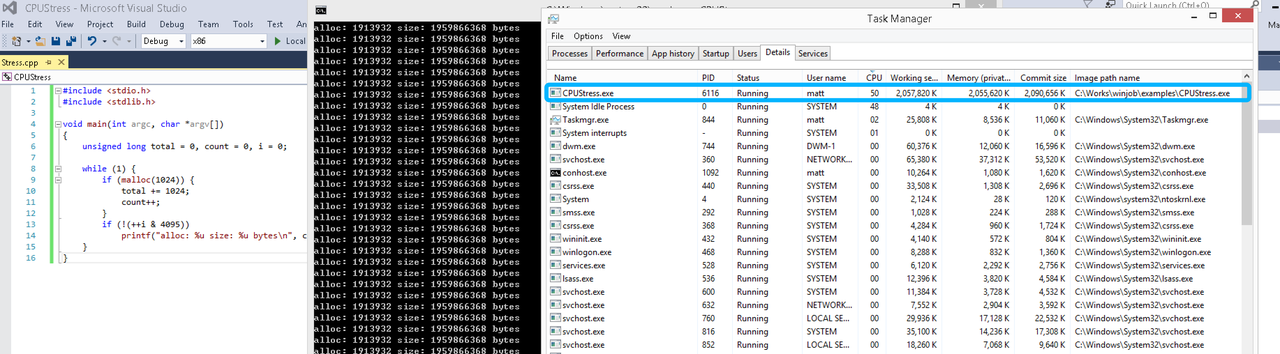
单一进程
在设定CPU上限16%及内存16M上限之后,结果如下:
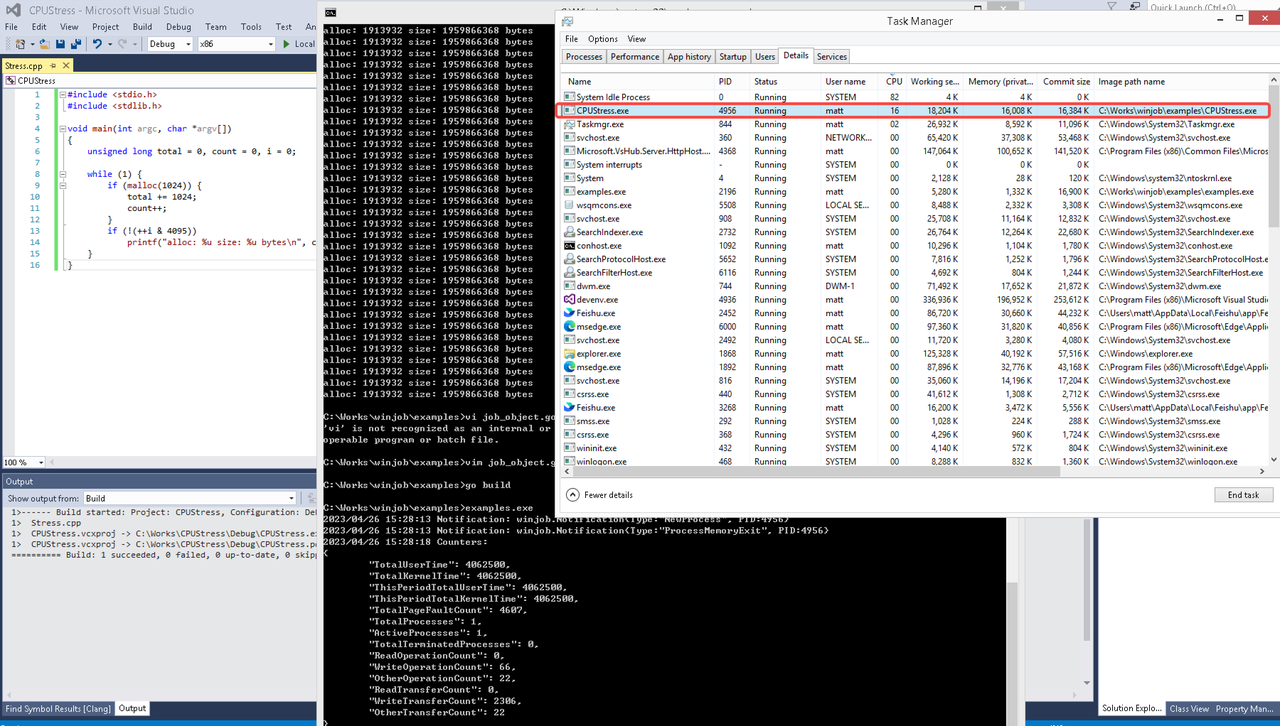 examples/job_object.go按如下修改:
var limits = []winjob.Limit{
        winjob.WithBreakawayOK(),
        winjob.WithKillOnJobClose(),
        winjob.WithActiveProcessLimit(3),
        winjob.WithProcessTimeLimit(10 * time.Second),
        winjob.WithCPUHardCapLimit(1600),        // 16%
        winjob.WithProcessMemoryLimit(16 << 20), // 16MB
        winjob.WithWriteClipboardLimit(),
}

const defaultCommand = ".\\CPUStress.exe"
多进程(双进程)
将winjob.WithProcessMemoryLimit 改为 winjob.WithJobMemoryLimit,后者表示此job内所有进程要占用的总内存限制:
var limits = []winjob.Limit{
        winjob.WithBreakawayOK(),
        winjob.WithKillOnJobClose(),
        winjob.WithActiveProcessLimit(3),
        winjob.WithProcessTimeLimit(10 * time.Second),
        winjob.WithCPUHardCapLimit(1600),    // 16%
        winjob.WithJobMemoryLimit(16 << 20), // 16MB
        winjob.WithWriteClipboardLimit(),
}
验证结果如下:
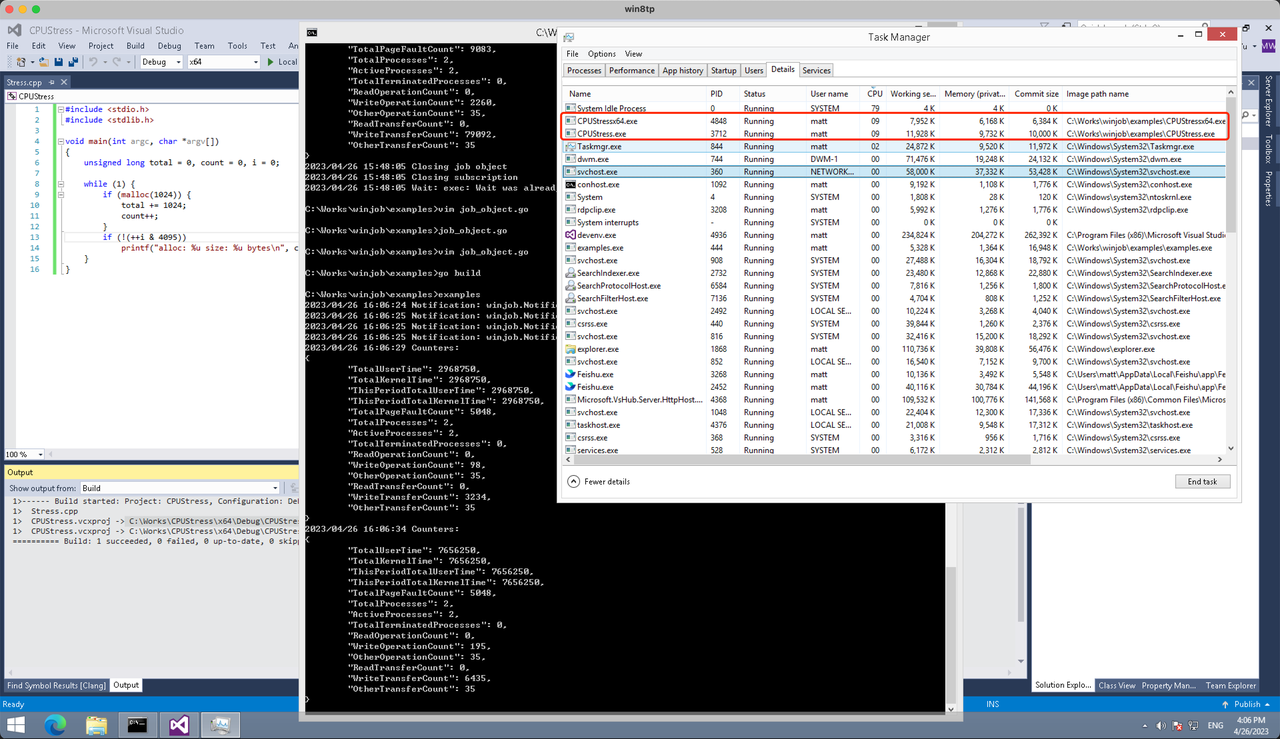
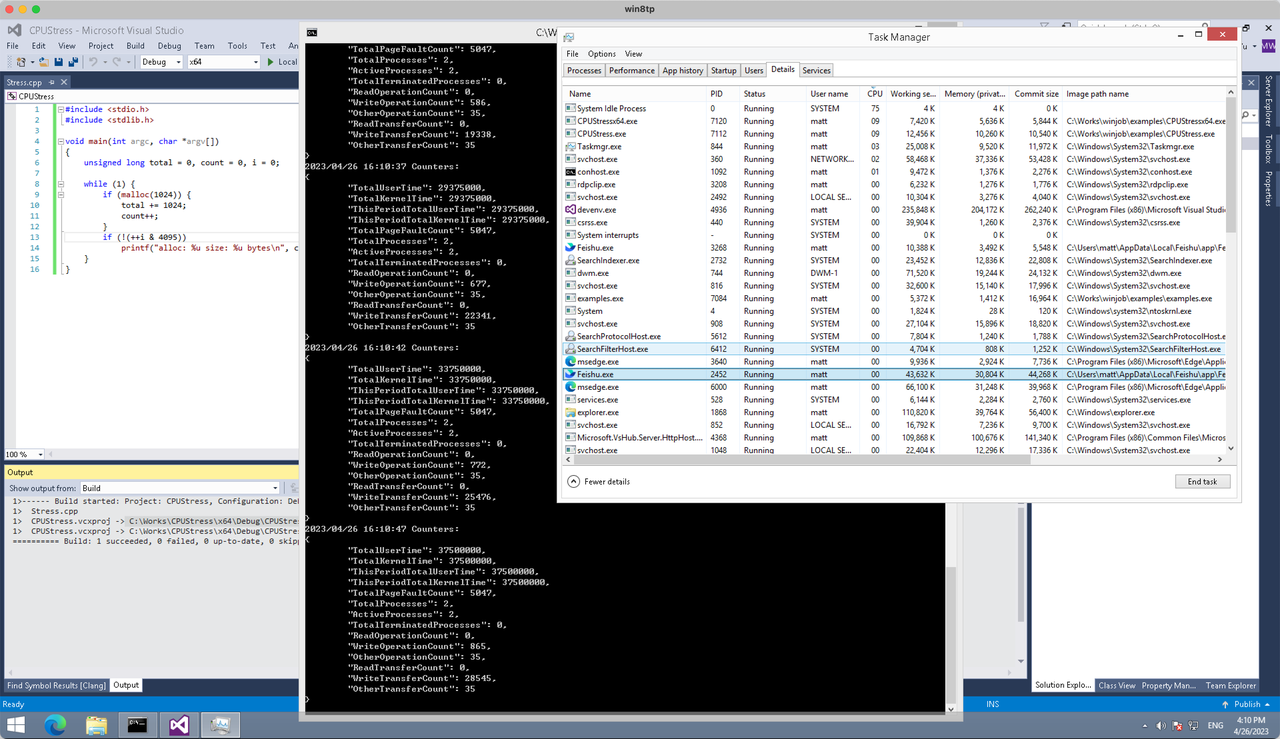
winjob example代码:
// +build windows

package main

import (
        "encoding/json"
        "log"
        "os"
        "os/exec"
        "os/signal"
        "time"

        "golang.org/x/sys/windows"

        "github.com/kolesnikovae/go-winjob"
)

var limits = []winjob.Limit{
        winjob.WithBreakawayOK(),
        winjob.WithKillOnJobClose(),
        winjob.WithActiveProcessLimit(3),
        winjob.WithProcessTimeLimit(10 * time.Second),
        winjob.WithCPUHardCapLimit(1600),    // 16%
        winjob.WithJobMemoryLimit(16 << 20), // 16MB
        winjob.WithWriteClipboardLimit(),
}

const defaultCommand = ".\\CPUStress.exe"
const stressCommand  = ".\\CPUStressX64.exe"

func main() {
        job, err := winjob.Create("", limits...)
        if err != nil {
                log.Fatalf("Create: %v", err)
        }

        cmd := exec.Command(defaultCommand)
        cmd.Stderr = os.Stderr
        cmd.SysProcAttr = &windows.SysProcAttr{
                CreationFlags: windows.CREATE_SUSPENDED,
        }
        if err := cmd.Start(); err != nil {
                log.Fatalf("Start: %v", err)
        }

        stress := exec.Command(stressCommand)
        stress.Stderr = os.Stderr
        stress.SysProcAttr = &windows.SysProcAttr{
                CreationFlags: windows.CREATE_SUSPENDED,
        }
        if err := stress.Start(); err != nil {
                log.Fatalf("Start: %v", err)
        }

        s := make(chan os.Signal, 1)
        signal.Notify(s, os.Interrupt)

        c := make(chan winjob.Notification)
        subscription, err := winjob.Notify(c, job)
        if err != nil {
                log.Fatalf("Notify: %v", err)
        }

        done := make(chan struct{})
        go func() {
                defer close(done)
                ticker := time.NewTicker(time.Second * 5)
                defer ticker.Stop()
                var counters winjob.Counters
                for {
                        select {
                        case <-s:
                                log.Println("Closing job object")
                                if err := job.Close(); err != nil {
                                        log.Fatal(err)
                                }
                                log.Println("Closing subscription")
                                if err := subscription.Close(); err != nil {
                                        log.Fatal(err)
                                }
                                return

                        case n, ok := <-c:
                                if ok {
                                        log.Printf("Notification: %#v\n", n)
                                } else if err := subscription.Err(); err != nil {
                                        log.Fatalf("Subscription: %v", err)
                                }

                        case <-ticker.C:
                                if err := job.QueryCounters(&counters); err != nil {
                                        log.Fatalf("QueryCounters: %v", err)
                                }
                                b, err := json.MarshalIndent(counters, "", "\t")
                                if err != nil {
                                        log.Fatal(err)
                                }
                                log.Printf("Counters: \n%s\n", b)
                        }
                }
        }()

        if err := job.Assign(cmd.Process); err != nil {
                log.Fatalf("Assign: %v", err)
        }
        if err := winjob.Resume(cmd); err != nil {
                log.Fatalf("Resume: %v", err)
        }

        if err := job.Assign(stress.Process); err != nil {
                log.Fatalf("Assign: %v", err)
        }
        if err := winjob.Resume(stress); err != nil {
                log.Fatalf("Resume: %v", err)
        }

        if err := cmd.Wait(); err != nil {
                log.Fatalf("Wait: %v", err)
        }
        if err := stress.Wait(); err != nil {
                log.Fatalf("Wait: %v", err)
        }

        // Wait for a signal.
        <-done
}
magnificent issues altogether, you simply gained a
new reader. What would you suggest in regards to your publish
that you made some days in the past? Any positive?
I favored your go back-to-operating plan after lower back affliction. Conservative development chart: Chiropractor Care fort myers
Appreciate the thorough write-up. Find more at 24/7 AC repair Hammond LA .
Honestly, I never thought I’d need to just step inside a counseling center unannounced, but earlier this year I had a seriously intense panic episode hit me out of nowhere while I was running errands the Artesia Boulevard corridor Mental health clinic
Nicely detailed. Discover more at window services near me .
This was highly educational. More at same day AC repair .
Very useful post. For similar content, visit L & L Roofing and Construction of Gainesville .
Wonderful tips! Find more at Irving emergency AC repair .
Hey I know this is off topic but I was wondering if you knew of any widgets I could add to my blog that automatically tweet my newest twitter updates. I’ve been looking for a plug-in like this for quite some time and was hoping maybe you would have some experience with something like this. Please let me know if you run into anything. I truly enjoy reading your blog and I look forward to your new updates.
This post is super helpful! I’m currently comparing quotes from different Sacramento moving company services. Sacramento commercial movers
Love the transparency and updates from Scranton auto shipping during transport. Scranton car transport
This was quite informative. For more, visit Daytona Beach SEO agency .
Продолжение [url=https://trip20.us/]трипскан вход[/url]
Appreciate the thorough insights. For more, visit Hammond AC service .
Appreciate the useful tips. For more, visit auto glass replacement .
Simply want to say your article is as astonishing. The clarity in your post is simply
spectacular and i could assume you are an expert on this subject.
Fine with your permission allow me to grab your feed to keep
updated with forthcoming post. Thanks a million and please keep up the gratifying work.
Including current residents’ families in the conversation is a great idea. I’ll be adding that recommendation to content on respite care .
The emotional comfort of being known and seen makes accepting help with ADLs so much easier for seniors. That’s why I’m more interested in options like assisted living rather than large institutions.
Magnificent beat ! I wish to apprentice while you amend your site, how
could i subscribe for a blog website? The account aided me a
acceptable deal. I had been a little bit acquainted of this your broadcast provided bright clear idea
This was a great article. Check out licensed AC repair for more.
Before scheduling anything, I was honestly overwhelmed about what I’d actually owe at a mental health clinic, so I contacted Eye Cue Mental Health with a long list of questions about insurance copay therapy rates versus out-of-pocket counseling cost best Mental health clinic
Valuable difference among sharp vs. boring discomfort when workout. Self-monitoring chart: Chiropractor Care
casino 2 euro lastschrift
Also visit my blog: online roulette Mit Paypal
Asking questions are actually pleasant thing if you are not understanding anything completely,
however this article provides pleasant understanding even.
This was very beneficial. For more, visit AC maintenance and repair .
I appreciate the emphasis on involving the senior in the decision. They should have a say in where they live. I used conversation tips from assisted living to approach this topic more respectfully with my parents.
I’ve seen firsthand how smaller senior care homes can make a huge difference in dementia care. The personalized attention and calm environment often reduce confusion and anxiety senior care
пояснения [url=https://trip20.us/]трипскан официальный сайт[/url]
A reliable office moving team can save a business a lot of downtime during relocation. Alameda companies looking for moving support might want to check this out: Office moving companies Alameda
Reading this felt so timely because last February I’d basically stopped showing up from my regular sessions after a tough winter best Mental health clinic
Great breakdown on how spinal alignment impacts nerve functionality. For readers short of a primer on what to anticipate at a primary chiropractic consult with, this aid may also guide: Chiropractor Care near me
This was very beneficial. For more, visit window maintenance services .
My coder is trying to convince me to move to .net from PHP.
I have always disliked the idea because of the expenses. But he’s
tryiong none the less. I’ve been using Movable-type on a variety of websites for
about a year and am concerned about switching to another
platform. I have heard fantastic things about blogengine.net.
Is there a way I can transfer all my wordpress posts into it?
Any kind of help would be really appreciated!
I appreciate the practical advice here. Fertilizing, mowing, and watering all need the right timing. lawn service offers more lawn service insights.
This was highly educational. More at Paver Sealing & Cleaning Pros of Merrick .
I appreciated this article. For more, visit best AC repair Duluth .
Nicely done! Find more at Roofing services Washington IL .
Appreciate the thorough analysis. For more, visit same day emergency AC repair .
If you need bonded carriers to Erie, Erie car transportation services lets you verify DOT and MC numbers easily.
For small studio moves in Decatur, Local movers Decatur suggested affordable two-person crews.
The idea of planning ahead before a health crisis hits is so important. We used planning guides from elderly care , together with information like this, to make decisions calmly instead of in an emergency.
My mom needed just a bit of help with daily tasks, not full nursing care. A smaller assisted living home was the perfect middle ground. I wish I had known about assisted living sooner in the search process.
I saved time and stress using Jersey City auto shipping for my car. Jersey City auto shippers
We had a multi-story house and Office moving companies Toms River navigated it easily in Toms River.
Wow that was unusual. I just wrote an very long comment but after I clicked submit my comment didn’t show up.
Grrrr… well I’m not writing all that over again. Anyway,
just wanted to say great blog!
If you’re planning a move in Soquel, it’s smart to book movers early and ask about packing services. Soquel Movers can be useful for anyone starting that process.
Good advice about avoiding hidden moving fees. Transparent pricing matters, especially for budget moves. Local movers San Leandro may be useful for people researching affordable movers.
This was very enlightening. For more, visit urgent AC repair service .
If you’ve got pets, create a calm space on move day. A pet prep guide from Centerville Mover’s helped my anxious cat big time.
Fall prevention during everyday tasks is easier to manage in a smaller, more controlled environment. It’s great to see providers like respite care focusing on safer assisted living options.