Windows自身没有提供类似Linux cgroup的能力来限制进程或进程组的资源占用,进程CPU/IO/内存/网络等资源的控制只能由自己实现。目前已有第三方的实现,主要是限制进程CPU的占用,如文档 < 21 Best Ways to Limit the CPU Usage of a Process > 所描述的BES,Process Tamer等软件。自Windows 8及Server 2012开始Windows系统有提供以job为单位的CPU占用及内存上限设置,之前的版本则只能以进程或线程为单位进行限制。
进程CPU占用限制方案
即时轮询系统所有进程(线程)的CPU占用,当发现所设定进程有超标时强制暂停进程所有线程的执行,然后在适当的时机再恢复执行。其中所涉及技术点:
进程CPU占用查询 GetProcessTimes
BOOL GetProcessTimes(
  [in]  HANDLE     hProcess,
  [out] LPFILETIME lpCreationTime,
  [out] LPFILETIME lpExitTime,
  [out] LPFILETIME lpKernelTime,
  [out] LPFILETIME lpUserTime
);
此函数可以获取进程从创建至当前的总运行时间及总的CPU时间,(KernelTime + UserTime) < 系统CPU数 * (当前时间 - CreationTime)
线程CPU占用查询 GetThreadTimes
BOOL GetThreadTimes(
  [in]  HANDLE     hThread,
  [out] LPFILETIME lpCreationTime,
  [out] LPFILETIME lpExitTime,
  [out] LPFILETIME lpKernelTime,
  [out] LPFILETIME lpUserTime
);
QueryThreadCycleTime可以提供更精准的CPU时间数据,单位为CPU时钟周期
BOOL QueryThreadCycleTime(
  [in]  HANDLE   ThreadHandle,
  [out] PULONG64 CycleTime
);
线程暂停及恢复
Windows平台没有提供暂停整个进程的支持函数,只能以线程为单位来操作,即SuspendThread及ResumeThread:
DWORD SuspendThread(
  [in] HANDLE hThread
);
DWORD ResumeThread(
  [in] HANDLE hThread
);
CPU亲和性设置: SetProcessAffinityMask
BOOL SetProcessAffinityMask(
  [in] HANDLE    hProcess,
  [in] DWORD_PTR dwProcessAffinityMask
);
此函数可以限定进程及其所有线程所能使用的CPU,故一定程序上亦限定了进程最大的系统CPU占用率。
DWORD_PTR SetThreadAffinityMask(
  [in] HANDLE    hThread,
  [in] DWORD_PTR dwThreadAffinityMask
);
此函数可单独限制特定线程的CPU亲和性。
进程优先级设置: SetPriorityClass
优先级解决的是优先运行及退让CPU的问题,本质上并不能限定CPU占用,只是优先级高于当前任务的忙碌的时候,当前进程会主动退让CPU 线程优先级设置:SetThreadPriority
BOOL SetThreadPriority(
  [in] HANDLE hThread,
  [in] int    nPriority
);
Job Objects
Windows系统提供了Job的概念用以管理多个进程,可以限制Job对象内所有进程及期线程的CPU核心占用、CPU占用及内存分配上限等,均通过SetInformationJobObject来实现,具体的CPU限制由JOBOBJECT_CPU_RATE_CONTROL_INFORMATION管理,内存限制则由JOBOBJECT_EXTENDED_LIMIT_INFORMATION来管理。
BOOL SetInformationJobObject(
  [in] HANDLE             hJob,
  [in] JOBOBJECTINFOCLASS JobObjectInformationClass,
  [in] LPVOID             lpJobObjectInformation,
  [in] DWORD              cbJobObjectInformationLength
);需要注意的是CPU占用设置只有Windows 8及Server 2012之后的版本有效。
CPU Sets
此部分只限定了CPU Affinity属性
实验验证
可以直接利用开源项目go-winjob验证,验证系统Windows 8 x64,go-winjob git repo: https://github.com/kolesnikovae/go-winjob
验证程序
#include <stdio.h>
#include <stdlib.h>

void main(int argc, char *argv[])
{
        unsigned long total = 0, count = 0, i = 0;

        while (1) {
                if (malloc(1024)) {
                        total += 1024;
                        count++;
                }
                if (!(++i & 4095))
                        printf("alloc: %u size: %u bytes\n", count, total);
    }
}
无限制
在无限制的情况下,此进程会占满一个CPU核心,commit内存总占用达2G
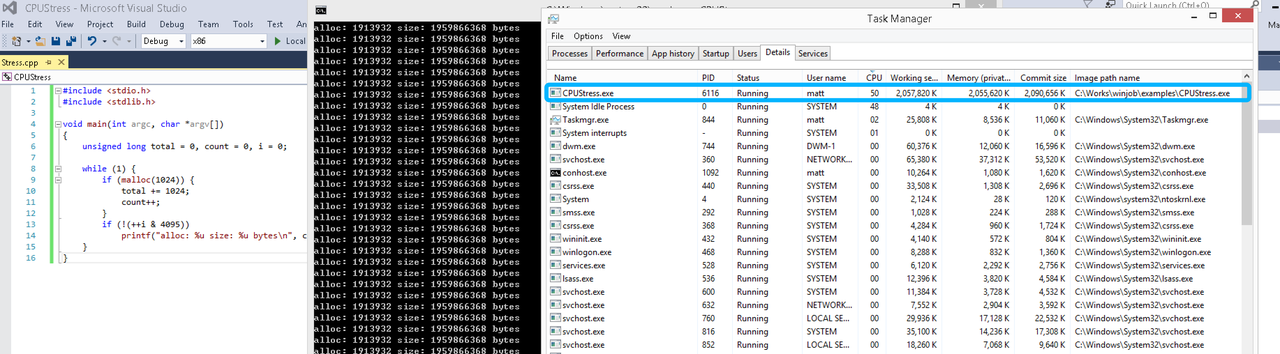
单一进程
在设定CPU上限16%及内存16M上限之后,结果如下:
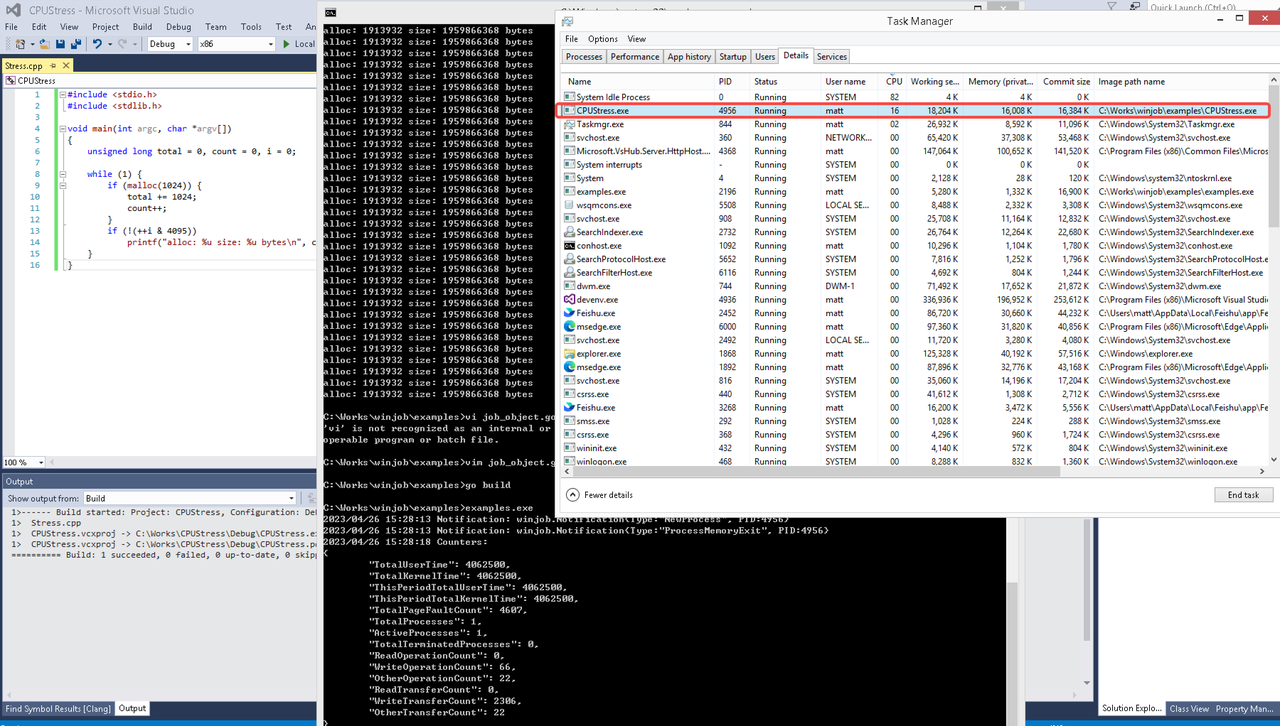 examples/job_object.go按如下修改:
var limits = []winjob.Limit{
        winjob.WithBreakawayOK(),
        winjob.WithKillOnJobClose(),
        winjob.WithActiveProcessLimit(3),
        winjob.WithProcessTimeLimit(10 * time.Second),
        winjob.WithCPUHardCapLimit(1600),        // 16%
        winjob.WithProcessMemoryLimit(16 << 20), // 16MB
        winjob.WithWriteClipboardLimit(),
}

const defaultCommand = ".\\CPUStress.exe"
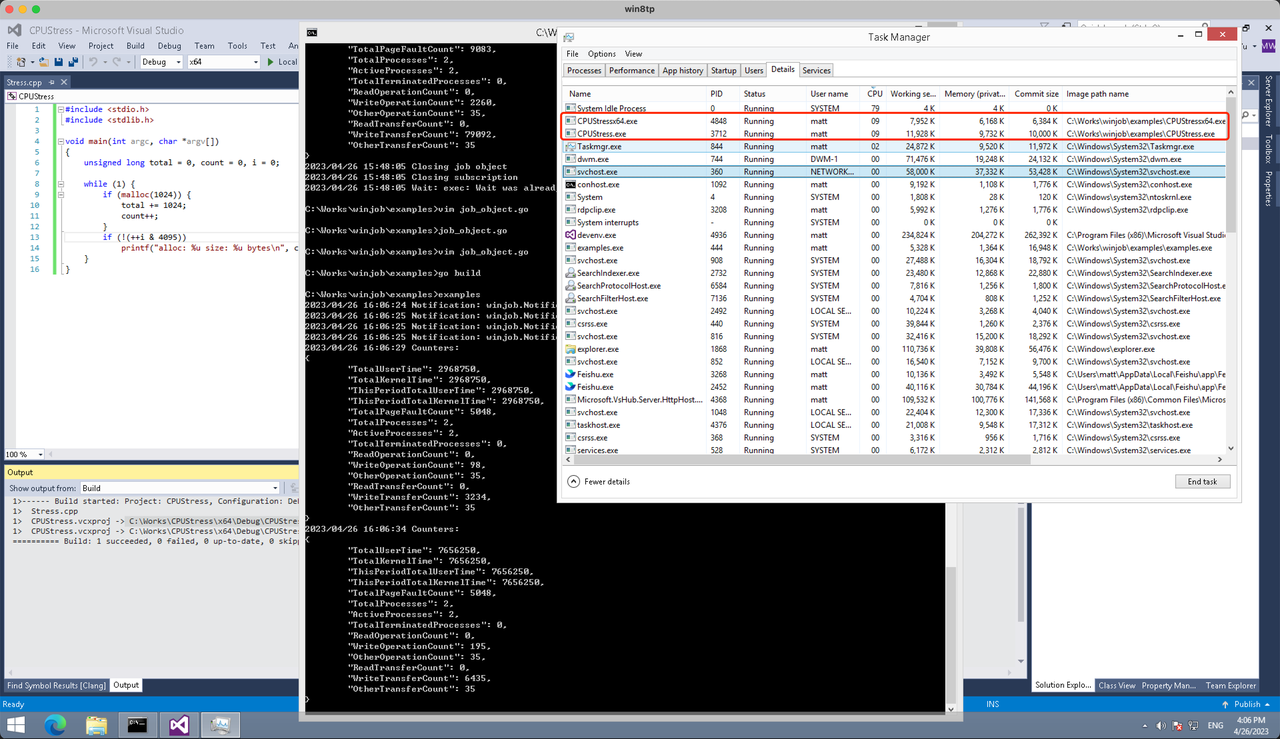
多进程(双进程)
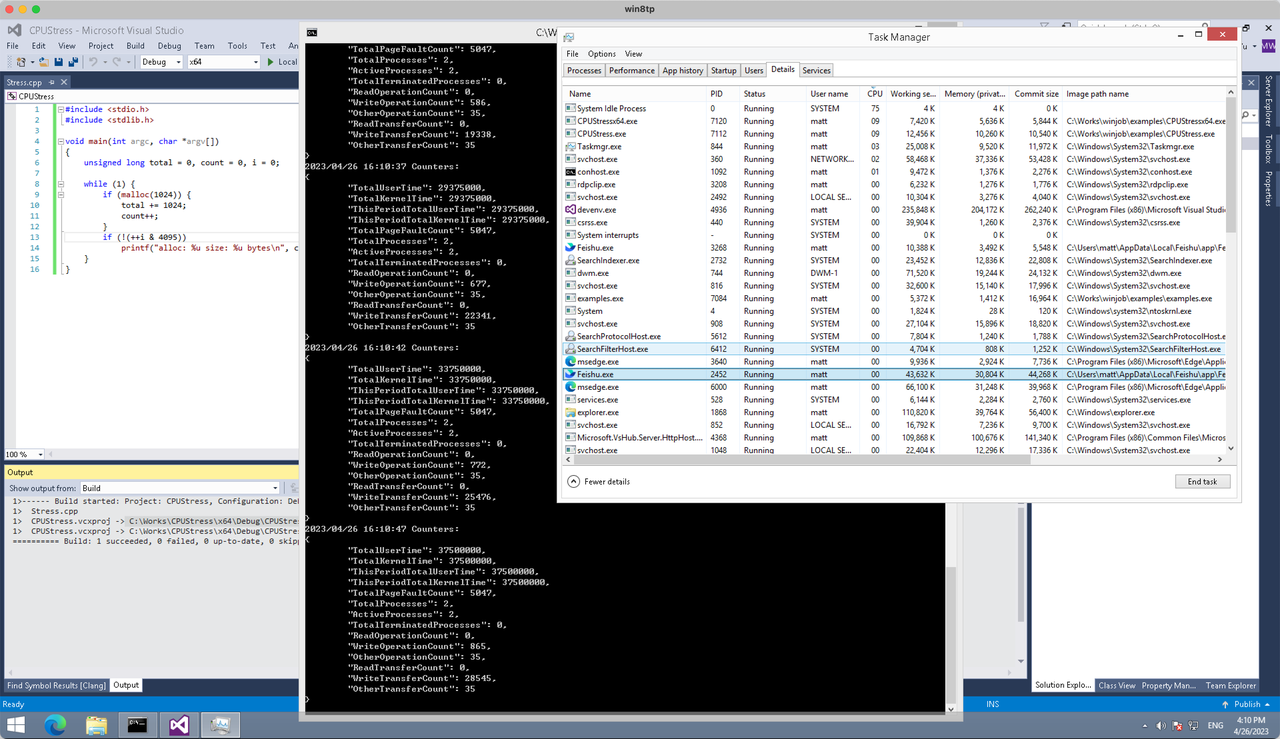
将winjob.WithProcessMemoryLimit 改为 winjob.WithJobMemoryLimit,后者表示此job内所有进程要占用的总内存限制:
var limits = []winjob.Limit{
        winjob.WithBreakawayOK(),
        winjob.WithKillOnJobClose(),
        winjob.WithActiveProcessLimit(3),
        winjob.WithProcessTimeLimit(10 * time.Second),
        winjob.WithCPUHardCapLimit(1600),    // 16%
        winjob.WithJobMemoryLimit(16 << 20), // 16MB
        winjob.WithWriteClipboardLimit(),
}
验证结果如下:
winjob example代码:
// +build windows

package main

import (
        "encoding/json"
        "log"
        "os"
        "os/exec"
        "os/signal"
        "time"

        "golang.org/x/sys/windows"

        "github.com/kolesnikovae/go-winjob"
)

var limits = []winjob.Limit{
        winjob.WithBreakawayOK(),
        winjob.WithKillOnJobClose(),
        winjob.WithActiveProcessLimit(3),
        winjob.WithProcessTimeLimit(10 * time.Second),
        winjob.WithCPUHardCapLimit(1600),    // 16%
        winjob.WithJobMemoryLimit(16 << 20), // 16MB
        winjob.WithWriteClipboardLimit(),
}

const defaultCommand = ".\\CPUStress.exe"
const stressCommand  = ".\\CPUStressX64.exe"

func main() {
        job, err := winjob.Create("", limits...)
        if err != nil {
                log.Fatalf("Create: %v", err)
        }

        cmd := exec.Command(defaultCommand)
        cmd.Stderr = os.Stderr
        cmd.SysProcAttr = &windows.SysProcAttr{
                CreationFlags: windows.CREATE_SUSPENDED,
        }
        if err := cmd.Start(); err != nil {
                log.Fatalf("Start: %v", err)
        }

        stress := exec.Command(stressCommand)
        stress.Stderr = os.Stderr
        stress.SysProcAttr = &windows.SysProcAttr{
                CreationFlags: windows.CREATE_SUSPENDED,
        }
        if err := stress.Start(); err != nil {
                log.Fatalf("Start: %v", err)
        }

        s := make(chan os.Signal, 1)
        signal.Notify(s, os.Interrupt)

        c := make(chan winjob.Notification)
        subscription, err := winjob.Notify(c, job)
        if err != nil {
                log.Fatalf("Notify: %v", err)
        }

        done := make(chan struct{})
        go func() {
                defer close(done)
                ticker := time.NewTicker(time.Second * 5)
                defer ticker.Stop()
                var counters winjob.Counters
                for {
                        select {
                        case <-s:
                                log.Println("Closing job object")
                                if err := job.Close(); err != nil {
                                        log.Fatal(err)
                                }
                                log.Println("Closing subscription")
                                if err := subscription.Close(); err != nil {
                                        log.Fatal(err)
                                }
                                return

                        case n, ok := <-c:
                                if ok {
                                        log.Printf("Notification: %#v\n", n)
                                } else if err := subscription.Err(); err != nil {
                                        log.Fatalf("Subscription: %v", err)
                                }

                        case <-ticker.C:
                                if err := job.QueryCounters(&counters); err != nil {
                                        log.Fatalf("QueryCounters: %v", err)
                                }
                                b, err := json.MarshalIndent(counters, "", "\t")
                                if err != nil {
                                        log.Fatal(err)
                                }
                                log.Printf("Counters: \n%s\n", b)
                        }
                }
        }()

        if err := job.Assign(cmd.Process); err != nil {
                log.Fatalf("Assign: %v", err)
        }
        if err := winjob.Resume(cmd); err != nil {
                log.Fatalf("Resume: %v", err)
        }

        if err := job.Assign(stress.Process); err != nil {
                log.Fatalf("Assign: %v", err)
        }
        if err := winjob.Resume(stress); err != nil {
                log.Fatalf("Resume: %v", err)
        }

        if err := cmd.Wait(); err != nil {
                log.Fatalf("Wait: %v", err)
        }
        if err := stress.Wait(); err != nil {
                log.Fatalf("Wait: %v", err)
        }

        // Wait for a signal.
        <-done
}
Great tips! For more, visit tricólogo Jaén .
What are the top qualities to look for in a Tacoma chiropractor? Would love some tips from Tacoma Chiropractor .
I am really glad to glance at this weblog posts which carries plenty of helpful facts, thanks for providing these statistics.
פוסט חשוב על אפיקי חניה למזומן. סקירת חלופות ונזילות: משכנתא לפנסיונרים להשלמת הידע.
Clearly presented. Discover more at tubidy music .
Business relocations are all about minimizing disruption. Hiring skilled commercial movers in Allentown can help companies get back to work quickly. Check out Best Allentown movers for more details.
The nerve symptoms that began in my left shoulder and arm after the wreck off I-285 approaching Buckhead was really alarming chiropractor near me
I found this helpful for understanding what goes into an office move. Having Tacoma commercial movers involved can make the process much more manageable.
Tension headaches had been headaches that would not quit after a collision off Bullsboro Drive, and I had no idea any of that was connected to my neck chiropractor newnan
I honestly did not know that post-accident chiropractic treatment could be paid for through the at-fault insurance — I assumed I would have to pay everything out of pocket chiropractor savannah
Impressive roof installing high quality. First Class Roofing is precisely who home owners need to lease. First Class Roofing,
Love the readability here—First Class Roofing knowledge actually displays within the remaining final result. First Class Roofing Melbourne,
Following a rear-end impact on Slappey Drive, I developed severe neck tightness about 36 hours later and did not know whiplash could develop that delayed. A coworker suggested Arrowhead Clinic in Albany, and I reached out the very next day chiropractor near me
If you’re dealing with a rat infestation, it’s crucial to address it quickly to prevent health risks and property damage. Effective rat removal techniques can make a significant difference in maintaining a safe and clean environment Pest Control Near Me
11. I value the time you put into this article. The bottom lines existed really plainly. financial strategies
Can anyone share their experiences with Tacoma chiropractors? I’m considering trying one out from Injury chiropractor .
What surprised me most after my accident on Peachtree Road was that I assumed I was okay until Arrowhead Clinic ran their same-day X-rays and # #anykeyword## the results showed soft tissue and structural damage that no one had picked up on chiropractor
I checked in with my family doctor first after my collision off Candler Road and left with nothing more than a suggestion to take over-the-counter pain relievers, which barely helped at all chiropractor decatur ga
Shoulder soreness after a wreck can surprise you because you fixate on the more immediate injuries first — but the soft tissue injury in my left shoulder from the collision was real enough that it limited my overhead reach for weeks chiropractic clinic
Don’t disregard fee valves on slopes to stop low-head drainage. Parts record and deploy graphics: sprinkler install .
Thanks for the valuable insights. More at AC repair near me .
Appreciate the thorough write-up. Find more at AC unit repair Irving TX .
Numbness radiating into my fingers showed up roughly ten days after my collision on I-285, and I was genuinely scared because I had no idea what it meant. Someone at work pointed me toward Arrowhead Clinic and I # #anykeyword## got an appointment quickly chiropractor atlanta
Choosing movers carefully is key to avoiding stress. If you’re looking for cheap movers Grand Rapids, check this out: Grand Rapids moving companies
Something I never expected was that the team at Arrowhead Clinic in Albany # #anykeyword## identified a structural imbalance that had been present well before my crash on Oglethorpe Boulevard — beyond just h chiropractor albany ga
A dependable moving team can make packing, loading, and transport much easier. For affordable movers in New Hyde Park, check New Hyde Park moving company .
I enjoyed this read. For more, visit affordable AC repair .
I appreciate the simple explanation of the auto transport process. If you need car transportation in Lubbock, Lubbock car transportation services may help.
The most eye-opening part of my recovery at Arrowhead Clinic Newnan was discovering that my shoulder pain was directly connected to my neck chiropractor near me
I originally came in to Arrowhead Clinic in Savannah strictly for post-collision treatment after a wreck that left me in pain from Victory Drive to my front door chiropractor savannah
The thing that caught me off guard at Arrowhead Clinic was that the clinician did not just treat the injury from the crash but also noted that my upper back had underlying postural strain that were aggravating the acute trauma decatur chiropractor
I recently moved to Puyallup, and I was shocked by how many pests I encountered in my new home! After doing some research on pest control options, I found that local services are crucial for effective solutions Pet Safe Pest Control
9. Thanks for the terrific article. The structure of this short article made it simple to comply with from beginning to end. financial advisors
Phoenix car transportation services can save drivers from the hassle of long-distance travel and unexpected road expenses. Phoenix auto shipping
This was very beneficial. For more, visit affordable window services .
продолжить https://trip75-at.cc
After a rear-impact crash on I-85 near Pleasant Hill Road, I noticed stabbing pain firing down my left leg that I came to understand was sciatica from nerve compression in my lower back duluth chiropractic clinic
Thanks for masking safeguard alongside steps. Low-glare step lighting fixtures superior visibility at my place; I planned placements with help from landscape illumination .
I originally came in to Arrowhead Clinic on Cascade Road as a car accident chiropractor patient after a rear-end collision on I-285 near College Park, and I honestly expected I would close out treatment once I felt better chiropractor in atlanta
This article highlights why organization is so important before moving. For international moves from Santa Clarita, Santa Clarita apartment movers can be included in the planning checklist.
Anyone ship a motorcycle into Reno? Tie-down guidance and quotes at local Reno car shippers were spot on.
Office moves can be stressful, especially when technology, furniture, and documents all need to be handled carefully. Choosing reliable Tulsa commercial movers makes a big difference. Tulsa international movers
Appreciate the comprehensive advice. For more, visit Duluth air conditioning repair .
I walked into Arrowhead Clinic in Newnan with a difficult history: I had dealt with lower back issues for years before a rear-impact collision on Newnan Crossing Bypass suddenly worsened everything chiropractor newnan
The stiffness in my neck set in fast after a crash on Abercorn Street — I struggled to look over my shoulder by the following morning. My doctor’s office suggested I look into a car accident chiropractor in Savannah, and Arrowhead Clinic kept coming up chiropractor savannah
найти это [url=https://trip75-at.cc]трип скан[/url]
This was a fantastic read. Check out Irving AC service for more.
This was very well put together. Discover more at best kitchen knife .
The flexibility of small homes is underrated. They can adjust routines or care plans quickly as dementia progresses. Reading about these benefits on assisted living shifted our search criteria.
This article explains well why some seniors might move directly to Assisted Living from home instead of trying Independent Living first. I found similar scenarios described on assisted living in their family case studies.