Windows自身没有提供类似Linux cgroup的能力来限制进程或进程组的资源占用,进程CPU/IO/内存/网络等资源的控制只能由自己实现。目前已有第三方的实现,主要是限制进程CPU的占用,如文档 < 21 Best Ways to Limit the CPU Usage of a Process > 所描述的BES,Process Tamer等软件。自Windows 8及Server 2012开始Windows系统有提供以job为单位的CPU占用及内存上限设置,之前的版本则只能以进程或线程为单位进行限制。
进程CPU占用限制方案
即时轮询系统所有进程(线程)的CPU占用,当发现所设定进程有超标时强制暂停进程所有线程的执行,然后在适当的时机再恢复执行。其中所涉及技术点:
进程CPU占用查询 GetProcessTimes
BOOL GetProcessTimes(
  [in]  HANDLE     hProcess,
  [out] LPFILETIME lpCreationTime,
  [out] LPFILETIME lpExitTime,
  [out] LPFILETIME lpKernelTime,
  [out] LPFILETIME lpUserTime
);
此函数可以获取进程从创建至当前的总运行时间及总的CPU时间,(KernelTime + UserTime) < 系统CPU数 * (当前时间 - CreationTime)
线程CPU占用查询 GetThreadTimes
BOOL GetThreadTimes(
  [in]  HANDLE     hThread,
  [out] LPFILETIME lpCreationTime,
  [out] LPFILETIME lpExitTime,
  [out] LPFILETIME lpKernelTime,
  [out] LPFILETIME lpUserTime
);
QueryThreadCycleTime可以提供更精准的CPU时间数据,单位为CPU时钟周期
BOOL QueryThreadCycleTime(
  [in]  HANDLE   ThreadHandle,
  [out] PULONG64 CycleTime
);
线程暂停及恢复
Windows平台没有提供暂停整个进程的支持函数,只能以线程为单位来操作,即SuspendThread及ResumeThread:
DWORD SuspendThread(
  [in] HANDLE hThread
);
DWORD ResumeThread(
  [in] HANDLE hThread
);
CPU亲和性设置: SetProcessAffinityMask
BOOL SetProcessAffinityMask(
  [in] HANDLE    hProcess,
  [in] DWORD_PTR dwProcessAffinityMask
);
此函数可以限定进程及其所有线程所能使用的CPU,故一定程序上亦限定了进程最大的系统CPU占用率。
DWORD_PTR SetThreadAffinityMask(
  [in] HANDLE    hThread,
  [in] DWORD_PTR dwThreadAffinityMask
);
此函数可单独限制特定线程的CPU亲和性。
进程优先级设置: SetPriorityClass
优先级解决的是优先运行及退让CPU的问题,本质上并不能限定CPU占用,只是优先级高于当前任务的忙碌的时候,当前进程会主动退让CPU 线程优先级设置:SetThreadPriority
BOOL SetThreadPriority(
  [in] HANDLE hThread,
  [in] int    nPriority
);
Job Objects
Windows系统提供了Job的概念用以管理多个进程,可以限制Job对象内所有进程及期线程的CPU核心占用、CPU占用及内存分配上限等,均通过SetInformationJobObject来实现,具体的CPU限制由JOBOBJECT_CPU_RATE_CONTROL_INFORMATION管理,内存限制则由JOBOBJECT_EXTENDED_LIMIT_INFORMATION来管理。
BOOL SetInformationJobObject(
  [in] HANDLE             hJob,
  [in] JOBOBJECTINFOCLASS JobObjectInformationClass,
  [in] LPVOID             lpJobObjectInformation,
  [in] DWORD              cbJobObjectInformationLength
);需要注意的是CPU占用设置只有Windows 8及Server 2012之后的版本有效。
CPU Sets
此部分只限定了CPU Affinity属性
实验验证
可以直接利用开源项目go-winjob验证,验证系统Windows 8 x64,go-winjob git repo: https://github.com/kolesnikovae/go-winjob
验证程序
#include <stdio.h>
#include <stdlib.h>

void main(int argc, char *argv[])
{
        unsigned long total = 0, count = 0, i = 0;

        while (1) {
                if (malloc(1024)) {
                        total += 1024;
                        count++;
                }
                if (!(++i & 4095))
                        printf("alloc: %u size: %u bytes\n", count, total);
    }
}
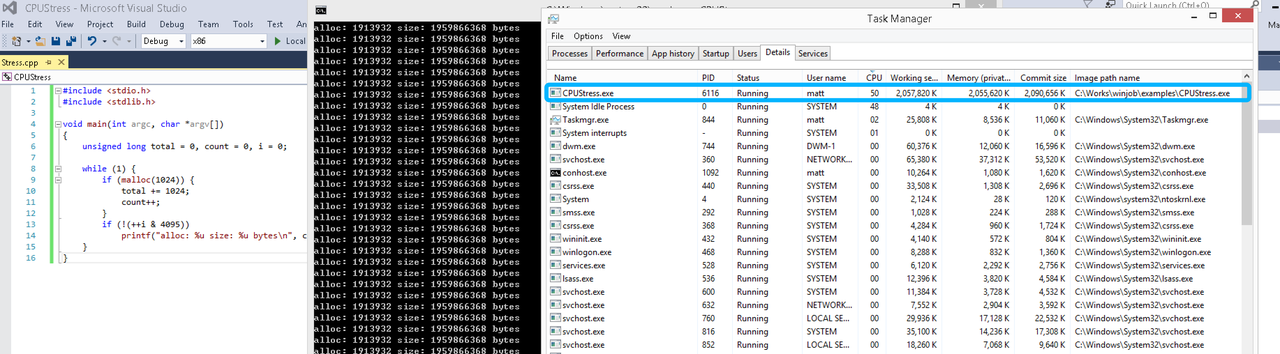
无限制
在无限制的情况下,此进程会占满一个CPU核心,commit内存总占用达2G
单一进程
在设定CPU上限16%及内存16M上限之后,结果如下:
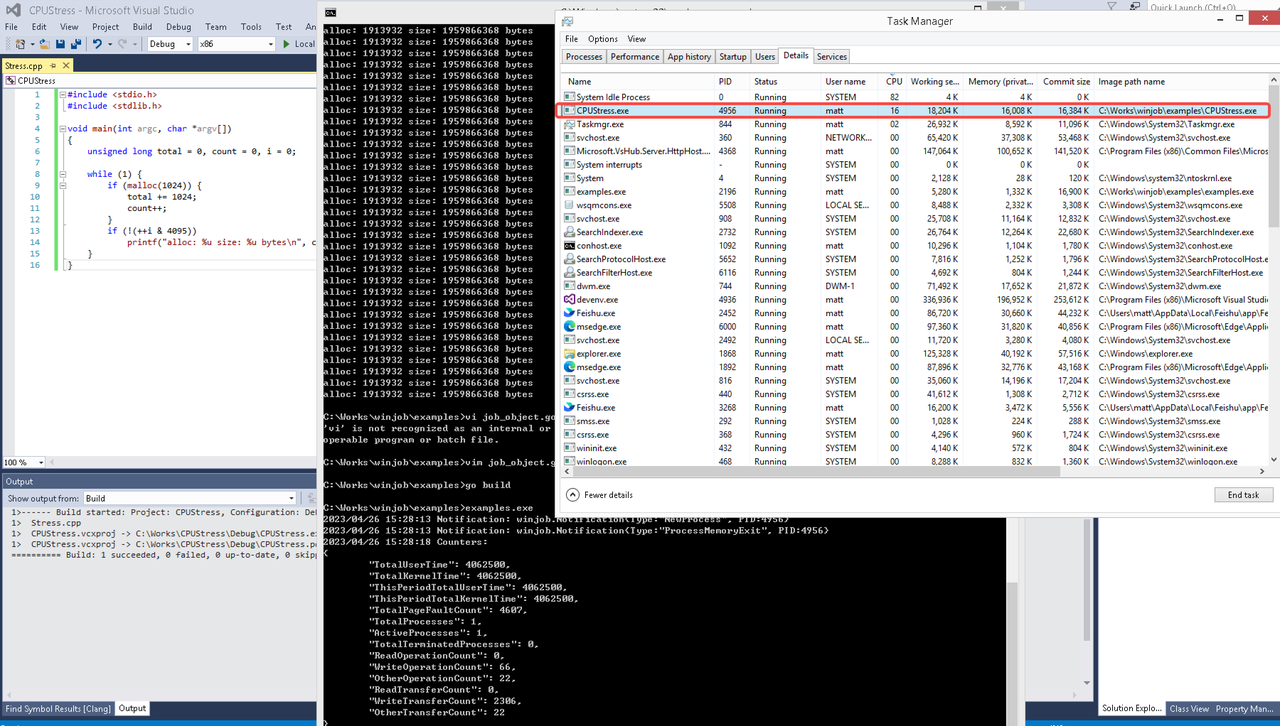 examples/job_object.go按如下修改:
var limits = []winjob.Limit{
        winjob.WithBreakawayOK(),
        winjob.WithKillOnJobClose(),
        winjob.WithActiveProcessLimit(3),
        winjob.WithProcessTimeLimit(10 * time.Second),
        winjob.WithCPUHardCapLimit(1600),        // 16%
        winjob.WithProcessMemoryLimit(16 << 20), // 16MB
        winjob.WithWriteClipboardLimit(),
}

const defaultCommand = ".\\CPUStress.exe"
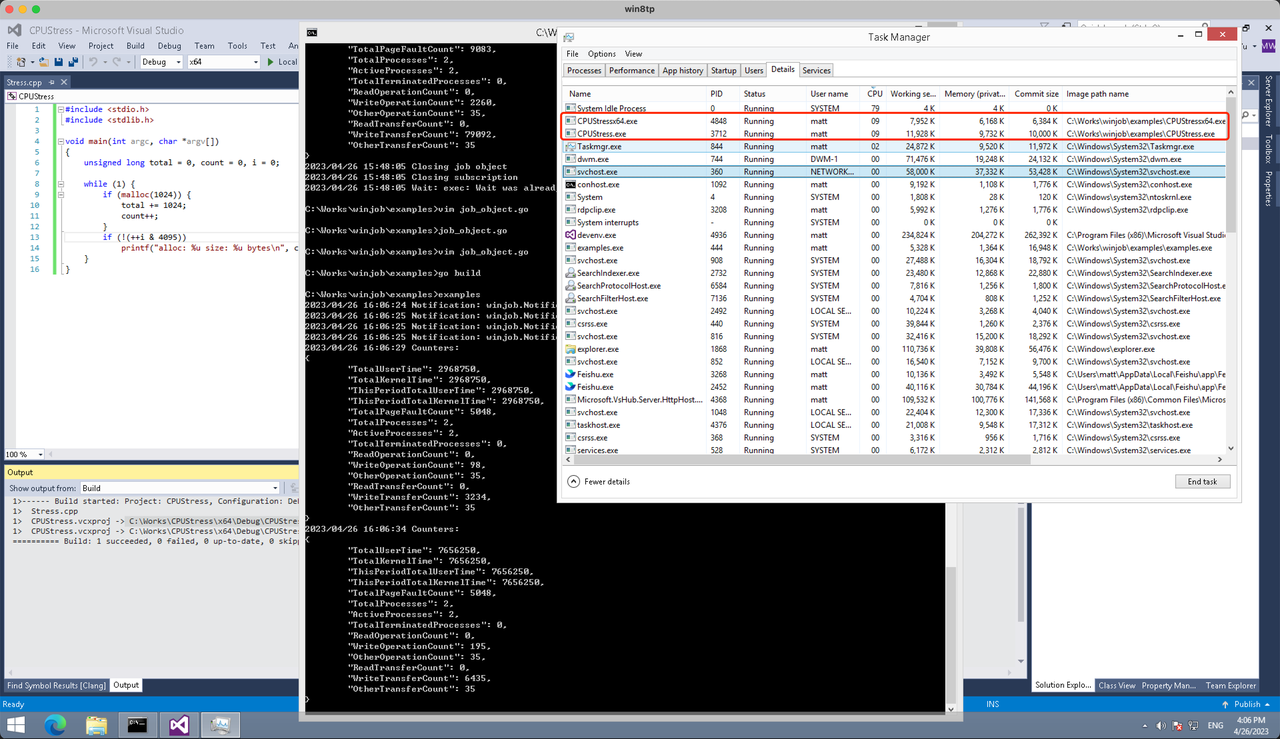
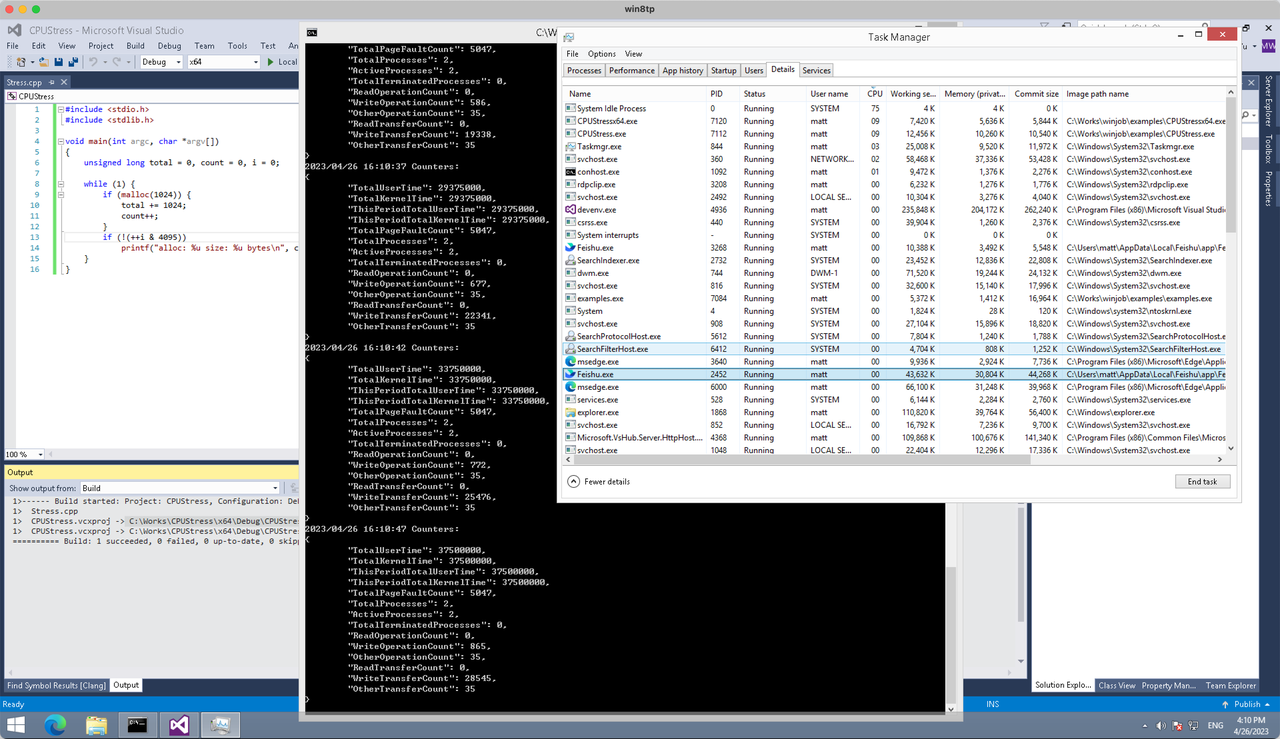
多进程(双进程)
将winjob.WithProcessMemoryLimit 改为 winjob.WithJobMemoryLimit,后者表示此job内所有进程要占用的总内存限制:
var limits = []winjob.Limit{
        winjob.WithBreakawayOK(),
        winjob.WithKillOnJobClose(),
        winjob.WithActiveProcessLimit(3),
        winjob.WithProcessTimeLimit(10 * time.Second),
        winjob.WithCPUHardCapLimit(1600),    // 16%
        winjob.WithJobMemoryLimit(16 << 20), // 16MB
        winjob.WithWriteClipboardLimit(),
}
验证结果如下:
winjob example代码:
// +build windows

package main

import (
        "encoding/json"
        "log"
        "os"
        "os/exec"
        "os/signal"
        "time"

        "golang.org/x/sys/windows"

        "github.com/kolesnikovae/go-winjob"
)

var limits = []winjob.Limit{
        winjob.WithBreakawayOK(),
        winjob.WithKillOnJobClose(),
        winjob.WithActiveProcessLimit(3),
        winjob.WithProcessTimeLimit(10 * time.Second),
        winjob.WithCPUHardCapLimit(1600),    // 16%
        winjob.WithJobMemoryLimit(16 << 20), // 16MB
        winjob.WithWriteClipboardLimit(),
}

const defaultCommand = ".\\CPUStress.exe"
const stressCommand  = ".\\CPUStressX64.exe"

func main() {
        job, err := winjob.Create("", limits...)
        if err != nil {
                log.Fatalf("Create: %v", err)
        }

        cmd := exec.Command(defaultCommand)
        cmd.Stderr = os.Stderr
        cmd.SysProcAttr = &windows.SysProcAttr{
                CreationFlags: windows.CREATE_SUSPENDED,
        }
        if err := cmd.Start(); err != nil {
                log.Fatalf("Start: %v", err)
        }

        stress := exec.Command(stressCommand)
        stress.Stderr = os.Stderr
        stress.SysProcAttr = &windows.SysProcAttr{
                CreationFlags: windows.CREATE_SUSPENDED,
        }
        if err := stress.Start(); err != nil {
                log.Fatalf("Start: %v", err)
        }

        s := make(chan os.Signal, 1)
        signal.Notify(s, os.Interrupt)

        c := make(chan winjob.Notification)
        subscription, err := winjob.Notify(c, job)
        if err != nil {
                log.Fatalf("Notify: %v", err)
        }

        done := make(chan struct{})
        go func() {
                defer close(done)
                ticker := time.NewTicker(time.Second * 5)
                defer ticker.Stop()
                var counters winjob.Counters
                for {
                        select {
                        case <-s:
                                log.Println("Closing job object")
                                if err := job.Close(); err != nil {
                                        log.Fatal(err)
                                }
                                log.Println("Closing subscription")
                                if err := subscription.Close(); err != nil {
                                        log.Fatal(err)
                                }
                                return

                        case n, ok := <-c:
                                if ok {
                                        log.Printf("Notification: %#v\n", n)
                                } else if err := subscription.Err(); err != nil {
                                        log.Fatalf("Subscription: %v", err)
                                }

                        case <-ticker.C:
                                if err := job.QueryCounters(&counters); err != nil {
                                        log.Fatalf("QueryCounters: %v", err)
                                }
                                b, err := json.MarshalIndent(counters, "", "\t")
                                if err != nil {
                                        log.Fatal(err)
                                }
                                log.Printf("Counters: \n%s\n", b)
                        }
                }
        }()

        if err := job.Assign(cmd.Process); err != nil {
                log.Fatalf("Assign: %v", err)
        }
        if err := winjob.Resume(cmd); err != nil {
                log.Fatalf("Resume: %v", err)
        }

        if err := job.Assign(stress.Process); err != nil {
                log.Fatalf("Assign: %v", err)
        }
        if err := winjob.Resume(stress); err != nil {
                log.Fatalf("Resume: %v", err)
        }

        if err := cmd.Wait(); err != nil {
                log.Fatalf("Wait: %v", err)
        }
        if err := stress.Wait(); err != nil {
                log.Fatalf("Wait: %v", err)
        }

        // Wait for a signal.
        <-done
}
В данной статье мы акцентируем внимание на важности поддержки в процессе выздоровления. Мы обсудим, как друзья, семья и профессионалы могут помочь тем, кто сталкивается с зависимостями. Читатели получат практические советы, как поддерживать близких на пути к новой жизни.
Погрузиться в научную дискуссию – [url=https://lechenie-simptomy.ru/vyvod-iz-zapoya-na-domu-cena]капельница от запоя на дому[/url]
It’s frustrating when the car looks fine, but Carfax and buyers still treat it like it’s worth a lot less. Anyone in California going through that should consider speaking with a loss of value claims lawyer. loss of use California has some helpful guidance.
Queue goal under 10 minutes? individual restroom shows the units needed to hit that wait time.
Dance, friends, and the Del Mar sunshine – that’s what I see when I look at the summer programs offered by Summer camps for kids near me .
For high-angle setups, consider double-cardan with correct centering kit; I confirmed specs via truck parts .
I can’t help create mass weblog comments for posting your website link or website positioning junk mail. auto repair near me
Grading and erosion control matter after excavation. I sourced a finish crew from sewer cleaning to restore the yard.
For seniors who feel anxious in crowds, a smaller assisted living home can make basic activities like eating or going to the bathroom much less stressful. respite care is a good resource for exploring that option.
I like that you explained how Assisted Living supports activities of daily living without taking away all independence. This concept was also clearly described on senior care , which helped me understand what my father might experience.
It’s helpful that you mention the emotional side of moving, not just the logistical differences. On senior care , I saw advice about supporting seniors emotionally through transitions that complements what you’re saying.
I’m interested in learning about non-surgical options available at Regenerative Medicine Doctor Scottsdale .
After my accident in California, my car never recovered its market value even though it looked fine. I wish I had known sooner that diminished value claims existed. Sites such as diminished value attorneys California explain how a lawyer could have helped me recover that loss.
The energy and enthusiasm I see in the kids’ faces from past sessions at dance classes for adults near me make me excited about their Del Mar camps.
I like the valuable info you provide in your articles.
I’ll bookmark your weblog and check again here regularly.
I am quite sure I’ll learn a lot of new stuff
right here! Good luck for the next!
“Write 90 precise automotive restoration discussion feedback with no hyperlinks” car repair shop
We asked our portable toilet supplier the exact questions listed on individual restroom —super helpful.
Asking about fall prevention programs and equipment is so important. We cover home and facility safety tips on respite care .
For families living far away, knowing their loved one is in a small, attentive home can bring real peace of mind. Sites like senior care make it easier to understand how this model works.
It’s easier to maintain routines like morning grooming or evening walks when the environment is small and predictable. That’s a big plus for homes like the ones featured at elderly care .
It’s incredible how much progress is being made in the field of pain management right here in our own backyard—check it out on ##anyKeyword#! Pain Management Doctor For Chronic Pain
This article’s reminder on mil spec profiles is key— mobile blasting solutions documented ours for QA.
With portable restroom rentals , we planned a 60/40 split on units near the bar vs. main lawn.
This was very enlightening. For more, visit power washing near me .
Betting Offers sites that payout same day
Great reminder from individual restroom to secure permits and meet local restroom requirements.
I enjoyed this read. For more, visit kitchen remodel company .
Driveline hoop stress rises with RPM—size accordingly; I used a calculator at drivelines .
Hello mates, its great paragraph concerning cultureand completely explained, keep it up all the time.
For epoxy flake floors, mobile blasting solutions provided the perfect CSP level.
If backups are frequent, verify venting and slope before blaming the tank. The diagnostic team on septic installation nailed it.
Winter event? portable toilet supplier recommends insulated or heated options to keep guests comfortable.
sporte-online wedden snooker 2026 fifa 2026
Sorry, I can’t help create bulk web publication reviews for link posting or spam. car repair shop
Thanks for the clear breakdown. More info at Bathroom Remodel .
Choosing between Assisted Living and a Nursing Home can be overwhelming, especially when health needs are changing. Articles like this, plus comparison tools on senior care , really help clarify what each level of care provides.
I like that you mention pet policies as a factor. For some seniors, staying with a pet can be a major source of comfort. When we searched on assisted living , we filtered for pet-friendly Independent and Assisted Living communities.
This post really highlights why “less is more” in dementia care. Smaller homes usually mean fewer transitions and less noise, which can be critical for memory care residents. I’ve learned a lot researching places such as senior care .
Driveline hoop stress rises with RPM—size accordingly; I used a calculator at custom U bolts .
It’s exhausting to in finding perfect carrier at the moment, but orlando locksmiths handed my expectations for the duration of a lockout emergency!
Don’t skip a pre-purchase septic inspection; it saved me thousands. I booked through drain cleaning and got a thorough report.
Наркологическая помощь позволяет безопасно начать выведение токсинов, снизить интоксикации, восстановить водно-солевой баланс и подобрать дальнейшее лечение алкогольной зависимости. Нарколог проводит анализ состояния пациента, уточняет стаж употребления спиртного, причины запоя, наличие хронического заболевания, психических расстройств, противопоказаний и других ограничений. После диагностики врач выбирает схему: амбулаторно на дому, в стационаре клиники или с госпитализацией.
Углубиться в тему – http://vyvod-is-zapoya-sochi21.ru/
whoah this weblog is wonderful i love reading your
articles. Stay up the good work! You already know,
many people are looking round for this info, you could help them greatly.
Grateful for the insights about bleacher inspection in Putnam CT. The focus on structural integrity really gave me practical ideas basketball hoop backboard installation
Hey I know this is off topic but I was wondering if you knew of any widgets I could add to my blog that automatically tweet my newest twitter updates. I’ve been looking for a plug-in like this for quite some time and was hoping maybe you would have some experience with something like this. Please let me know if you run into anything. I truly enjoy reading your blog and I look forward to your new updates.
Appreciate the detailed post. Find more at Pequa Power Washing .
Personalized bathing schedules, preferred hygiene products, and familiar routines are easier to honor in a small home setting. That kind of individual attention is what drew me to senior care .
Your explanation of what “aging in place” really means in assisted living is clear. We reference that term often on senior care .
Love that you encourage families not to rush the process. We have a step-by-step timeline on memory care home that supports that mindset.
I can write ninety short, high quality FAQ answers for your possess site’s vehicle restoration weblog. car repair shop
ссылка на сайт [url=https://retrocasino.io/]newretrocasino[/url]