Windows自身没有提供类似Linux cgroup的能力来限制进程或进程组的资源占用,进程CPU/IO/内存/网络等资源的控制只能由自己实现。目前已有第三方的实现,主要是限制进程CPU的占用,如文档 < 21 Best Ways to Limit the CPU Usage of a Process > 所描述的BES,Process Tamer等软件。自Windows 8及Server 2012开始Windows系统有提供以job为单位的CPU占用及内存上限设置,之前的版本则只能以进程或线程为单位进行限制。
进程CPU占用限制方案
即时轮询系统所有进程(线程)的CPU占用,当发现所设定进程有超标时强制暂停进程所有线程的执行,然后在适当的时机再恢复执行。其中所涉及技术点:
进程CPU占用查询 GetProcessTimes
BOOL GetProcessTimes(
  [in]  HANDLE     hProcess,
  [out] LPFILETIME lpCreationTime,
  [out] LPFILETIME lpExitTime,
  [out] LPFILETIME lpKernelTime,
  [out] LPFILETIME lpUserTime
);
此函数可以获取进程从创建至当前的总运行时间及总的CPU时间,(KernelTime + UserTime) < 系统CPU数 * (当前时间 - CreationTime)
线程CPU占用查询 GetThreadTimes
BOOL GetThreadTimes(
  [in]  HANDLE     hThread,
  [out] LPFILETIME lpCreationTime,
  [out] LPFILETIME lpExitTime,
  [out] LPFILETIME lpKernelTime,
  [out] LPFILETIME lpUserTime
);
QueryThreadCycleTime可以提供更精准的CPU时间数据,单位为CPU时钟周期
BOOL QueryThreadCycleTime(
  [in]  HANDLE   ThreadHandle,
  [out] PULONG64 CycleTime
);
线程暂停及恢复
Windows平台没有提供暂停整个进程的支持函数,只能以线程为单位来操作,即SuspendThread及ResumeThread:
DWORD SuspendThread(
  [in] HANDLE hThread
);
DWORD ResumeThread(
  [in] HANDLE hThread
);
CPU亲和性设置: SetProcessAffinityMask
BOOL SetProcessAffinityMask(
  [in] HANDLE    hProcess,
  [in] DWORD_PTR dwProcessAffinityMask
);
此函数可以限定进程及其所有线程所能使用的CPU,故一定程序上亦限定了进程最大的系统CPU占用率。
DWORD_PTR SetThreadAffinityMask(
  [in] HANDLE    hThread,
  [in] DWORD_PTR dwThreadAffinityMask
);
此函数可单独限制特定线程的CPU亲和性。
进程优先级设置: SetPriorityClass
优先级解决的是优先运行及退让CPU的问题,本质上并不能限定CPU占用,只是优先级高于当前任务的忙碌的时候,当前进程会主动退让CPU 线程优先级设置:SetThreadPriority
BOOL SetThreadPriority(
  [in] HANDLE hThread,
  [in] int    nPriority
);
Job Objects
Windows系统提供了Job的概念用以管理多个进程,可以限制Job对象内所有进程及期线程的CPU核心占用、CPU占用及内存分配上限等,均通过SetInformationJobObject来实现,具体的CPU限制由JOBOBJECT_CPU_RATE_CONTROL_INFORMATION管理,内存限制则由JOBOBJECT_EXTENDED_LIMIT_INFORMATION来管理。
BOOL SetInformationJobObject(
  [in] HANDLE             hJob,
  [in] JOBOBJECTINFOCLASS JobObjectInformationClass,
  [in] LPVOID             lpJobObjectInformation,
  [in] DWORD              cbJobObjectInformationLength
);需要注意的是CPU占用设置只有Windows 8及Server 2012之后的版本有效。
CPU Sets
此部分只限定了CPU Affinity属性
实验验证
可以直接利用开源项目go-winjob验证,验证系统Windows 8 x64,go-winjob git repo: https://github.com/kolesnikovae/go-winjob
验证程序
#include <stdio.h>
#include <stdlib.h>

void main(int argc, char *argv[])
{
        unsigned long total = 0, count = 0, i = 0;

        while (1) {
                if (malloc(1024)) {
                        total += 1024;
                        count++;
                }
                if (!(++i & 4095))
                        printf("alloc: %u size: %u bytes\n", count, total);
    }
}
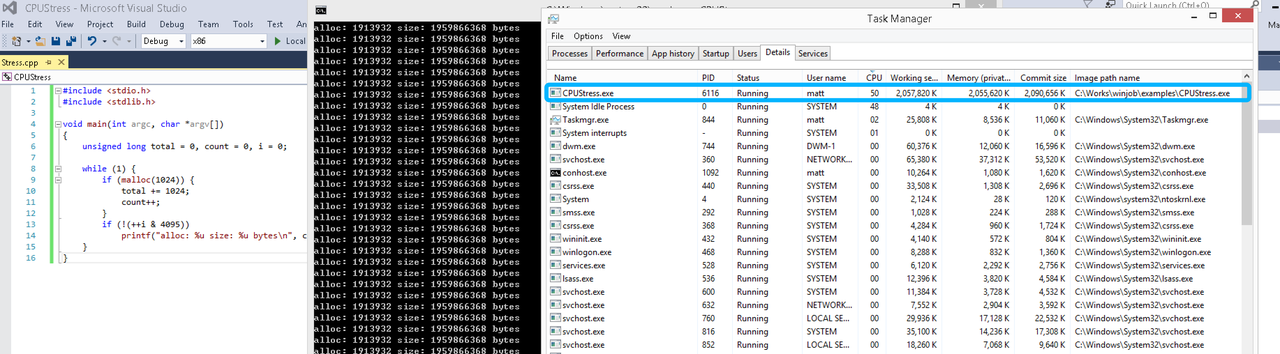
无限制
在无限制的情况下,此进程会占满一个CPU核心,commit内存总占用达2G
单一进程
在设定CPU上限16%及内存16M上限之后,结果如下:
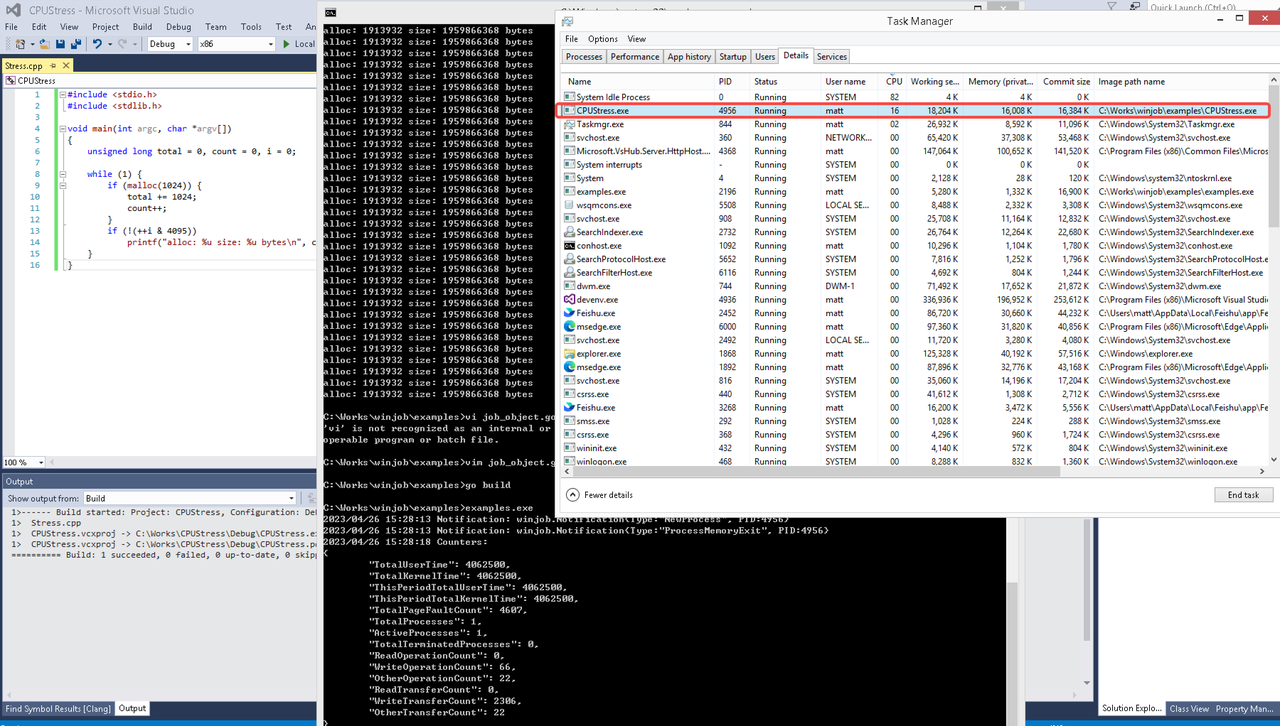 examples/job_object.go按如下修改:
var limits = []winjob.Limit{
        winjob.WithBreakawayOK(),
        winjob.WithKillOnJobClose(),
        winjob.WithActiveProcessLimit(3),
        winjob.WithProcessTimeLimit(10 * time.Second),
        winjob.WithCPUHardCapLimit(1600),        // 16%
        winjob.WithProcessMemoryLimit(16 << 20), // 16MB
        winjob.WithWriteClipboardLimit(),
}

const defaultCommand = ".\\CPUStress.exe"
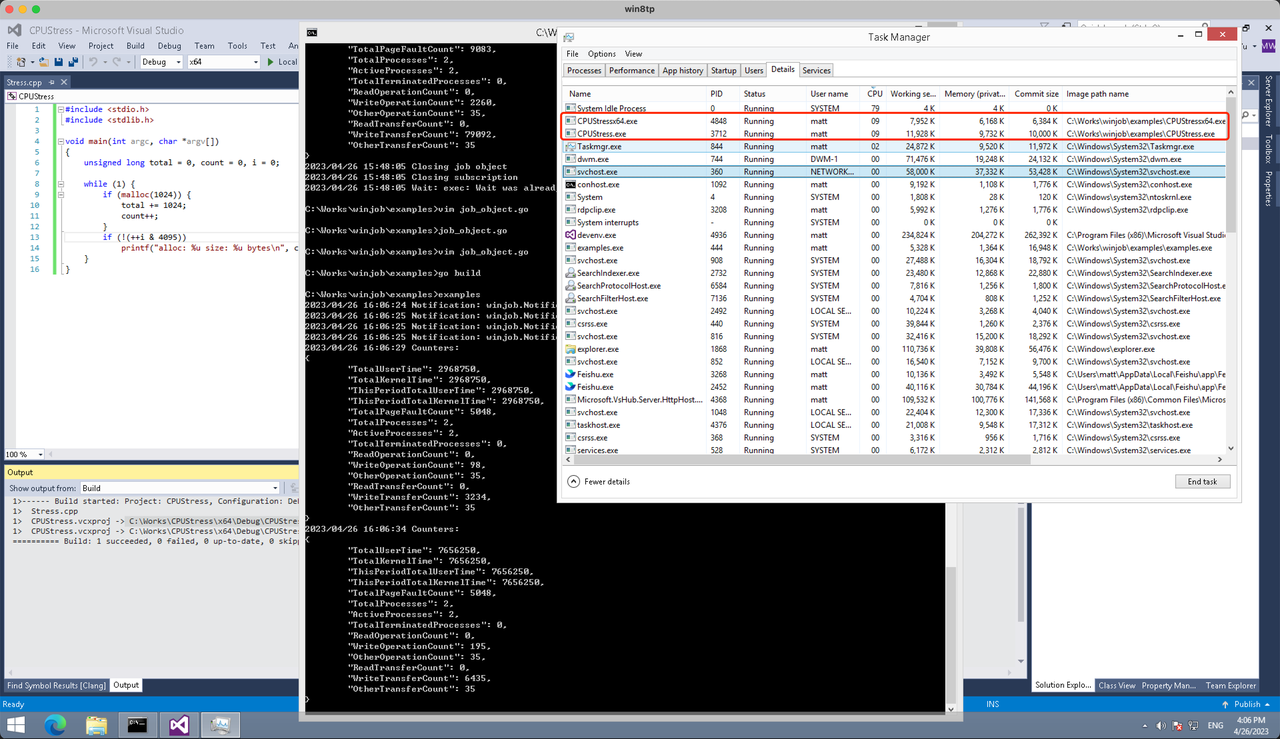
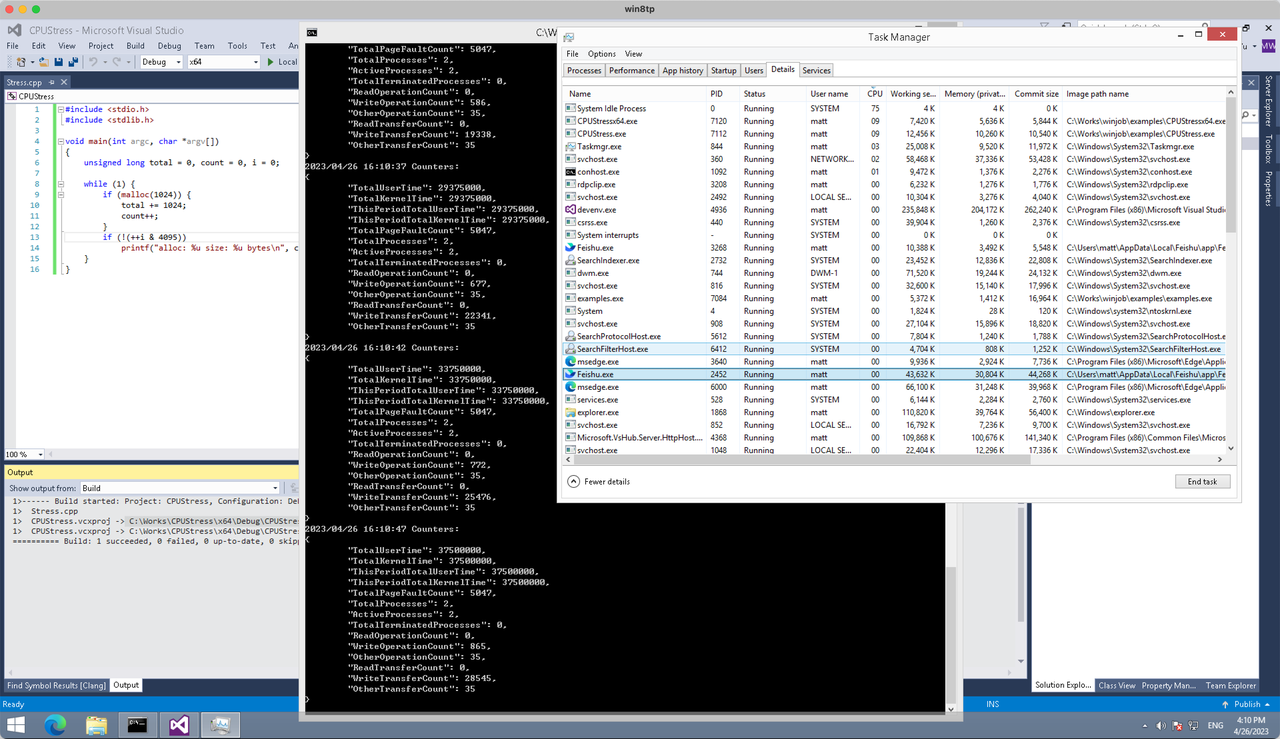
多进程(双进程)
将winjob.WithProcessMemoryLimit 改为 winjob.WithJobMemoryLimit,后者表示此job内所有进程要占用的总内存限制:
var limits = []winjob.Limit{
        winjob.WithBreakawayOK(),
        winjob.WithKillOnJobClose(),
        winjob.WithActiveProcessLimit(3),
        winjob.WithProcessTimeLimit(10 * time.Second),
        winjob.WithCPUHardCapLimit(1600),    // 16%
        winjob.WithJobMemoryLimit(16 << 20), // 16MB
        winjob.WithWriteClipboardLimit(),
}
验证结果如下:
winjob example代码:
// +build windows

package main

import (
        "encoding/json"
        "log"
        "os"
        "os/exec"
        "os/signal"
        "time"

        "golang.org/x/sys/windows"

        "github.com/kolesnikovae/go-winjob"
)

var limits = []winjob.Limit{
        winjob.WithBreakawayOK(),
        winjob.WithKillOnJobClose(),
        winjob.WithActiveProcessLimit(3),
        winjob.WithProcessTimeLimit(10 * time.Second),
        winjob.WithCPUHardCapLimit(1600),    // 16%
        winjob.WithJobMemoryLimit(16 << 20), // 16MB
        winjob.WithWriteClipboardLimit(),
}

const defaultCommand = ".\\CPUStress.exe"
const stressCommand  = ".\\CPUStressX64.exe"

func main() {
        job, err := winjob.Create("", limits...)
        if err != nil {
                log.Fatalf("Create: %v", err)
        }

        cmd := exec.Command(defaultCommand)
        cmd.Stderr = os.Stderr
        cmd.SysProcAttr = &windows.SysProcAttr{
                CreationFlags: windows.CREATE_SUSPENDED,
        }
        if err := cmd.Start(); err != nil {
                log.Fatalf("Start: %v", err)
        }

        stress := exec.Command(stressCommand)
        stress.Stderr = os.Stderr
        stress.SysProcAttr = &windows.SysProcAttr{
                CreationFlags: windows.CREATE_SUSPENDED,
        }
        if err := stress.Start(); err != nil {
                log.Fatalf("Start: %v", err)
        }

        s := make(chan os.Signal, 1)
        signal.Notify(s, os.Interrupt)

        c := make(chan winjob.Notification)
        subscription, err := winjob.Notify(c, job)
        if err != nil {
                log.Fatalf("Notify: %v", err)
        }

        done := make(chan struct{})
        go func() {
                defer close(done)
                ticker := time.NewTicker(time.Second * 5)
                defer ticker.Stop()
                var counters winjob.Counters
                for {
                        select {
                        case <-s:
                                log.Println("Closing job object")
                                if err := job.Close(); err != nil {
                                        log.Fatal(err)
                                }
                                log.Println("Closing subscription")
                                if err := subscription.Close(); err != nil {
                                        log.Fatal(err)
                                }
                                return

                        case n, ok := <-c:
                                if ok {
                                        log.Printf("Notification: %#v\n", n)
                                } else if err := subscription.Err(); err != nil {
                                        log.Fatalf("Subscription: %v", err)
                                }

                        case <-ticker.C:
                                if err := job.QueryCounters(&counters); err != nil {
                                        log.Fatalf("QueryCounters: %v", err)
                                }
                                b, err := json.MarshalIndent(counters, "", "\t")
                                if err != nil {
                                        log.Fatal(err)
                                }
                                log.Printf("Counters: \n%s\n", b)
                        }
                }
        }()

        if err := job.Assign(cmd.Process); err != nil {
                log.Fatalf("Assign: %v", err)
        }
        if err := winjob.Resume(cmd); err != nil {
                log.Fatalf("Resume: %v", err)
        }

        if err := job.Assign(stress.Process); err != nil {
                log.Fatalf("Assign: %v", err)
        }
        if err := winjob.Resume(stress); err != nil {
                log.Fatalf("Resume: %v", err)
        }

        if err := cmd.Wait(); err != nil {
                log.Fatalf("Wait: %v", err)
        }
        if err := stress.Wait(); err != nil {
                log.Fatalf("Wait: %v", err)
        }

        // Wait for a signal.
        <-done
}
Этот документ охватывает важные аспекты медицинской науки, сосредотачиваясь на ключевых вопросах, касающихся здоровья населения. Мы рассматриваем свежие исследования, клинические рекомендации и лучшие практики, которые помогут улучшить качество лечения и профилактики заболеваний. Читатели получат возможность углубиться в различные медицинские дисциплины.
Заходи — там интересно – [url=https://sosamba-novg1.ru/kak-vyyti-iz-zapoya-bez-stressa-i-vreda-dlya-zdorovya-vsyo-chto-nuzhno-znat/]Наркологическая клиника Плюс в Подольске[/url]
здесь https://trip71.us
The pre-emergent schedule you shared is on point for Gretna’s spring. I paired it with provider from Aeration and overseeding .
When selling my house last year, improving the garage was key—the advice here plus recommendations from Garage Door Service Greenwood led me to upgrade through Select Garage Doors; buyers loved it!
Excellent breakdown of common garage door problems here! For those needing more visuals, Garage Door Installation has some awesome troubleshooting videos courtesy of Select Garage Doors.
Para quem está vendendo, a forma como o imóvel é apresentado pode mudar bastante a percepção de valor.
imobiliária perto de mim povoaimoveis.com.br
This was very beneficial. For more, visit asesoría legal económica .
Anyone else experience noisy operation during cold months? A winter tune-up by Select Garage Doors (scheduled through Garage Door Installation Parker ) made a huge difference!
I vital a instant leak diagnostic— local roofer Millsboro DE in Millsboro chanced on it at a skylight cut down.
Этот обзор медицинских исследований собрал самое важное из последних публикаций в области медицины. Мы проанализировали ключевые находки и представили их в доступной форме, чтобы читатели могли легко ориентироваться в актуальных темах. Этот материал станет отличным подспорьем для изучения медицины.
Подробная информация доступна по запросу – [url=https://mir-diet.ru/psihologiya/kapelnicza-ot-pohmelya-vidy-i-osobennosti-provedeniya-dannoj-proczedury.html]clinica plus в пскове[/url]
Good name on spare placement. If your car has a space-saver spare, thoughts the velocity minimize—agree with a tow for long journeys. best towing company in St. Cloud FL
If your roof drip line is eroding landscaping, Local Roofing Company Manassas VA has Manassas-detailed fixes.
Aeration made a titanic distinction for my clay soil in Gretna—way to info from Residential Fertilizing .
Ενδιαφέρουσες ιδέες για ραντεβού στο κέντρο. Παρεμπιπτόντως, όσοι ψάχνουν συνοδεία για έξοδο, μπορούν να βρουν επιλογές στο private vip escorts .
IT decommissioning and e-waste are often overlooked. We followed a secure chain-of-custody checklist from charleston sc moving companies .
carreras de caballos juegos de apuestas Betplay Hoy Colombia
Ahaa, its good discussion about this article here at this blog, I have read all that, so now me also
commenting here.
I can generate: German maintenance Portland OR
We love the theory of zones—public, exclusive, and carrier. Zoning diagrams accessible at Vancouver WA remodelers were worthwhile.
This explanation is very helpful regarding budget planning. Your insight on historical building considerations is excellent. Local projects in Mystic are likely to benefit from these recommendations commercial contractors mystic
Thank you for the detailed guide on garage door repairs and installations! As someone living in Gold Coast QLD 4217, finding reliable services for garage door opener repair and commercial roller door repairs can be challenging gold coast garage door services
Unquestionably imagine that which you stated.
Your favorite reason seemed to be on the web the simplest thing
to bear in mind of. I say to you, I certainly get annoyed while other people consider concerns that they plainly do not know
about. You managed to hit the nail upon the highest as neatly as defined out the whole thing
without having side-effects , people could take a signal.
Will probably be again to get more. Thank you
Thanks for putting this together on selecting the right Ford dealer. Your comments about transparent pricing and knowledgeable staff resonated with me. For those of us in Plainville, CT, local insight into inventory and financing adds real value 2026 Transit cargo passenger CT
Safe promoting concept: construct relationships with native bloggers because of educated rates, no longer comment links. auto repair shop Portland OR
Подробнее здесь [url=https://retrocasino.io/]retro casino[/url]
The reminder about keeping tracks clean is so important—I used to overlook this until seeing before-and-after maintenance results from Select Garage Doors on Garage Door Repair Service Near Me .
For Lakewood homeowners, having a trustworthy company like Select Garage Doors is essential for emergencies. Their team really knows their stuff—found some great advice on Garage Door Repair Lakewood about troubleshooting minor issues before calling in the pros.
My teenage son accidentally backed into our garage door—thankfully, Select Garage Doors (through Garage Door Installation ) repaired it quickly and efficiently!
Grateful for the insights! This really highlights the need for proactive plumbing care. For residents of Mystic, CT, these tips are especially relevant. Does anyone have recommendations for affordable plumbing services in the area? fire damage restoration Gales Ferry
I am not sure where you’re getting your info, but great topic.
I needs to spend some time learning much more or understanding more.
Thanks for great info I was looking for this information for my
mission.
If you’re frightened approximately contractor licensing in Manassas, roofing contractor explains what to determine.
This put up on right kind attic sealing is spot on— roofing company addressed air leaks all through our roof venture in Millsboro.
This post on Volvo dealers in East Hartford Connecticut is quite insightful. It’s great to see the focus on certified pre-owned vehicles and how they support the East Hartford community 2026 Volvo XC90 plug-in hybrid
Grateful for the insights. Your advice on evaluating local car dealers in Summit NJ was very practical. I’ve also noticed that visiting multiple dealerships in Summit can reveal better deals Evija car North Jersey
Useful notes on roadside documentation. Share odometer, VIN, and tow destination in writing to ward off combine-ups. towing service
Эта статья освещает различные аспекты освобождения от зависимости и пути к выздоровлению. Мы обсуждаем важность осознания своей проблемы и обращения за помощью. Читатели получат практические советы о том, как преодолевать трудности и строить новую жизнь без зависимости.
Более того — здесь – [url=http://kupidonchik.org/sotsialnaya-reabilitatsiya-alkogolikov-put-k-normalnoy-zhizni-posle-lecheniya/]клиника плюс нижний новгород[/url]
Your note on spare keys is gold. We do quite a few lockouts at trailheads; preserving a spare in a coded magnetic box can retailer cash and time. towing st. cloud
como funciona sistema en pagina apuestas deportivas (Kieran)
I loved exploring the aesthetic potentials discussed in your article regarding custom roofs!!! Get ideas tailored specifically through professionals over # roof replacement
I constantly emailed this web site post page to all my associates,
because if like to read it then my contacts will too.
Bare spot repair in any case took. The seed-soil touch manner from Irrigation Installation works.
If you’re questioning metallic roofing in Millsboro, DE, determine strategies due to local roofer Millsboro DE first.
Just had a storm inspection finished— roofing contractor in Millsboro documented the whole thing for insurance coverage.
Ventilation issues in our humid summers— roofing service bought solid suggestions tailor-made to Manassas buildings.
Thanks for highlighting disabled car legal guidelines. Florida’s Move Over Law matters—give tow vans sufficient space, peculiarly on the 417 and 528 connectors. tow truck
Grateful for your insights on renovation strategies for hotels. The focus on contractor selection is very helpful. For those working in Mystic, Connecticut, these tips are incredibly relevant hotel remodeling contractor
For reliable warranties on Feasterville plumbing work, compare Plumber Feasterville options at plumber feasterville .
This was a well-written overview on selecting the right Ford dealer. Your comments about transparent pricing and knowledgeable staff resonated with me. For those of us in Plainville, CT, local insight into inventory and financing is incredibly helpful Maverick XL for sale
Open strains of communication by means of textual content and weekly investigate-ins: Prestige Remodeling Vancouver WA
В данной статье рассматриваются физиологические и эмоциональные аспекты зависимости. Мы обсудим, как организм реагирует на зависимое поведение, и какие методы помогают восстановить здоровье и внутреннее равновесие.
Есть чему поучиться – [url=https://poleznye-svoistva.ru/cchto-takoe-kodirovanie-ot-alkogolizma/]наркологическая клиника в пскове[/url]