Windows自身没有提供类似Linux cgroup的能力来限制进程或进程组的资源占用,进程CPU/IO/内存/网络等资源的控制只能由自己实现。目前已有第三方的实现,主要是限制进程CPU的占用,如文档 < 21 Best Ways to Limit the CPU Usage of a Process > 所描述的BES,Process Tamer等软件。自Windows 8及Server 2012开始Windows系统有提供以job为单位的CPU占用及内存上限设置,之前的版本则只能以进程或线程为单位进行限制。
进程CPU占用限制方案
即时轮询系统所有进程(线程)的CPU占用,当发现所设定进程有超标时强制暂停进程所有线程的执行,然后在适当的时机再恢复执行。其中所涉及技术点:
进程CPU占用查询 GetProcessTimes
BOOL GetProcessTimes(
  [in]  HANDLE     hProcess,
  [out] LPFILETIME lpCreationTime,
  [out] LPFILETIME lpExitTime,
  [out] LPFILETIME lpKernelTime,
  [out] LPFILETIME lpUserTime
);
此函数可以获取进程从创建至当前的总运行时间及总的CPU时间,(KernelTime + UserTime) < 系统CPU数 * (当前时间 - CreationTime)
线程CPU占用查询 GetThreadTimes
BOOL GetThreadTimes(
  [in]  HANDLE     hThread,
  [out] LPFILETIME lpCreationTime,
  [out] LPFILETIME lpExitTime,
  [out] LPFILETIME lpKernelTime,
  [out] LPFILETIME lpUserTime
);
QueryThreadCycleTime可以提供更精准的CPU时间数据,单位为CPU时钟周期
BOOL QueryThreadCycleTime(
  [in]  HANDLE   ThreadHandle,
  [out] PULONG64 CycleTime
);
线程暂停及恢复
Windows平台没有提供暂停整个进程的支持函数,只能以线程为单位来操作,即SuspendThread及ResumeThread:
DWORD SuspendThread(
  [in] HANDLE hThread
);
DWORD ResumeThread(
  [in] HANDLE hThread
);
CPU亲和性设置: SetProcessAffinityMask
BOOL SetProcessAffinityMask(
  [in] HANDLE    hProcess,
  [in] DWORD_PTR dwProcessAffinityMask
);
此函数可以限定进程及其所有线程所能使用的CPU,故一定程序上亦限定了进程最大的系统CPU占用率。
DWORD_PTR SetThreadAffinityMask(
  [in] HANDLE    hThread,
  [in] DWORD_PTR dwThreadAffinityMask
);
此函数可单独限制特定线程的CPU亲和性。
进程优先级设置: SetPriorityClass
优先级解决的是优先运行及退让CPU的问题,本质上并不能限定CPU占用,只是优先级高于当前任务的忙碌的时候,当前进程会主动退让CPU 线程优先级设置:SetThreadPriority
BOOL SetThreadPriority(
  [in] HANDLE hThread,
  [in] int    nPriority
);
Job Objects
Windows系统提供了Job的概念用以管理多个进程,可以限制Job对象内所有进程及期线程的CPU核心占用、CPU占用及内存分配上限等,均通过SetInformationJobObject来实现,具体的CPU限制由JOBOBJECT_CPU_RATE_CONTROL_INFORMATION管理,内存限制则由JOBOBJECT_EXTENDED_LIMIT_INFORMATION来管理。
BOOL SetInformationJobObject(
  [in] HANDLE             hJob,
  [in] JOBOBJECTINFOCLASS JobObjectInformationClass,
  [in] LPVOID             lpJobObjectInformation,
  [in] DWORD              cbJobObjectInformationLength
);需要注意的是CPU占用设置只有Windows 8及Server 2012之后的版本有效。
CPU Sets
此部分只限定了CPU Affinity属性
实验验证
可以直接利用开源项目go-winjob验证,验证系统Windows 8 x64,go-winjob git repo: https://github.com/kolesnikovae/go-winjob
验证程序
#include <stdio.h>
#include <stdlib.h>

void main(int argc, char *argv[])
{
        unsigned long total = 0, count = 0, i = 0;

        while (1) {
                if (malloc(1024)) {
                        total += 1024;
                        count++;
                }
                if (!(++i & 4095))
                        printf("alloc: %u size: %u bytes\n", count, total);
    }
}
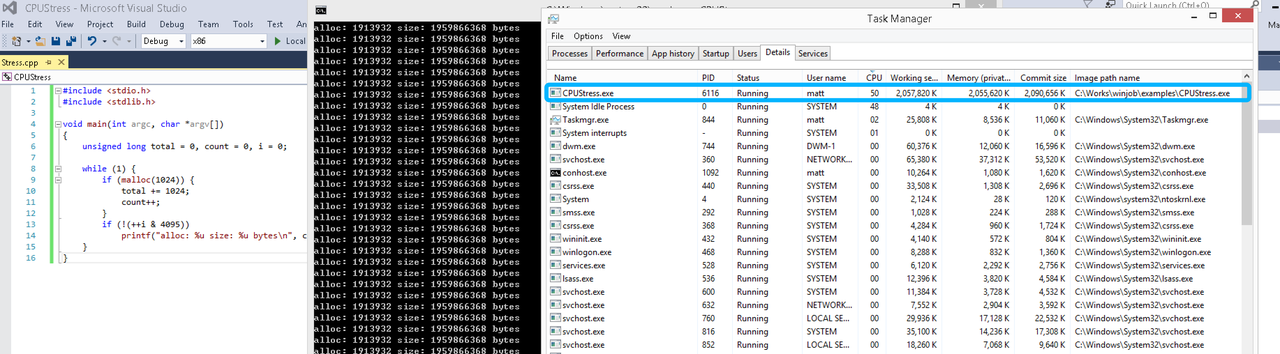
无限制
在无限制的情况下,此进程会占满一个CPU核心,commit内存总占用达2G
单一进程
在设定CPU上限16%及内存16M上限之后,结果如下:
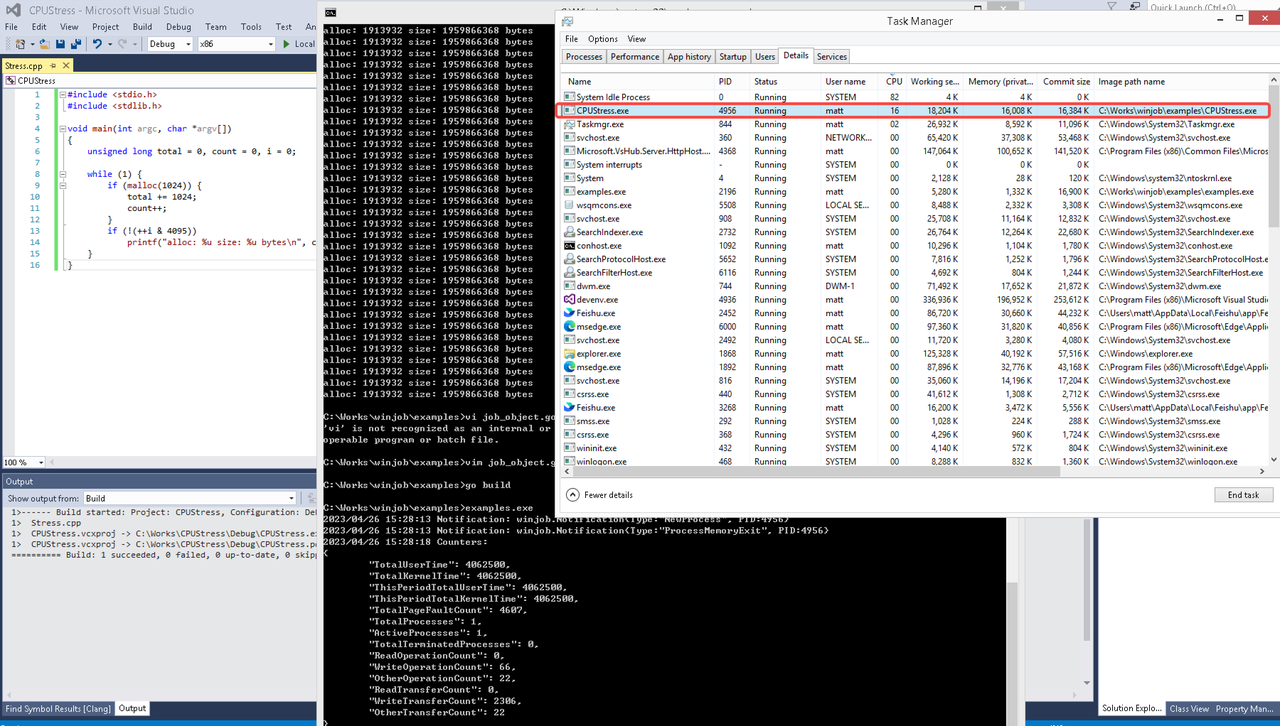 examples/job_object.go按如下修改:
var limits = []winjob.Limit{
        winjob.WithBreakawayOK(),
        winjob.WithKillOnJobClose(),
        winjob.WithActiveProcessLimit(3),
        winjob.WithProcessTimeLimit(10 * time.Second),
        winjob.WithCPUHardCapLimit(1600),        // 16%
        winjob.WithProcessMemoryLimit(16 << 20), // 16MB
        winjob.WithWriteClipboardLimit(),
}

const defaultCommand = ".\\CPUStress.exe"
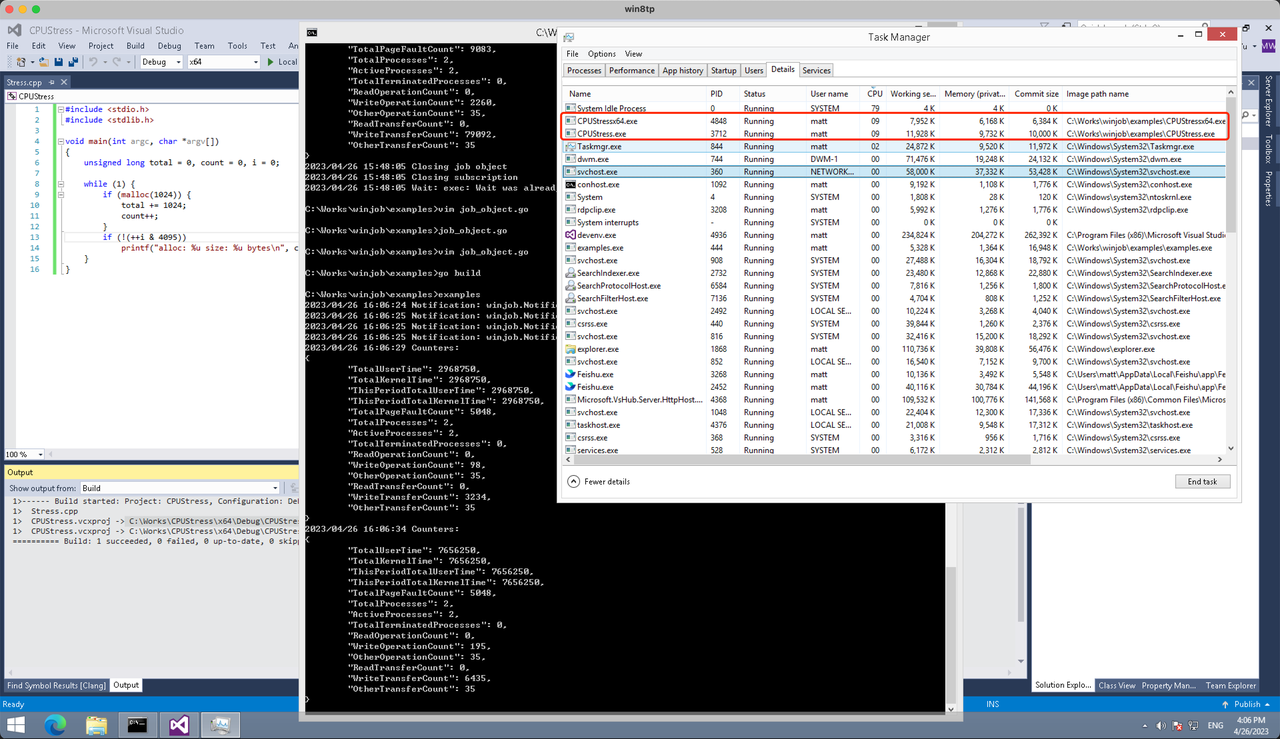
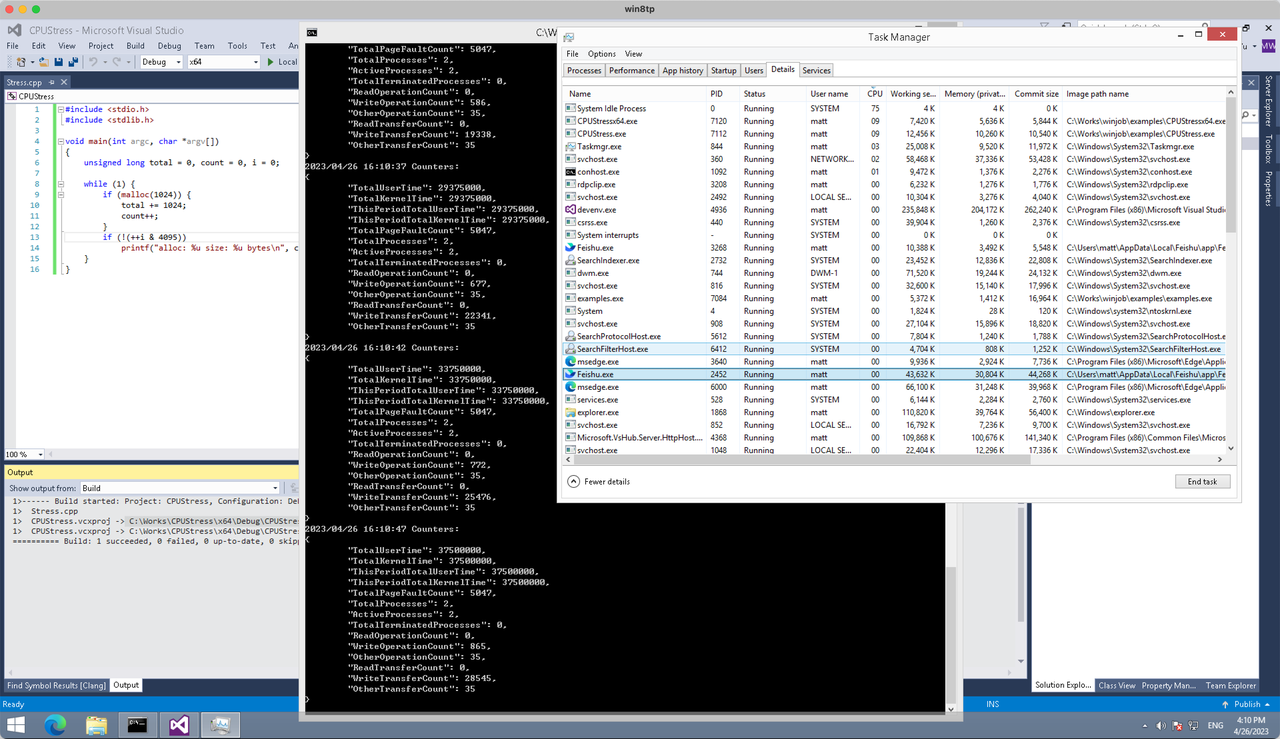
多进程(双进程)
将winjob.WithProcessMemoryLimit 改为 winjob.WithJobMemoryLimit,后者表示此job内所有进程要占用的总内存限制:
var limits = []winjob.Limit{
        winjob.WithBreakawayOK(),
        winjob.WithKillOnJobClose(),
        winjob.WithActiveProcessLimit(3),
        winjob.WithProcessTimeLimit(10 * time.Second),
        winjob.WithCPUHardCapLimit(1600),    // 16%
        winjob.WithJobMemoryLimit(16 << 20), // 16MB
        winjob.WithWriteClipboardLimit(),
}
验证结果如下:
winjob example代码:
// +build windows

package main

import (
        "encoding/json"
        "log"
        "os"
        "os/exec"
        "os/signal"
        "time"

        "golang.org/x/sys/windows"

        "github.com/kolesnikovae/go-winjob"
)

var limits = []winjob.Limit{
        winjob.WithBreakawayOK(),
        winjob.WithKillOnJobClose(),
        winjob.WithActiveProcessLimit(3),
        winjob.WithProcessTimeLimit(10 * time.Second),
        winjob.WithCPUHardCapLimit(1600),    // 16%
        winjob.WithJobMemoryLimit(16 << 20), // 16MB
        winjob.WithWriteClipboardLimit(),
}

const defaultCommand = ".\\CPUStress.exe"
const stressCommand  = ".\\CPUStressX64.exe"

func main() {
        job, err := winjob.Create("", limits...)
        if err != nil {
                log.Fatalf("Create: %v", err)
        }

        cmd := exec.Command(defaultCommand)
        cmd.Stderr = os.Stderr
        cmd.SysProcAttr = &windows.SysProcAttr{
                CreationFlags: windows.CREATE_SUSPENDED,
        }
        if err := cmd.Start(); err != nil {
                log.Fatalf("Start: %v", err)
        }

        stress := exec.Command(stressCommand)
        stress.Stderr = os.Stderr
        stress.SysProcAttr = &windows.SysProcAttr{
                CreationFlags: windows.CREATE_SUSPENDED,
        }
        if err := stress.Start(); err != nil {
                log.Fatalf("Start: %v", err)
        }

        s := make(chan os.Signal, 1)
        signal.Notify(s, os.Interrupt)

        c := make(chan winjob.Notification)
        subscription, err := winjob.Notify(c, job)
        if err != nil {
                log.Fatalf("Notify: %v", err)
        }

        done := make(chan struct{})
        go func() {
                defer close(done)
                ticker := time.NewTicker(time.Second * 5)
                defer ticker.Stop()
                var counters winjob.Counters
                for {
                        select {
                        case <-s:
                                log.Println("Closing job object")
                                if err := job.Close(); err != nil {
                                        log.Fatal(err)
                                }
                                log.Println("Closing subscription")
                                if err := subscription.Close(); err != nil {
                                        log.Fatal(err)
                                }
                                return

                        case n, ok := <-c:
                                if ok {
                                        log.Printf("Notification: %#v\n", n)
                                } else if err := subscription.Err(); err != nil {
                                        log.Fatalf("Subscription: %v", err)
                                }

                        case <-ticker.C:
                                if err := job.QueryCounters(&counters); err != nil {
                                        log.Fatalf("QueryCounters: %v", err)
                                }
                                b, err := json.MarshalIndent(counters, "", "\t")
                                if err != nil {
                                        log.Fatal(err)
                                }
                                log.Printf("Counters: \n%s\n", b)
                        }
                }
        }()

        if err := job.Assign(cmd.Process); err != nil {
                log.Fatalf("Assign: %v", err)
        }
        if err := winjob.Resume(cmd); err != nil {
                log.Fatalf("Resume: %v", err)
        }

        if err := job.Assign(stress.Process); err != nil {
                log.Fatalf("Assign: %v", err)
        }
        if err := winjob.Resume(stress); err != nil {
                log.Fatalf("Resume: %v", err)
        }

        if err := cmd.Wait(); err != nil {
                log.Fatalf("Wait: %v", err)
        }
        if err := stress.Wait(); err != nil {
                log.Fatalf("Wait: %v", err)
        }

        // Wait for a signal.
        <-done
}
My partner and I stumbled over here from a different web address and thought I might as well check things out.
I like what I see so now i’m following you. Look forward to
looking over your web page again.
I definitely enjoy the concept of having a yard deck! It’s such an excellent method to extend your living space outdoors. I recently encountered some amazing design concepts that truly motivated me deck builders
This was a wonderful guide. Check out payday loans new braunfels for more.
Good post! We are linking to this great content on our site.
Keep up the great writing.
This was quite useful. For more, visit ranking de abogados .
Thank you for the good writeup. It in fact was a amusement
account it. Look advanced to more added agreeable from
you! However, how can we communicate?
Precious jewelry trends come and go, however classic pieces are constantly in design. I just recently purchased a timeless locket that I know I’ll wear for years to come buy gold denver co
Great protection of roofing necessities. First Class Roofing feels like a cast alternative for any roof process. best First Class Roofing,
Thanks for sharing these insights. Proper packing and careful handling are essential when moving household items safely. Disclosure: I’m affiliated with Canoga Park full-service movers .
Good advice about units — for AC Repair in Fayetteville, call install AC in Fayetteville .
Ask satisfied customers to leave genuine reviews mentioning your lawn care services and city. pest control near me
Appreciate the useful tips. For more, visit personal loans .
Hi everyone, it’s my first go to see at this web site, and post is
truly fruitful in support of me, keep up posting these articles.
What’s up to all, how is the whole thing, I think every
one is getting more from this website, and your views are nice designed for new people.
Great counsel! If I necessary roof maintenance, I’d touch First Class Roofing with no hesitation. Verandah Roofing First Class,
This helped me get ready for my first session; addiction treatment shares a packing list.
Wow that was unusual. I just wrote an extremely long comment but after I clicked submit my comment didn’t show up. Grrrr… well I’m not writing all that over again. Anyways, just wanted to say wonderful blog!
Flags have played pivotal roles as symbols of defiance in opposition to oppression all over international historical past—in truth inspiring experiences exist there! 13 Star USA flag
This article has great practical steps I can use right away. I’ll be sharing a link with friends—check out Church Christmas Light Installation Vancouver
Ductless Mini Split Oshawa Bedroom Comfort Taunton Trades
Our master bedroom has always been too warm in summer. Taunton Trades installed a mini-split and it is the best sleep we have had in years air conditioning repair Whitby
Dual Diagnosis Drug Rehabs San Diego HGR Depression Addiction
I came to HGR Drug Rehabs San Diego California with both an alcohol problem and a depression diagnosis that had never been properly treated together drug rehabs San Diego California
Aw, this was an incredibly good post. Taking a few minutes and actual effort to generate a superb article… but what can I say… I hesitate a whole lot and don’t manage to get nearly anything done.
Hello, after reading this amazing paragraph i am also cheerful to share my know-how here with friends.
It’s unbelievable how precise flags have transform symbols of resistance and desire in instances of war. 1st American Flag
Hello, constantly i used to check web site posts here early in the break of day, because i like
to learn more and more.
If you’re switching suppliers, addiction treatment explains transferring records efficiently.
I enjoyed this post. For additional info, visit payday loans new braunfels .
Этот медицинский обзор сосредоточен на последних достижениях, которые оказывают влияние на пациентов и медицинскую практику. Мы разбираем инновационные методы лечения и исследований, акцентируя внимание на их значимости для общественного здоровья. Читатели узнают о свежих данных и их возможном применении.
Связаться за уточнением – [url=https://o-privivkah.ru/lechenie-alkogolizma-v-murome-primenenie-kompleksnogo-podhoda-i-rol-spetsialistov/]наркологическая клиника в муром[/url]
Great insurance policy of roofing necessities. First Class Roofing looks like a solid resolution for any roof process. best First Class installers
This is my first time go to see at here and i am genuinely happy to read all at
alone place.
I have learn a few good stuff here. Certainly price bookmarking for revisiting.
I wonder how much attempt you put to make such a magnificent
informative web site.
Hello would you mind letting me know which hosting company you’re utilizing?
I’ve loaded your blog in 3 completely different web browsers and I must say this blog loads a
lot faster then most. Can you recommend a good hosting provider at a honest
price? Thanks, I appreciate it!
I am really loving the theme/design of your website.
Do you ever run into any internet browser compatibility problems?
A small number of my blog visitors have complained about my site not working correctly in Explorer
but looks great in Safari. Do you have any advice to help fix this problem?
Useful information! For Scottsdale roof upgrades check roofing contractor near me .
This was highly educational. For more, visit abogados Galicia Santiago .
I just like the helpful info you provide in your articles.
I will bookmark your blog and check once more right here regularly.
I am fairly certain I’ll learn lots of new stuff right right here!
Best of luck for the following!
Tales woven into textile remind us why we need to attempt in direction of peace instead repeating cycles marked by means of clash—flags preserve power beyond mere symbols Cool Historic Flags _
For rural readers, addiction treatment lists regional tele-recovery options.
Alcohol Rehabs San Diego Husband Wife Family Support HGR Program
My wife and I attended the family component of HGR’s alcohol rehab program together drug rehabs San Diego California
I’m captivated by way of differing interpretations came upon among students mastering similar motifs across varied cultures’ interpretations as a result of time ##aniKeyWord##_ Historic War Flags
Heat Pump Installation Whitby Daikin Taunton Trades Durham
Taunton Trades installed a Daikin heat pump for our Whitby home and the difference in our heating bills has been noticeable air conditioning repair Whitby
Our hose bib burst during a freeze because the hose was left connected. emergency plumber replaced it with a frost-free model and educated us on winterizing.
Great post for renters and owners. If you need Fayetteville AC Repair, AC service and repair Fayetteville offers good options.
Appreciate the great suggestions. For more, visit payday loans near me .
For nutrition on a spending plan, addiction treatment shares low-priced, high-protein ideas.
Χρήσιμο για όσους κάνουν industry trips στην πόλη. Για διακριτικές και επαγγελματικές συνοδούς συνοδείας, το independent Greek escort είναι αρκετά δημοφιλές.
The adaptability of backyard decks is fantastic! You can tailor them to fit any design or function you require. I recently found some innovative concepts for multi-level decks at deck builders that could truly raise your outdoor space.
Aw, this was an extremely good post. Taking a few minutes and actual effort to produce a top notch article… but what can I say… I procrastinate a whole lot and never manage to get nearly anything done.
I found the repair versus replacement section especially useful. Owens Corning preferred contractor Concord NC
Historical battles generally had custom-made banners; these flags were a very powerful for identification at the battlefield! Buy American Revolution Flag