Windows自身没有提供类似Linux cgroup的能力来限制进程或进程组的资源占用,进程CPU/IO/内存/网络等资源的控制只能由自己实现。目前已有第三方的实现,主要是限制进程CPU的占用,如文档 < 21 Best Ways to Limit the CPU Usage of a Process > 所描述的BES,Process Tamer等软件。自Windows 8及Server 2012开始Windows系统有提供以job为单位的CPU占用及内存上限设置,之前的版本则只能以进程或线程为单位进行限制。
进程CPU占用限制方案
即时轮询系统所有进程(线程)的CPU占用,当发现所设定进程有超标时强制暂停进程所有线程的执行,然后在适当的时机再恢复执行。其中所涉及技术点:
进程CPU占用查询 GetProcessTimes
BOOL GetProcessTimes(
  [in]  HANDLE     hProcess,
  [out] LPFILETIME lpCreationTime,
  [out] LPFILETIME lpExitTime,
  [out] LPFILETIME lpKernelTime,
  [out] LPFILETIME lpUserTime
);
此函数可以获取进程从创建至当前的总运行时间及总的CPU时间,(KernelTime + UserTime) < 系统CPU数 * (当前时间 - CreationTime)
线程CPU占用查询 GetThreadTimes
BOOL GetThreadTimes(
  [in]  HANDLE     hThread,
  [out] LPFILETIME lpCreationTime,
  [out] LPFILETIME lpExitTime,
  [out] LPFILETIME lpKernelTime,
  [out] LPFILETIME lpUserTime
);
QueryThreadCycleTime可以提供更精准的CPU时间数据,单位为CPU时钟周期
BOOL QueryThreadCycleTime(
  [in]  HANDLE   ThreadHandle,
  [out] PULONG64 CycleTime
);
线程暂停及恢复
Windows平台没有提供暂停整个进程的支持函数,只能以线程为单位来操作,即SuspendThread及ResumeThread:
DWORD SuspendThread(
  [in] HANDLE hThread
);
DWORD ResumeThread(
  [in] HANDLE hThread
);
CPU亲和性设置: SetProcessAffinityMask
BOOL SetProcessAffinityMask(
  [in] HANDLE    hProcess,
  [in] DWORD_PTR dwProcessAffinityMask
);
此函数可以限定进程及其所有线程所能使用的CPU,故一定程序上亦限定了进程最大的系统CPU占用率。
DWORD_PTR SetThreadAffinityMask(
  [in] HANDLE    hThread,
  [in] DWORD_PTR dwThreadAffinityMask
);
此函数可单独限制特定线程的CPU亲和性。
进程优先级设置: SetPriorityClass
优先级解决的是优先运行及退让CPU的问题,本质上并不能限定CPU占用,只是优先级高于当前任务的忙碌的时候,当前进程会主动退让CPU 线程优先级设置:SetThreadPriority
BOOL SetThreadPriority(
  [in] HANDLE hThread,
  [in] int    nPriority
);
Job Objects
Windows系统提供了Job的概念用以管理多个进程,可以限制Job对象内所有进程及期线程的CPU核心占用、CPU占用及内存分配上限等,均通过SetInformationJobObject来实现,具体的CPU限制由JOBOBJECT_CPU_RATE_CONTROL_INFORMATION管理,内存限制则由JOBOBJECT_EXTENDED_LIMIT_INFORMATION来管理。
BOOL SetInformationJobObject(
  [in] HANDLE             hJob,
  [in] JOBOBJECTINFOCLASS JobObjectInformationClass,
  [in] LPVOID             lpJobObjectInformation,
  [in] DWORD              cbJobObjectInformationLength
);需要注意的是CPU占用设置只有Windows 8及Server 2012之后的版本有效。
CPU Sets
此部分只限定了CPU Affinity属性
实验验证
可以直接利用开源项目go-winjob验证,验证系统Windows 8 x64,go-winjob git repo: https://github.com/kolesnikovae/go-winjob
验证程序
#include <stdio.h>
#include <stdlib.h>

void main(int argc, char *argv[])
{
        unsigned long total = 0, count = 0, i = 0;

        while (1) {
                if (malloc(1024)) {
                        total += 1024;
                        count++;
                }
                if (!(++i & 4095))
                        printf("alloc: %u size: %u bytes\n", count, total);
    }
}
无限制
在无限制的情况下,此进程会占满一个CPU核心,commit内存总占用达2G
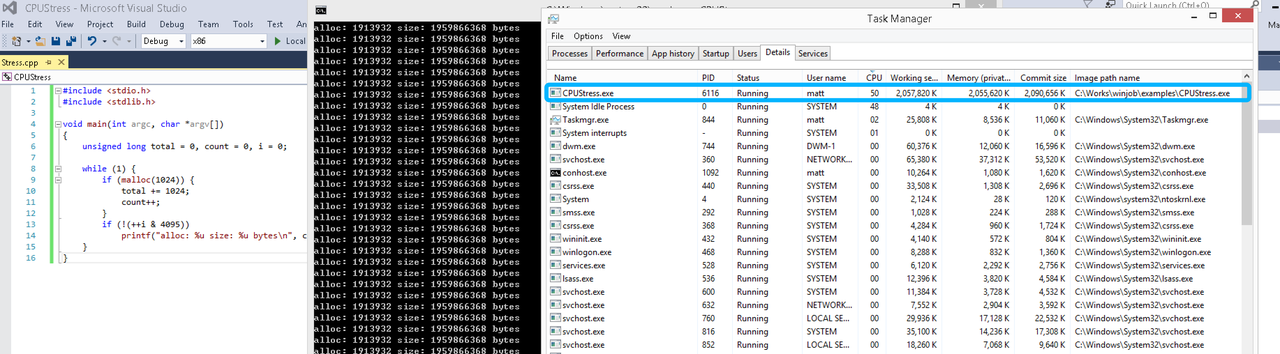
单一进程
在设定CPU上限16%及内存16M上限之后,结果如下:
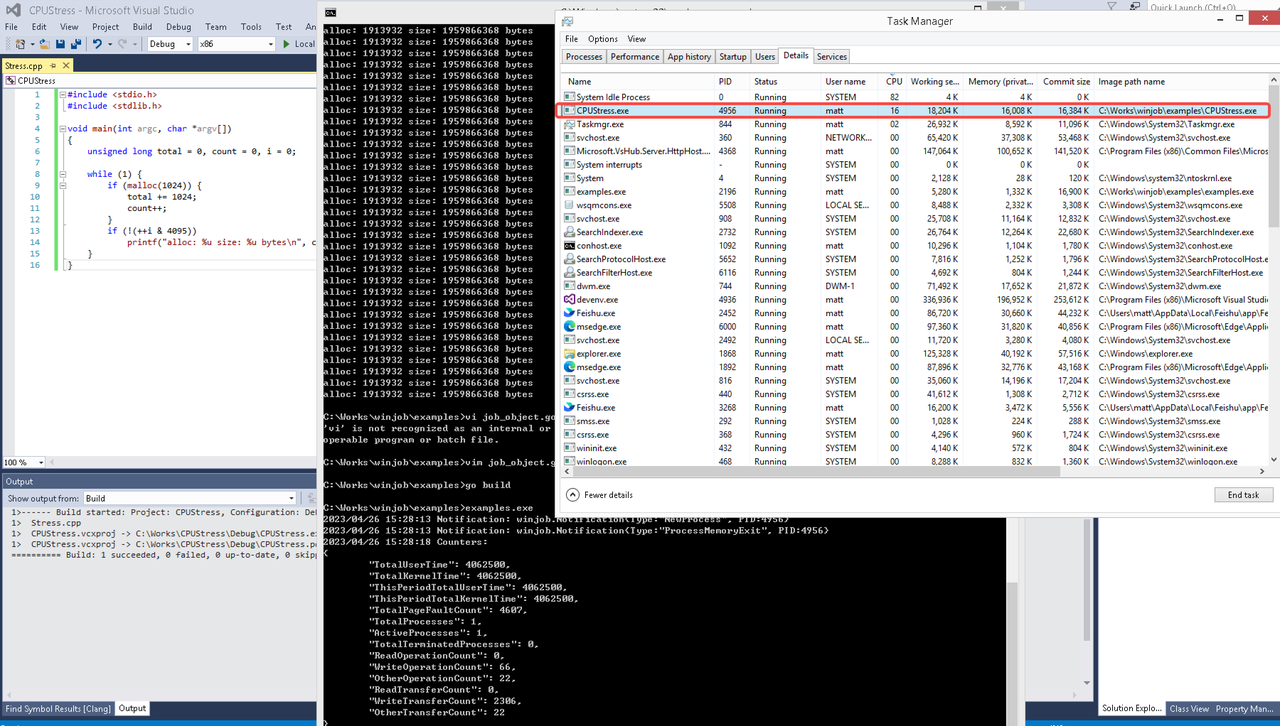 examples/job_object.go按如下修改:
var limits = []winjob.Limit{
        winjob.WithBreakawayOK(),
        winjob.WithKillOnJobClose(),
        winjob.WithActiveProcessLimit(3),
        winjob.WithProcessTimeLimit(10 * time.Second),
        winjob.WithCPUHardCapLimit(1600),        // 16%
        winjob.WithProcessMemoryLimit(16 << 20), // 16MB
        winjob.WithWriteClipboardLimit(),
}

const defaultCommand = ".\\CPUStress.exe"
多进程(双进程)
将winjob.WithProcessMemoryLimit 改为 winjob.WithJobMemoryLimit,后者表示此job内所有进程要占用的总内存限制:
var limits = []winjob.Limit{
        winjob.WithBreakawayOK(),
        winjob.WithKillOnJobClose(),
        winjob.WithActiveProcessLimit(3),
        winjob.WithProcessTimeLimit(10 * time.Second),
        winjob.WithCPUHardCapLimit(1600),    // 16%
        winjob.WithJobMemoryLimit(16 << 20), // 16MB
        winjob.WithWriteClipboardLimit(),
}
验证结果如下:
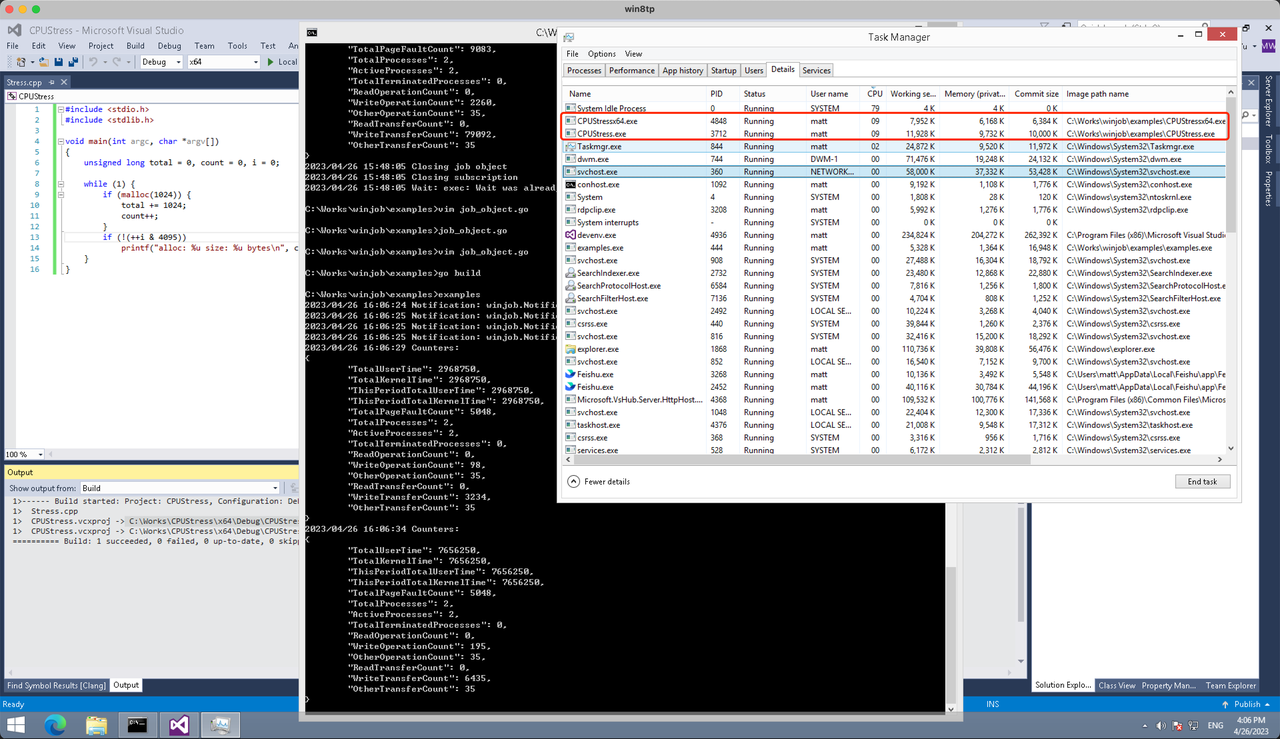
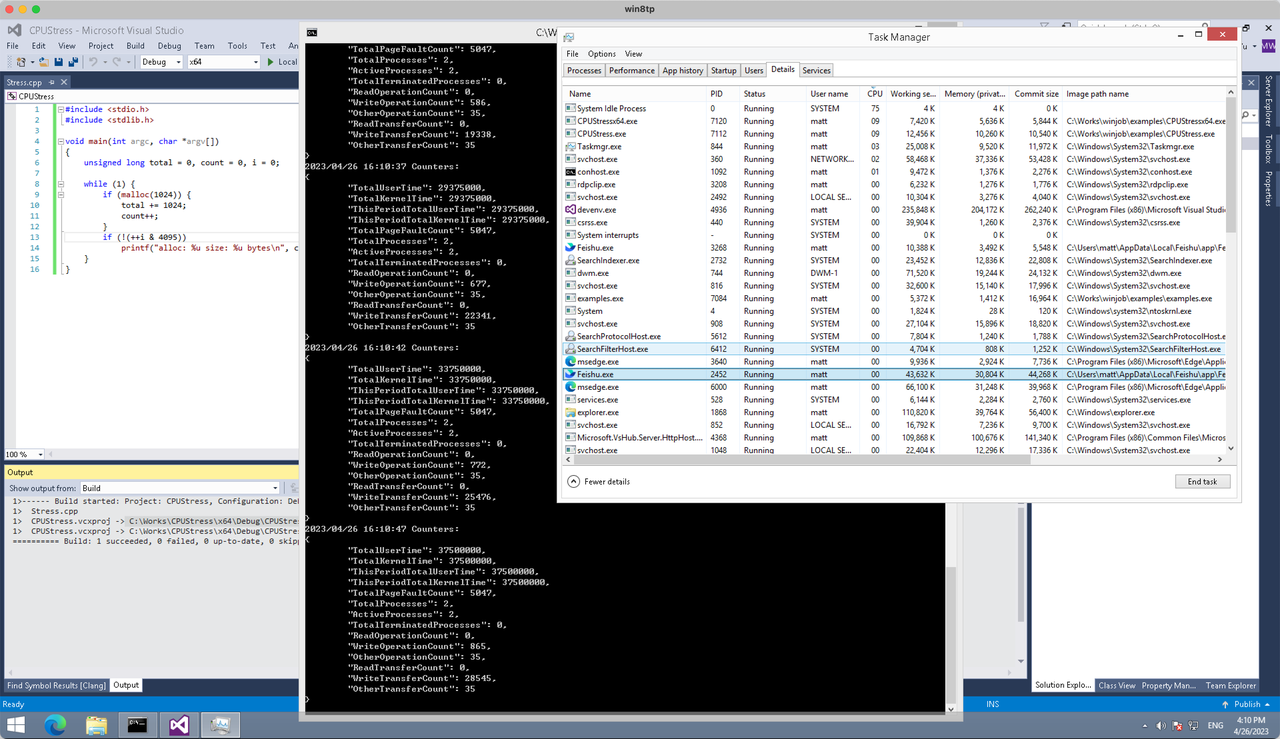
winjob example代码:
// +build windows

package main

import (
        "encoding/json"
        "log"
        "os"
        "os/exec"
        "os/signal"
        "time"

        "golang.org/x/sys/windows"

        "github.com/kolesnikovae/go-winjob"
)

var limits = []winjob.Limit{
        winjob.WithBreakawayOK(),
        winjob.WithKillOnJobClose(),
        winjob.WithActiveProcessLimit(3),
        winjob.WithProcessTimeLimit(10 * time.Second),
        winjob.WithCPUHardCapLimit(1600),    // 16%
        winjob.WithJobMemoryLimit(16 << 20), // 16MB
        winjob.WithWriteClipboardLimit(),
}

const defaultCommand = ".\\CPUStress.exe"
const stressCommand  = ".\\CPUStressX64.exe"

func main() {
        job, err := winjob.Create("", limits...)
        if err != nil {
                log.Fatalf("Create: %v", err)
        }

        cmd := exec.Command(defaultCommand)
        cmd.Stderr = os.Stderr
        cmd.SysProcAttr = &windows.SysProcAttr{
                CreationFlags: windows.CREATE_SUSPENDED,
        }
        if err := cmd.Start(); err != nil {
                log.Fatalf("Start: %v", err)
        }

        stress := exec.Command(stressCommand)
        stress.Stderr = os.Stderr
        stress.SysProcAttr = &windows.SysProcAttr{
                CreationFlags: windows.CREATE_SUSPENDED,
        }
        if err := stress.Start(); err != nil {
                log.Fatalf("Start: %v", err)
        }

        s := make(chan os.Signal, 1)
        signal.Notify(s, os.Interrupt)

        c := make(chan winjob.Notification)
        subscription, err := winjob.Notify(c, job)
        if err != nil {
                log.Fatalf("Notify: %v", err)
        }

        done := make(chan struct{})
        go func() {
                defer close(done)
                ticker := time.NewTicker(time.Second * 5)
                defer ticker.Stop()
                var counters winjob.Counters
                for {
                        select {
                        case <-s:
                                log.Println("Closing job object")
                                if err := job.Close(); err != nil {
                                        log.Fatal(err)
                                }
                                log.Println("Closing subscription")
                                if err := subscription.Close(); err != nil {
                                        log.Fatal(err)
                                }
                                return

                        case n, ok := <-c:
                                if ok {
                                        log.Printf("Notification: %#v\n", n)
                                } else if err := subscription.Err(); err != nil {
                                        log.Fatalf("Subscription: %v", err)
                                }

                        case <-ticker.C:
                                if err := job.QueryCounters(&counters); err != nil {
                                        log.Fatalf("QueryCounters: %v", err)
                                }
                                b, err := json.MarshalIndent(counters, "", "\t")
                                if err != nil {
                                        log.Fatal(err)
                                }
                                log.Printf("Counters: \n%s\n", b)
                        }
                }
        }()

        if err := job.Assign(cmd.Process); err != nil {
                log.Fatalf("Assign: %v", err)
        }
        if err := winjob.Resume(cmd); err != nil {
                log.Fatalf("Resume: %v", err)
        }

        if err := job.Assign(stress.Process); err != nil {
                log.Fatalf("Assign: %v", err)
        }
        if err := winjob.Resume(stress); err != nil {
                log.Fatalf("Resume: %v", err)
        }

        if err := cmd.Wait(); err != nil {
                log.Fatalf("Wait: %v", err)
        }
        if err := stress.Wait(); err != nil {
                log.Fatalf("Wait: %v", err)
        }

        // Wait for a signal.
        <-done
}
Thanks for the valuable insights. More at zona industrial Campollano .
Appreciate the detailed post. Find more at South Shore Power Washing | House & Roof Washing .
Using an oil extractor is neat for tight areas; I sold one after analyzing auto glass .
Fantastic message, thanks! I just featured a similar pointer on professional home health care agency .
My favorite finish combo: white cabinetry + brass pulls from Closets Dallas .
My developer is trying to persuade me to move to .net from
PHP. I have always disliked the idea because of the costs.
But he’s tryiong none the less. I’ve been using Movable-type on various websites for about
a year and am worried about switching to another platform.
I have heard great things about blogengine.net. Is there a way I can import all my
wordpress content into it? Any kind of help would be greatly appreciated!
Thanks for the insightful write-up. More like this at albergue asequible Palas de Rei .
I’ve been experimenting with using multiple models in a single thread, and it’s definitely a game-changer for complex workflows. I’m curious, though, how the Debate mode handles situations where models disagree on factual points More help
Great tips! For more, visit Pressure washing company .
Fantastic message– extremely informative. For a much deeper dive, I wrote about it on Local SEO Services .
I’ve been experimenting with Suprmind lately, and the workflow is pretty interesting. I am curious how it handles disagreement tracking when you have multiple models analyzing the same prompt Click here!
Nice post. I was checking continuously this weblog and I’m inspired!
Very helpful information specifically the closing part :
) I handle such information much. I used to be seeking this certain info for a very
lengthy time. Thanks and best of luck.
Loving the matte black hardware trend—picked ours from a collection on Custom closets Dallas TX .
If you remain in St. Augustine and browsing finest garage door repair near me, Wagmore Garage Doors is the real bargain. They appeared same-day for a damaged springtime, tuned the opener, and left every little thing balanced and whisper-quiet garage door repair
Нарколог на дом в Казани — это возможность получить медицинского специалиста без посещения клиники, когда человеку нужна помощь при запое, интоксикации, тяжелом похмелья, абстинентном синдроме, употребления алкоголя или наркотиков. Врач приезжает на дом, проводит осмотр пациента, оценивает симптомы, подбирает препараты и дает рекомендации по дальнейшему лечению.
Изучить вопрос глубже – [url=https://narkolog-na-dom-kazan21.ru/]нарколог на дом цена в казани[/url]
I have been testing Suprmind lately and the multi-model approach is really interesting for getting diverse perspectives. I am curious how the Debate mode handles nuance when the models start to disagree https://tr.ee/1
Improve your crypto trading skills when you learn to sell bitcoin in india.
Thanks for the detailed post. Find more at Pressure washing near me .
I’m partial to natural wood finishes; the stain gallery at Luxury closet designers Dallas helped me decide.
High sulfur gas places can also influence periods; windshield replacment has nearby notes.
Packing supplies were pricey locally, but Best Springfield movers connected me with Springfield movers who included boxes.
Senior discount came in clutch for my parents’ move—found through Long distance movers Santa Ana and saved 10%.
top 10 sports betting sites control and licensing board zambia
Your advice on treating gaps is vital; personal injury claim lawyer shows how gaps affect claims.
Excellent overview—anyone needing a personal injury lawyer can start with personal injury attorney for wrongful death .
Snowbird here—heading back to Virginia Beach each spring. I book 2–3 weeks ahead with Virginia Beach car transport to lock better rates.
If youreside in Ponte Vedra Beach and browsing ideal garage door repair near me, Wagmore Garage Doors is the real value. They showed up same-day for a broken spring, tuned the opener, and left whatever balanced and whisper-quiet garage door repair
Love your section on lighting; I added motion sensors after reading Luxury closet designers Dallas .
Dallas renters can still upgrade with freestanding systems—found options at Closets Dallas .
Bursa’da evimi boyatmayı düşünüyorum, kaliteli işçilik arayanlar için profesyonel Bursa boya ustası gerçekten faydalı bir kaynak oldu; fiyat/performans ve renk seçimi konusunda güzel ipuçları var.
The guide to styling a quiff was simple; pomade from local barbershop holds well.
If you need short-term storage with your Bayonne move, Long distance movers Bayonne bundled it in and saved me time.
Your advice on acclimation time saved us headaches. In Charlotte, tile flooring installation service got it right.
Properly seating the clear out through hand beats overtightening. I reviewed torque checklist on tire repair .
Moving a lifted truck from Greensboro? Verify height limits and winch availability—my carrier sourced through Greensboro auto transport companies handled it fine.
Terrific blog post, many thanks! This increases on a topic I covered at in home health care .
Excellent roundup! Anyone new to Elgin should use Elgin moving company to compare movers, see reviews, and lock in a fair quote.
quoten wetten dass gestern
My web-site – fussballwetten-de.com
Just had a smooth pickup near Downtown Naperville by a carrier I found via Naperville auto transport companies . On-time, clear bill of lading, and good photo documentation.
Great breakdown of Cat6 vs Cat6a performance in crowded racks. For anyone planning an office refresh, we documented a step-by-step cabling checklist here: Access Control Installation .
Terrific message– exactly what I needed. I added a fast referral on Local SEO Consultant .
El bono más extendido es el bono de bienvenida.
Lo común es que consiste en un match sobre tu primer carga, por ejemplo
100% hasta $50,000 ARS. Esto significa que si depositás
$50,000, el casino te añade otros $50,000 para apostar.
If you’re in Ponte Vedra Beach and searching most dependable garage door repair near me, Wagmore Garage Doors is the genuine bargain. They showed up same-day for a broken springtime, tuned the opener, and left everything balanced and whisper-quiet garage door repair
Terrific article, many thanks! I’ll be sharing your insights on professional home health care agency .
Solid review! For someone planning their subsequent oil swap, I’ve stumbled on clean guides and equipment at auto glass replacement .
Very useful post. For similar content, visit Pressure Washing .
Great tips! For more, visit oficinas industriales Campollano .
Эта доказательная статья представляет собой глубокое погружение в успехи и вызовы лечения зависимостей. Мы обращаемся к научным исследованиям и опыту специалистов, чтобы предоставить читателям надежные данные об эффективности различных методик. Изучите, что работает лучше всего, и получите информацию от экспертов.
Прочитать подробнее – [url=https://tonus-studiya.ru/kto-takoj-narkologi-i-kogda-nuzhna-ego-pomoshh/]клиника плюс курск[/url]
top gewinner sportwetten
Also visit my web blog; wett tipps heute Basketball
If youreside in Nocatee and looking finest garage door repair near me, Wagmore Garage Doors is the genuine value. They appeared same-day for a damaged springtime, tuned the opener, and left everything balanced and whisper-quiet garage door repair