Windows自身没有提供类似Linux cgroup的能力来限制进程或进程组的资源占用,进程CPU/IO/内存/网络等资源的控制只能由自己实现。目前已有第三方的实现,主要是限制进程CPU的占用,如文档 < 21 Best Ways to Limit the CPU Usage of a Process > 所描述的BES,Process Tamer等软件。自Windows 8及Server 2012开始Windows系统有提供以job为单位的CPU占用及内存上限设置,之前的版本则只能以进程或线程为单位进行限制。
进程CPU占用限制方案
即时轮询系统所有进程(线程)的CPU占用,当发现所设定进程有超标时强制暂停进程所有线程的执行,然后在适当的时机再恢复执行。其中所涉及技术点:
进程CPU占用查询 GetProcessTimes
BOOL GetProcessTimes(
  [in]  HANDLE     hProcess,
  [out] LPFILETIME lpCreationTime,
  [out] LPFILETIME lpExitTime,
  [out] LPFILETIME lpKernelTime,
  [out] LPFILETIME lpUserTime
);
此函数可以获取进程从创建至当前的总运行时间及总的CPU时间,(KernelTime + UserTime) < 系统CPU数 * (当前时间 - CreationTime)
线程CPU占用查询 GetThreadTimes
BOOL GetThreadTimes(
  [in]  HANDLE     hThread,
  [out] LPFILETIME lpCreationTime,
  [out] LPFILETIME lpExitTime,
  [out] LPFILETIME lpKernelTime,
  [out] LPFILETIME lpUserTime
);
QueryThreadCycleTime可以提供更精准的CPU时间数据,单位为CPU时钟周期
BOOL QueryThreadCycleTime(
  [in]  HANDLE   ThreadHandle,
  [out] PULONG64 CycleTime
);
线程暂停及恢复
Windows平台没有提供暂停整个进程的支持函数,只能以线程为单位来操作,即SuspendThread及ResumeThread:
DWORD SuspendThread(
  [in] HANDLE hThread
);
DWORD ResumeThread(
  [in] HANDLE hThread
);
CPU亲和性设置: SetProcessAffinityMask
BOOL SetProcessAffinityMask(
  [in] HANDLE    hProcess,
  [in] DWORD_PTR dwProcessAffinityMask
);
此函数可以限定进程及其所有线程所能使用的CPU,故一定程序上亦限定了进程最大的系统CPU占用率。
DWORD_PTR SetThreadAffinityMask(
  [in] HANDLE    hThread,
  [in] DWORD_PTR dwThreadAffinityMask
);
此函数可单独限制特定线程的CPU亲和性。
进程优先级设置: SetPriorityClass
优先级解决的是优先运行及退让CPU的问题,本质上并不能限定CPU占用,只是优先级高于当前任务的忙碌的时候,当前进程会主动退让CPU 线程优先级设置:SetThreadPriority
BOOL SetThreadPriority(
  [in] HANDLE hThread,
  [in] int    nPriority
);
Job Objects
Windows系统提供了Job的概念用以管理多个进程,可以限制Job对象内所有进程及期线程的CPU核心占用、CPU占用及内存分配上限等,均通过SetInformationJobObject来实现,具体的CPU限制由JOBOBJECT_CPU_RATE_CONTROL_INFORMATION管理,内存限制则由JOBOBJECT_EXTENDED_LIMIT_INFORMATION来管理。
BOOL SetInformationJobObject(
  [in] HANDLE             hJob,
  [in] JOBOBJECTINFOCLASS JobObjectInformationClass,
  [in] LPVOID             lpJobObjectInformation,
  [in] DWORD              cbJobObjectInformationLength
);需要注意的是CPU占用设置只有Windows 8及Server 2012之后的版本有效。
CPU Sets
此部分只限定了CPU Affinity属性
实验验证
可以直接利用开源项目go-winjob验证,验证系统Windows 8 x64,go-winjob git repo: https://github.com/kolesnikovae/go-winjob
验证程序
#include <stdio.h>
#include <stdlib.h>

void main(int argc, char *argv[])
{
        unsigned long total = 0, count = 0, i = 0;

        while (1) {
                if (malloc(1024)) {
                        total += 1024;
                        count++;
                }
                if (!(++i & 4095))
                        printf("alloc: %u size: %u bytes\n", count, total);
    }
}
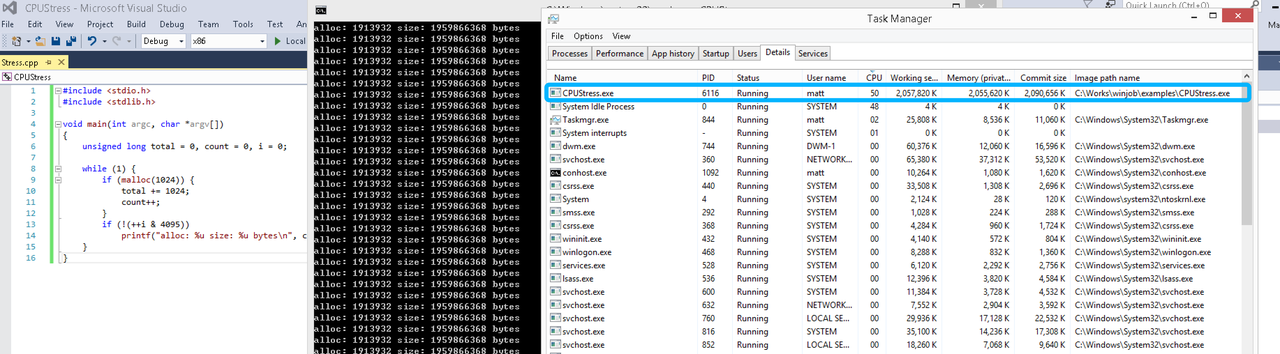
无限制
在无限制的情况下,此进程会占满一个CPU核心,commit内存总占用达2G
单一进程
在设定CPU上限16%及内存16M上限之后,结果如下:
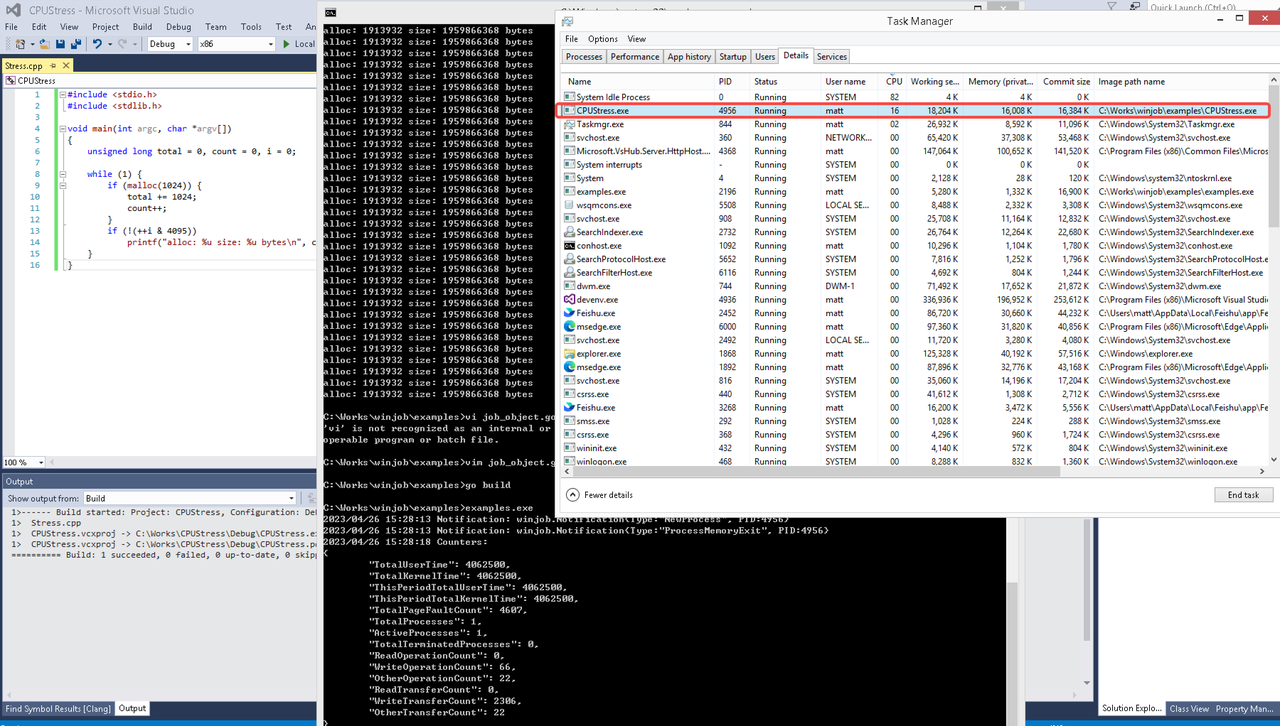 examples/job_object.go按如下修改:
var limits = []winjob.Limit{
        winjob.WithBreakawayOK(),
        winjob.WithKillOnJobClose(),
        winjob.WithActiveProcessLimit(3),
        winjob.WithProcessTimeLimit(10 * time.Second),
        winjob.WithCPUHardCapLimit(1600),        // 16%
        winjob.WithProcessMemoryLimit(16 << 20), // 16MB
        winjob.WithWriteClipboardLimit(),
}

const defaultCommand = ".\\CPUStress.exe"
多进程(双进程)
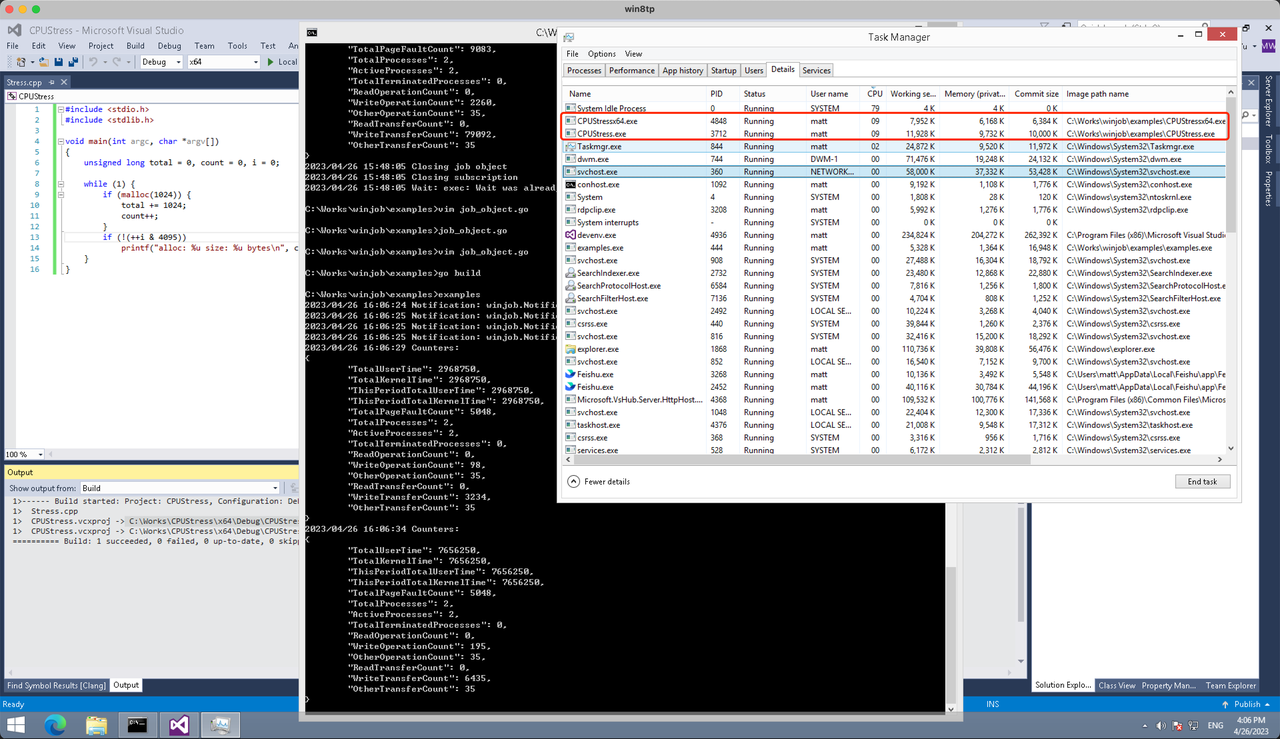
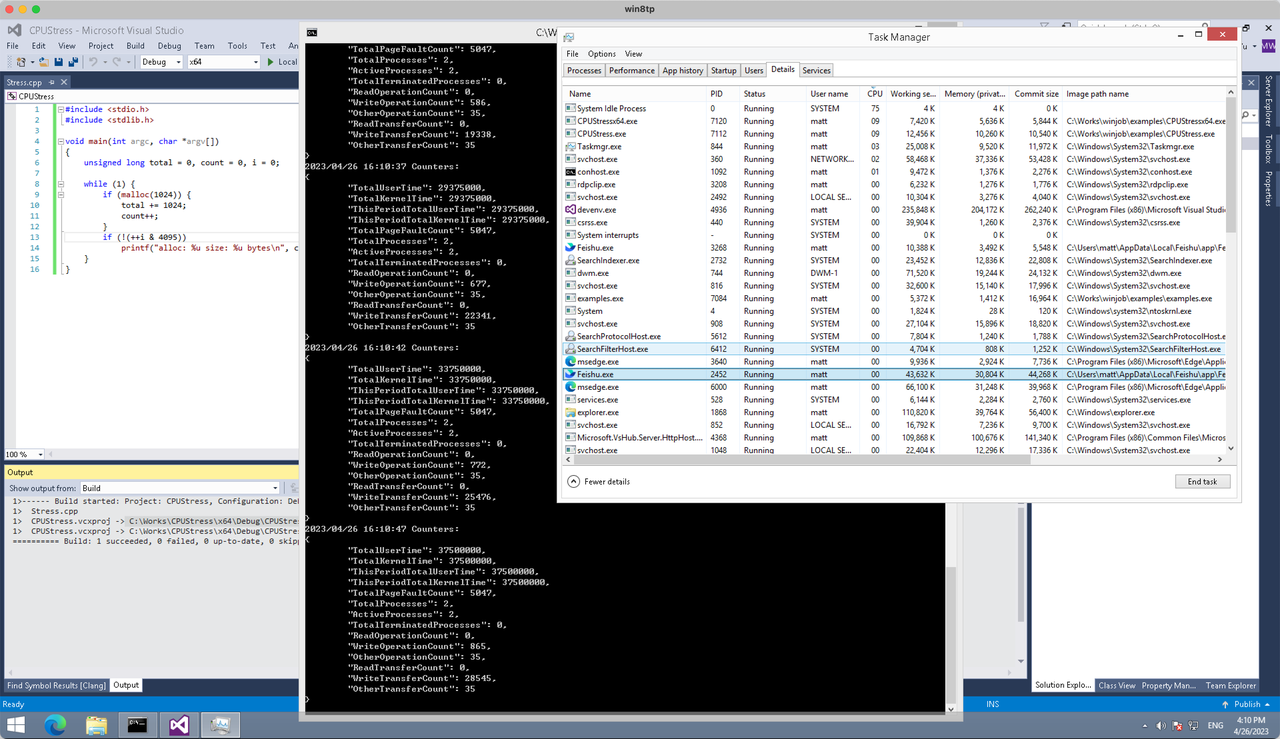
将winjob.WithProcessMemoryLimit 改为 winjob.WithJobMemoryLimit,后者表示此job内所有进程要占用的总内存限制:
var limits = []winjob.Limit{
        winjob.WithBreakawayOK(),
        winjob.WithKillOnJobClose(),
        winjob.WithActiveProcessLimit(3),
        winjob.WithProcessTimeLimit(10 * time.Second),
        winjob.WithCPUHardCapLimit(1600),    // 16%
        winjob.WithJobMemoryLimit(16 << 20), // 16MB
        winjob.WithWriteClipboardLimit(),
}
验证结果如下:
winjob example代码:
// +build windows

package main

import (
        "encoding/json"
        "log"
        "os"
        "os/exec"
        "os/signal"
        "time"

        "golang.org/x/sys/windows"

        "github.com/kolesnikovae/go-winjob"
)

var limits = []winjob.Limit{
        winjob.WithBreakawayOK(),
        winjob.WithKillOnJobClose(),
        winjob.WithActiveProcessLimit(3),
        winjob.WithProcessTimeLimit(10 * time.Second),
        winjob.WithCPUHardCapLimit(1600),    // 16%
        winjob.WithJobMemoryLimit(16 << 20), // 16MB
        winjob.WithWriteClipboardLimit(),
}

const defaultCommand = ".\\CPUStress.exe"
const stressCommand  = ".\\CPUStressX64.exe"

func main() {
        job, err := winjob.Create("", limits...)
        if err != nil {
                log.Fatalf("Create: %v", err)
        }

        cmd := exec.Command(defaultCommand)
        cmd.Stderr = os.Stderr
        cmd.SysProcAttr = &windows.SysProcAttr{
                CreationFlags: windows.CREATE_SUSPENDED,
        }
        if err := cmd.Start(); err != nil {
                log.Fatalf("Start: %v", err)
        }

        stress := exec.Command(stressCommand)
        stress.Stderr = os.Stderr
        stress.SysProcAttr = &windows.SysProcAttr{
                CreationFlags: windows.CREATE_SUSPENDED,
        }
        if err := stress.Start(); err != nil {
                log.Fatalf("Start: %v", err)
        }

        s := make(chan os.Signal, 1)
        signal.Notify(s, os.Interrupt)

        c := make(chan winjob.Notification)
        subscription, err := winjob.Notify(c, job)
        if err != nil {
                log.Fatalf("Notify: %v", err)
        }

        done := make(chan struct{})
        go func() {
                defer close(done)
                ticker := time.NewTicker(time.Second * 5)
                defer ticker.Stop()
                var counters winjob.Counters
                for {
                        select {
                        case <-s:
                                log.Println("Closing job object")
                                if err := job.Close(); err != nil {
                                        log.Fatal(err)
                                }
                                log.Println("Closing subscription")
                                if err := subscription.Close(); err != nil {
                                        log.Fatal(err)
                                }
                                return

                        case n, ok := <-c:
                                if ok {
                                        log.Printf("Notification: %#v\n", n)
                                } else if err := subscription.Err(); err != nil {
                                        log.Fatalf("Subscription: %v", err)
                                }

                        case <-ticker.C:
                                if err := job.QueryCounters(&counters); err != nil {
                                        log.Fatalf("QueryCounters: %v", err)
                                }
                                b, err := json.MarshalIndent(counters, "", "\t")
                                if err != nil {
                                        log.Fatal(err)
                                }
                                log.Printf("Counters: \n%s\n", b)
                        }
                }
        }()

        if err := job.Assign(cmd.Process); err != nil {
                log.Fatalf("Assign: %v", err)
        }
        if err := winjob.Resume(cmd); err != nil {
                log.Fatalf("Resume: %v", err)
        }

        if err := job.Assign(stress.Process); err != nil {
                log.Fatalf("Assign: %v", err)
        }
        if err := winjob.Resume(stress); err != nil {
                log.Fatalf("Resume: %v", err)
        }

        if err := cmd.Wait(); err != nil {
                log.Fatalf("Wait: %v", err)
        }
        if err := stress.Wait(); err != nil {
                log.Fatalf("Wait: %v", err)
        }

        // Wait for a signal.
        <-done
}
Your payback sensitivity analysis is valuable; tools on solar installers near me Concord, CA replicate it.
I really relate to the frustration with laggy streams mentioned here. It completely ruins the immersion when you are trying to watch live content. I found that clearing my browser cache and switching to a wired connection usually helps quite a bit short session entertainment for breaks
Your point about AC vs. DC coupling is clear; wiring diagrams live on Rocklin, CA solar installers near me .
It is interesting to see how much mobile gaming has changed recently. I have found that while the mobile experience is mostly smooth, the onboarding process on some platforms is still quite clunky compared to their desktop counterparts multiplayer casino games for mobile
We needed weld slag cleaned up— sandblasting made short work of it.
I’ve really been enjoying the shift toward more interactive mobile play lately. The live dealers feature has honestly been a game-changer for me; it makes playing on my phone feel so much more social and authentic https://city-wiki.win/index.php/Live_Dealer_Casinos:_Why_Your_Phone_Outperforms_Your_Desktop
I really enjoyed your perspective on using entertainment to boost remote morale. I especially love the idea of implementing “points and badges” to foster healthy team competition lms with built-in gamification
подробнее здесь [url=https://retrocasinogames.com]casino retro[/url]
I really enjoyed reading this take on digital entertainment. The part about personalization really stood out to me. When I am watching live events on my phone, I love how the interface changes based on what I like to see https://www.mediafire.com/file/4nsla6fifvu1cd5/pdf-11788-32763.pdf/file
If aesthetics matter, Sacramento, CA solar panel installation sacramento showcases black-on-black panel options from top solar companies.
Agree that battery sizing matters— solar panel installation offered an off-grid calculator that matched our load.
This piece really hit home about how much we rely on mobile apps to fill our downtime cross-device experience optimization
I really enjoyed this piece. Adding game elements to business tools is a great way to keep people focused, but I worry about burnout achievement systems for productivity
Thông tin hữu ích, mình thấy dịch vụ tại đăng ký b52club ổn định.
The emotional connection we have with precious jewelry is amazing. Whether it’s a household treasure or a present from an enjoyed one, each piece tells a story buy gold denver co
I really enjoyed this breakdown of mobile betting interfaces. My biggest issue is always the withdrawal speed. Even when the app looks great and the navigation is smooth, waiting three days to get my winnings feels like an eternity betting app navigation
I really enjoyed reading your thoughts on online engagement. I find that the live chat feature during streams makes such a huge difference when I’m watching games with my friends here
I’ve been running into that exact quota error lately whenever I use my work VPN. It gets so frustrating when the verification loop just keeps reloading over and over again without letting me through https://garrettwigp625.tearosediner.net/how-long-should-it-will-only-take-a-few-seconds-actually-take
I agree that digital entertainment should be instant, but it’s frustrating when the stream lags right at the climax of a show. I’ve found that switching to a wired ethernet connection usually fixes the buffering issues for me Great site
Loft Conversion Havering Permitted Development No Planning Needed
I was convinced we would need planning permission and was dreading the process Loft Conversion Near Me
It is interesting to see how much mobile gaming has changed recently. I’ve noticed that while the tech is getting better, some sites still have really clunky onboarding processes that take forever to complete https://xeon-wiki.win/index.php/Why_Complicated_Payment_Steps_Are_Killing_Your_Casino_App
I really like that you suggested getting at least two or three quotes to compare quality and pricing. I’ve already requested one from emergency plumber and will see how it stacks up.
I’ve really noticed how much more engaging mobile casinos are getting lately. Having live dealers makes a massive difference compared to the old-school automated games—it honestly feels so much more like being at a real table interactive casino apps
I love the idea of using entertainment to build culture in distributed teams. Incorporating points and badges definitely helps keep morale high when we miss those casual office chats https://rentry.co/d2fvrxp8
I really enjoyed reading your take on the future of live digital shows! I wonder if mobile devices will ever truly capture that immersive feeling compared to desktop setups faster internet infrastructure
This approach makes a lot of sense for retention. We experimented with daily streaks in our team tools, but some users found them distracting after a while rewards programs
I find the way apps use streaks to keep us coming back both impressive and slightly stressful. It feels like I can never take a day off without losing my progress, which makes me wonder if the design is actually good for my mental health Go to this site
Great breakdown of the UX design. I agree that speed is everything when it comes to mobile betting. One thing I’ve noticed is that withdrawal speed can really make or break a platform’s reputation for me Discover more
A good sign is when they’re willing to explain which surfaces should never be hit with high pressure (like certain roof materials or older brick). I saw a detailed explanation of that on Power Washer Arlington VA and now I ask every contractor.
веб-сайт [url=https://retrocasinogames.com/]casino retro[/url]
The structure of small homes helps keep a consistent routine, which is especially good for seniors who need cues for when to eat, bathe, or rest. senior care explains how routine supports healthy aging.
I really enjoyed this piece on how we connect online. I personally find that live chat during streams makes the whole experience feel so much more personal streaming culture
This breakdown of the differences between Assisted Living, Independent Living, and Nursing Homes is really helpful. It makes it easier for families like mine to decide which option is best respite care
I’ve been running into these endless verification loops constantly lately. It’s so frustrating when the site claims I’ve hit a quota limit even though I’m just trying to log in https://www.hometalk.com/member/248861590/cole1256061
If you’re on NEM 3.0, solar power installation danville explains optimized battery dispatch.
It is interesting to see how much mobile gaming has expanded lately. I have noticed that live dealer streaming on mobile devices has become much smoother over the last year. It makes the experience feel far more immersive while you are on the move encrypted transactions casino
Honestly, the promise of instant access is great once you’re in, but the initial onboarding process really dragged for me. I almost closed the tab while waiting for that email verification to finally come through push notifications engagement
Nếu muốn chơi lâu dài, nhà cái như rikvipvg io rất quan trọng để tin tưởng.
I’ve definitely noticed this shift too. The addition of live dealers has been a total game-changer for me. It feels so much more immersive than just staring at a static digital screen https://www.mapleprimes.com/users/jeffreydavis9
I really enjoy the idea of using gamification to keep remote teams engaged! While “points and badges” make tasks feel like a fun challenge, they sometimes seem a bit forced for long-term morale https://www.mapleprimes.com/users/carlbutler24
Thanks for the thorough article. Find more at authentic ProDentim reviews .
I’ve been testing streaks in our team tools to encourage daily logins, but I’m worried about causing burnout retention loops
I really loved reading about the evolution of these digital events. The part about personalization really caught my eye user retention in mobile apps
Gamification is everywhere now. I find that I am way more likely to open an app just because I have a streak going, even if I do not actually need to use it https://privatebin.net/?92224819bb20dc5f#Aue5xeTkF8PmtmePtpev86A3H3UaHJGHwJgSKjfJi32M
It’s refreshing to see a non-scary explanation of senior living options. There’s a lot of fear around the idea of “going to a home.” Articles like this and resources such as assisted living help make the process more understandable.
I really enjoyed this breakdown of mobile betting interfaces. It hits on a lot of important points, but for me, the biggest frustration is always withdrawal speed. I hate when a simple payout takes three days to clear https://www.mapleprimes.com/users/fionajones93
Inter-row spacing affects bifacial gain; solar installation davis helps balance land use with output.
I really enjoyed your take on how engagement drives these platforms. I find the live chat feature is a total game changer when I am gaming with friends on the weekend. It makes the whole experience feel so much more connected than it used to be https://solo.to/josephrobinson07
Valuable information! Find more at Residential Roofing .
It is interesting to see the growth in this sector, though I have found the mobile experience varies quite a bit between platforms. Personally, I think live dealer streaming is the real game changer here instant notifications casino