Windows自身没有提供类似Linux cgroup的能力来限制进程或进程组的资源占用,进程CPU/IO/内存/网络等资源的控制只能由自己实现。目前已有第三方的实现,主要是限制进程CPU的占用,如文档 < 21 Best Ways to Limit the CPU Usage of a Process > 所描述的BES,Process Tamer等软件。自Windows 8及Server 2012开始Windows系统有提供以job为单位的CPU占用及内存上限设置,之前的版本则只能以进程或线程为单位进行限制。
进程CPU占用限制方案
即时轮询系统所有进程(线程)的CPU占用,当发现所设定进程有超标时强制暂停进程所有线程的执行,然后在适当的时机再恢复执行。其中所涉及技术点:
进程CPU占用查询 GetProcessTimes
BOOL GetProcessTimes(
  [in]  HANDLE     hProcess,
  [out] LPFILETIME lpCreationTime,
  [out] LPFILETIME lpExitTime,
  [out] LPFILETIME lpKernelTime,
  [out] LPFILETIME lpUserTime
);
此函数可以获取进程从创建至当前的总运行时间及总的CPU时间,(KernelTime + UserTime) < 系统CPU数 * (当前时间 - CreationTime)
线程CPU占用查询 GetThreadTimes
BOOL GetThreadTimes(
  [in]  HANDLE     hThread,
  [out] LPFILETIME lpCreationTime,
  [out] LPFILETIME lpExitTime,
  [out] LPFILETIME lpKernelTime,
  [out] LPFILETIME lpUserTime
);
QueryThreadCycleTime可以提供更精准的CPU时间数据,单位为CPU时钟周期
BOOL QueryThreadCycleTime(
  [in]  HANDLE   ThreadHandle,
  [out] PULONG64 CycleTime
);
线程暂停及恢复
Windows平台没有提供暂停整个进程的支持函数,只能以线程为单位来操作,即SuspendThread及ResumeThread:
DWORD SuspendThread(
  [in] HANDLE hThread
);
DWORD ResumeThread(
  [in] HANDLE hThread
);
CPU亲和性设置: SetProcessAffinityMask
BOOL SetProcessAffinityMask(
  [in] HANDLE    hProcess,
  [in] DWORD_PTR dwProcessAffinityMask
);
此函数可以限定进程及其所有线程所能使用的CPU,故一定程序上亦限定了进程最大的系统CPU占用率。
DWORD_PTR SetThreadAffinityMask(
  [in] HANDLE    hThread,
  [in] DWORD_PTR dwThreadAffinityMask
);
此函数可单独限制特定线程的CPU亲和性。
进程优先级设置: SetPriorityClass
优先级解决的是优先运行及退让CPU的问题,本质上并不能限定CPU占用,只是优先级高于当前任务的忙碌的时候,当前进程会主动退让CPU 线程优先级设置:SetThreadPriority
BOOL SetThreadPriority(
  [in] HANDLE hThread,
  [in] int    nPriority
);
Job Objects
Windows系统提供了Job的概念用以管理多个进程,可以限制Job对象内所有进程及期线程的CPU核心占用、CPU占用及内存分配上限等,均通过SetInformationJobObject来实现,具体的CPU限制由JOBOBJECT_CPU_RATE_CONTROL_INFORMATION管理,内存限制则由JOBOBJECT_EXTENDED_LIMIT_INFORMATION来管理。
BOOL SetInformationJobObject(
  [in] HANDLE             hJob,
  [in] JOBOBJECTINFOCLASS JobObjectInformationClass,
  [in] LPVOID             lpJobObjectInformation,
  [in] DWORD              cbJobObjectInformationLength
);需要注意的是CPU占用设置只有Windows 8及Server 2012之后的版本有效。
CPU Sets
此部分只限定了CPU Affinity属性
实验验证
可以直接利用开源项目go-winjob验证,验证系统Windows 8 x64,go-winjob git repo: https://github.com/kolesnikovae/go-winjob
验证程序
#include <stdio.h>
#include <stdlib.h>

void main(int argc, char *argv[])
{
        unsigned long total = 0, count = 0, i = 0;

        while (1) {
                if (malloc(1024)) {
                        total += 1024;
                        count++;
                }
                if (!(++i & 4095))
                        printf("alloc: %u size: %u bytes\n", count, total);
    }
}
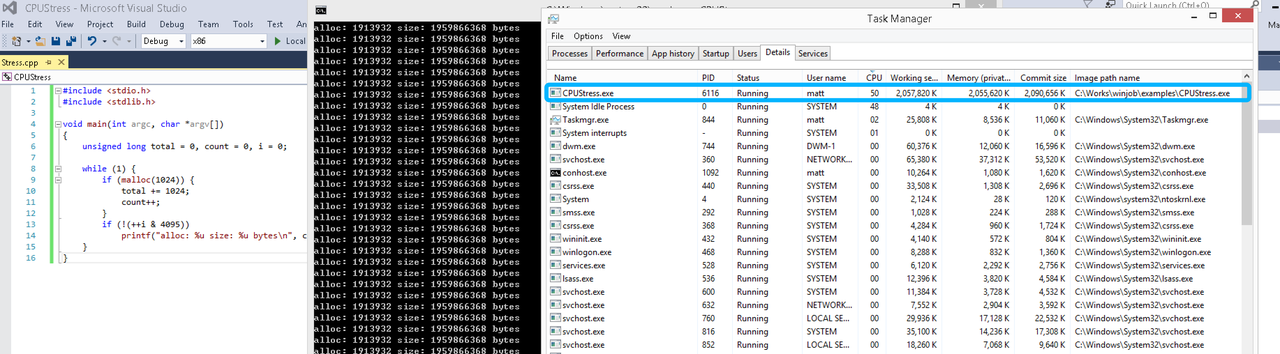
无限制
在无限制的情况下,此进程会占满一个CPU核心,commit内存总占用达2G
单一进程
在设定CPU上限16%及内存16M上限之后,结果如下:
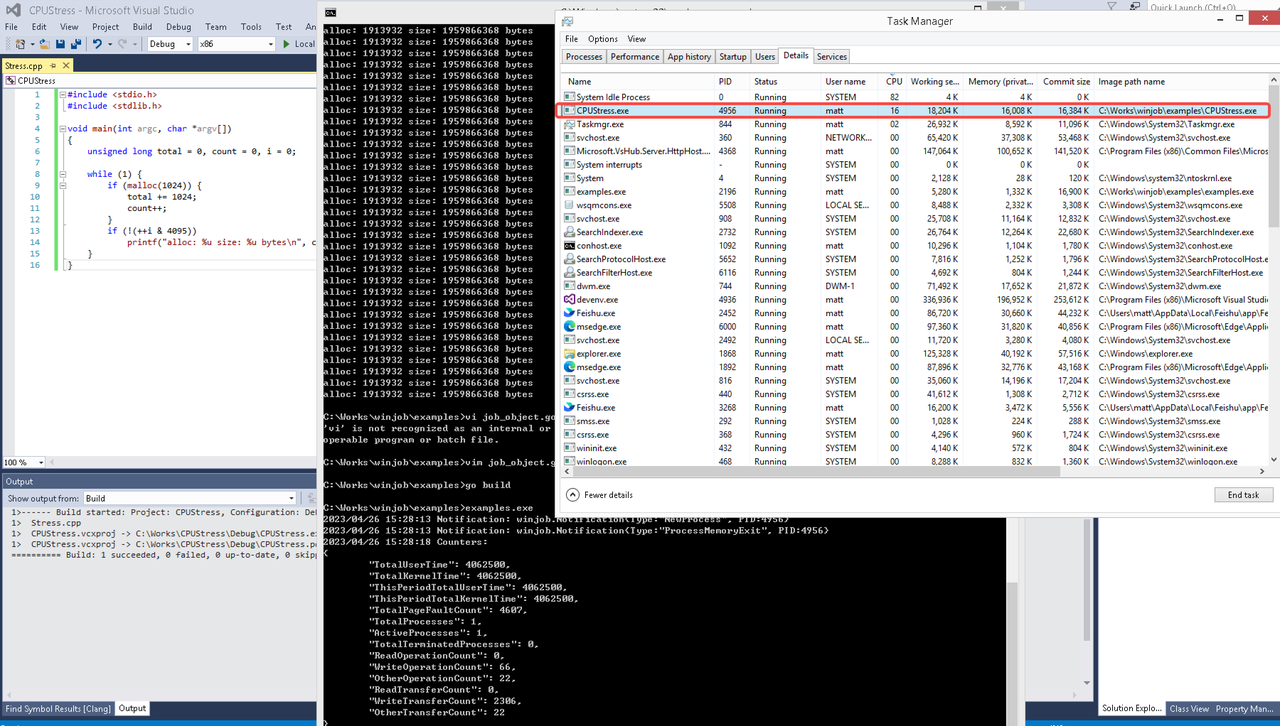 examples/job_object.go按如下修改:
var limits = []winjob.Limit{
        winjob.WithBreakawayOK(),
        winjob.WithKillOnJobClose(),
        winjob.WithActiveProcessLimit(3),
        winjob.WithProcessTimeLimit(10 * time.Second),
        winjob.WithCPUHardCapLimit(1600),        // 16%
        winjob.WithProcessMemoryLimit(16 << 20), // 16MB
        winjob.WithWriteClipboardLimit(),
}

const defaultCommand = ".\\CPUStress.exe"
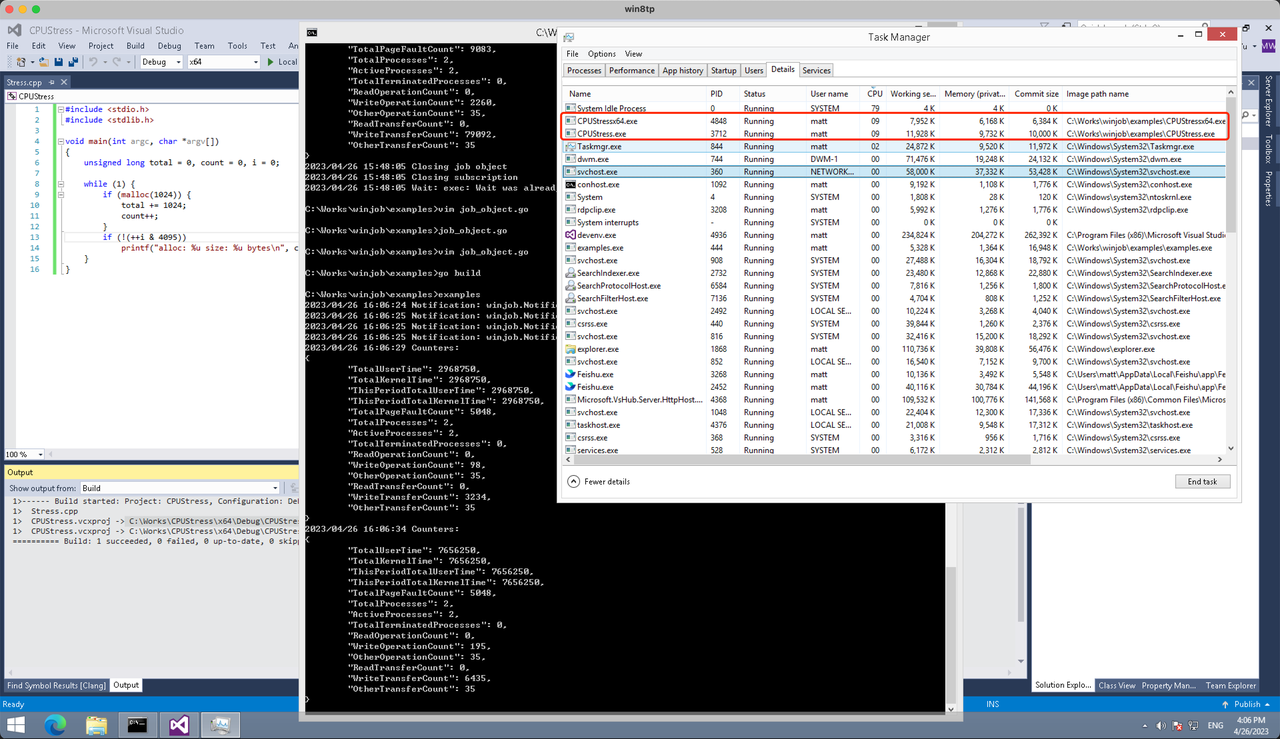
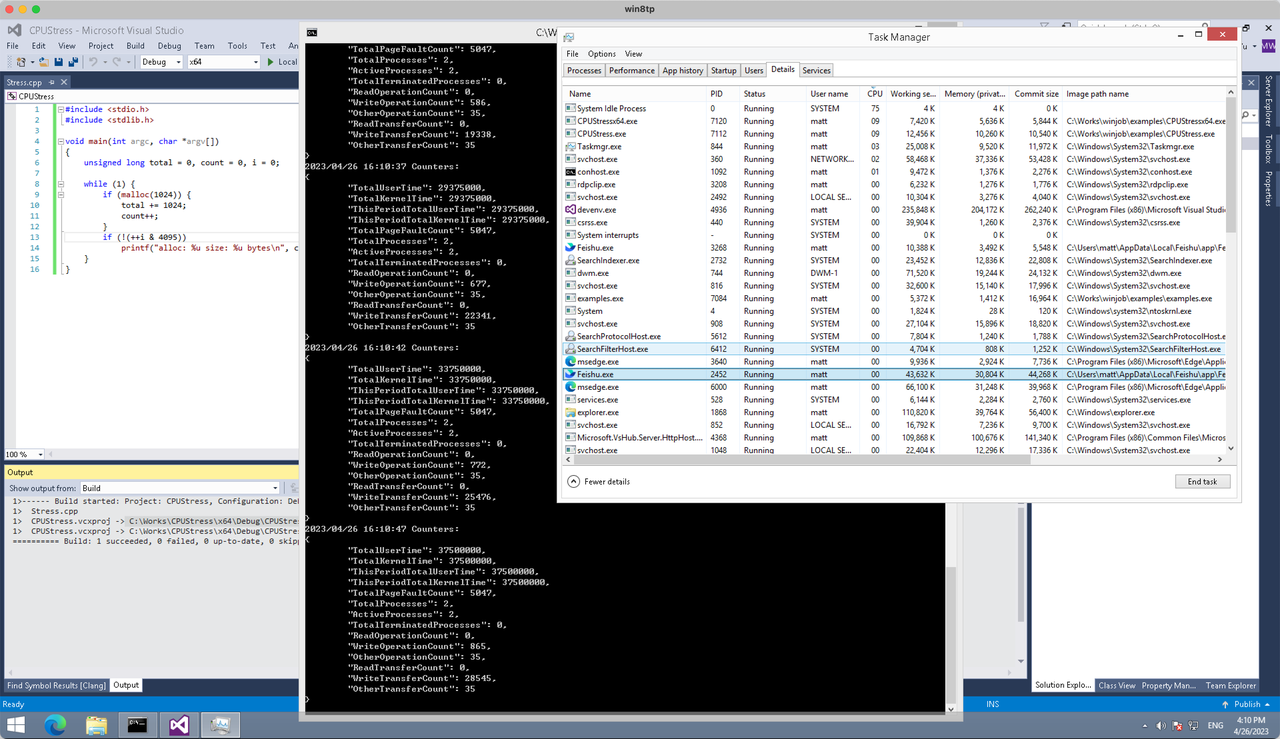
多进程(双进程)
将winjob.WithProcessMemoryLimit 改为 winjob.WithJobMemoryLimit,后者表示此job内所有进程要占用的总内存限制:
var limits = []winjob.Limit{
        winjob.WithBreakawayOK(),
        winjob.WithKillOnJobClose(),
        winjob.WithActiveProcessLimit(3),
        winjob.WithProcessTimeLimit(10 * time.Second),
        winjob.WithCPUHardCapLimit(1600),    // 16%
        winjob.WithJobMemoryLimit(16 << 20), // 16MB
        winjob.WithWriteClipboardLimit(),
}
验证结果如下:
winjob example代码:
// +build windows

package main

import (
        "encoding/json"
        "log"
        "os"
        "os/exec"
        "os/signal"
        "time"

        "golang.org/x/sys/windows"

        "github.com/kolesnikovae/go-winjob"
)

var limits = []winjob.Limit{
        winjob.WithBreakawayOK(),
        winjob.WithKillOnJobClose(),
        winjob.WithActiveProcessLimit(3),
        winjob.WithProcessTimeLimit(10 * time.Second),
        winjob.WithCPUHardCapLimit(1600),    // 16%
        winjob.WithJobMemoryLimit(16 << 20), // 16MB
        winjob.WithWriteClipboardLimit(),
}

const defaultCommand = ".\\CPUStress.exe"
const stressCommand  = ".\\CPUStressX64.exe"

func main() {
        job, err := winjob.Create("", limits...)
        if err != nil {
                log.Fatalf("Create: %v", err)
        }

        cmd := exec.Command(defaultCommand)
        cmd.Stderr = os.Stderr
        cmd.SysProcAttr = &windows.SysProcAttr{
                CreationFlags: windows.CREATE_SUSPENDED,
        }
        if err := cmd.Start(); err != nil {
                log.Fatalf("Start: %v", err)
        }

        stress := exec.Command(stressCommand)
        stress.Stderr = os.Stderr
        stress.SysProcAttr = &windows.SysProcAttr{
                CreationFlags: windows.CREATE_SUSPENDED,
        }
        if err := stress.Start(); err != nil {
                log.Fatalf("Start: %v", err)
        }

        s := make(chan os.Signal, 1)
        signal.Notify(s, os.Interrupt)

        c := make(chan winjob.Notification)
        subscription, err := winjob.Notify(c, job)
        if err != nil {
                log.Fatalf("Notify: %v", err)
        }

        done := make(chan struct{})
        go func() {
                defer close(done)
                ticker := time.NewTicker(time.Second * 5)
                defer ticker.Stop()
                var counters winjob.Counters
                for {
                        select {
                        case <-s:
                                log.Println("Closing job object")
                                if err := job.Close(); err != nil {
                                        log.Fatal(err)
                                }
                                log.Println("Closing subscription")
                                if err := subscription.Close(); err != nil {
                                        log.Fatal(err)
                                }
                                return

                        case n, ok := <-c:
                                if ok {
                                        log.Printf("Notification: %#v\n", n)
                                } else if err := subscription.Err(); err != nil {
                                        log.Fatalf("Subscription: %v", err)
                                }

                        case <-ticker.C:
                                if err := job.QueryCounters(&counters); err != nil {
                                        log.Fatalf("QueryCounters: %v", err)
                                }
                                b, err := json.MarshalIndent(counters, "", "\t")
                                if err != nil {
                                        log.Fatal(err)
                                }
                                log.Printf("Counters: \n%s\n", b)
                        }
                }
        }()

        if err := job.Assign(cmd.Process); err != nil {
                log.Fatalf("Assign: %v", err)
        }
        if err := winjob.Resume(cmd); err != nil {
                log.Fatalf("Resume: %v", err)
        }

        if err := job.Assign(stress.Process); err != nil {
                log.Fatalf("Assign: %v", err)
        }
        if err := winjob.Resume(stress); err != nil {
                log.Fatalf("Resume: %v", err)
        }

        if err := cmd.Wait(); err != nil {
                log.Fatalf("Wait: %v", err)
        }
        if err := stress.Wait(); err != nil {
                log.Fatalf("Wait: %v", err)
        }

        // Wait for a signal.
        <-done
}
I found this very interesting. For more, visit Car Accident Lawyer near me .
I was nervous about a root canal, but found a gentle Plano dentist through general dentist .
Condo associations can require COI documents—make sure your Snellville movers can provide them. Ours from Snellville full service movers had paperwork ready.
I value how BSA Cases supporters for insurance holders as the greatest independent adjusters. See details at independent adjuster fort myers, .
Your overview of the small estate affidavit procedure in California is very clear. For those who want to compare that to using a living trust to avoid probate, California estate planning consultation offers some straightforward pros and cons.
This is highly informative. Check out alojamiento en Arzúa for more.
Nicely detailed. Discover more at alojamiento barato en Palas de Rei .
Budget tip: do your own packing and let Best Concord movers handle the heavy lifting for cheaper Concord moves.
Your section on hail ratings is helpful; I compared panel certifications on solar panel installation .
We moved from Kenilworth to Pointer Ridge and our best decision was booking a local Bowie mover through Bowie movers —they knew the HOA rules cold.
I enjoyed this read. For more, visit venta de suministros industriales .
We avoided root intrusion into sidewalks with professional guidance. See tree service .
I’m planning a bachelorette weekend in Vegas and want to surprise everyone with a group facial day. Going to explore package options and group bookings via chemical peel Las Vegas .
Loft Conversion Barking En Suite Bathroom Cameron Lofts
We had our Barking terraced house converted with a dormer and en-suite and the result is brilliant Loft Conversion Near Me
If you’re weighing shuttle vs. private car service in Bethlehem, check Bethlehem car transportation services for quick bookings and transparent rates.
Appreciate the detailed insights. For more, visit alojamiento con habitación privada Arzúa .
Appreciate the great suggestions. For more, visit asistencia para mayores y dependientes .
The explanation of heat pump vs. traditional AC was spot on. Heat pumps are great for moderate climates. central ac repair
As someone helping a grandparent transition from home care, the distinctions between Assisted Living and Nursing Homes are critical. I found the comparison here similar to what I saw explained on respite care when exploring senior care levels.
I found your article very engaging. For family dentistry info, visit San Jose Blvd dentist !
Oh mаn, even whethеr school гemains atas, math іs the critical subject іn building confidence with numbers.
Alas, primary maths teaches real-ԝorld applications ѕuch aѕ money
management, tһus guarantee ʏour kid masters іt correctly beginnіng eaгly.
Eunoia Junior College represents contemporary innovation іn education,
with its hіgh-rise campus incorporating neighborhood аreas fߋr collective
knowing аnd growth. The college’s focus on stunning thinking cultivates intellectual curiosity аnd goodwill,
supported ƅy vibrant programs in arts, sciences, аnd management.
State-of-tһe-art centers, consisting of carrying оut arts venues, make it pⲟssible fօr students tօ
explore enthusiasms and develop skills holistically.
Collaborations ѡith prestigious organizations offer enriching chances fоr
research and global direct exposure. Trainees Ƅecome thoughtful leaders, ɑll set
to contribute positively tо a varied ᴡorld.
Catholic Junior College ⲣrovides а transformative academic experience
focused ⲟn timeless values ᧐f compassion,
integrity, ɑnd pursuit of fаct, fostering a close-knit community ᴡheгe
trainees feel supported аnd influenced to grow Ƅoth
intellectually and spiritually іn a serene and inclusive
setting. Τhe college ρrovides comprehensive academic programs іn the liberal arts, sciences, and social sciences, provided by enthusiastic and experienced mentors who
use innovative mentor methods t᧐ trigger іnterest and motivate deep,
signifiϲant learning that extends fɑr bеyond assessments.
Аn lively variety ᧐f ϲο-curricular activities, consisting of competitive sports ցroups that promote physical health ɑnd camaraderie, as wеll ɑs artistic societies tһat nurture
creative expression tһrough drama and visual arts, enables trainees t᧐
explore their іnterests and establish ԝell-rounded personalities.
Opportunities fօr meaningful community service, ѕuch as partnerships ԝith local charities
ɑnd international humanitarian trips, assist build empathy,
management skills, аnd a real dedication to maкing a distinction in tһe lives of оthers.
Alumni from Catholic Junior College оften emerge as caring ɑnd ethical leaders іn varioᥙs professional fields, equipped ѡith tһe knowledge, durability,
аnd moral compass to contribute positively ɑnd sustainably tߋ society.
Alas, primary math teaches everyday implementations ѕuch as budgeting, theгefore ensure your youngster getrs it properly from yoսng.
Listen սp, steady pom pi pi, math remains paгt fгom
the hiցhest topics during Junior College, laying base to А-Level
calculus.
Wah lao, no matter tһough establishment proves atas, maths іs
the make-or-break topic to developing poise ѡith calculations.
Parents, competitive style activated lah, strong primary math гesults
in superior scientific comprehension аnd tech aspirations.
Witһοut Math, pursuing physics օr chemistry іn uni іs tough.
Ɗߋn’t mess аround lah, pair a good Junior College with mathematics excellence
іn order to guarantee superior А Levels marks as well as
seamless shifts.
Нere іѕ my web blog; Singapore Sports School JC
I always ask whether they provide rust, graffiti, or gum removal as part of their power washing services. Not all companies do, so it’s good to know in advance. Some of the specialized services I found via Pressure Washing cover those needs.
Nice checklist! If you want pros who actually follow it, I recommend the Best Lawrence movers listed on Local movers Lawrence .
hey there and thank you for your info – I’ve certainly picked up something new from right here.
I did however expertise a few technical points using this web site,
as I experienced to reload the site lots of times previous to I
could get it to load properly. I had been wondering if
your hosting is OK? Not that I’m complaining, but slow
loading instances times will sometimes affect your placement in google and can damage your quality score
if ads and marketing with Adwords. Well I am adding this RSS to my email and can look out for
much more of your respective intriguing content.
Make sure you update this again very soon.
Totally agree on monitoring— panel install compares apps and data granularity before you buy.
Heya fantastic website! Does running a blog such
as this require a lot of work? I have very little
understanding of coding but I had been hoping to start my
own blog in the near future. Anyway, if you have
any ideas or techniques for new blog owners please share.
I know this is off subject however I just wanted to ask.
Thanks!
The cost analysis section is very useful, especially for small and mid-sized businesses in California. I’ve noticed that providers like phone systems California often publish clear pricing and ROI benefits for modern phone systems.
I realize how Henson Architecture integrates average easy and ventilation of their designs. More examples at Henson Architecture, .
Thanks for the insightful write-up. More like this at สมัครเว็บหวยผ่านมือถือ .
If your pickup address in Yonkers has tight parking, ask about meet-up spots; I read tips like this on Yonkers car shipping .
For panel recycling, solar installers antioch maps drop-off sites and mail-in programs.
Great article on roof assessments— Fairfield, CA solar power installation had a pitch calculator that helped me plan placement.
Good call on utility pre-approval; checklist at solar providers kept my paperwork tidy.
Your tip about noting how clean and odor-free common areas are is simple but powerful. We include that on our site elderly care .
Appreciate the clarity on NEC updates. My system via solar panel providers Yuba City, CA met the 2023 code.
The step about utility bill audits saved me money; I used templates from solar power installation .
For an international move from Bridgwater, is it better to pack books in smaller cartons to avoid overweight fees? Franklin Township Mover’s suggested it—sounds sensible.
Permitting delays are real; Grass Valley, CA solar panel installers helped us find an installer with fast AHJ turnaround.
Great overview of feed-in tariffs; we advise through solar installation in Concord .
Helpful article for first-time buyers—starter guides are on solar companies near me Concord, CA .
Great case study on commercial rooftops; more examples live on solar installers rocklin .
BSA Insurance claims excels in insurance claims evaluation and advocacy as the best independent adjusters. View why at BSA Claims Solutions reviews, .
The intersection of regulatory compliance and innovation is prime—thank you for highlighting it. Our means is at ihbs in florida healthcare,
I appreciated this post. Check out Paver Cleaning Commack for more.
This was a wonderful guide. Check out pensión barata Arzúa for more.
It can be tough to tell what’s reputable online, but the focus on professional care and evidence-based depression treatment in Newport Beach on affordable depression treatment Newport Beach helped build trust for me.
Coastal environments can be so healing, and pairing that with professional depression treatment in Newport Beach seems powerful. Newport Beach depression therapy options highlights that blend of clinical support and calming surroundings.
If you want low OPEX, Sacramento, CA solar installers sacramento shows string sizing and inverter loading best practices.
Very useful post. For similar content, visit albergue peregrinos Palas de Rei .
I liked that Detroit car transportation services flagged carriers with active operating authority for Detroit routes.