Windows自身没有提供类似Linux cgroup的能力来限制进程或进程组的资源占用,进程CPU/IO/内存/网络等资源的控制只能由自己实现。目前已有第三方的实现,主要是限制进程CPU的占用,如文档 < 21 Best Ways to Limit the CPU Usage of a Process > 所描述的BES,Process Tamer等软件。自Windows 8及Server 2012开始Windows系统有提供以job为单位的CPU占用及内存上限设置,之前的版本则只能以进程或线程为单位进行限制。
进程CPU占用限制方案
即时轮询系统所有进程(线程)的CPU占用,当发现所设定进程有超标时强制暂停进程所有线程的执行,然后在适当的时机再恢复执行。其中所涉及技术点:
进程CPU占用查询 GetProcessTimes
BOOL GetProcessTimes(
  [in]  HANDLE     hProcess,
  [out] LPFILETIME lpCreationTime,
  [out] LPFILETIME lpExitTime,
  [out] LPFILETIME lpKernelTime,
  [out] LPFILETIME lpUserTime
);
此函数可以获取进程从创建至当前的总运行时间及总的CPU时间,(KernelTime + UserTime) < 系统CPU数 * (当前时间 - CreationTime)
线程CPU占用查询 GetThreadTimes
BOOL GetThreadTimes(
  [in]  HANDLE     hThread,
  [out] LPFILETIME lpCreationTime,
  [out] LPFILETIME lpExitTime,
  [out] LPFILETIME lpKernelTime,
  [out] LPFILETIME lpUserTime
);
QueryThreadCycleTime可以提供更精准的CPU时间数据,单位为CPU时钟周期
BOOL QueryThreadCycleTime(
  [in]  HANDLE   ThreadHandle,
  [out] PULONG64 CycleTime
);
线程暂停及恢复
Windows平台没有提供暂停整个进程的支持函数,只能以线程为单位来操作,即SuspendThread及ResumeThread:
DWORD SuspendThread(
  [in] HANDLE hThread
);
DWORD ResumeThread(
  [in] HANDLE hThread
);
CPU亲和性设置: SetProcessAffinityMask
BOOL SetProcessAffinityMask(
  [in] HANDLE    hProcess,
  [in] DWORD_PTR dwProcessAffinityMask
);
此函数可以限定进程及其所有线程所能使用的CPU,故一定程序上亦限定了进程最大的系统CPU占用率。
DWORD_PTR SetThreadAffinityMask(
  [in] HANDLE    hThread,
  [in] DWORD_PTR dwThreadAffinityMask
);
此函数可单独限制特定线程的CPU亲和性。
进程优先级设置: SetPriorityClass
优先级解决的是优先运行及退让CPU的问题,本质上并不能限定CPU占用,只是优先级高于当前任务的忙碌的时候,当前进程会主动退让CPU 线程优先级设置:SetThreadPriority
BOOL SetThreadPriority(
  [in] HANDLE hThread,
  [in] int    nPriority
);
Job Objects
Windows系统提供了Job的概念用以管理多个进程,可以限制Job对象内所有进程及期线程的CPU核心占用、CPU占用及内存分配上限等,均通过SetInformationJobObject来实现,具体的CPU限制由JOBOBJECT_CPU_RATE_CONTROL_INFORMATION管理,内存限制则由JOBOBJECT_EXTENDED_LIMIT_INFORMATION来管理。
BOOL SetInformationJobObject(
  [in] HANDLE             hJob,
  [in] JOBOBJECTINFOCLASS JobObjectInformationClass,
  [in] LPVOID             lpJobObjectInformation,
  [in] DWORD              cbJobObjectInformationLength
);需要注意的是CPU占用设置只有Windows 8及Server 2012之后的版本有效。
CPU Sets
此部分只限定了CPU Affinity属性
实验验证
可以直接利用开源项目go-winjob验证,验证系统Windows 8 x64,go-winjob git repo: https://github.com/kolesnikovae/go-winjob
验证程序
#include <stdio.h>
#include <stdlib.h>

void main(int argc, char *argv[])
{
        unsigned long total = 0, count = 0, i = 0;

        while (1) {
                if (malloc(1024)) {
                        total += 1024;
                        count++;
                }
                if (!(++i & 4095))
                        printf("alloc: %u size: %u bytes\n", count, total);
    }
}
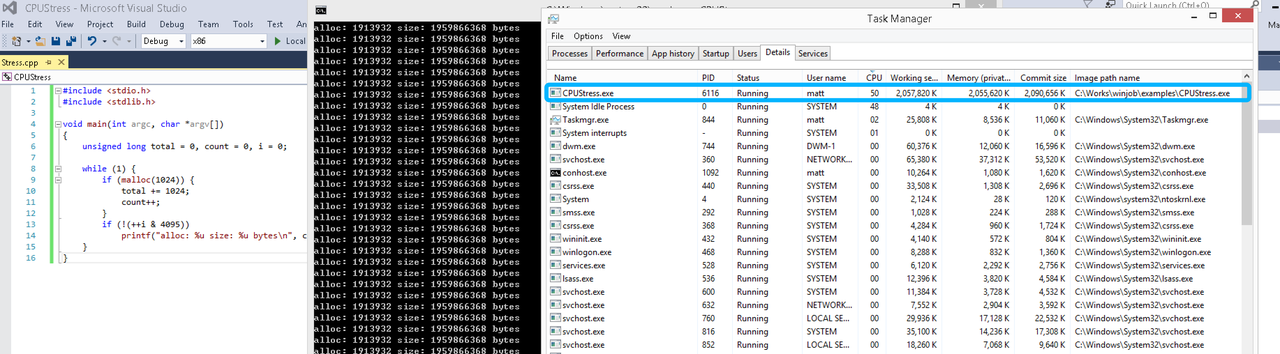
无限制
在无限制的情况下,此进程会占满一个CPU核心,commit内存总占用达2G
单一进程
在设定CPU上限16%及内存16M上限之后,结果如下:
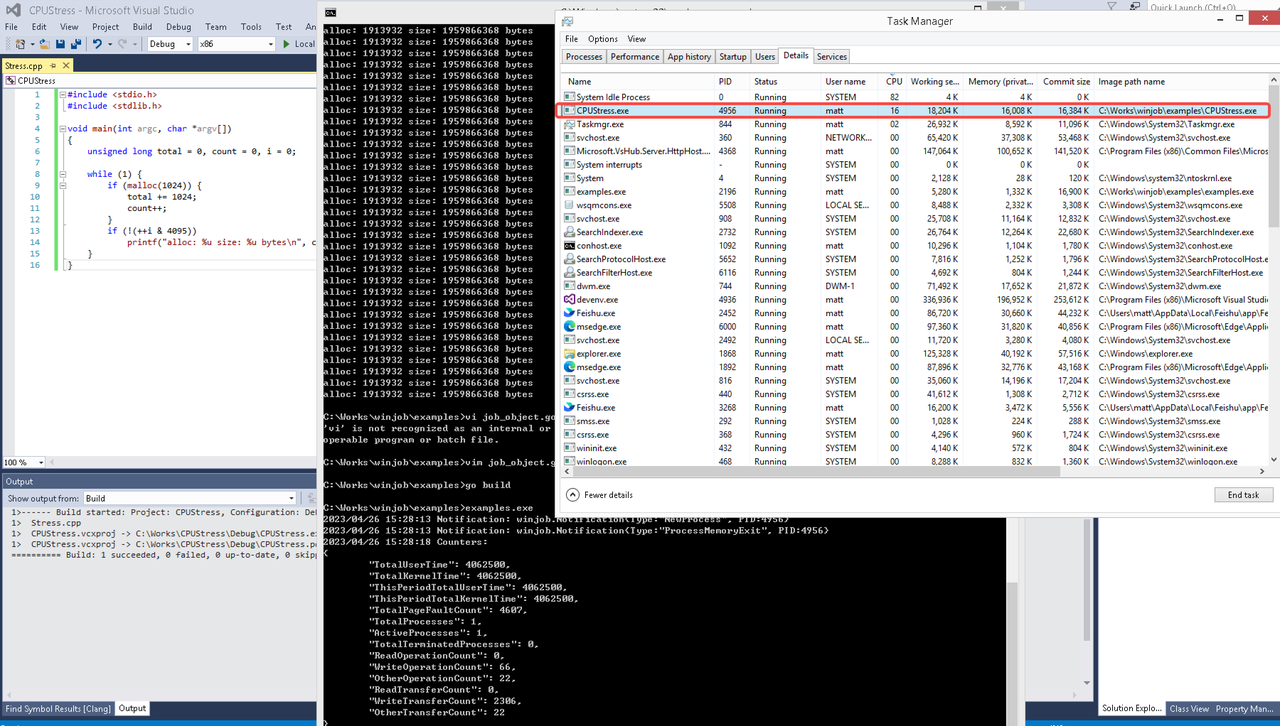 examples/job_object.go按如下修改:
var limits = []winjob.Limit{
        winjob.WithBreakawayOK(),
        winjob.WithKillOnJobClose(),
        winjob.WithActiveProcessLimit(3),
        winjob.WithProcessTimeLimit(10 * time.Second),
        winjob.WithCPUHardCapLimit(1600),        // 16%
        winjob.WithProcessMemoryLimit(16 << 20), // 16MB
        winjob.WithWriteClipboardLimit(),
}

const defaultCommand = ".\\CPUStress.exe"
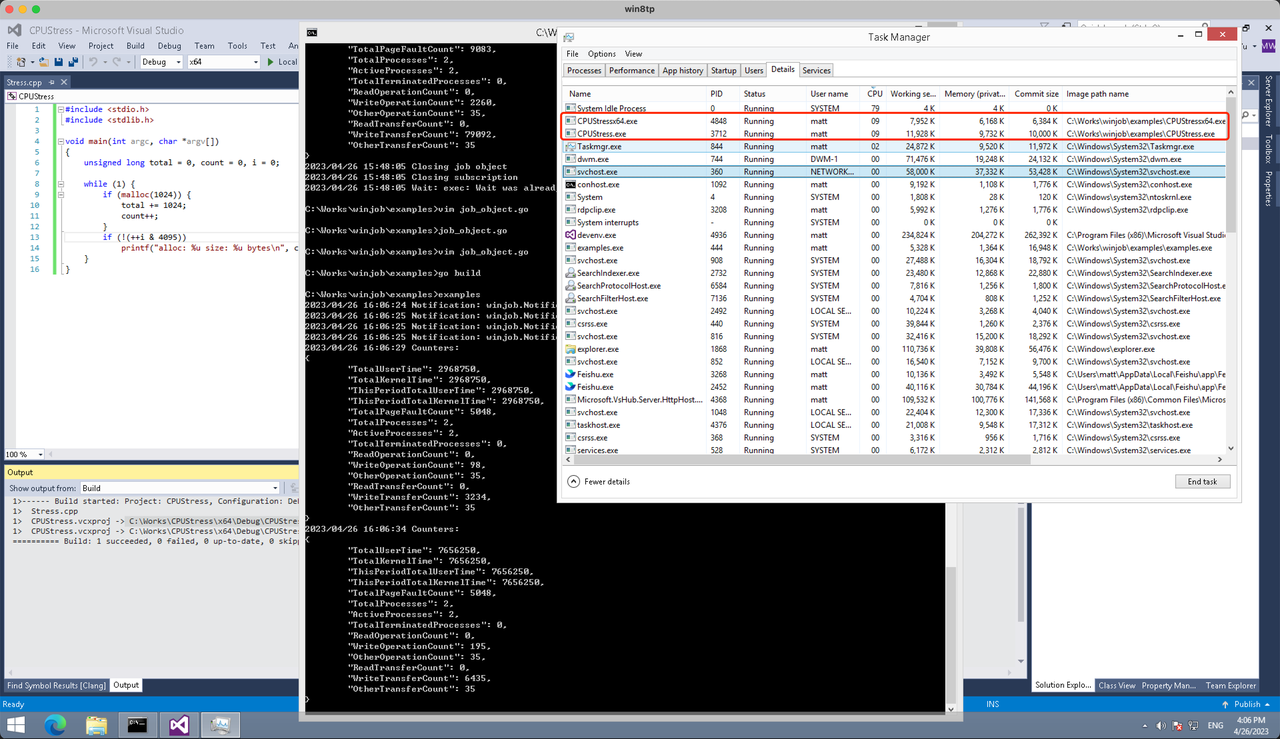
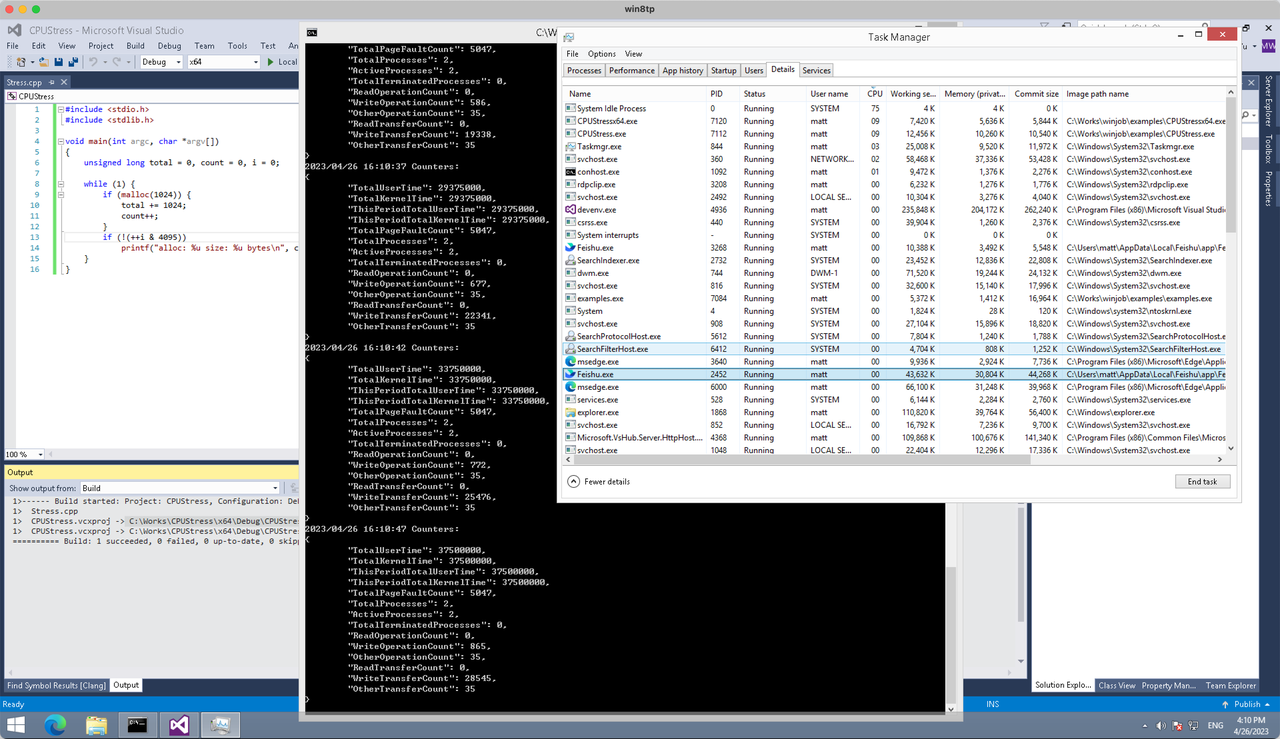
多进程(双进程)
将winjob.WithProcessMemoryLimit 改为 winjob.WithJobMemoryLimit,后者表示此job内所有进程要占用的总内存限制:
var limits = []winjob.Limit{
        winjob.WithBreakawayOK(),
        winjob.WithKillOnJobClose(),
        winjob.WithActiveProcessLimit(3),
        winjob.WithProcessTimeLimit(10 * time.Second),
        winjob.WithCPUHardCapLimit(1600),    // 16%
        winjob.WithJobMemoryLimit(16 << 20), // 16MB
        winjob.WithWriteClipboardLimit(),
}
验证结果如下:
winjob example代码:
// +build windows

package main

import (
        "encoding/json"
        "log"
        "os"
        "os/exec"
        "os/signal"
        "time"

        "golang.org/x/sys/windows"

        "github.com/kolesnikovae/go-winjob"
)

var limits = []winjob.Limit{
        winjob.WithBreakawayOK(),
        winjob.WithKillOnJobClose(),
        winjob.WithActiveProcessLimit(3),
        winjob.WithProcessTimeLimit(10 * time.Second),
        winjob.WithCPUHardCapLimit(1600),    // 16%
        winjob.WithJobMemoryLimit(16 << 20), // 16MB
        winjob.WithWriteClipboardLimit(),
}

const defaultCommand = ".\\CPUStress.exe"
const stressCommand  = ".\\CPUStressX64.exe"

func main() {
        job, err := winjob.Create("", limits...)
        if err != nil {
                log.Fatalf("Create: %v", err)
        }

        cmd := exec.Command(defaultCommand)
        cmd.Stderr = os.Stderr
        cmd.SysProcAttr = &windows.SysProcAttr{
                CreationFlags: windows.CREATE_SUSPENDED,
        }
        if err := cmd.Start(); err != nil {
                log.Fatalf("Start: %v", err)
        }

        stress := exec.Command(stressCommand)
        stress.Stderr = os.Stderr
        stress.SysProcAttr = &windows.SysProcAttr{
                CreationFlags: windows.CREATE_SUSPENDED,
        }
        if err := stress.Start(); err != nil {
                log.Fatalf("Start: %v", err)
        }

        s := make(chan os.Signal, 1)
        signal.Notify(s, os.Interrupt)

        c := make(chan winjob.Notification)
        subscription, err := winjob.Notify(c, job)
        if err != nil {
                log.Fatalf("Notify: %v", err)
        }

        done := make(chan struct{})
        go func() {
                defer close(done)
                ticker := time.NewTicker(time.Second * 5)
                defer ticker.Stop()
                var counters winjob.Counters
                for {
                        select {
                        case <-s:
                                log.Println("Closing job object")
                                if err := job.Close(); err != nil {
                                        log.Fatal(err)
                                }
                                log.Println("Closing subscription")
                                if err := subscription.Close(); err != nil {
                                        log.Fatal(err)
                                }
                                return

                        case n, ok := <-c:
                                if ok {
                                        log.Printf("Notification: %#v\n", n)
                                } else if err := subscription.Err(); err != nil {
                                        log.Fatalf("Subscription: %v", err)
                                }

                        case <-ticker.C:
                                if err := job.QueryCounters(&counters); err != nil {
                                        log.Fatalf("QueryCounters: %v", err)
                                }
                                b, err := json.MarshalIndent(counters, "", "\t")
                                if err != nil {
                                        log.Fatal(err)
                                }
                                log.Printf("Counters: \n%s\n", b)
                        }
                }
        }()

        if err := job.Assign(cmd.Process); err != nil {
                log.Fatalf("Assign: %v", err)
        }
        if err := winjob.Resume(cmd); err != nil {
                log.Fatalf("Resume: %v", err)
        }

        if err := job.Assign(stress.Process); err != nil {
                log.Fatalf("Assign: %v", err)
        }
        if err := winjob.Resume(stress); err != nil {
                log.Fatalf("Resume: %v", err)
        }

        if err := cmd.Wait(); err != nil {
                log.Fatalf("Wait: %v", err)
        }
        if err := stress.Wait(); err != nil {
                log.Fatalf("Wait: %v", err)
        }

        // Wait for a signal.
        <-done
}
Many people assume “all senior care is the same,” but your article makes it clear why memory care is more specialized. We’ve found the same misunderstanding and address it on senior care .
It’s interesting how Independent Living is more about lifestyle and amenities rather than medical support. This article reflects what I’ve learned while researching on elderly care about active retirement options.
As an adult child living in another state, the clarity here helps me talk more confidently with my siblings. We’ve been using assisted living to compare communities and learn what each level of care actually offers.
I’ll be sharing this guide with clients and including it as a recommended resource on senior care .
For shade from chimneys, solar power companies near me placed optimizers only where needed.
подробнее здесь [url=https://retrocasino-mobile.com]casino retro[/url]
Zera’s Latin Food is my go-to when I want variety; I created a mini tasting map and added it on Zera’s Latin Food .
Curtailment risk is real for large sites; solar power installation near me Davis, CA explains zero-export controls and utility settings.
Η ανάλυσή σας για τις διαφορές μεταξύ αυτόματων και ανθρώπινων Μεταφράσεων είναι πολύ εύστοχη. Στο μετάφραση πιστοποιητικών γέννησης αξιοποιούν και τα δύο, με τελικό έλεγχο από επαγγελματίες.
Pretty! This has been a really wonderful post. Thank you for supplying this information.
Appreciated the real production vs. modeled chart; Tracy, CA solar installation tracy calibrates forecasts after month one.
Insurance agents often speak in jargon, so I appreciate any guide that breaks it down in plain language Cheap Box Truck Insurance
The before-and-after photos in this article are impressive. If you’re in Irvine CA and your pond or fountain doesn’t look this good, you might want to reach out to Fountain And Ponds Repair Irvine CA for professional repairs and cleaning.
It is the best time to make some plans for the future and
it’s time to be happy. I’ve read this post and if I could I
wish to suggest you few interesting things or advice.
Maybe you could write next articles referring to this article.
I want to read more things about it!
Your point about cultural fit and personal values is often overlooked. That’s something we emphasize strongly on respite care .
It’s encouraging to see a growing focus on small, home-style assisted living, where the goal is to support independence in everyday tasks for as long as possible. assisted living has great information about this trend.
On rainy days the burrito truck parks under the overpass, which makes it the easiest quick bite without getting soaked. food truck latin cuisine spring tx Zera’s Latin Food
There’s a lot of confusion around the terms “locked unit” vs “secured neighborhood.” Your explanation helps clarify that, and we expand on terminology on respite care .
I’ve seen more creative, individualized behavior strategies in small homes than in large institutions. Staff actually have time to observe and adapt. I first looked into this through memory care .
This helped me understand the para-medical aesthetics technician role. Found a detailed guide on medical esthetics school .
Personalized support with activities of daily living is often the deciding factor in quality of life. Small homes like the ones highlighted by elderly care can really bridge that gap.
Nicely done! Find more at Car Accident Lawyer West Ocala FL .
В этой статье рассматривается комплексный подход к избавлению от зависимости. Читатель узнает, как сочетание физического, психологического и духовного восстановления помогает достичь стойкого выздоровления.
Ознакомиться с теоретической базой – [url=https://gorodkirov.ru/news/vyvod-iz-zapoya-put-k-zdorovoj-zhizni/]наркологическая клиника в калининграде[/url]
It’s helpful that you mention warranty on both repair and paint. Our contractor, discovered through drywall repair denver co , gave us a written guarantee that they’d fix any peeling or cracking within a year.
Kurallara saygılı, zaman yönetimi iyi olan profiller bulmak zor; bu noktada özel escort Diyarbakır düzenli güncellemeleriyle öne çıkıyor.
This was highly useful. For more, visit polígono industrial Campollano .
Hello there, just became aware of your blog through Google, and found
that it’s truly informative. I’m gonna watch out for brussels.
I’ll be grateful if you continue this in future. Numerous people will be benefited from your writing.
Cheers!
I’m so glad to see online bingo making a comeback. I really love jumping into those quick 10-minute rounds when I’m finally winding down at night after a long day. It’s such a nice way to decompress without needing to focus too much Additional reading
I’m impressed by how approachable the Latin dishes are here. Zera’s Latin Food
My koi pond filter kept clogging, and it was stressing the fish. A pond service I located through Fountain And Ponds Repair Irvine CA in Irvine CA diagnosed the problem and upgraded the filtration system, which made a huge difference.
This was highly educational. For more, visit pensión acogedora Arzúa .
I’ve recently had a huge problem with pests in my home, and I didn’t know where to turn Pest Control Near Me
Injury lawyers not only help with claims but also provide support during challenging times—don’t hesitate to reach out! More info at Wasilla Car accident Attorney .
I enjoyed this read. For more, visit personas mayores y dependientes .
Этот медицинский обзор сосредоточен на последних достижениях, которые оказывают влияние на пациентов и медицинскую практику. Мы разбираем инновационные методы лечения и исследований, акцентируя внимание на их значимости для общественного здоровья. Читатели узнают о свежих данных и их возможном применении.
Выяснить больше – [url=https://paracetamol.pro/novosti/osnovnye-printsipy-lecheniya/]кодирование от алкоголизма в Костроме[/url]
I’m so glad bingo is making a comeback online! I’ve really been enjoying the 30-ball games lately because they are so fast-paced. It’s the perfect way for me to wind down at night after the kids are finally asleep https://johnnywrbo401.wpsuo.com/why-do-people-say-bingo-is-structurally-simple-a-deep-dive-into-the-mechanics-of-a-cultural-icon
I’ve learned to schedule drywall repair and painting between tenants in my rentals. I coordinate with local pros I find on drywall repair denver co so we can handle everything in a tight turnaround window.
A motivating discussion is definitely worth comment.
There’s no doubt that that you need to write more about this subject matter,
it might not be a taboo matter but usually people don’t discuss these subjects.
To the next! Kind regards!!
hello!,I love your writing so so much! share we be in contact more about your article on AOL?
I need an expert in this house to resolve my problem. Maybe that is you!
Taking a look ahead to look you.
Anxiety, sleep issues, and mood changes are common after traumatic events. Counseling and support groups can aid recovery. Claims should include documented psychological impacts. wrongful injury attorney
I completely agree that we need to prioritize beach conservation to save these fragile habitats. It is interesting to look back at the research data starting in 1962 because it shows how much our coastline has changed since then Go to this site
Hi! Someone in my Myspace group shared this website with us so I
came to check it out. I’m definitely enjoying the information. I’m bookmarking and will be tweeting this to my followers!
Superb blog and amazing style and design.
This is quite enlightening. Check out Paver Cleaning & Sealing Pros of Dix Hills for more.
I’m so glad to see online bingo making a comeback! I actually love jumping into those 1p ticket games while I’m winding down at night before bed. It’s a great way to relax without needing to focus too hard after a long day Homepage
I have been playing at live dealer casinos for a few months now, and I definitely feel much more comfortable knowing I can actually see the cards being dealt in real time https://wiki-view.win/index.php/Live_Baccarat_on_Mobile:_Does_it_Actually_Run_Smoothly%3F
Για μικρές ιδιωτικές εκδηλώσεις σε κτήματα, η ενοικίαση λίγων χημικών τουαλετών είναι πιο οικονομική από την κατασκευή υποδομών. Περισσότερα παραδείγματα κόστους στο εξοπλισμός χημικών εργοταξίου .
It feels strange to see how gaming terminology dominates our daily chats. I recently noticed a colleague use “GG” after finishing a difficult project report during a Zoom meeting. These gaming terms bridge gaps between different online circles so quickly https://delta-wiki.win/index.php/Discord_Servers:_A_Non-Gamer%E2%80%99s_Guide_to_Digital_Hangouts
I find streaks and badges in apps pretty motivating, but I actually disagree that they always improve the experience. Sometimes they just feel like chores instead of fun Helpful resources
It is really cool to see mobile gaming taking off like this. I honestly spend so much of my morning commute playing on my phone now. The fast loading times are a total game changer because I can hop in for a quick round before my stop slots website mobile
This article really hit home for me. I have always struggled with overspending on random weekend outings without realizing how quickly it adds up. I really love the idea of setting a fixed monthly fun limit Click for more