Windows自身没有提供类似Linux cgroup的能力来限制进程或进程组的资源占用,进程CPU/IO/内存/网络等资源的控制只能由自己实现。目前已有第三方的实现,主要是限制进程CPU的占用,如文档 < 21 Best Ways to Limit the CPU Usage of a Process > 所描述的BES,Process Tamer等软件。自Windows 8及Server 2012开始Windows系统有提供以job为单位的CPU占用及内存上限设置,之前的版本则只能以进程或线程为单位进行限制。
进程CPU占用限制方案
即时轮询系统所有进程(线程)的CPU占用,当发现所设定进程有超标时强制暂停进程所有线程的执行,然后在适当的时机再恢复执行。其中所涉及技术点:
进程CPU占用查询 GetProcessTimes
BOOL GetProcessTimes(
  [in]  HANDLE     hProcess,
  [out] LPFILETIME lpCreationTime,
  [out] LPFILETIME lpExitTime,
  [out] LPFILETIME lpKernelTime,
  [out] LPFILETIME lpUserTime
);
此函数可以获取进程从创建至当前的总运行时间及总的CPU时间,(KernelTime + UserTime) < 系统CPU数 * (当前时间 - CreationTime)
线程CPU占用查询 GetThreadTimes
BOOL GetThreadTimes(
  [in]  HANDLE     hThread,
  [out] LPFILETIME lpCreationTime,
  [out] LPFILETIME lpExitTime,
  [out] LPFILETIME lpKernelTime,
  [out] LPFILETIME lpUserTime
);
QueryThreadCycleTime可以提供更精准的CPU时间数据,单位为CPU时钟周期
BOOL QueryThreadCycleTime(
  [in]  HANDLE   ThreadHandle,
  [out] PULONG64 CycleTime
);
线程暂停及恢复
Windows平台没有提供暂停整个进程的支持函数,只能以线程为单位来操作,即SuspendThread及ResumeThread:
DWORD SuspendThread(
  [in] HANDLE hThread
);
DWORD ResumeThread(
  [in] HANDLE hThread
);
CPU亲和性设置: SetProcessAffinityMask
BOOL SetProcessAffinityMask(
  [in] HANDLE    hProcess,
  [in] DWORD_PTR dwProcessAffinityMask
);
此函数可以限定进程及其所有线程所能使用的CPU,故一定程序上亦限定了进程最大的系统CPU占用率。
DWORD_PTR SetThreadAffinityMask(
  [in] HANDLE    hThread,
  [in] DWORD_PTR dwThreadAffinityMask
);
此函数可单独限制特定线程的CPU亲和性。
进程优先级设置: SetPriorityClass
优先级解决的是优先运行及退让CPU的问题,本质上并不能限定CPU占用,只是优先级高于当前任务的忙碌的时候,当前进程会主动退让CPU 线程优先级设置:SetThreadPriority
BOOL SetThreadPriority(
  [in] HANDLE hThread,
  [in] int    nPriority
);
Job Objects
Windows系统提供了Job的概念用以管理多个进程,可以限制Job对象内所有进程及期线程的CPU核心占用、CPU占用及内存分配上限等,均通过SetInformationJobObject来实现,具体的CPU限制由JOBOBJECT_CPU_RATE_CONTROL_INFORMATION管理,内存限制则由JOBOBJECT_EXTENDED_LIMIT_INFORMATION来管理。
BOOL SetInformationJobObject(
  [in] HANDLE             hJob,
  [in] JOBOBJECTINFOCLASS JobObjectInformationClass,
  [in] LPVOID             lpJobObjectInformation,
  [in] DWORD              cbJobObjectInformationLength
);需要注意的是CPU占用设置只有Windows 8及Server 2012之后的版本有效。
CPU Sets
此部分只限定了CPU Affinity属性
实验验证
可以直接利用开源项目go-winjob验证,验证系统Windows 8 x64,go-winjob git repo: https://github.com/kolesnikovae/go-winjob
验证程序
#include <stdio.h>
#include <stdlib.h>

void main(int argc, char *argv[])
{
        unsigned long total = 0, count = 0, i = 0;

        while (1) {
                if (malloc(1024)) {
                        total += 1024;
                        count++;
                }
                if (!(++i & 4095))
                        printf("alloc: %u size: %u bytes\n", count, total);
    }
}
无限制
在无限制的情况下,此进程会占满一个CPU核心,commit内存总占用达2G
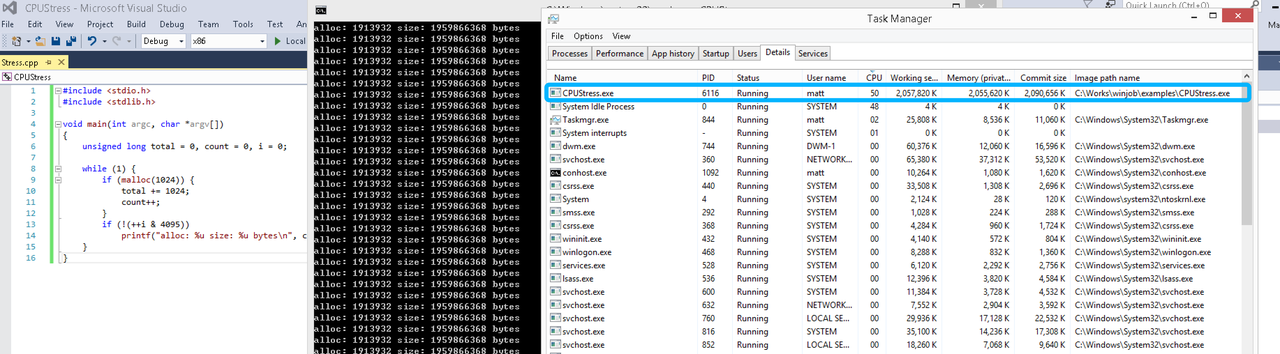
单一进程
在设定CPU上限16%及内存16M上限之后,结果如下:
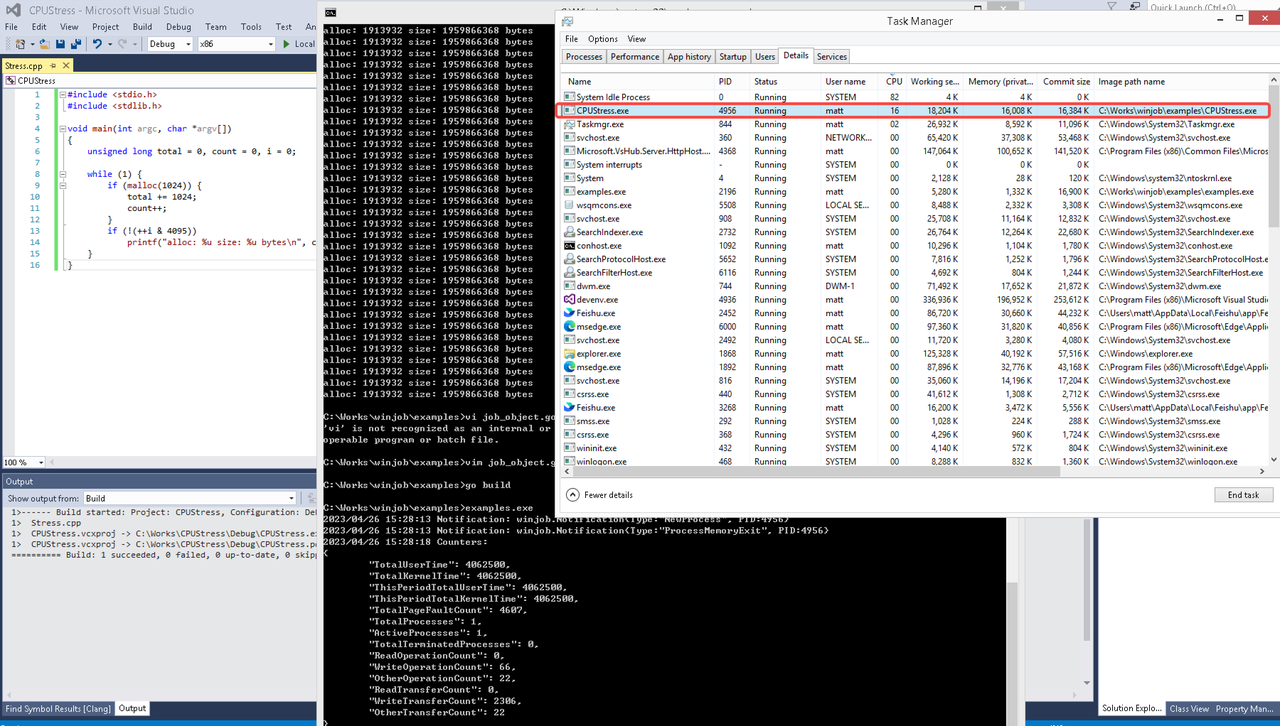 examples/job_object.go按如下修改:
var limits = []winjob.Limit{
        winjob.WithBreakawayOK(),
        winjob.WithKillOnJobClose(),
        winjob.WithActiveProcessLimit(3),
        winjob.WithProcessTimeLimit(10 * time.Second),
        winjob.WithCPUHardCapLimit(1600),        // 16%
        winjob.WithProcessMemoryLimit(16 << 20), // 16MB
        winjob.WithWriteClipboardLimit(),
}

const defaultCommand = ".\\CPUStress.exe"
多进程(双进程)
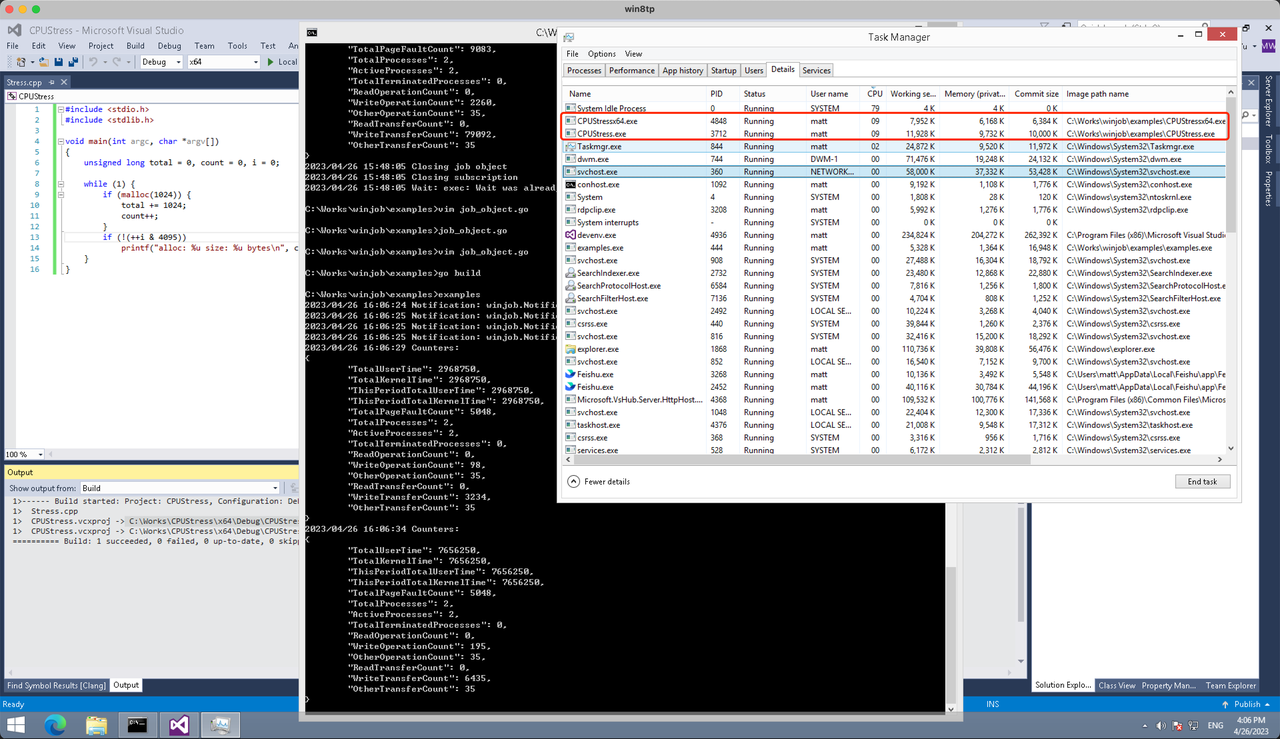
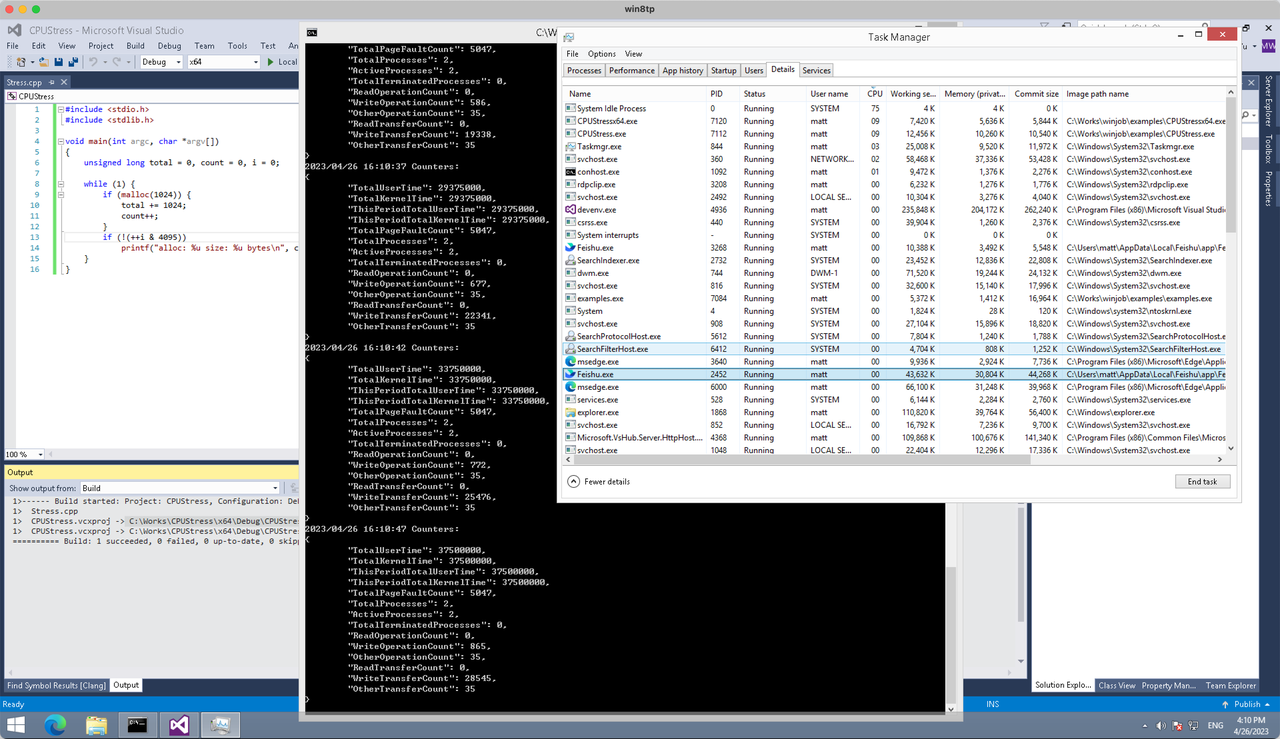
将winjob.WithProcessMemoryLimit 改为 winjob.WithJobMemoryLimit,后者表示此job内所有进程要占用的总内存限制:
var limits = []winjob.Limit{
        winjob.WithBreakawayOK(),
        winjob.WithKillOnJobClose(),
        winjob.WithActiveProcessLimit(3),
        winjob.WithProcessTimeLimit(10 * time.Second),
        winjob.WithCPUHardCapLimit(1600),    // 16%
        winjob.WithJobMemoryLimit(16 << 20), // 16MB
        winjob.WithWriteClipboardLimit(),
}
验证结果如下:
winjob example代码:
// +build windows

package main

import (
        "encoding/json"
        "log"
        "os"
        "os/exec"
        "os/signal"
        "time"

        "golang.org/x/sys/windows"

        "github.com/kolesnikovae/go-winjob"
)

var limits = []winjob.Limit{
        winjob.WithBreakawayOK(),
        winjob.WithKillOnJobClose(),
        winjob.WithActiveProcessLimit(3),
        winjob.WithProcessTimeLimit(10 * time.Second),
        winjob.WithCPUHardCapLimit(1600),    // 16%
        winjob.WithJobMemoryLimit(16 << 20), // 16MB
        winjob.WithWriteClipboardLimit(),
}

const defaultCommand = ".\\CPUStress.exe"
const stressCommand  = ".\\CPUStressX64.exe"

func main() {
        job, err := winjob.Create("", limits...)
        if err != nil {
                log.Fatalf("Create: %v", err)
        }

        cmd := exec.Command(defaultCommand)
        cmd.Stderr = os.Stderr
        cmd.SysProcAttr = &windows.SysProcAttr{
                CreationFlags: windows.CREATE_SUSPENDED,
        }
        if err := cmd.Start(); err != nil {
                log.Fatalf("Start: %v", err)
        }

        stress := exec.Command(stressCommand)
        stress.Stderr = os.Stderr
        stress.SysProcAttr = &windows.SysProcAttr{
                CreationFlags: windows.CREATE_SUSPENDED,
        }
        if err := stress.Start(); err != nil {
                log.Fatalf("Start: %v", err)
        }

        s := make(chan os.Signal, 1)
        signal.Notify(s, os.Interrupt)

        c := make(chan winjob.Notification)
        subscription, err := winjob.Notify(c, job)
        if err != nil {
                log.Fatalf("Notify: %v", err)
        }

        done := make(chan struct{})
        go func() {
                defer close(done)
                ticker := time.NewTicker(time.Second * 5)
                defer ticker.Stop()
                var counters winjob.Counters
                for {
                        select {
                        case <-s:
                                log.Println("Closing job object")
                                if err := job.Close(); err != nil {
                                        log.Fatal(err)
                                }
                                log.Println("Closing subscription")
                                if err := subscription.Close(); err != nil {
                                        log.Fatal(err)
                                }
                                return

                        case n, ok := <-c:
                                if ok {
                                        log.Printf("Notification: %#v\n", n)
                                } else if err := subscription.Err(); err != nil {
                                        log.Fatalf("Subscription: %v", err)
                                }

                        case <-ticker.C:
                                if err := job.QueryCounters(&counters); err != nil {
                                        log.Fatalf("QueryCounters: %v", err)
                                }
                                b, err := json.MarshalIndent(counters, "", "\t")
                                if err != nil {
                                        log.Fatal(err)
                                }
                                log.Printf("Counters: \n%s\n", b)
                        }
                }
        }()

        if err := job.Assign(cmd.Process); err != nil {
                log.Fatalf("Assign: %v", err)
        }
        if err := winjob.Resume(cmd); err != nil {
                log.Fatalf("Resume: %v", err)
        }

        if err := job.Assign(stress.Process); err != nil {
                log.Fatalf("Assign: %v", err)
        }
        if err := winjob.Resume(stress); err != nil {
                log.Fatalf("Resume: %v", err)
        }

        if err := cmd.Wait(); err != nil {
                log.Fatalf("Wait: %v", err)
        }
        if err := stress.Wait(); err != nil {
                log.Fatalf("Wait: %v", err)
        }

        // Wait for a signal.
        <-done
}
Thanks for the helpful article. More like this at fast youtube downloader .
If you want real reviews on the best botox treatments in warrington, this page helped me a lot: what to expect in a botox treatment
В практике круглосуточного лечения применяются следующие этапы:
Исследовать вопрос подробнее – [url=https://narkologicheskaya-klinika-v-rostove19.ru/]наркологическая клиника вывод из запоя ростов-на-дону[/url]
FABET được nhiều người chơi đánh giá cao nhờ sự ổn định trong vận hành và cách xử lý minh bạch trong từng trò chơi. Các sảnh game hoạt động rõ ràng, giúp người tham gia yên tâm khi trải nghiệm lâu dài bbc
11WIN là lựa chọn phù hợp cho người chơi muốn tìm kiếm một nền tảng giải trí trực tuyến có nhiều sảnh game và thao tác đơn giản. Từ game bài truyền thống đến các trò chơi hiện đại như slot và bắn cá, tất cả đều được tích hợp trong cùng một hệ thống bbc
http://primefuturetrades.com/
A empresa Primefuturetrades e uma empresa profissional com forte presenca no panorama nacional portugues, que entrega servicos de qualidade aos seus clientes, destacando-se por nos resultados. Veja a oferta completa nesta pagina.
Weather-friendly bounce houses for all seasons listed at bounce house rentals long island .
Appreciate the great suggestions. For more, visit albergue de peregrinos Palas de Rei .
Informative tips. If rodents are a concern in LA, contact cheap rodent control near me for a professional assessment.
I appreciate the emphasis on responsible disposal— yard junk removal Sydney does it right.
Clear guidance on airflow issues. For Fayetteville service calls, try seasonal AC maintenance Fayetteville .
BU88 là nền tảng giải trí trực tuyến nổi bật với nhiều sản phẩm như cá cược thể thao, live casino, nổ hũ, bắn cá, đá gà và xổ số bbc
VK88 là nền tảng giải trí trực tuyến tập trung vào cá cược thể thao, e-sports, live casino, bắn cá, nổ hũ, đá gà và xổ số bbc
Wonderful tips! Find more at opiniones abogados Vigo .
BU88 tại vegdork.com được xây dựng như một nền tảng giải trí trực tuyến hiện đại, tập trung mang đến trải nghiệm cá cược thể thao và casino mượt mà cho người dùng bbc
Loved the recommendation on roof coloration and reduce appeal. same day roof installation near me had tremendous coloration samples to make a choice from.
Os comentários do youtube resumão do fim de semana é a única coisa que leio na segunda.
спецтехника Volvo [url=tech-group.com.ua]tech-group.com.ua[/url]
My heat pump struggled in defrost mode. local Tampa AC repair updated the control board in Tampa.
That visual guide to dumpster sizes was perfect. Picked a 15-yard from dumpster rental Fresno .
8XBET là nền tảng giải trí trực tuyến được xây dựng theo hướng hiện đại, tập trung vào sự tiện lợi, tốc độ và trải nghiệm người dùng bbc
I’m not sure why but this site is loading very slow for me. Is anyone else having this issue or is it a problem on my end? I’ll check back later on and see if the problem still exists.
บาคาร่า
3BET là nền tảng giải trí trực tuyến được xây dựng theo hướng hiện đại, tập trung vào trải nghiệm cá cược thể thao, casino online và các sản phẩm giải trí đa dạng bbc
сколько стоит поставить капельницу в екатеринбурге [url=https://kapelnicza-ot-pokhmelya-ekaterinburg-17.ru]сколько стоит поставить капельницу в екатеринбурге[/url]
Hi to all, how is everything, I think every one is getting more from this web site, and your views are good designed for new people.
บาคาร่า
I9BET là nền tảng giải trí trực tuyến được phát triển với giao diện hiện đại, dễ thao tác và phù hợp với nhiều nhóm người chơi bbc
крипто букмекеры [url=https://forumsilverstars.forum24.ru/?1-9-0-00000118-000-0-0]крипто букмекеры[/url]
The best botox treatments in warrington can vary by practitioner—here are some vetted options at where to get a botox treatment in warrington
нажмите [url=https://bond007shop2.com]купить травмат Москва[/url]
бк Литвы [url=https://glen-jitterbug-fd8.notion.site/359b8cddbfaf80d98440c11f3dd12b14]бк Литвы[/url]
Great insights! Find more at Pressure washing near me .
Thanks for the insightful write-up. More like this at Thats A Wrap Power Washing .
Appreciate the knowledge. Garage Door Repair Mesa AZ upgraded my opener light to LED. garage door business Mesa AZ
WOW just what I was looking for. Came here by searching for %meta_keyword%
บาคาร่า
A parents’ guide to supervising bounce houses effectively via where to rent bounce houses .
Thanks for the helpful article. More like this at seguros de viaje completos .
Just moved to Phoenix and need an electrician? Look no further than local reviews to find the best options! electrician in phoenix
Fantastic post however , I was wanting to know if you could write a litte more on this subject? I’d be very thankful if you could elaborate a little bit further. Kudos!
บาคาร่า
This was very beneficial. For more, visit https://www.google.com/maps/dir/Fence+Cleaning+near+me,+10320+West+County+Rd+K,+Beloit,+WI+53511,+United+States/Simmons+Fence+%26+Specialty+Products,+L.L.C.,+4527+US-51,+Janesville,+WI+53546,+United+States/@42.5591105,-89.1964654,20527m/data=!3m2!1e3!4b1!4m13!4m12!1m5!1m1!1s0x8808a0be4eb13ea9:0xd7bbc91cf9ddd875!2m2!1d-89.2030153!2d42.5081363!1m5!1m1!1s0x88061ebbbe02c003:0x1b35d859b6459925!2m2!1d-89.029108!2d42.613965!5m1!1e3?entry=ttu&g_ep=EgoyMDI2MDUxMC4wIKXMDSoASAFQAw%3D%3D .
Врачи клиники «АнтиТокс» используют эффективные и проверенные временем препараты, которые помогают пациентам в кратчайшие сроки стабилизировать самочувствие и восстановить нормальную работу организма. В список основных препаратов входят:
Ознакомиться с деталями – https://vyvod-iz-zapoya-novosibirsk0.ru/vyvod-iz-zapoya-czena-novosibirsk/
The emergency leak bucket/patch suggestions had been excellent. I nevertheless referred to as a professional from Hired Guns Roofing contractor to restore it excellent.
This checklist minimized my stress— same day junk removal Sydney handled the heavy stuff.
Keyless entry is so convenient. Garage Door Repair Tucson installers set ours up with temporary codes for guests. Tucson garage door installers
Thanks for sharing your thoughts. I really appreciate your efforts and I will be waiting for your next post thank you once again.
บาคาร่า
May I simply say what a comfort to discover an individual who genuinely knows what they are discussing online. You certainly realize how to bring an issue to light and make it important. More people ought to look at this and understand this side of the story. I was surprised that you are not more popular given that you certainly have the gift.
บาคาร่า
全球矚目嘅國際足總世界盃就快開鑼,VERTEX9已經準備好最詳盡嘅世界盃賽程同賽事直播,同你迎接四年一度嘅足球投注盛事!由分組賽到淘汰賽,平台提供馬會級數嘅穩定賠率同多元化玩法,無論係半全場、波膽定係首名入球,應有盡有。即刻嚟睇2026世界盃嘅賽事分組形勢,提早分析各路雄獅嘅實力,設定你嘅投注攻略。唔好錯過任何一場關鍵對決,喺VERTEX9用最流暢嘅體驗,一齊見證王者誕生。
Игнорирование этих симптомов может привести к тяжелым последствиям для здоровья, включая алкогольный психоз и повреждение внутренних органов.
Подробнее тут – https://kapelnica-ot-zapoya-krasnodar7.ru
Thanks for some other fantastic post. Where else may just anybody get that kind of information in such a perfect method of writing? I’ve a presentation next week, and I’m at the look for such information.
บาคาร่า
What’s up everyone, it’s my first pay a visit at this web page, and piece of writing is really fruitful in favor of me, keep up posting such posts.
บาคาร่า
My attic insulation was low, making the AC run more. affordable HVAC repair pointed it out during a Tampa tune-up.