Windows自身没有提供类似Linux cgroup的能力来限制进程或进程组的资源占用,进程CPU/IO/内存/网络等资源的控制只能由自己实现。目前已有第三方的实现,主要是限制进程CPU的占用,如文档 < 21 Best Ways to Limit the CPU Usage of a Process > 所描述的BES,Process Tamer等软件。自Windows 8及Server 2012开始Windows系统有提供以job为单位的CPU占用及内存上限设置,之前的版本则只能以进程或线程为单位进行限制。
进程CPU占用限制方案
即时轮询系统所有进程(线程)的CPU占用,当发现所设定进程有超标时强制暂停进程所有线程的执行,然后在适当的时机再恢复执行。其中所涉及技术点:
进程CPU占用查询 GetProcessTimes
BOOL GetProcessTimes(
  [in]  HANDLE     hProcess,
  [out] LPFILETIME lpCreationTime,
  [out] LPFILETIME lpExitTime,
  [out] LPFILETIME lpKernelTime,
  [out] LPFILETIME lpUserTime
);
此函数可以获取进程从创建至当前的总运行时间及总的CPU时间,(KernelTime + UserTime) < 系统CPU数 * (当前时间 - CreationTime)
线程CPU占用查询 GetThreadTimes
BOOL GetThreadTimes(
  [in]  HANDLE     hThread,
  [out] LPFILETIME lpCreationTime,
  [out] LPFILETIME lpExitTime,
  [out] LPFILETIME lpKernelTime,
  [out] LPFILETIME lpUserTime
);
QueryThreadCycleTime可以提供更精准的CPU时间数据,单位为CPU时钟周期
BOOL QueryThreadCycleTime(
  [in]  HANDLE   ThreadHandle,
  [out] PULONG64 CycleTime
);
线程暂停及恢复
Windows平台没有提供暂停整个进程的支持函数,只能以线程为单位来操作,即SuspendThread及ResumeThread:
DWORD SuspendThread(
  [in] HANDLE hThread
);
DWORD ResumeThread(
  [in] HANDLE hThread
);
CPU亲和性设置: SetProcessAffinityMask
BOOL SetProcessAffinityMask(
  [in] HANDLE    hProcess,
  [in] DWORD_PTR dwProcessAffinityMask
);
此函数可以限定进程及其所有线程所能使用的CPU,故一定程序上亦限定了进程最大的系统CPU占用率。
DWORD_PTR SetThreadAffinityMask(
  [in] HANDLE    hThread,
  [in] DWORD_PTR dwThreadAffinityMask
);
此函数可单独限制特定线程的CPU亲和性。
进程优先级设置: SetPriorityClass
优先级解决的是优先运行及退让CPU的问题,本质上并不能限定CPU占用,只是优先级高于当前任务的忙碌的时候,当前进程会主动退让CPU 线程优先级设置:SetThreadPriority
BOOL SetThreadPriority(
  [in] HANDLE hThread,
  [in] int    nPriority
);
Job Objects
Windows系统提供了Job的概念用以管理多个进程,可以限制Job对象内所有进程及期线程的CPU核心占用、CPU占用及内存分配上限等,均通过SetInformationJobObject来实现,具体的CPU限制由JOBOBJECT_CPU_RATE_CONTROL_INFORMATION管理,内存限制则由JOBOBJECT_EXTENDED_LIMIT_INFORMATION来管理。
BOOL SetInformationJobObject(
  [in] HANDLE             hJob,
  [in] JOBOBJECTINFOCLASS JobObjectInformationClass,
  [in] LPVOID             lpJobObjectInformation,
  [in] DWORD              cbJobObjectInformationLength
);需要注意的是CPU占用设置只有Windows 8及Server 2012之后的版本有效。
CPU Sets
此部分只限定了CPU Affinity属性
实验验证
可以直接利用开源项目go-winjob验证,验证系统Windows 8 x64,go-winjob git repo: https://github.com/kolesnikovae/go-winjob
验证程序
#include <stdio.h>
#include <stdlib.h>

void main(int argc, char *argv[])
{
        unsigned long total = 0, count = 0, i = 0;

        while (1) {
                if (malloc(1024)) {
                        total += 1024;
                        count++;
                }
                if (!(++i & 4095))
                        printf("alloc: %u size: %u bytes\n", count, total);
    }
}
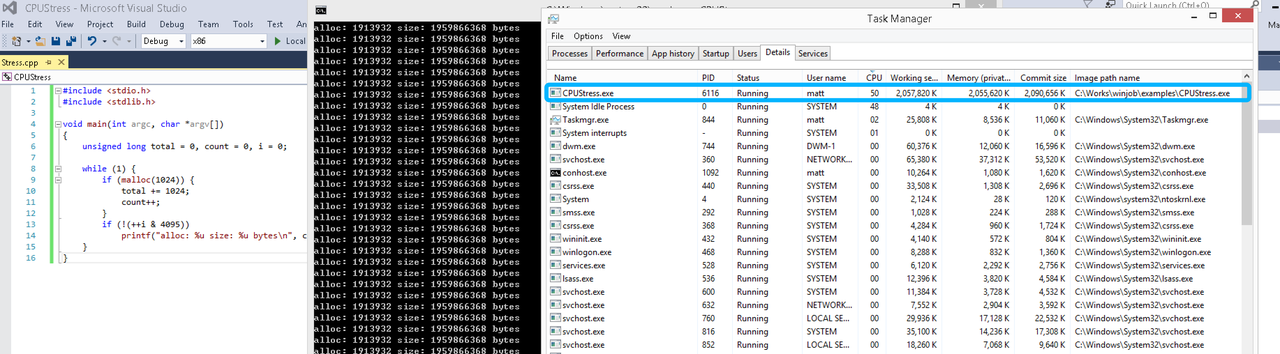
无限制
在无限制的情况下,此进程会占满一个CPU核心,commit内存总占用达2G
单一进程
在设定CPU上限16%及内存16M上限之后,结果如下:
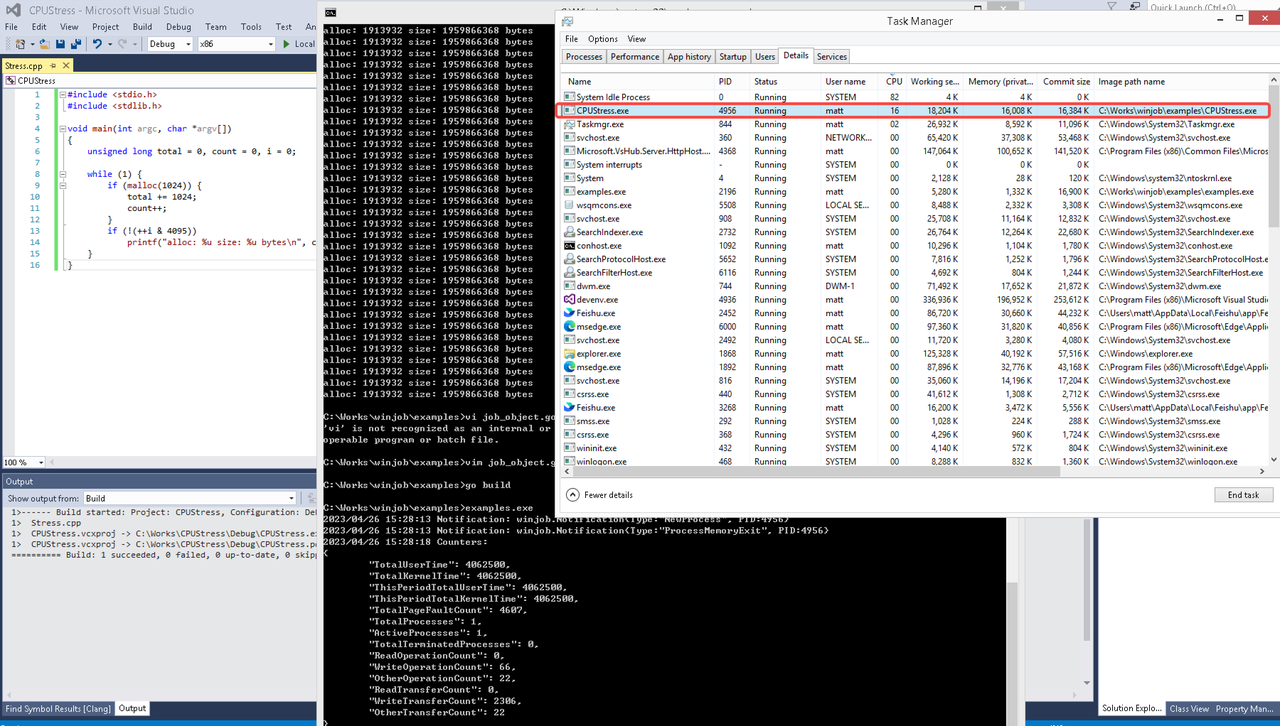 examples/job_object.go按如下修改:
var limits = []winjob.Limit{
        winjob.WithBreakawayOK(),
        winjob.WithKillOnJobClose(),
        winjob.WithActiveProcessLimit(3),
        winjob.WithProcessTimeLimit(10 * time.Second),
        winjob.WithCPUHardCapLimit(1600),        // 16%
        winjob.WithProcessMemoryLimit(16 << 20), // 16MB
        winjob.WithWriteClipboardLimit(),
}

const defaultCommand = ".\\CPUStress.exe"
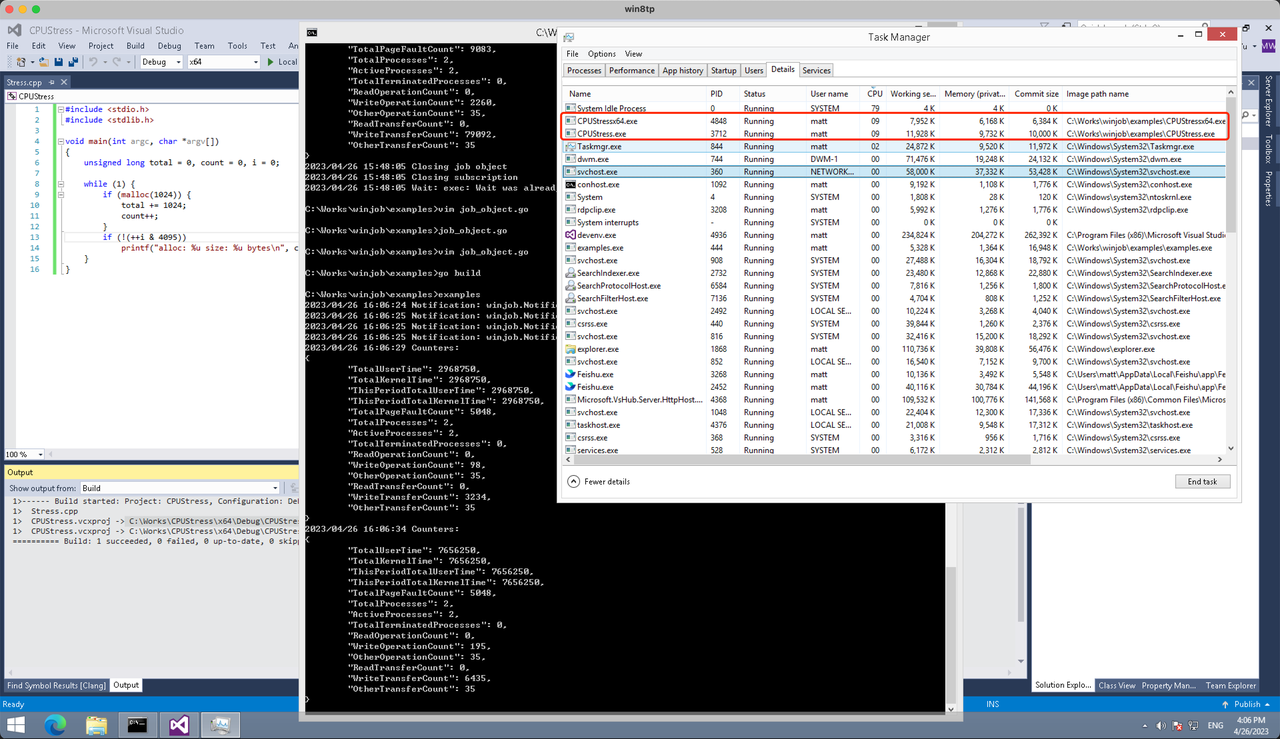
多进程(双进程)
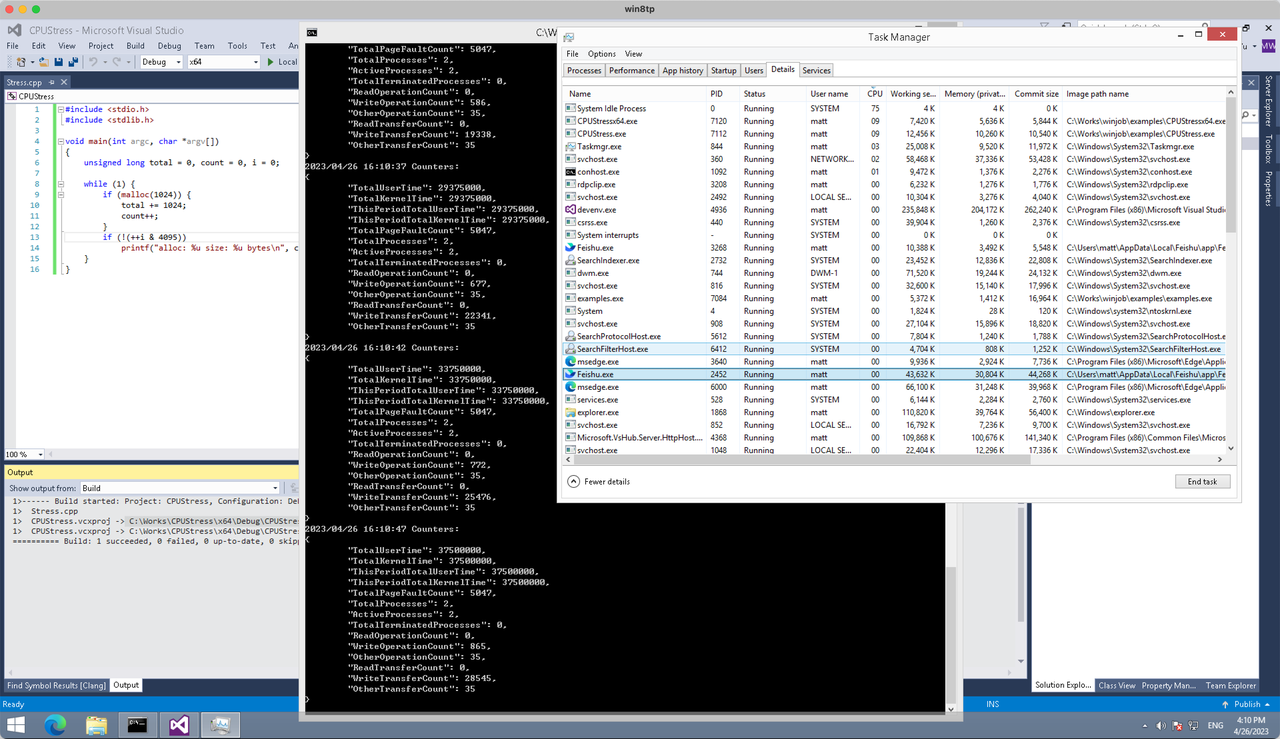
将winjob.WithProcessMemoryLimit 改为 winjob.WithJobMemoryLimit,后者表示此job内所有进程要占用的总内存限制:
var limits = []winjob.Limit{
        winjob.WithBreakawayOK(),
        winjob.WithKillOnJobClose(),
        winjob.WithActiveProcessLimit(3),
        winjob.WithProcessTimeLimit(10 * time.Second),
        winjob.WithCPUHardCapLimit(1600),    // 16%
        winjob.WithJobMemoryLimit(16 << 20), // 16MB
        winjob.WithWriteClipboardLimit(),
}
验证结果如下:
winjob example代码:
// +build windows

package main

import (
        "encoding/json"
        "log"
        "os"
        "os/exec"
        "os/signal"
        "time"

        "golang.org/x/sys/windows"

        "github.com/kolesnikovae/go-winjob"
)

var limits = []winjob.Limit{
        winjob.WithBreakawayOK(),
        winjob.WithKillOnJobClose(),
        winjob.WithActiveProcessLimit(3),
        winjob.WithProcessTimeLimit(10 * time.Second),
        winjob.WithCPUHardCapLimit(1600),    // 16%
        winjob.WithJobMemoryLimit(16 << 20), // 16MB
        winjob.WithWriteClipboardLimit(),
}

const defaultCommand = ".\\CPUStress.exe"
const stressCommand  = ".\\CPUStressX64.exe"

func main() {
        job, err := winjob.Create("", limits...)
        if err != nil {
                log.Fatalf("Create: %v", err)
        }

        cmd := exec.Command(defaultCommand)
        cmd.Stderr = os.Stderr
        cmd.SysProcAttr = &windows.SysProcAttr{
                CreationFlags: windows.CREATE_SUSPENDED,
        }
        if err := cmd.Start(); err != nil {
                log.Fatalf("Start: %v", err)
        }

        stress := exec.Command(stressCommand)
        stress.Stderr = os.Stderr
        stress.SysProcAttr = &windows.SysProcAttr{
                CreationFlags: windows.CREATE_SUSPENDED,
        }
        if err := stress.Start(); err != nil {
                log.Fatalf("Start: %v", err)
        }

        s := make(chan os.Signal, 1)
        signal.Notify(s, os.Interrupt)

        c := make(chan winjob.Notification)
        subscription, err := winjob.Notify(c, job)
        if err != nil {
                log.Fatalf("Notify: %v", err)
        }

        done := make(chan struct{})
        go func() {
                defer close(done)
                ticker := time.NewTicker(time.Second * 5)
                defer ticker.Stop()
                var counters winjob.Counters
                for {
                        select {
                        case <-s:
                                log.Println("Closing job object")
                                if err := job.Close(); err != nil {
                                        log.Fatal(err)
                                }
                                log.Println("Closing subscription")
                                if err := subscription.Close(); err != nil {
                                        log.Fatal(err)
                                }
                                return

                        case n, ok := <-c:
                                if ok {
                                        log.Printf("Notification: %#v\n", n)
                                } else if err := subscription.Err(); err != nil {
                                        log.Fatalf("Subscription: %v", err)
                                }

                        case <-ticker.C:
                                if err := job.QueryCounters(&counters); err != nil {
                                        log.Fatalf("QueryCounters: %v", err)
                                }
                                b, err := json.MarshalIndent(counters, "", "\t")
                                if err != nil {
                                        log.Fatal(err)
                                }
                                log.Printf("Counters: \n%s\n", b)
                        }
                }
        }()

        if err := job.Assign(cmd.Process); err != nil {
                log.Fatalf("Assign: %v", err)
        }
        if err := winjob.Resume(cmd); err != nil {
                log.Fatalf("Resume: %v", err)
        }

        if err := job.Assign(stress.Process); err != nil {
                log.Fatalf("Assign: %v", err)
        }
        if err := winjob.Resume(stress); err != nil {
                log.Fatalf("Resume: %v", err)
        }

        if err := cmd.Wait(); err != nil {
                log.Fatalf("Wait: %v", err)
        }
        if err := stress.Wait(); err != nil {
                log.Fatalf("Wait: %v", err)
        }

        // Wait for a signal.
        <-done
}
Never thought about gate width—thanks! Confirmed truck access with the hauler on Fresno CA roll off dumpster .
Just desire to say your article is as amazing. The clearness in your post is simply great and i can assume you are an expert on this subject. Fine with your permission allow me to grab your RSS feed to keep updated with forthcoming post. Thanks a million and please carry on the gratifying work.
casino depot 10 euros
wetten halbzeit endstand
My blog … strategien für sportwetten (Kandy)
When my system iced over, the tech from affordable ac repair service found a dirty filter and low refrigerant in Tampa.
When in doubt about where to go for care in Patong, doctor patong is my first stop.
Minor allergies flared up—quickly found a Patong clinic using clinic patong . Super convenient.
The thermostat calibration trick worked! If not, call furnace repair in Charlotte like I did.
Hi to all, because I am in fact eager of reading this webpage’s post to be updated regularly. It carries nice data.
casino en ligne depot 10 euros
Pretty component of content. I simply stumbled upon your site and in accession capital to say that I get in fact loved account your weblog posts. Anyway I will be subscribing for your feeds or even I achievement you get admission to constantly rapidly.
casino depot 10 euros
Thanks for the detailed post. Find more at Oxnard Dental Office .
Thanks for the practical tips. More at Garaginization LLC .
What’s up to every , as I am in fact eager of reading this website’s post to be updated daily. It includes fastidious data.
casino en ligne depot minimum 10 euros
Do you have a spam problem on this website; I also am a blogger, and I was curious about your situation; many of us have developed some nice procedures and we are looking to exchange techniques with others, be sure to shoot me an email if interested.
casino depot 10 euros minimum
This is very insightful. Check out Garaginization for more.
This was quite helpful. For more, visit Garaginization Storage Solutions .
Awesome article! Discover more at Commercial Pest Control Service .
https://dev.to/mikefromgidstats/tactical-analysis-and-betting-value-lfa-233-preview-2i3l
The soon-to-be-held LFA 233 card in Salamanca, New York provides a number of strategically fascinating pairings that present well-defined spots to engage for careful players.
Well done! Find more at Garaginization .
В этой статье мы рассматриваем разные способы борьбы с алкогольной зависимостью. Обсуждаются методы лечения, программы реабилитации и советы для поддержки близких. Читатели получат информацию о том, как преодолеть зависимость и добиться успешного выздоровления.
Личный опыт — читайте сами – [url=https://nashydety.ru/2021/09/narkolog-na-dom-v-rostove-na-donu.html]narcology clinic[/url]
Simply want to say your article is as surprising. The clearness on your post is simply excellent and i could assume you are an expert in this subject. Fine with your permission allow me to clutch your RSS feed to stay updated with drawing close post. Thank you a million and please keep up the gratifying work.
casino depot 10 euros minimum
Thanks for the great explanation. Find more at cotizar seguros de viaje Easy Go .
Love the step-by-step advice. For any AC Repair in Hutto needs, use after hours AC repair .
Amazing! Its in fact remarkable post, I have got much clear idea concerning from this article.
casino depot 10 euros minimum
What’s up mates, how is the whole thing, and what you wish for to say on the topic of this paragraph, in my view its actually amazing designed for me.
casino depot 10 euros
När ni köper hemsida: be om exportfunktioner för innehåll så ni inte blir inlåsta. köpa hemsida
888starz موقع [url=https://888starz-egyp.com/]888starz موقع[/url].
вывод из запоя с выездом на дом цена [url=https://vyvod-iz-zapoya-na-domu-ekaterinburg-29.ru]вывод из запоя с выездом на дом цена[/url]
I think that what you said made a ton of sense. But, what about this? what if you were to write a awesome headline? I am not saying your content is not solid, but suppose you added a post title to maybe get a person’s attention? I mean %BLOG_TITLE% is a little boring. You should look at Yahoo’s front page and note how they create article headlines to get people to click. You might add a video or a picture or two to get readers excited about what you’ve written. In my opinion, it could bring your posts a little livelier.
casino depot 10 euros minimum
Greate article. Keep writing such kind of info on your blog. Im really impressed by your blog.
Hi there, You have done a great job. I will certainly digg it and for my part suggest to my friends. I’m confident they will be benefited from this web site.
casino en ligne depot 10 euros
sportwetten unentschieden strategie
Also visit my web site: live wetten tipps (Margo)
Good post. I learn something totally new and challenging on blogs I stumbleupon on a daily basis. It will always be helpful to read through articles from other writers and use something from their sites.
casino en ligne depot minimum 10 euros
каталог
[url=https://maxtopsmm.ru/order/max-maks-prosmotry]увеличить просмотры max[/url]
Hi, all the time i used to check website posts here early in the morning, since i love to learn more and more.
casino en ligne depot minimum 10 euros
http://herodigital-ch.com/
O projeto Herodigital Ch e uma empresa profissional com forte presenca no tecido empresarial portugues, que proporciona um acompanhamento profissional aos seus clientes, com foco na transparencia e confianca. Saiba mais atraves do link.
As any individual going through grownup zits and eczema, searching a sincere Dermatologist Near Me inside the Johns Creek aspect has been a priority. The reminder to ask about patch checking out and isotretinoin monitoring used to be spot-on child support lawyer denver
After evaluating clinical spa near me solutions, I booked with https://maps.google.com/?cid=711593445538118973&g_mp=CiVnb29nbGUubWFwcy5wbGFjZXMudjEuUGxhY2VzLkdldFBsYWNlEAIYASAA&hl=vi&gl=US&source=embed in Clifton Park for a custom plan adding laser hair removing.
It’s not just about fun; it’s about creating memories! Rent your next inflatable from # anyKeywords #. Bounce Genie Event Rentals
The solar-able roofing guidance is well timed. I coordinated roofing and sunlight prep with roofing contractor in Conroe .
I’d like to find out more? I’d like to find out some additional information.
casino en ligne depot 10 euros
This is very interesting, You are a very skilled blogger. I have joined your feed and look forward to seeking more of your great post. Also, I’ve shared your site in my social networks!
casino en ligne depot minimum 10 euros
Hello to all, how is all, I think every one is getting more from this website, and your views are nice for new users.
casino depot 10 euros minimum
Planning a party in Tampa? You can’t go wrong with a bounce house from Bounce Genie water slide rentals Tampa Florida !
What’s up it’s me, I am also visiting this site daily, this site is actually fastidious and the users are truly sharing nice thoughts.
casino depot 10 euros
I enjoyed this article. Check out Paxos Electric Co. for more.
Эта доказательная статья представляет собой глубокое погружение в успехи и вызовы лечения зависимостей. Мы обращаемся к научным исследованиям и опыту специалистов, чтобы предоставить читателям надежные данные об эффективности различных методик. Изучите, что работает лучше всего, и получите информацию от экспертов.
Откройте для себя больше – [url=http://www.rusmedserver.ru/lechenie-bolezn/Vyvod-iz-zapoya-v-klinike-osnovnye-etapy-i-preimushchestva.html]вывод из запоя ростов-на-дону[/url]
BetFury — платформа нового поколения
[url=https://betfurydice.com]betfury dice[/url]
BetFury представляет собой уникальную платформу, предназначенную для азартных игроков и любителей криптовалют. Она предлагает широкий спектр возможностей, включая ставки на спортивные события, казино-игры и различные виды лотерей. Одной из наиболее популярных функций платформы является BetFury Dice, игра, позволяющая пользователям делать ставки на исход случайных чисел.
Ключевые особенности BetFury
[url=https://betfury-apk.com]betfury[/url]
1. Удобство использования: Платформа доступна через веб-сайт betfury.com и мобильное приложение BetFury App. Это позволяет игрокам наслаждаться игрой независимо от их местоположения.
2. Безопасность: Все транзакции на платформе защищены современными технологиями шифрования, обеспечивая безопасность ваших средств.
[url=https://betfury-apk.com]betfury.com[/url]
3. Широкий выбор игр: Помимо традиционных ставок на спорт, пользователи могут попробовать себя в различных играх, таких как слоты, рулетка и покер.
4. Поддержка криптовалюты: BetFury поддерживает множество криптовалют, включая Bitcoin, Ethereum и Litecoin, что делает процесс пополнения счета и вывода средств быстрым и удобным.
[url=https://betfury-app.net]betfury apk[/url]
5. Приложение для Android: Для пользователей Android доступно специальное приложение BetFury APK, которое можно скачать непосредственно с сайта платформы.
Как начать играть?
Чтобы начать пользоваться платформой BetFury, вам необходимо создать учетную запись на сайте betfury.com. После регистрации вы можете пополнить свой баланс и приступить к игре. Если вы предпочитаете мобильную версию, скачайте приложение BetFury App или установите BetFury APK на свое устройство.
Заключение
BetFury — это больше, чем просто игровая платформа. Это сообщество энтузиастов, которые любят азартные игры и стремятся получать удовольствие от процесса. Присоединяйтесь к нам и откройте для себя мир новых возможностей!
betfury app
https://betfurycom.casino
Thanks for the travel checklist! I’d add: save clinic patong for medical clinic details in Patong.
Great reminders about travel health! I’d add: bookmark doctor patong for Patong clinic contacts.
1xbet 888 [url=http://www.888starz-egypt7.com]موقع 888[/url]
888stazr [url=http://888starz-uz-online.com/]888stazr[/url] .