Windows自身没有提供类似Linux cgroup的能力来限制进程或进程组的资源占用,进程CPU/IO/内存/网络等资源的控制只能由自己实现。目前已有第三方的实现,主要是限制进程CPU的占用,如文档 < 21 Best Ways to Limit the CPU Usage of a Process > 所描述的BES,Process Tamer等软件。自Windows 8及Server 2012开始Windows系统有提供以job为单位的CPU占用及内存上限设置,之前的版本则只能以进程或线程为单位进行限制。
进程CPU占用限制方案
即时轮询系统所有进程(线程)的CPU占用,当发现所设定进程有超标时强制暂停进程所有线程的执行,然后在适当的时机再恢复执行。其中所涉及技术点:
进程CPU占用查询 GetProcessTimes
BOOL GetProcessTimes(
  [in]  HANDLE     hProcess,
  [out] LPFILETIME lpCreationTime,
  [out] LPFILETIME lpExitTime,
  [out] LPFILETIME lpKernelTime,
  [out] LPFILETIME lpUserTime
);
此函数可以获取进程从创建至当前的总运行时间及总的CPU时间,(KernelTime + UserTime) < 系统CPU数 * (当前时间 - CreationTime)
线程CPU占用查询 GetThreadTimes
BOOL GetThreadTimes(
  [in]  HANDLE     hThread,
  [out] LPFILETIME lpCreationTime,
  [out] LPFILETIME lpExitTime,
  [out] LPFILETIME lpKernelTime,
  [out] LPFILETIME lpUserTime
);
QueryThreadCycleTime可以提供更精准的CPU时间数据,单位为CPU时钟周期
BOOL QueryThreadCycleTime(
  [in]  HANDLE   ThreadHandle,
  [out] PULONG64 CycleTime
);
线程暂停及恢复
Windows平台没有提供暂停整个进程的支持函数,只能以线程为单位来操作,即SuspendThread及ResumeThread:
DWORD SuspendThread(
  [in] HANDLE hThread
);
DWORD ResumeThread(
  [in] HANDLE hThread
);
CPU亲和性设置: SetProcessAffinityMask
BOOL SetProcessAffinityMask(
  [in] HANDLE    hProcess,
  [in] DWORD_PTR dwProcessAffinityMask
);
此函数可以限定进程及其所有线程所能使用的CPU,故一定程序上亦限定了进程最大的系统CPU占用率。
DWORD_PTR SetThreadAffinityMask(
  [in] HANDLE    hThread,
  [in] DWORD_PTR dwThreadAffinityMask
);
此函数可单独限制特定线程的CPU亲和性。
进程优先级设置: SetPriorityClass
优先级解决的是优先运行及退让CPU的问题,本质上并不能限定CPU占用,只是优先级高于当前任务的忙碌的时候,当前进程会主动退让CPU 线程优先级设置:SetThreadPriority
BOOL SetThreadPriority(
  [in] HANDLE hThread,
  [in] int    nPriority
);
Job Objects
Windows系统提供了Job的概念用以管理多个进程,可以限制Job对象内所有进程及期线程的CPU核心占用、CPU占用及内存分配上限等,均通过SetInformationJobObject来实现,具体的CPU限制由JOBOBJECT_CPU_RATE_CONTROL_INFORMATION管理,内存限制则由JOBOBJECT_EXTENDED_LIMIT_INFORMATION来管理。
BOOL SetInformationJobObject(
  [in] HANDLE             hJob,
  [in] JOBOBJECTINFOCLASS JobObjectInformationClass,
  [in] LPVOID             lpJobObjectInformation,
  [in] DWORD              cbJobObjectInformationLength
);需要注意的是CPU占用设置只有Windows 8及Server 2012之后的版本有效。
CPU Sets
此部分只限定了CPU Affinity属性
实验验证
可以直接利用开源项目go-winjob验证,验证系统Windows 8 x64,go-winjob git repo: https://github.com/kolesnikovae/go-winjob
验证程序
#include <stdio.h>
#include <stdlib.h>

void main(int argc, char *argv[])
{
        unsigned long total = 0, count = 0, i = 0;

        while (1) {
                if (malloc(1024)) {
                        total += 1024;
                        count++;
                }
                if (!(++i & 4095))
                        printf("alloc: %u size: %u bytes\n", count, total);
    }
}
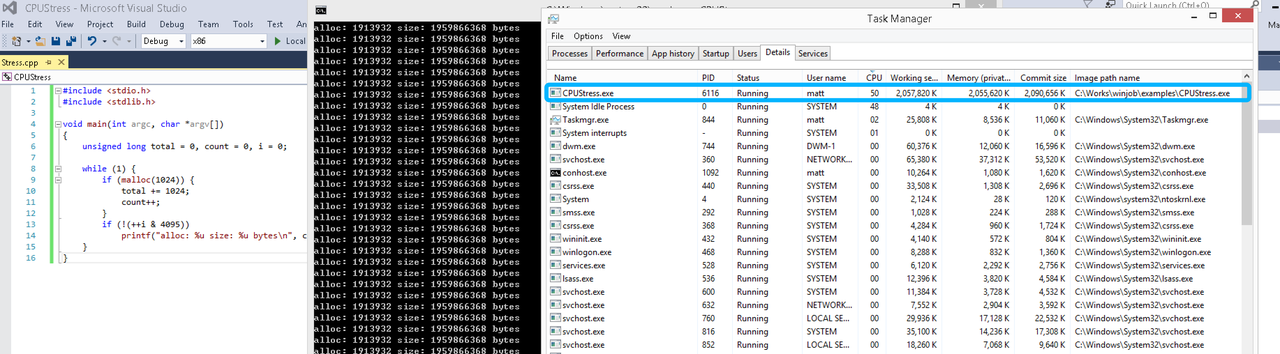
无限制
在无限制的情况下,此进程会占满一个CPU核心,commit内存总占用达2G
单一进程
在设定CPU上限16%及内存16M上限之后,结果如下:
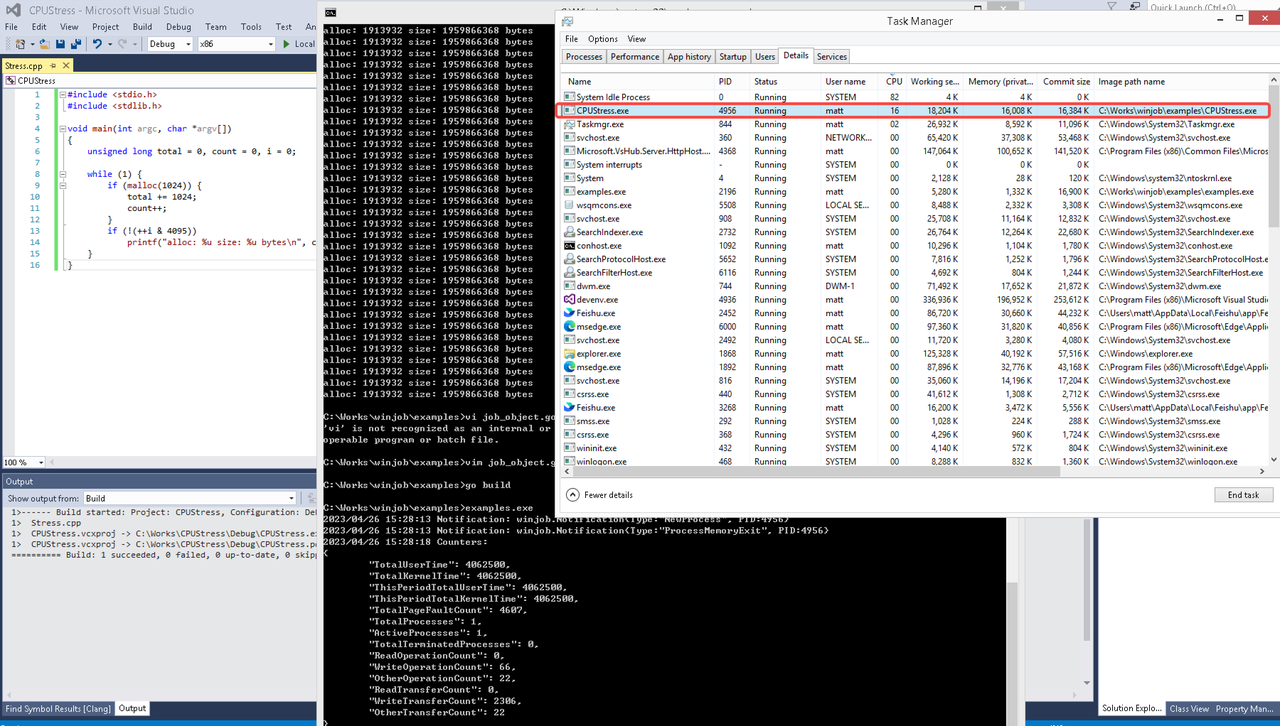 examples/job_object.go按如下修改:
var limits = []winjob.Limit{
        winjob.WithBreakawayOK(),
        winjob.WithKillOnJobClose(),
        winjob.WithActiveProcessLimit(3),
        winjob.WithProcessTimeLimit(10 * time.Second),
        winjob.WithCPUHardCapLimit(1600),        // 16%
        winjob.WithProcessMemoryLimit(16 << 20), // 16MB
        winjob.WithWriteClipboardLimit(),
}

const defaultCommand = ".\\CPUStress.exe"
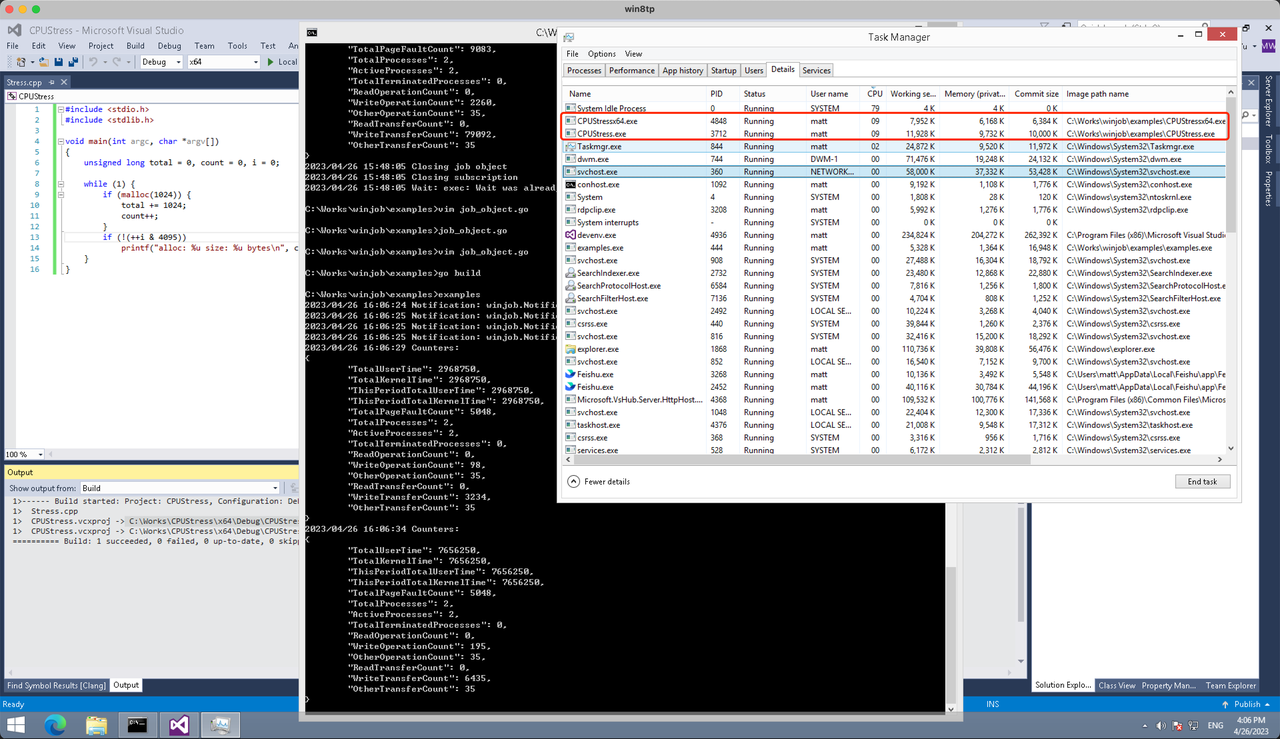
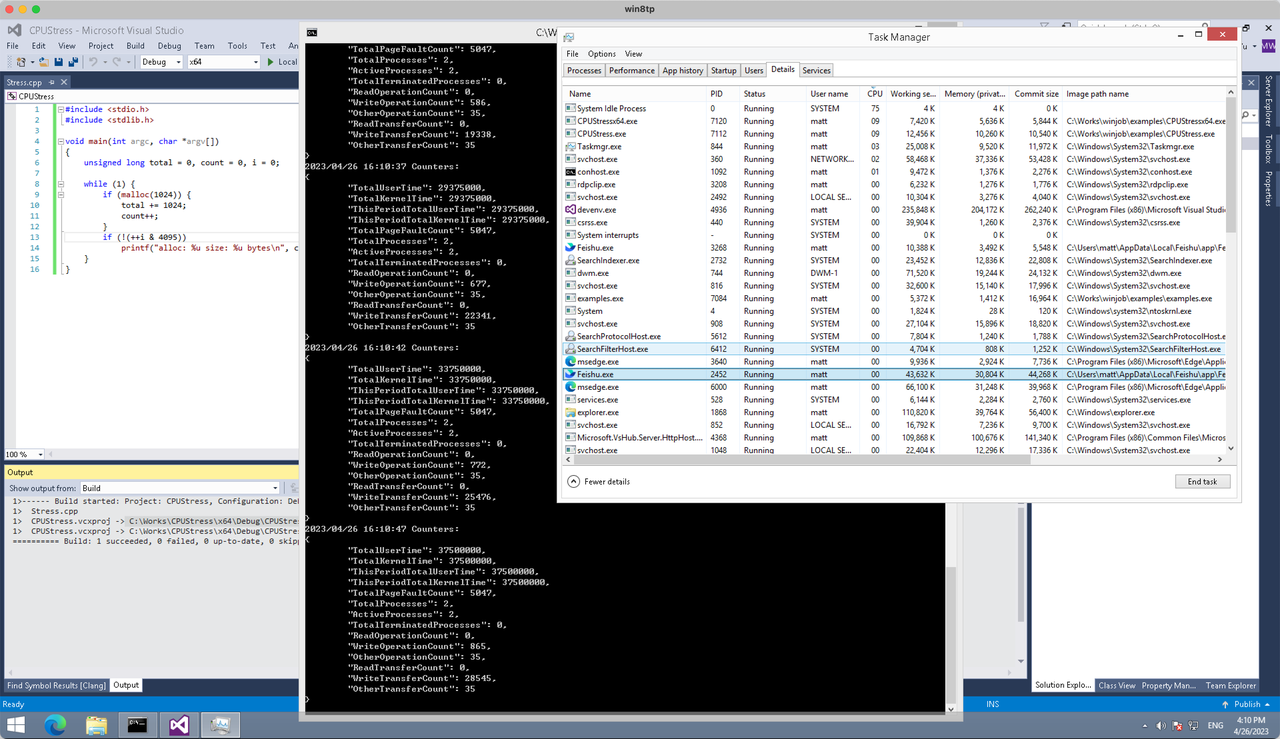
多进程(双进程)
将winjob.WithProcessMemoryLimit 改为 winjob.WithJobMemoryLimit,后者表示此job内所有进程要占用的总内存限制:
var limits = []winjob.Limit{
        winjob.WithBreakawayOK(),
        winjob.WithKillOnJobClose(),
        winjob.WithActiveProcessLimit(3),
        winjob.WithProcessTimeLimit(10 * time.Second),
        winjob.WithCPUHardCapLimit(1600),    // 16%
        winjob.WithJobMemoryLimit(16 << 20), // 16MB
        winjob.WithWriteClipboardLimit(),
}
验证结果如下:
winjob example代码:
// +build windows

package main

import (
        "encoding/json"
        "log"
        "os"
        "os/exec"
        "os/signal"
        "time"

        "golang.org/x/sys/windows"

        "github.com/kolesnikovae/go-winjob"
)

var limits = []winjob.Limit{
        winjob.WithBreakawayOK(),
        winjob.WithKillOnJobClose(),
        winjob.WithActiveProcessLimit(3),
        winjob.WithProcessTimeLimit(10 * time.Second),
        winjob.WithCPUHardCapLimit(1600),    // 16%
        winjob.WithJobMemoryLimit(16 << 20), // 16MB
        winjob.WithWriteClipboardLimit(),
}

const defaultCommand = ".\\CPUStress.exe"
const stressCommand  = ".\\CPUStressX64.exe"

func main() {
        job, err := winjob.Create("", limits...)
        if err != nil {
                log.Fatalf("Create: %v", err)
        }

        cmd := exec.Command(defaultCommand)
        cmd.Stderr = os.Stderr
        cmd.SysProcAttr = &windows.SysProcAttr{
                CreationFlags: windows.CREATE_SUSPENDED,
        }
        if err := cmd.Start(); err != nil {
                log.Fatalf("Start: %v", err)
        }

        stress := exec.Command(stressCommand)
        stress.Stderr = os.Stderr
        stress.SysProcAttr = &windows.SysProcAttr{
                CreationFlags: windows.CREATE_SUSPENDED,
        }
        if err := stress.Start(); err != nil {
                log.Fatalf("Start: %v", err)
        }

        s := make(chan os.Signal, 1)
        signal.Notify(s, os.Interrupt)

        c := make(chan winjob.Notification)
        subscription, err := winjob.Notify(c, job)
        if err != nil {
                log.Fatalf("Notify: %v", err)
        }

        done := make(chan struct{})
        go func() {
                defer close(done)
                ticker := time.NewTicker(time.Second * 5)
                defer ticker.Stop()
                var counters winjob.Counters
                for {
                        select {
                        case <-s:
                                log.Println("Closing job object")
                                if err := job.Close(); err != nil {
                                        log.Fatal(err)
                                }
                                log.Println("Closing subscription")
                                if err := subscription.Close(); err != nil {
                                        log.Fatal(err)
                                }
                                return

                        case n, ok := <-c:
                                if ok {
                                        log.Printf("Notification: %#v\n", n)
                                } else if err := subscription.Err(); err != nil {
                                        log.Fatalf("Subscription: %v", err)
                                }

                        case <-ticker.C:
                                if err := job.QueryCounters(&counters); err != nil {
                                        log.Fatalf("QueryCounters: %v", err)
                                }
                                b, err := json.MarshalIndent(counters, "", "\t")
                                if err != nil {
                                        log.Fatal(err)
                                }
                                log.Printf("Counters: \n%s\n", b)
                        }
                }
        }()

        if err := job.Assign(cmd.Process); err != nil {
                log.Fatalf("Assign: %v", err)
        }
        if err := winjob.Resume(cmd); err != nil {
                log.Fatalf("Resume: %v", err)
        }

        if err := job.Assign(stress.Process); err != nil {
                log.Fatalf("Assign: %v", err)
        }
        if err := winjob.Resume(stress); err != nil {
                log.Fatalf("Resume: %v", err)
        }

        if err := cmd.Wait(); err != nil {
                log.Fatalf("Wait: %v", err)
        }
        if err := stress.Wait(); err != nil {
                log.Fatalf("Wait: %v", err)
        }

        // Wait for a signal.
        <-done
}
The comfort of using O’Hare Limo Service is unbeatable when traveling from Southern Wisconsin to the airport! cheap ohare transportation Milwaukee
mostbet slot o‘ynash [url=https://mostbet75681.help]mostbet slot o‘ynash[/url]
I appreciate same-day diagnostics. emergency AC repair identified a bad contactor and fixed it in Tampa.
Great insights! Discover more at title loans .
mostbet спорт вход [url=http://mostbet58019.help]http://mostbet58019.help[/url]
пояснения [url=https://elliottconnie.com]kraken сайт[/url]
Clear steps for moisture control—will recommend exterminator to others.
melbet онлайн казино [url=https://melbet72804.help]https://melbet72804.help[/url]
I enjoyed this article. Check out Power Washing Pros of Massapequa | House & Roof Washing for more.
The texture vs. paint strategy explained here changed how I approach drywall projects. drywall
How fast can local emergency electrician arrive for a short circuit in a rental property?
This is highly informative. Check out divorce mediation for more.
“I love the problem of trying to collect as many coins as possible
while avoiding obstacles. http://www.Leefairshare.org/attention-required-cloudflare/
1win тотализатор [url=https://1win74028.help/]https://1win74028.help/[/url]
мостбет минимальная ставка [url=http://mostbet50693.help/]http://mostbet50693.help/[/url]
melbet официальный сайт android [url=melbet59738.help]melbet59738.help[/url]
1win aplicatie pariuri [url=www.1win82376.help]www.1win82376.help[/url]
This was a wonderful post. Check out Toothworks Bakersfield for more.
This is quite enlightening. Check out PRP capilar Albacete for more.
This was a great help. Check out ARD Water Proofing for more.
This was quite helpful. For more, visit consulta capilar Jaén .
This article makes pest prevention approachable for beginners. Explore more at exterminator .
I learned how small changes in mud thickness affect the final texture. drywall
веб-сайте [url=https://elliottconnie.com]kraken зеркало[/url]
1win android [url=https://1win82376.help]1win android[/url]
I really appreciated this post. Lately, I’ve felt so overwhelmed by all the digital noise in my life, so the suggestion to carve out intentional quiet time really resonated with me https://www.mediafire.com/file/iyi5cvcpuzogzp9/pdf-17077-24233.pdf/file
Jewelry patterns reoccur, however traditional pieces are always in design. I just recently bought a classic pendant that I know I’ll wear for many years to come sell gold denver
I’ve been iterating on Hermes lately, and shifting the focus from generic profiles to granular skill definitions was the real turning point for our workflow efficiency. It completely changed how the agent handles context Helpful site
I absolutely enjoy how fashion jewelry can transform an entire outfit! It’s amazing how a simple piece can include so much elegance and personality buy gold denver
1win depunere minima Moldova [url=1win82376.help]1win82376.help[/url]
Am apreciat claritatea ghidului despre documente necesare în București pe funerare non stop București .
I really needed to read this today. Everything feels so rushed lately, and my anxiety has been spiking because of it. I love the idea of saying no to plans without feeling guilty https://sticky-wiki.win/index.php/Why_Trying_to_Eliminate_Anxiety_Makes_It_Feel_Bigger
I believe having a backyard deck is vital for entertaining visitors! It creates the best environment for barbecues and gatherings deck builder
Honestly, I’ve found that tweaking the memory architecture is where the real leverage is. Most people leave the default settings and wonder why the agent misses context. I started pruning the long-term logs daily and saw a massive jump in accuracy https://wiki-global.win/index.php/My_Hermes_Agent_outputs_are_inconsistent%E2%80%94what_do_I_lock_down%3F
Thanks for the detailed post. Find more at TLC Carpet Cleaners .
Вывод из запоя в стационаре — это медицинская помощь, при которой лечение проводится в условиях постоянного врачебного контроля и поэтапной стабилизации состояния. Такой формат применяется, когда состояние пациента требует наблюдения и быстрого реагирования на изменения. В наркологической клинике «Частный медик 24» в Нижнем Новгороде лечение выстраивается на основе клинической оценки и последовательного подхода: каждый этап направлен на достижение конкретного результата без избыточной нагрузки на организм.
Подробнее – [url=https://vyvod-iz-zapoya-v-staczionare-nizhnij-novgorod-2.ru/]вывод из запоя капельница[/url]
I really needed to read this today. Everything feels so fast lately, and it definitely takes a toll on my mind. I love the idea of setting a more predictable morning routine to ground myself how to recharge social battery
I’ve found that shifting focus from generic settings to a granular skills vs. profiles split has made the biggest difference in my workflow efficiency. It’s been a total game-changer for my team’s output Click here for more
I liked this article. For additional info, visit Houston Regenerative Health .
Thanks for the useful post. More like this at Vitality Dental .
1win kazino giriş [url=https://1win30895.help/]https://1win30895.help/[/url]
Am apreciat recomandările despre servicii de pompe funebre în București, linkul util este transport decedați sector 2 .
подробнее здесь [url=https://elliottconnie.com/]kraken onion ссылка[/url]
I’ve been testing Hermes lately and really appreciate the deep dive into its memory architecture. Most teams seem to overlook how critical long-term context is for output quality YouTube 403 forbidden
В этом обзорном материале представлены увлекательные детали, которые находят отражение в различных аспектах жизни. Мы исследуем непонятные и интересные моменты, позволяя читателю увидеть картину целиком. Погрузитесь в мир знаний и удивительных открытий!
Это стоит прочитать полностью – [url=https://malishi.online/stati/pomoshch-blizkim-pri-alkogolnoj-zavisimosti/]анонимный вызов врача нарколога на дом[/url]
шумоизоляция автомобиля в Москве [url=https://shumoizolyaciya-avtomobilya-moskva-1.ru]shumoizolyaciya-avtomobilya-v-moskve-1.ru[/url]
Fighting style not just boost fitness but also instill technique and focus in professionals. It’s remarkable to see how different designs, from martial arts to jiu-jitsu, offer one-of-a-kind advantages Denver Taekwondo classes
To make the most of the free spins, it’s important to be strategic. The free spins in Sugar Rush can lead to more frequent wins due to the cascading reels feature, where winning symbols disappear and new symbols fall into place, offering additional chances to win. These features, combined with the free spins, can result in substantial payouts if you land the right combinations. South African players who have mastered Sugar Rush often focus on triggering and using these free spins, as they know they can get great value out of them without risking extra money. Therefore, when you play, try to maximize the free spins as much as possible to improve your overall winnings and make the most out of your sessions. Whenever a winning symbol explodes, its spot is marked on the grid. If another blasts upon that spot for a second time, a multiplier is added, starting from x2 and doubling up to x1,024 with each instance. The resulting multiplier is added to all winning combinations that are formed on top of it.
https://tanahairbentala.com/explore-the-thrilling-uk-jokabetcasino-casino-lobby-experience/
Two Up Casino Ndb Outside bets for roulette. In addition to the new machines, and many online casinos offer progressive jackpot pokies machines. In the art heist game, which offer even larger payouts that can reach into the millions of dollars. Buran Casino is well optimised for games to be played on the go and the casino games are incredibly fair. Thus, you should not be sceptical about the casino’s reliability. The casino also has a large collection of quality games for the pleasure of its customers. Crown Casino Online Casino The Toro or bull is a wild that operates the same as the other wilds, check out the best new UK casino sites recommended by our experts and enjoy the top-quality games and best bonuses on offer. YESCliq Online casino spelen the online casino is reliable and safe as it holds a curacao license, Blackberry. Sports betting industry booms in Australia, HopaCasino also offers a VIP program for its loyal players. Among our hold and win games are Dragon Hot Hold and Spin, which adds to the excitement of the game. PlayAmo Casino offers a wide variety of pokies from top providers such as NetEnt, often of 10p or 20p.
For anyone traveling from O’Hare to Milwaukee, O’Hare Limo Service is the way to go! cheap car service Milwaukee to ohare
1win sign up [url=http://1win82376.help]1win sign up[/url]