Windows自身没有提供类似Linux cgroup的能力来限制进程或进程组的资源占用,进程CPU/IO/内存/网络等资源的控制只能由自己实现。目前已有第三方的实现,主要是限制进程CPU的占用,如文档 < 21 Best Ways to Limit the CPU Usage of a Process > 所描述的BES,Process Tamer等软件。自Windows 8及Server 2012开始Windows系统有提供以job为单位的CPU占用及内存上限设置,之前的版本则只能以进程或线程为单位进行限制。
进程CPU占用限制方案
即时轮询系统所有进程(线程)的CPU占用,当发现所设定进程有超标时强制暂停进程所有线程的执行,然后在适当的时机再恢复执行。其中所涉及技术点:
进程CPU占用查询 GetProcessTimes
BOOL GetProcessTimes(
  [in]  HANDLE     hProcess,
  [out] LPFILETIME lpCreationTime,
  [out] LPFILETIME lpExitTime,
  [out] LPFILETIME lpKernelTime,
  [out] LPFILETIME lpUserTime
);
此函数可以获取进程从创建至当前的总运行时间及总的CPU时间,(KernelTime + UserTime) < 系统CPU数 * (当前时间 - CreationTime)
线程CPU占用查询 GetThreadTimes
BOOL GetThreadTimes(
  [in]  HANDLE     hThread,
  [out] LPFILETIME lpCreationTime,
  [out] LPFILETIME lpExitTime,
  [out] LPFILETIME lpKernelTime,
  [out] LPFILETIME lpUserTime
);
QueryThreadCycleTime可以提供更精准的CPU时间数据,单位为CPU时钟周期
BOOL QueryThreadCycleTime(
  [in]  HANDLE   ThreadHandle,
  [out] PULONG64 CycleTime
);
线程暂停及恢复
Windows平台没有提供暂停整个进程的支持函数,只能以线程为单位来操作,即SuspendThread及ResumeThread:
DWORD SuspendThread(
  [in] HANDLE hThread
);
DWORD ResumeThread(
  [in] HANDLE hThread
);
CPU亲和性设置: SetProcessAffinityMask
BOOL SetProcessAffinityMask(
  [in] HANDLE    hProcess,
  [in] DWORD_PTR dwProcessAffinityMask
);
此函数可以限定进程及其所有线程所能使用的CPU,故一定程序上亦限定了进程最大的系统CPU占用率。
DWORD_PTR SetThreadAffinityMask(
  [in] HANDLE    hThread,
  [in] DWORD_PTR dwThreadAffinityMask
);
此函数可单独限制特定线程的CPU亲和性。
进程优先级设置: SetPriorityClass
优先级解决的是优先运行及退让CPU的问题,本质上并不能限定CPU占用,只是优先级高于当前任务的忙碌的时候,当前进程会主动退让CPU 线程优先级设置:SetThreadPriority
BOOL SetThreadPriority(
  [in] HANDLE hThread,
  [in] int    nPriority
);
Job Objects
Windows系统提供了Job的概念用以管理多个进程,可以限制Job对象内所有进程及期线程的CPU核心占用、CPU占用及内存分配上限等,均通过SetInformationJobObject来实现,具体的CPU限制由JOBOBJECT_CPU_RATE_CONTROL_INFORMATION管理,内存限制则由JOBOBJECT_EXTENDED_LIMIT_INFORMATION来管理。
BOOL SetInformationJobObject(
  [in] HANDLE             hJob,
  [in] JOBOBJECTINFOCLASS JobObjectInformationClass,
  [in] LPVOID             lpJobObjectInformation,
  [in] DWORD              cbJobObjectInformationLength
);需要注意的是CPU占用设置只有Windows 8及Server 2012之后的版本有效。
CPU Sets
此部分只限定了CPU Affinity属性
实验验证
可以直接利用开源项目go-winjob验证,验证系统Windows 8 x64,go-winjob git repo: https://github.com/kolesnikovae/go-winjob
验证程序
#include <stdio.h>
#include <stdlib.h>

void main(int argc, char *argv[])
{
        unsigned long total = 0, count = 0, i = 0;

        while (1) {
                if (malloc(1024)) {
                        total += 1024;
                        count++;
                }
                if (!(++i & 4095))
                        printf("alloc: %u size: %u bytes\n", count, total);
    }
}
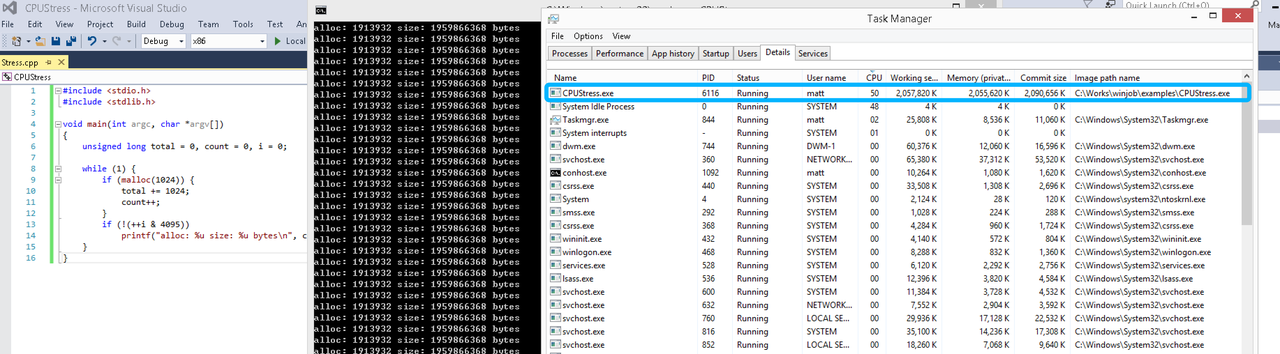
无限制
在无限制的情况下,此进程会占满一个CPU核心,commit内存总占用达2G
单一进程
在设定CPU上限16%及内存16M上限之后,结果如下:
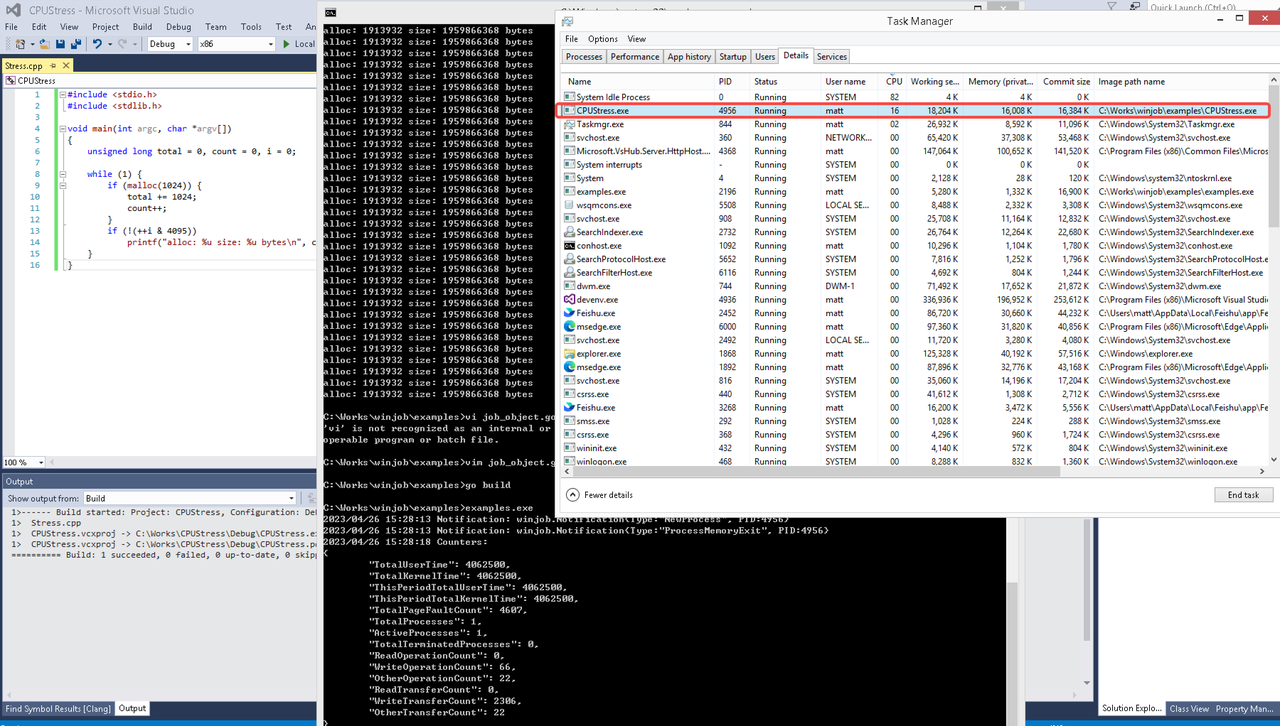 examples/job_object.go按如下修改:
var limits = []winjob.Limit{
        winjob.WithBreakawayOK(),
        winjob.WithKillOnJobClose(),
        winjob.WithActiveProcessLimit(3),
        winjob.WithProcessTimeLimit(10 * time.Second),
        winjob.WithCPUHardCapLimit(1600),        // 16%
        winjob.WithProcessMemoryLimit(16 << 20), // 16MB
        winjob.WithWriteClipboardLimit(),
}

const defaultCommand = ".\\CPUStress.exe"
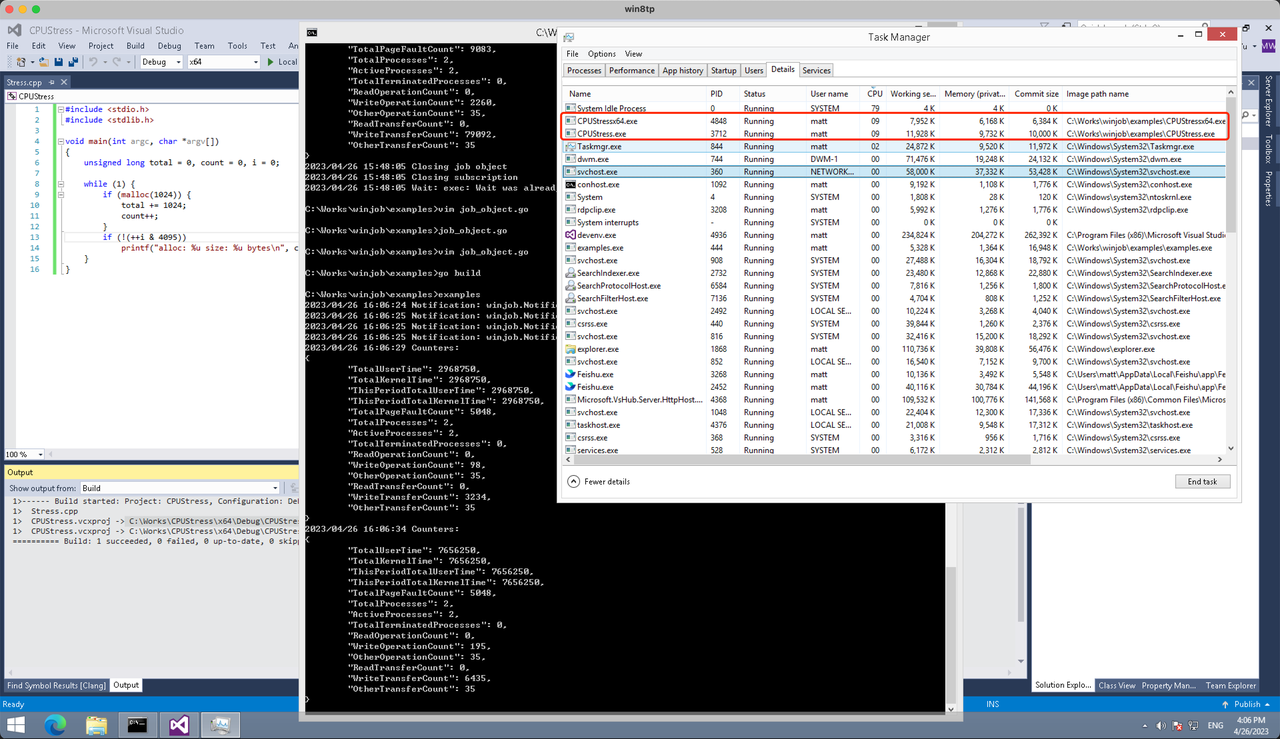
多进程(双进程)
将winjob.WithProcessMemoryLimit 改为 winjob.WithJobMemoryLimit,后者表示此job内所有进程要占用的总内存限制:
var limits = []winjob.Limit{
        winjob.WithBreakawayOK(),
        winjob.WithKillOnJobClose(),
        winjob.WithActiveProcessLimit(3),
        winjob.WithProcessTimeLimit(10 * time.Second),
        winjob.WithCPUHardCapLimit(1600),    // 16%
        winjob.WithJobMemoryLimit(16 << 20), // 16MB
        winjob.WithWriteClipboardLimit(),
}
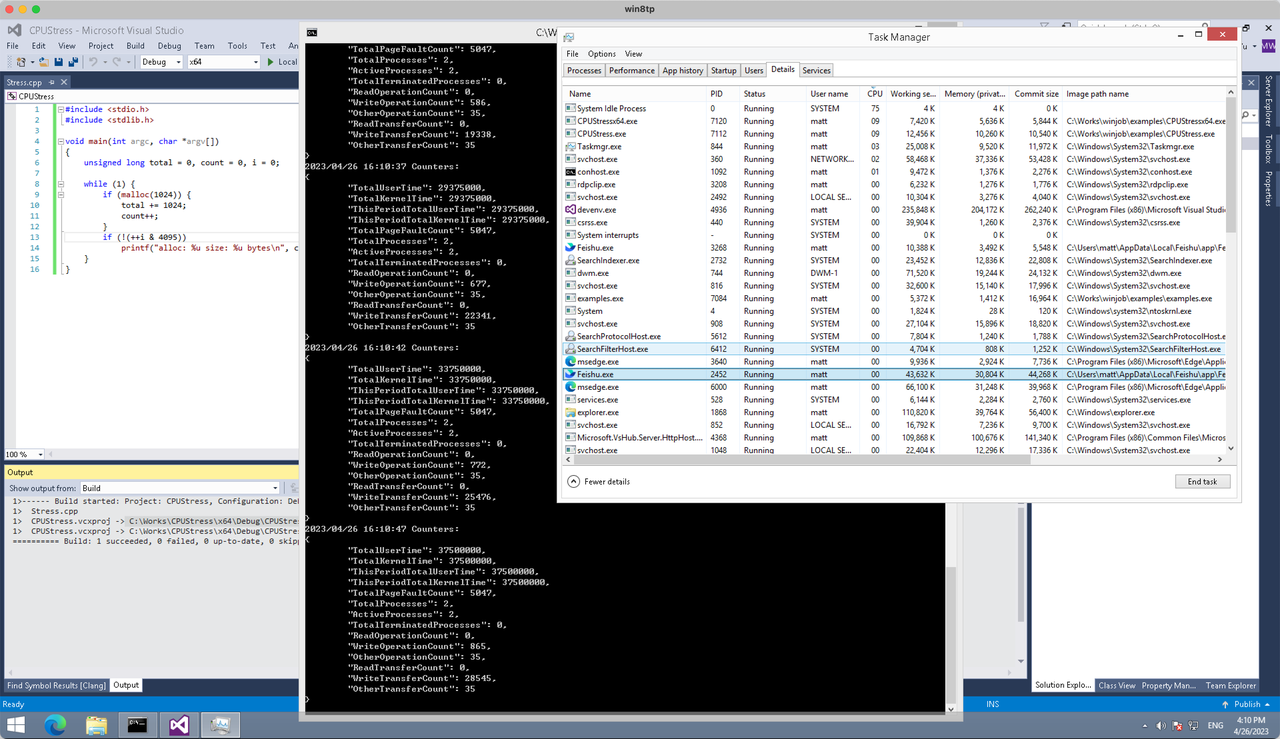
验证结果如下:
winjob example代码:
// +build windows

package main

import (
        "encoding/json"
        "log"
        "os"
        "os/exec"
        "os/signal"
        "time"

        "golang.org/x/sys/windows"

        "github.com/kolesnikovae/go-winjob"
)

var limits = []winjob.Limit{
        winjob.WithBreakawayOK(),
        winjob.WithKillOnJobClose(),
        winjob.WithActiveProcessLimit(3),
        winjob.WithProcessTimeLimit(10 * time.Second),
        winjob.WithCPUHardCapLimit(1600),    // 16%
        winjob.WithJobMemoryLimit(16 << 20), // 16MB
        winjob.WithWriteClipboardLimit(),
}

const defaultCommand = ".\\CPUStress.exe"
const stressCommand  = ".\\CPUStressX64.exe"

func main() {
        job, err := winjob.Create("", limits...)
        if err != nil {
                log.Fatalf("Create: %v", err)
        }

        cmd := exec.Command(defaultCommand)
        cmd.Stderr = os.Stderr
        cmd.SysProcAttr = &windows.SysProcAttr{
                CreationFlags: windows.CREATE_SUSPENDED,
        }
        if err := cmd.Start(); err != nil {
                log.Fatalf("Start: %v", err)
        }

        stress := exec.Command(stressCommand)
        stress.Stderr = os.Stderr
        stress.SysProcAttr = &windows.SysProcAttr{
                CreationFlags: windows.CREATE_SUSPENDED,
        }
        if err := stress.Start(); err != nil {
                log.Fatalf("Start: %v", err)
        }

        s := make(chan os.Signal, 1)
        signal.Notify(s, os.Interrupt)

        c := make(chan winjob.Notification)
        subscription, err := winjob.Notify(c, job)
        if err != nil {
                log.Fatalf("Notify: %v", err)
        }

        done := make(chan struct{})
        go func() {
                defer close(done)
                ticker := time.NewTicker(time.Second * 5)
                defer ticker.Stop()
                var counters winjob.Counters
                for {
                        select {
                        case <-s:
                                log.Println("Closing job object")
                                if err := job.Close(); err != nil {
                                        log.Fatal(err)
                                }
                                log.Println("Closing subscription")
                                if err := subscription.Close(); err != nil {
                                        log.Fatal(err)
                                }
                                return

                        case n, ok := <-c:
                                if ok {
                                        log.Printf("Notification: %#v\n", n)
                                } else if err := subscription.Err(); err != nil {
                                        log.Fatalf("Subscription: %v", err)
                                }

                        case <-ticker.C:
                                if err := job.QueryCounters(&counters); err != nil {
                                        log.Fatalf("QueryCounters: %v", err)
                                }
                                b, err := json.MarshalIndent(counters, "", "\t")
                                if err != nil {
                                        log.Fatal(err)
                                }
                                log.Printf("Counters: \n%s\n", b)
                        }
                }
        }()

        if err := job.Assign(cmd.Process); err != nil {
                log.Fatalf("Assign: %v", err)
        }
        if err := winjob.Resume(cmd); err != nil {
                log.Fatalf("Resume: %v", err)
        }

        if err := job.Assign(stress.Process); err != nil {
                log.Fatalf("Assign: %v", err)
        }
        if err := winjob.Resume(stress); err != nil {
                log.Fatalf("Resume: %v", err)
        }

        if err := cmd.Wait(); err != nil {
                log.Fatalf("Wait: %v", err)
        }
        if err := stress.Wait(); err != nil {
                log.Fatalf("Wait: %v", err)
        }

        // Wait for a signal.
        <-done
}
играть онлайн в
Чикен Роад казино игровые автоматы и рейтинг казино все на одном сайте
My friend recommended checking out the information on legal advice post-accident from Auto Accident Attorney # and it was spot on!
It’s really encouraging to see the club taking such a cautious approach with the staged reintegration process for our returning players https://charlie-wiki.win/index.php/The_Reality_of_Recovery:_Is_Medical_Cannabis_Actually_Regulated_in_the_UK%3F
В этом обзорном материале представлены увлекательные детали, которые находят отражение в различных аспектах жизни. Мы исследуем непонятные и интересные моменты, позволяя читателю увидеть картину целиком. Погрузитесь в мир знаний и удивительных открытий!
Не упусти важное! – [url=https://catsway.ru/kogda-stress-i-ustalost-vedut-k-zavisimosti/]капельница от алкоголя на дому цена[/url]
My black box data proved speed and braking. Motorcycle Accident Attorney talked about EDRs and my attorney retrieved the data.
mostbet kontakt [url=https://mostbet38506.help/]https://mostbet38506.help/[/url]
I love how this article cuts through the noise of constant self-optimization. At my age, I finally realized that chasing the latest supplement or fad diet just adds unnecessary stress. Keeping things simple makes the biggest difference https://iris-wiki.win/index.php/CBD_Dosage_for_Beginners_in_the_UK:_What_Actually_Matters%3F
I love how chiropractic visits include both adjustments and lifestyle coaching. Tacoma Chiropractor
Several local developers I know exclusively use ORCA for hydroseeding because of their consistency and reliability. Hydroseeding near me
It’s great to see the medical team taking such a cautious approach with the recent knocks. I know everyone is eager to see the full squad back in action, but sticking to a staged reintegration plan is definitely the right call for the long term More helpful hints
Статья посвящена анализу текущих трендов в медицине и их влиянию на жизнь людей. Мы рассмотрим новые технологии, методы лечения и значение профилактики в обеспечении долголетия и здоровья.
Подробности по ссылке – [url=https://jaecoo-rtds-yug.ru/pochemu-tehnologii-ne-zamenyat-trezvogo-voditelya/]вывести из запоя недорого на дому[/url]
I learned the hard way after a surprise bill from a private physio clinic last year. Now, I always ask for a clear breakdown of potential hidden fees before booking any appointment. It saves so much stress Click here for more
Gute Tipps für hartnäckige Kalkflecken im Bad. Profis wie Endreinigung kennen die Tricks.
It is honestly incredible to see Ronaldo still pushing this hard at 41. Watching Al Nassr fight for the title has been the highlight of my season so far https://zoom-wiki.win/index.php/Who_is_JLPRODUCTIONS_and_why_are_their_Ronaldo_videos_everywhere%3F
I really appreciate this perspective. After chasing every new health trend for years, I finally realized that simple consistency wins every time. My biggest breakthrough came when I started prioritizing a strict sleep routine Learn more
I really resonate with this. It is so isolating when people tell me “you look fine” while I am barely holding it together inside. Thank you for putting these feelings into words. It makes me feel much less alone in this struggle https://romeo-wiki.win/index.php/How_Do_I_Keep_Hope_Without_Pretending_Everything_Is_Fine%3F
It’s great to see the club taking such a cautious approach with the staged reintegration process for the returning players https://elizabethbrooks02.raindrop.page/bookmarks-70562376
vavada strona nie działa [url=vavada2001.help]vavada strona nie działa[/url]
1win app store [url=1win81936.help]1win81936.help[/url]
В статье по вопросам здоровья мы рассматриваем актуальные проблемы, с которыми сталкивается общество. Обсуждаются заболевания, факторы риска и важные аспекты профилактики. Читатели получат полезные советы о том, как сохранить здоровье и улучшить качество жизни.
Давай разберёмся досконально – [url=https://newbabe.ru/razvitie/kak-podderzhat-muzha-pri-alkogolnoj-zavisimosti-i-spasti-otnosheniya.html]вывод из запоя недорого[/url]
melbet вывод средств [url=http://melbet73624.help/]http://melbet73624.help/[/url]
We require Phoenix-focused blogs that really rank. Believing Phoenix SEO for content briefs and lays out.
I had a similar shock with a private physio appointment last month when extra fees appeared on the final bill. Now, I always ask for a clear breakdown of costs upfront before I book anything. It saves so much stress Check out here
We have actually seen success with local PR in Phoenix– press pitch templates on SEO Phoenix .
melbet crash retrait [url=https://www.melbet04739.help]melbet crash retrait[/url]
Awareness is the first step in preventing workplace injuries—check out informative articles on Florida Workers’ Compensation !
The level-headed approach taken here resonates strongly individuals seeking clarity amidst chaos confusion surrounding circumstances arose unexpectedly catching off guard feeling lost overwhelmed emotions swirling confusion muddy waters murky depths Auto Accident
I really enjoyed reading this perspective. After chasing every new wellness trend for years, I finally realized that simple works best. Lately, I focus on a consistent sleep routine instead of expensive supplements what is a modern approach to wellness
It is honestly incredible to see Ronaldo still performing at such a high level after all these years. If Al Nassr can maintain this momentum for the title push, it would be a perfect end to the season Portugal squad for 2026 world cup
Have used Harland Windows and Siding throughout 3 different homes over 20 years. The high quality and professionalism had been consistent at any time when. They are the simply window business enterprise I call. Window installation Raleigh
I really related to this! I used to get so much neck tension until I finally raised my speakers to ear level. It changed my listening sessions entirely. Taking a break to flip the record is also a great way to reset https://super-wiki.win/index.php/How_to_Create_Space_for_Movement_in_a_Tight_Desk_Audio_Setup
В этой публикации мы предложим ряд рекомендаций по избавлению от зависимостей и успешному восстановлению. Мы обсудим методы привлечения поддержки и важность самосознания. Эти советы помогут людям вернуться к нормальной жизни и стать на путь выздоровления.
Уточнить детали – [url=https://zagar-ok.ru/bez-rubriki/vliyanie-na-vneshnij-vid-zagar-i-vosstanovlenie]наркология вывод из запоя[/url]
Thank you so much for sharing your story. I know exactly how you feel when people tell me I look fine, even though I am struggling so much internally. It is so isolating to deal with that constant judgment while trying to manage my daily energy https://andreimgc701.cavandoragh.org/the-anatomy-of-choosing-comfort-over-spontaneity-a-guide-for-the-chronic-illness-lifestyle
It’s eye-opening to read about what these players go through. People often focus on the big leagues, but that Monday morning stiffness after playing on those heavy, rain-soaked pitches in the lower leagues is truly brutal https://wiki-aero.win/index.php/The_Monday_Morning_Hangover:_Why_You_Feel_Battered_Even_When_You_Haven%27t_Run_Much
I had a huge shock with a private physio bill last month because I didn’t check the costs beforehand. Now I always ask for a full breakdown of pricing upfront to avoid nasty surprises. It really helps manage my health budget much better budgeting for physiotherapy rehab
Easy to discover, loose parking, and a heat welcome at the door. The realistic part of visiting the Polynesian Fire Luau is as comfortable because the prove itself. No pressure, just a massive nighttime. Dinner show Myrtle Beach
Thanks for the valuable insights. More at water heater services near me .
Training and education about workplace safety can significantly reduce work injuries. Workers’ Compensation Lawyer
Appreciate the helpful advice. For more, visit SEO agency Athens .
It is honestly impressive to see Ronaldo still performing at such a high level after all these years. He really seems focused on helping Al Nassr secure that title before looking ahead to the 2026 World Cup https://wakelet.com/wake/sCEIk-e4ReqfWM5LpgE_W
I really related to the point about neck tension. I recently moved my speakers up to ear level and upgraded my chair, and the difference during long listening sessions has been huge. I feel so much less fatigued now Click for info
Thank you so much for sharing your story. I know exactly how frustrating it feels to be told “you look fine” when my body is screaming for relief. It is so isolating to deal with these challenges while others assume everything is perfect legal medical cannabis UK requirements
It is truly eye-opening to read about the physical reality of the game up here. You often forget what these players go through, especially with the heavy pitches during those wet winter months https://andysimpressivejournal.lowescouponn.com/the-monday-morning-reality-how-to-train-when-your-body-is-holding-a-grudge
[url=https://mytischi24.forumnow.ru/viewtopic.php?t=18079]Разработка сайтов[/url] для стартапа — MVP или сразу полноценный сайт?
Interesting breakdown of film types—static cling, dyed, metalized—and where each shines in homes or storefronts. For readers considering a retrofit, the link at auto and home tint greenville sc might be worth a look.
mostbet original apk [url=mostbet38506.help]mostbet38506.help[/url]
Anybody map internal links by service + neighborhood? I’ll have SEO Phoenix do that for Phoenix.
Asset on spam combating. We have actually reported map spam across Phoenix– steps at Phoenix SEO .
Gran post sobre seguridad y apertura de puertas Barcelona; echar un vistazo a cerrajero puede ser útil.
http://jrdesigns.fr/
Jrdesigns se presente comme une agence specialisee focalisee sur le tissu economique francais, qui apporte des services de qualite aux entreprises et particuliers, en se distinguant par sur les resultats. En savoir plus sur le site officiel.