Windows自身没有提供类似Linux cgroup的能力来限制进程或进程组的资源占用,进程CPU/IO/内存/网络等资源的控制只能由自己实现。目前已有第三方的实现,主要是限制进程CPU的占用,如文档 < 21 Best Ways to Limit the CPU Usage of a Process > 所描述的BES,Process Tamer等软件。自Windows 8及Server 2012开始Windows系统有提供以job为单位的CPU占用及内存上限设置,之前的版本则只能以进程或线程为单位进行限制。
进程CPU占用限制方案
即时轮询系统所有进程(线程)的CPU占用,当发现所设定进程有超标时强制暂停进程所有线程的执行,然后在适当的时机再恢复执行。其中所涉及技术点:
进程CPU占用查询 GetProcessTimes
BOOL GetProcessTimes(
  [in]  HANDLE     hProcess,
  [out] LPFILETIME lpCreationTime,
  [out] LPFILETIME lpExitTime,
  [out] LPFILETIME lpKernelTime,
  [out] LPFILETIME lpUserTime
);
此函数可以获取进程从创建至当前的总运行时间及总的CPU时间,(KernelTime + UserTime) < 系统CPU数 * (当前时间 - CreationTime)
线程CPU占用查询 GetThreadTimes
BOOL GetThreadTimes(
  [in]  HANDLE     hThread,
  [out] LPFILETIME lpCreationTime,
  [out] LPFILETIME lpExitTime,
  [out] LPFILETIME lpKernelTime,
  [out] LPFILETIME lpUserTime
);
QueryThreadCycleTime可以提供更精准的CPU时间数据,单位为CPU时钟周期
BOOL QueryThreadCycleTime(
  [in]  HANDLE   ThreadHandle,
  [out] PULONG64 CycleTime
);
线程暂停及恢复
Windows平台没有提供暂停整个进程的支持函数,只能以线程为单位来操作,即SuspendThread及ResumeThread:
DWORD SuspendThread(
  [in] HANDLE hThread
);
DWORD ResumeThread(
  [in] HANDLE hThread
);
CPU亲和性设置: SetProcessAffinityMask
BOOL SetProcessAffinityMask(
  [in] HANDLE    hProcess,
  [in] DWORD_PTR dwProcessAffinityMask
);
此函数可以限定进程及其所有线程所能使用的CPU,故一定程序上亦限定了进程最大的系统CPU占用率。
DWORD_PTR SetThreadAffinityMask(
  [in] HANDLE    hThread,
  [in] DWORD_PTR dwThreadAffinityMask
);
此函数可单独限制特定线程的CPU亲和性。
进程优先级设置: SetPriorityClass
优先级解决的是优先运行及退让CPU的问题,本质上并不能限定CPU占用,只是优先级高于当前任务的忙碌的时候,当前进程会主动退让CPU 线程优先级设置:SetThreadPriority
BOOL SetThreadPriority(
  [in] HANDLE hThread,
  [in] int    nPriority
);
Job Objects
Windows系统提供了Job的概念用以管理多个进程,可以限制Job对象内所有进程及期线程的CPU核心占用、CPU占用及内存分配上限等,均通过SetInformationJobObject来实现,具体的CPU限制由JOBOBJECT_CPU_RATE_CONTROL_INFORMATION管理,内存限制则由JOBOBJECT_EXTENDED_LIMIT_INFORMATION来管理。
BOOL SetInformationJobObject(
  [in] HANDLE             hJob,
  [in] JOBOBJECTINFOCLASS JobObjectInformationClass,
  [in] LPVOID             lpJobObjectInformation,
  [in] DWORD              cbJobObjectInformationLength
);需要注意的是CPU占用设置只有Windows 8及Server 2012之后的版本有效。
CPU Sets
此部分只限定了CPU Affinity属性
实验验证
可以直接利用开源项目go-winjob验证,验证系统Windows 8 x64,go-winjob git repo: https://github.com/kolesnikovae/go-winjob
验证程序
#include <stdio.h>
#include <stdlib.h>

void main(int argc, char *argv[])
{
        unsigned long total = 0, count = 0, i = 0;

        while (1) {
                if (malloc(1024)) {
                        total += 1024;
                        count++;
                }
                if (!(++i & 4095))
                        printf("alloc: %u size: %u bytes\n", count, total);
    }
}
无限制
在无限制的情况下,此进程会占满一个CPU核心,commit内存总占用达2G
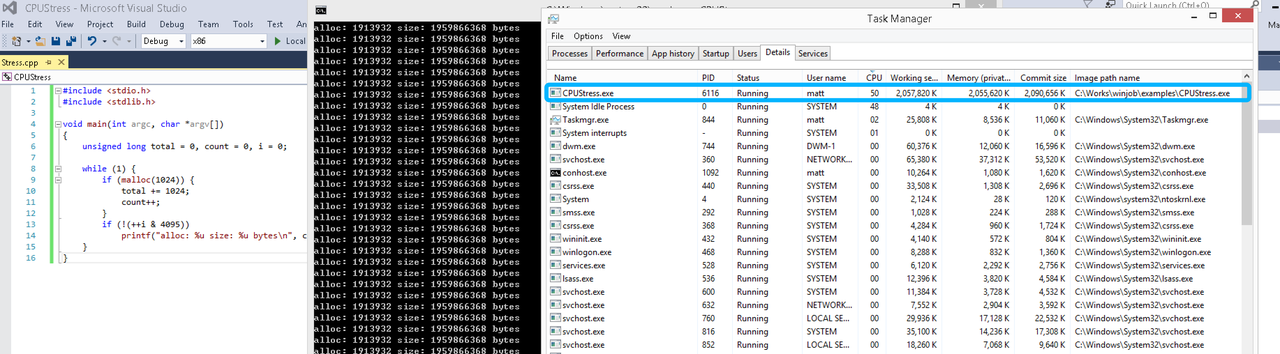
单一进程
在设定CPU上限16%及内存16M上限之后,结果如下:
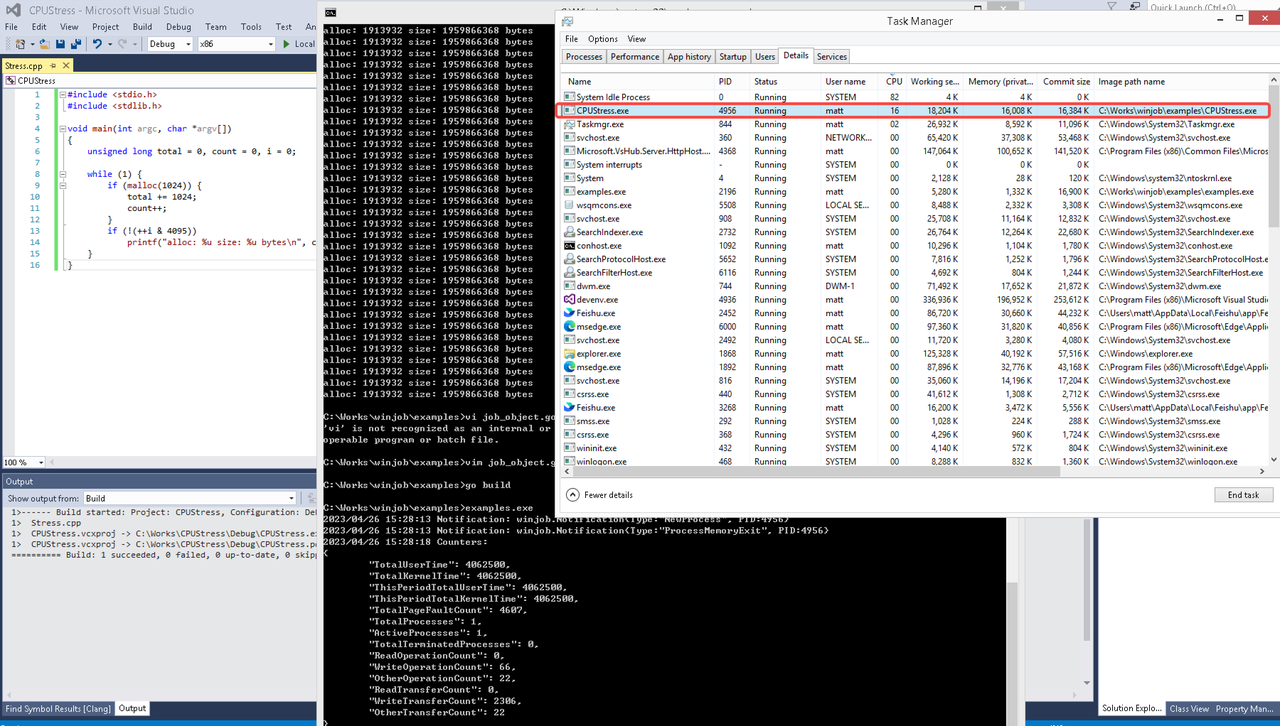 examples/job_object.go按如下修改:
var limits = []winjob.Limit{
        winjob.WithBreakawayOK(),
        winjob.WithKillOnJobClose(),
        winjob.WithActiveProcessLimit(3),
        winjob.WithProcessTimeLimit(10 * time.Second),
        winjob.WithCPUHardCapLimit(1600),        // 16%
        winjob.WithProcessMemoryLimit(16 << 20), // 16MB
        winjob.WithWriteClipboardLimit(),
}

const defaultCommand = ".\\CPUStress.exe"
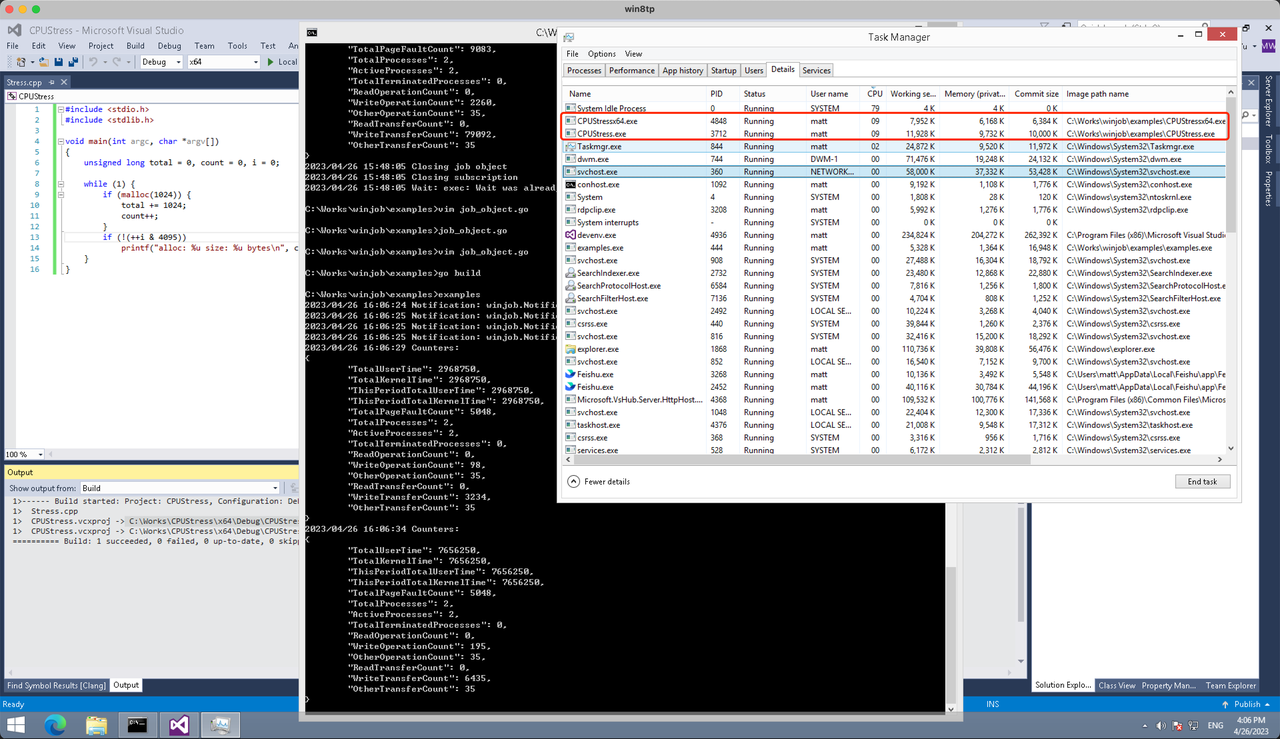
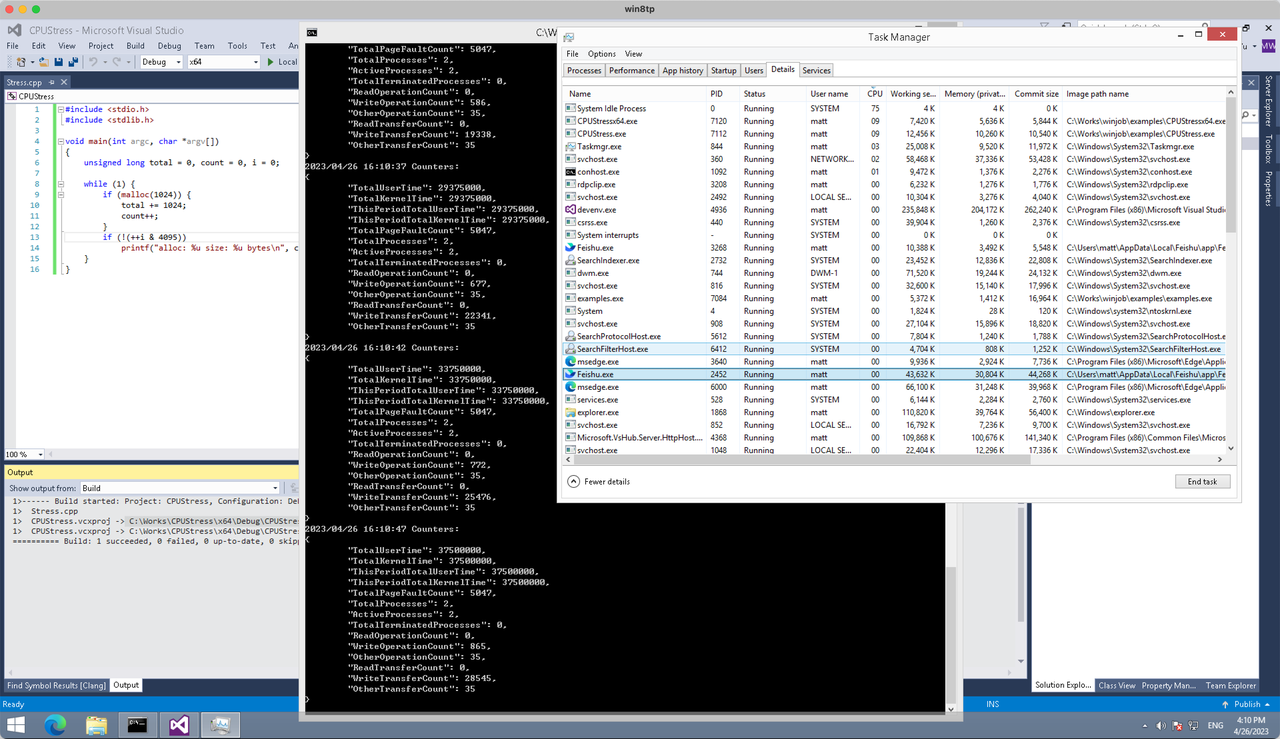
多进程(双进程)
将winjob.WithProcessMemoryLimit 改为 winjob.WithJobMemoryLimit,后者表示此job内所有进程要占用的总内存限制:
var limits = []winjob.Limit{
        winjob.WithBreakawayOK(),
        winjob.WithKillOnJobClose(),
        winjob.WithActiveProcessLimit(3),
        winjob.WithProcessTimeLimit(10 * time.Second),
        winjob.WithCPUHardCapLimit(1600),    // 16%
        winjob.WithJobMemoryLimit(16 << 20), // 16MB
        winjob.WithWriteClipboardLimit(),
}
验证结果如下:
winjob example代码:
// +build windows

package main

import (
        "encoding/json"
        "log"
        "os"
        "os/exec"
        "os/signal"
        "time"

        "golang.org/x/sys/windows"

        "github.com/kolesnikovae/go-winjob"
)

var limits = []winjob.Limit{
        winjob.WithBreakawayOK(),
        winjob.WithKillOnJobClose(),
        winjob.WithActiveProcessLimit(3),
        winjob.WithProcessTimeLimit(10 * time.Second),
        winjob.WithCPUHardCapLimit(1600),    // 16%
        winjob.WithJobMemoryLimit(16 << 20), // 16MB
        winjob.WithWriteClipboardLimit(),
}

const defaultCommand = ".\\CPUStress.exe"
const stressCommand  = ".\\CPUStressX64.exe"

func main() {
        job, err := winjob.Create("", limits...)
        if err != nil {
                log.Fatalf("Create: %v", err)
        }

        cmd := exec.Command(defaultCommand)
        cmd.Stderr = os.Stderr
        cmd.SysProcAttr = &windows.SysProcAttr{
                CreationFlags: windows.CREATE_SUSPENDED,
        }
        if err := cmd.Start(); err != nil {
                log.Fatalf("Start: %v", err)
        }

        stress := exec.Command(stressCommand)
        stress.Stderr = os.Stderr
        stress.SysProcAttr = &windows.SysProcAttr{
                CreationFlags: windows.CREATE_SUSPENDED,
        }
        if err := stress.Start(); err != nil {
                log.Fatalf("Start: %v", err)
        }

        s := make(chan os.Signal, 1)
        signal.Notify(s, os.Interrupt)

        c := make(chan winjob.Notification)
        subscription, err := winjob.Notify(c, job)
        if err != nil {
                log.Fatalf("Notify: %v", err)
        }

        done := make(chan struct{})
        go func() {
                defer close(done)
                ticker := time.NewTicker(time.Second * 5)
                defer ticker.Stop()
                var counters winjob.Counters
                for {
                        select {
                        case <-s:
                                log.Println("Closing job object")
                                if err := job.Close(); err != nil {
                                        log.Fatal(err)
                                }
                                log.Println("Closing subscription")
                                if err := subscription.Close(); err != nil {
                                        log.Fatal(err)
                                }
                                return

                        case n, ok := <-c:
                                if ok {
                                        log.Printf("Notification: %#v\n", n)
                                } else if err := subscription.Err(); err != nil {
                                        log.Fatalf("Subscription: %v", err)
                                }

                        case <-ticker.C:
                                if err := job.QueryCounters(&counters); err != nil {
                                        log.Fatalf("QueryCounters: %v", err)
                                }
                                b, err := json.MarshalIndent(counters, "", "\t")
                                if err != nil {
                                        log.Fatal(err)
                                }
                                log.Printf("Counters: \n%s\n", b)
                        }
                }
        }()

        if err := job.Assign(cmd.Process); err != nil {
                log.Fatalf("Assign: %v", err)
        }
        if err := winjob.Resume(cmd); err != nil {
                log.Fatalf("Resume: %v", err)
        }

        if err := job.Assign(stress.Process); err != nil {
                log.Fatalf("Assign: %v", err)
        }
        if err := winjob.Resume(stress); err != nil {
                log.Fatalf("Resume: %v", err)
        }

        if err := cmd.Wait(); err != nil {
                log.Fatalf("Wait: %v", err)
        }
        if err := stress.Wait(); err != nil {
                log.Fatalf("Wait: %v", err)
        }

        // Wait for a signal.
        <-done
}
The sound troubleshooting guide is spot-on. Humming turned out to be a capacitor problem that licensed emergency ac repair replaced quickly.
join mostbet [url=https://mostbet94827.help/]join mostbet[/url]
1win турниры слоты [url=http://1win59801.help]http://1win59801.help[/url]
From the initial consultation, Salt Lake Injury Law builds a thorough strategy tailored to your injury case. Truck accident lawyer
When Hezbollah fired rockets at Israel on March 2, two days after Israel and the United States launched a war on Iran, the resulting Israeli operation to destroy the group quickly became a mission to flatten swathes of southern Lebanon.
[url=https://a-slon6.net]slon2 at[/url]
As Israeli warplanes carried out airstrikes across the country, soldiers seized more territory in the south. Ground operations began to take on the appearance of those seen in Gaza: bulldozers tearing down buildings and demolitions razing whole villages to the ground.
Even after last week’s ceasefire agreement between Israel and Lebanon, those ground operations have continued.
A CNN review of satellite imagery reveals the scale of the destruction.
slon4.at
https://a-slon4.ru
Hundreds of buildings – most of which appear to be homes – have been either completely flattened or rendered uninhabitable.
Satellite imagery and videos from after the April 16 ceasefire announcement show demolitions continuing apace, with excavators and armored vehicles clearly visible.
Rights groups have sounded the alarm, warning that Israel’s military offensive is mirroring tactics used in Gaza – from heavy strikes on critical infrastructure and healthcare facilities, to the targeting of journalists and psychological warfare.
[url=https://slon10-c.cc]slon7.at[/url]
Israeli officials have outlined plans for a long-term “security zone” inside the border – though the preferred terminology now is a “forward defense line area” – with Israeli Prime Minister Benjamin Netanyahu saying his forces will expand their positions 10 kilometers (6 miles) deep inside Lebanon.
Child safety tips were spot-on. We added interior locks and door reinforcements with help from key replacement .
Senior Israeli government figures have been clear about what that means.
[url=https://kraken2trfqodidvlh4ab337cpzfrhdlfldhve5fn7njhumwr7instad-onion.ru]kraken7jmgt7yhhe2c4iyilthnhcugfylcztsdhh7otrr6jgdw667pqd.onion[/url]
Defense Minister Israel Katz vowed to destroy all homes in villages near the border, in line with what he called “the Rafah and Beit Hanoun model.”
Rafah and Beit Hanoun are cities at, respectively, the southern and northern ends of Gaza, which have been laid to waste by Israeli forces over the last two and a half years.
kraken5af44k24fwzohe6fvqfgxfsee4lgydb3ayzkfhlzqhuwlo33ad.onion
https://kraken2trfqodidvlh4ab337cpzfrhdlfldhev5fn7njhumwr7instad-onion.ru
After the ceasefire was announced last week, Katz doubled down, saying the “destruction of houses in the Lebanese contact-line villages” will continue, describing them as “terrorist outposts.”
The Israeli military says it is targeting Hezbollah infrastructure across the country in response to the launch of thousands of rockets, drones and anti-tank missiles towards Israel since 2023.
It says Hezbollah embeds and stores weapons in civilian homes, releasing images of arms and ammunition it says its soldiers have uncovered during searches, as well as what it said was an underground command center hidden under a clothes shop.
[url=https://kraken2trfqodivdlh4ab337cpzrhfldfdlhve5fn7njhurmw7instad-onion.ru]kraken2trfqodidvlh4aa337cpzfrhdlfldhve5nf7njhumwr7instad onion[/url]
Senior Israel Defense Forces (IDF) officials say Israel will impose what it calls a “yellow line” in Lebanon, barring residents from returning to areas occupied by the Israeli military.
Related article
Verify they won’t use sealants on pruning cuts—old myth. Science-backed notes on tree trimming .
The discussion on uninsured motorists is spot-on. If hit by one, reach out to car accident lawyer .
If you want to make some money on regional heavyweights who fight like they have a parking meter running outside UAE Warriors 70 is your playground .
I appreciate how this article highlights the dignity and independence that senior home care can provide. in-home home care for parents
UAE Warriors 70 represents more than just another event on the regional circuit. In the Middle East, this is the premier forge where prospects are either tempered into diamonds or shattered into dust.
http://yellowlove.es/
La empresa Yellowlove se presenta como una consultora con experiencia enfocada en el ambito nacional espanol, que ofrece servicios de calidad a quienes buscan resultados, priorizando en la atencion personalizada. Descubre todos los detalles aqui.
mostbet бонус без депозита казино [url=http://mostbet15384.help]http://mostbet15384.help[/url]
Ensure they comply with local dumping regulations. The provider I found on junk removal companies had permits.
Don’t ignore flickering lights—could be loose neutrals. Pros at commercial electrical services Las Vegas .
mostbet new site [url=www.mostbet94827.help]mostbet new site[/url]
Legal prep matters: POA and advance directives should be ready before moving. Steps at respite care .
1win регистрация бонус [url=http://1win59801.help/]http://1win59801.help/[/url]
Great job! Find more at elderly care .
За выездом врача чаще обращаются тогда, когда человеку тяжело добраться до клиники, он ослаблен после нескольких дней употребления алкоголя или родственникам важно быстрее понять, какая тактика будет безопасной. После осмотра можно определить, нужна ли капельница, достаточно ли детоксикации на дому, требуется ли повторное наблюдение, а в дальнейшем — консультация по лечению алкоголизма, кодирование или реабилитация. В части случаев уже первый звонок позволяет понять, идет ли речь только о временном ухудшении самочувствия или о состоянии, при котором может потребоваться вывод из запоя в стационаре.
Выяснить больше – [url=https://narkolog-na-dom-ekaterinburg-3.ru/]нарколог на дом в екатеринбурге[/url]
Whiplash symptoms are no match for the expert care provided by Wall Family Chiropractic Center’s skilled chiropractors. Tacoma car accident chiropractor
If you’re dealing with a rat infestation, it’s crucial to address it quickly to prevent health risks and property damage. Effective rat removal techniques can make a significant difference in maintaining a safe and clean environment Exterminator Puyallup
If you’re unsure about how to proceed after a car accident in Anchorage, reach out to an experienced attorney today. Visit Personal injury lawyer near me for guidance.
Does anyone know how to choose the right ##Puyallup Chiropractor##? I want to make sure I find someone experienced. Chiropractor near me
UAE Warriors 70, set to take place on May 8, 2026, at Abu Dhabi’s Space42 Arena serves as a perfect example of this.
มีอแดปเตอร์แบบ PNP สำหรับรุ่นยอดนิยม ติดตั้งง่าย รายละเอียดใน ตั้งไฟหน้ารถ
I appreciate the informative content here! For those needing legal support, look into criminal defense attorney .
Этот обзор предлагает структурированное изложение информации по актуальным вопросам. Материал подан так, чтобы даже новичок мог быстро освоиться в теме и начать использовать полученные знания в практике.
Желаете узнать подробности? – [url=https://volosymoi.ru/lechenie/kak-deficit-vitaminov-svyazan-s-intoksikaciey.html]капельница от запоя нижний новгород[/url]
1win casino slots [url=https://www.1win68503.help]1win casino slots[/url]
Salt Lake Injury Law helped me recover wages I lost while out of work after my accident. They fought for every dollar I deserved. Salt Lake Injury Lawyer
ставки на спорт, новости спорта, прогнозы и
https://bkradar.com читайте подробнее про ставки и букмекеров на bkradar.com
If you were partly at fault, you may still recover. car accident lawyer calculated my share accurately.
In-Depth Knowledge of Local Conditions:
Abilene’s authentic climate stipulations and soil varieties require selected expertise in relation to concrete news
Don’t overlook future medical needs; Auto Accident Attorney helped me reach a car accident lawyer to calculate them.
1win селфи верификатсия [url=1win26514.help]1win26514.help[/url]
This is evident and actionable. I proportion case reports at digital marketing northampton .
1win как вывести на DemirBank [url=www.1win68503.help]1win как вывести на DemirBank[/url]
ставки на спорт, новости спорта, прогнозы и
рейтинг букмекеров читайте подробнее про ставки и букмекеров на bkradar.com
I learned the hard way that having a car accident lawyer is vital for getting fair compensation. Car Accident Attorney
Getting started might feel daunting—but don’t hesitate too long before seeking advice reliable sources like local experts such Injury Lawyers near today!! Car Accident
1win отменить вывод [url=1win68503.help]1win68503.help[/url]
Good review. Citizens of Snohomish Area seeking a reputable cleaning company need to think about move out cleaning Granite Falls WA .
Many thanks for the detailed regimen. For move-in/move-out cleaning, I constantly recommend reserving with https://everlink.tools/dutycleaners early.
Нарколог на дом в Екатеринбурге: выезд врача на дом, лечение запоя и консультации в наркологической клинике «НЕО+».
Разобраться лучше – https://narkolog-na-dom-ekaterinburg.ru/
Hurricane prep tip for Conroe homeowners: reinforce struts and test manual release—learned it via garage door installation houston .
мостбет не могу войти [url=www.mostbet15384.help]www.mostbet15384.help[/url]
pin-up aviator strategiya [url=https://pinup2010.help]https://pinup2010.help[/url]
The progression of dementia requires proactive planning. Consider Memory Care before a crisis. Planning guide: respite care .
Wonderful tips! Find more at Ir aquí .