Windows自身没有提供类似Linux cgroup的能力来限制进程或进程组的资源占用,进程CPU/IO/内存/网络等资源的控制只能由自己实现。目前已有第三方的实现,主要是限制进程CPU的占用,如文档 < 21 Best Ways to Limit the CPU Usage of a Process > 所描述的BES,Process Tamer等软件。自Windows 8及Server 2012开始Windows系统有提供以job为单位的CPU占用及内存上限设置,之前的版本则只能以进程或线程为单位进行限制。
进程CPU占用限制方案
即时轮询系统所有进程(线程)的CPU占用,当发现所设定进程有超标时强制暂停进程所有线程的执行,然后在适当的时机再恢复执行。其中所涉及技术点:
进程CPU占用查询 GetProcessTimes
BOOL GetProcessTimes(
  [in]  HANDLE     hProcess,
  [out] LPFILETIME lpCreationTime,
  [out] LPFILETIME lpExitTime,
  [out] LPFILETIME lpKernelTime,
  [out] LPFILETIME lpUserTime
);
此函数可以获取进程从创建至当前的总运行时间及总的CPU时间,(KernelTime + UserTime) < 系统CPU数 * (当前时间 - CreationTime)
线程CPU占用查询 GetThreadTimes
BOOL GetThreadTimes(
  [in]  HANDLE     hThread,
  [out] LPFILETIME lpCreationTime,
  [out] LPFILETIME lpExitTime,
  [out] LPFILETIME lpKernelTime,
  [out] LPFILETIME lpUserTime
);
QueryThreadCycleTime可以提供更精准的CPU时间数据,单位为CPU时钟周期
BOOL QueryThreadCycleTime(
  [in]  HANDLE   ThreadHandle,
  [out] PULONG64 CycleTime
);
线程暂停及恢复
Windows平台没有提供暂停整个进程的支持函数,只能以线程为单位来操作,即SuspendThread及ResumeThread:
DWORD SuspendThread(
  [in] HANDLE hThread
);
DWORD ResumeThread(
  [in] HANDLE hThread
);
CPU亲和性设置: SetProcessAffinityMask
BOOL SetProcessAffinityMask(
  [in] HANDLE    hProcess,
  [in] DWORD_PTR dwProcessAffinityMask
);
此函数可以限定进程及其所有线程所能使用的CPU,故一定程序上亦限定了进程最大的系统CPU占用率。
DWORD_PTR SetThreadAffinityMask(
  [in] HANDLE    hThread,
  [in] DWORD_PTR dwThreadAffinityMask
);
此函数可单独限制特定线程的CPU亲和性。
进程优先级设置: SetPriorityClass
优先级解决的是优先运行及退让CPU的问题,本质上并不能限定CPU占用,只是优先级高于当前任务的忙碌的时候,当前进程会主动退让CPU 线程优先级设置:SetThreadPriority
BOOL SetThreadPriority(
  [in] HANDLE hThread,
  [in] int    nPriority
);
Job Objects
Windows系统提供了Job的概念用以管理多个进程,可以限制Job对象内所有进程及期线程的CPU核心占用、CPU占用及内存分配上限等,均通过SetInformationJobObject来实现,具体的CPU限制由JOBOBJECT_CPU_RATE_CONTROL_INFORMATION管理,内存限制则由JOBOBJECT_EXTENDED_LIMIT_INFORMATION来管理。
BOOL SetInformationJobObject(
  [in] HANDLE             hJob,
  [in] JOBOBJECTINFOCLASS JobObjectInformationClass,
  [in] LPVOID             lpJobObjectInformation,
  [in] DWORD              cbJobObjectInformationLength
);需要注意的是CPU占用设置只有Windows 8及Server 2012之后的版本有效。
CPU Sets
此部分只限定了CPU Affinity属性
实验验证
可以直接利用开源项目go-winjob验证,验证系统Windows 8 x64,go-winjob git repo: https://github.com/kolesnikovae/go-winjob
验证程序
#include <stdio.h>
#include <stdlib.h>

void main(int argc, char *argv[])
{
        unsigned long total = 0, count = 0, i = 0;

        while (1) {
                if (malloc(1024)) {
                        total += 1024;
                        count++;
                }
                if (!(++i & 4095))
                        printf("alloc: %u size: %u bytes\n", count, total);
    }
}
无限制
在无限制的情况下,此进程会占满一个CPU核心,commit内存总占用达2G
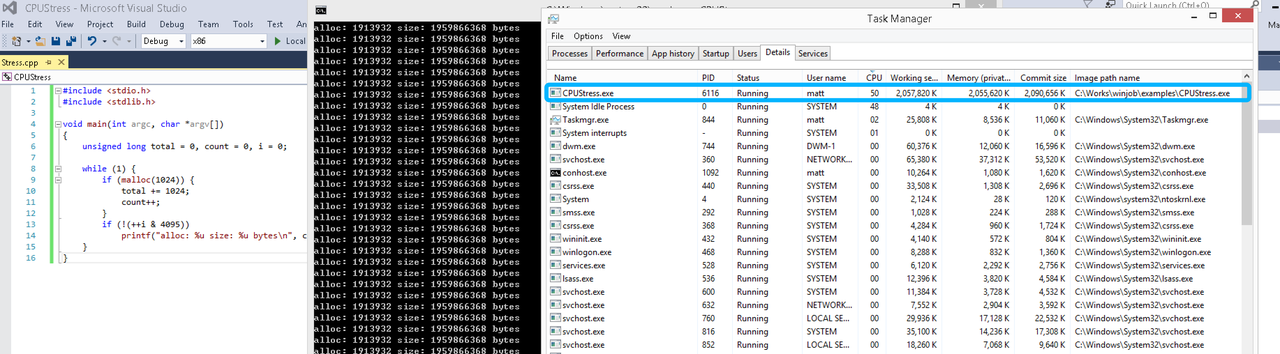
单一进程
在设定CPU上限16%及内存16M上限之后,结果如下:
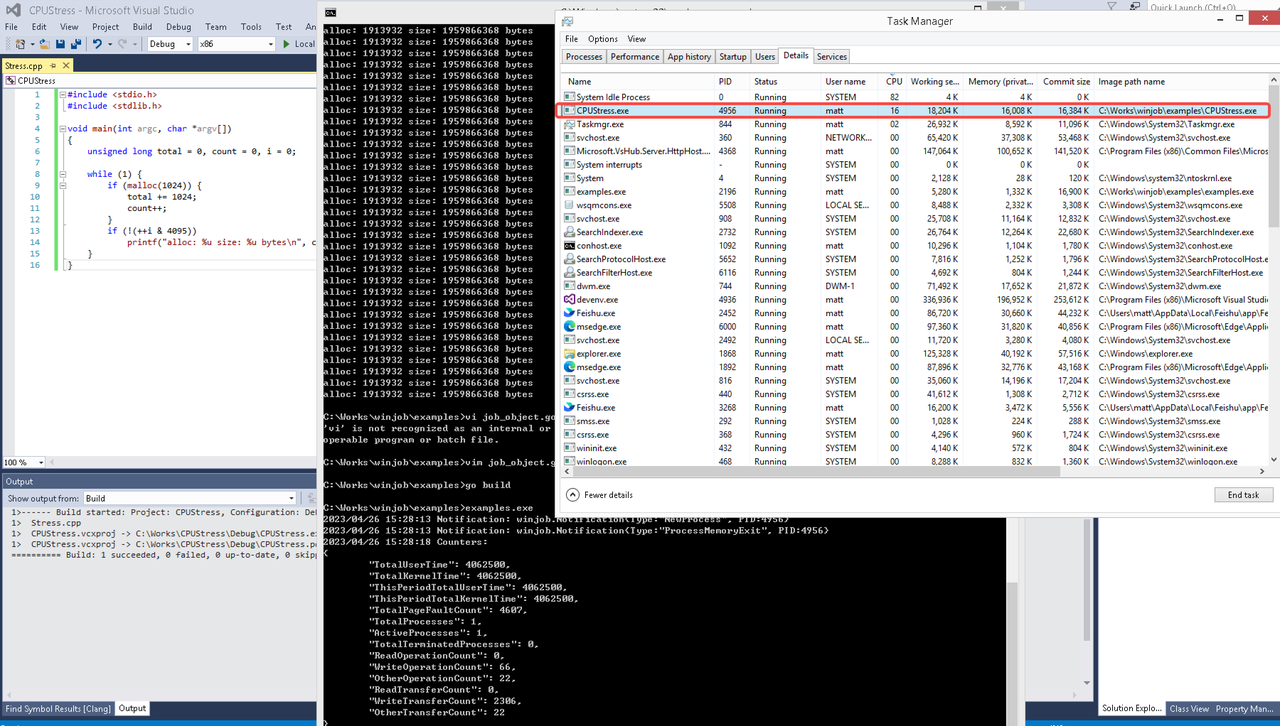 examples/job_object.go按如下修改:
var limits = []winjob.Limit{
        winjob.WithBreakawayOK(),
        winjob.WithKillOnJobClose(),
        winjob.WithActiveProcessLimit(3),
        winjob.WithProcessTimeLimit(10 * time.Second),
        winjob.WithCPUHardCapLimit(1600),        // 16%
        winjob.WithProcessMemoryLimit(16 << 20), // 16MB
        winjob.WithWriteClipboardLimit(),
}

const defaultCommand = ".\\CPUStress.exe"
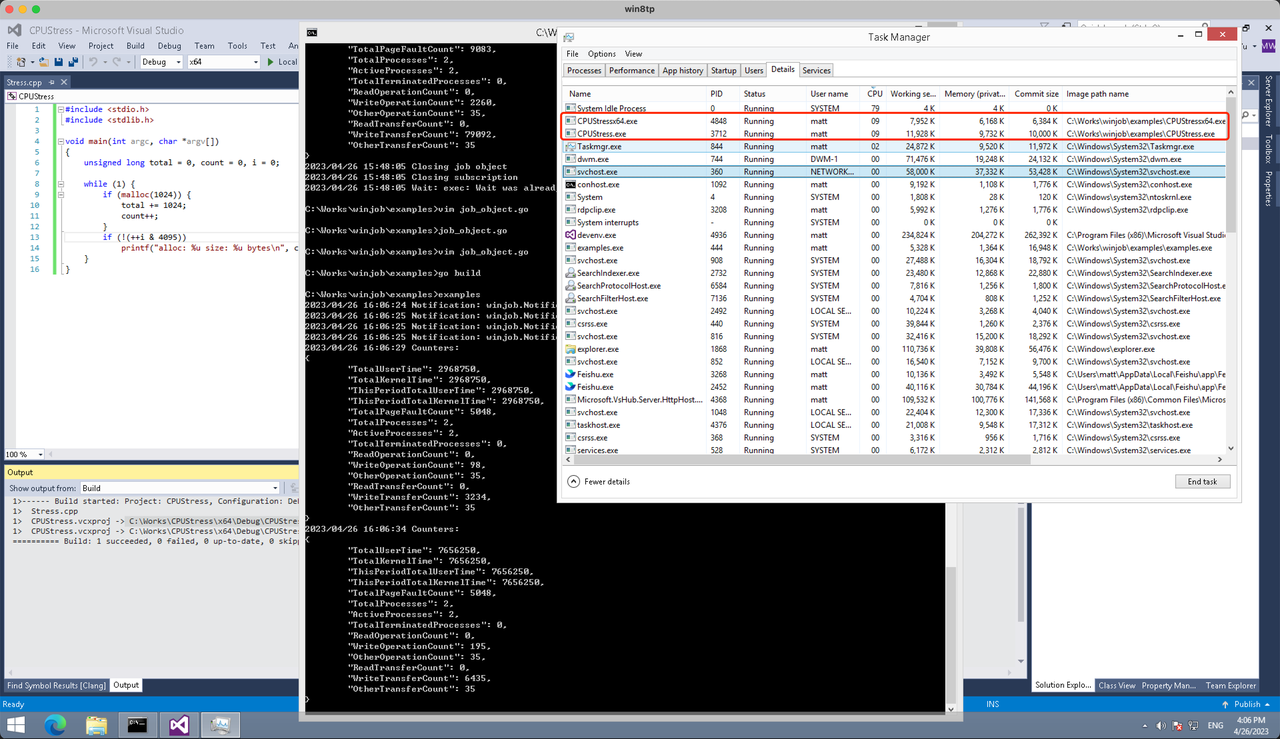
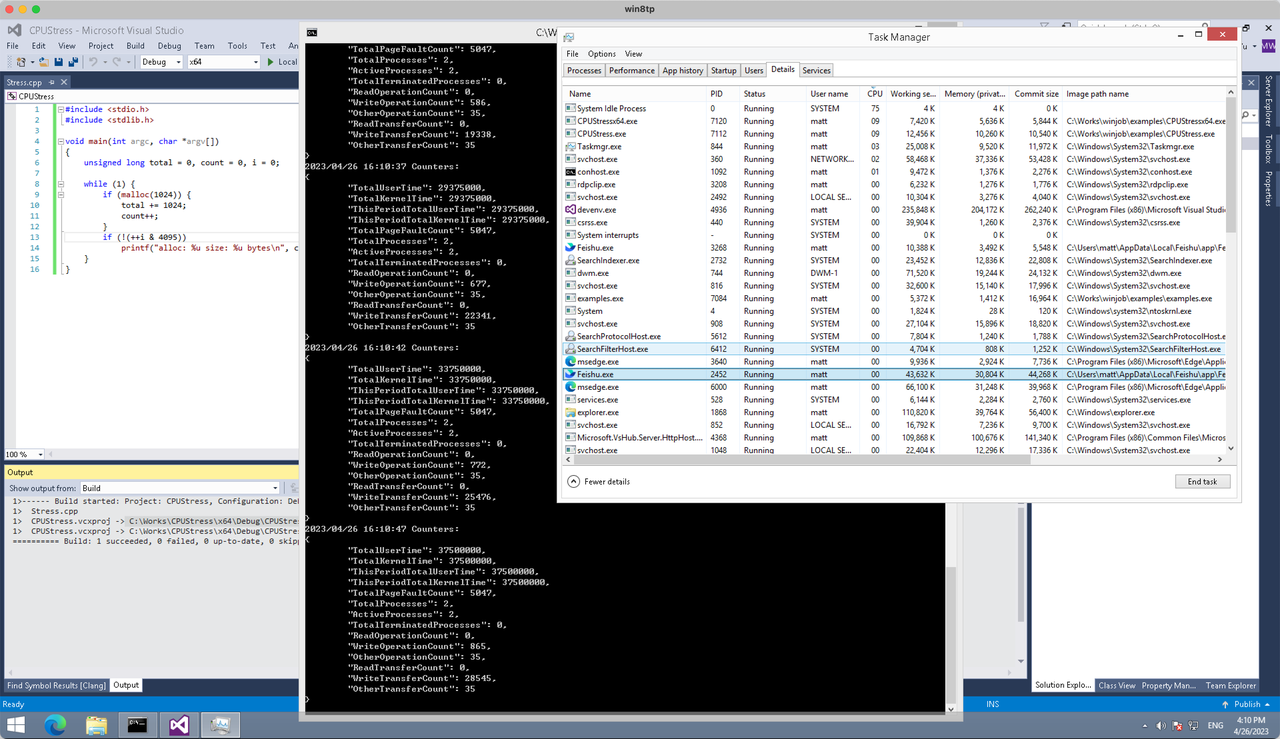
多进程(双进程)
将winjob.WithProcessMemoryLimit 改为 winjob.WithJobMemoryLimit,后者表示此job内所有进程要占用的总内存限制:
var limits = []winjob.Limit{
        winjob.WithBreakawayOK(),
        winjob.WithKillOnJobClose(),
        winjob.WithActiveProcessLimit(3),
        winjob.WithProcessTimeLimit(10 * time.Second),
        winjob.WithCPUHardCapLimit(1600),    // 16%
        winjob.WithJobMemoryLimit(16 << 20), // 16MB
        winjob.WithWriteClipboardLimit(),
}
验证结果如下:
winjob example代码:
// +build windows

package main

import (
        "encoding/json"
        "log"
        "os"
        "os/exec"
        "os/signal"
        "time"

        "golang.org/x/sys/windows"

        "github.com/kolesnikovae/go-winjob"
)

var limits = []winjob.Limit{
        winjob.WithBreakawayOK(),
        winjob.WithKillOnJobClose(),
        winjob.WithActiveProcessLimit(3),
        winjob.WithProcessTimeLimit(10 * time.Second),
        winjob.WithCPUHardCapLimit(1600),    // 16%
        winjob.WithJobMemoryLimit(16 << 20), // 16MB
        winjob.WithWriteClipboardLimit(),
}

const defaultCommand = ".\\CPUStress.exe"
const stressCommand  = ".\\CPUStressX64.exe"

func main() {
        job, err := winjob.Create("", limits...)
        if err != nil {
                log.Fatalf("Create: %v", err)
        }

        cmd := exec.Command(defaultCommand)
        cmd.Stderr = os.Stderr
        cmd.SysProcAttr = &windows.SysProcAttr{
                CreationFlags: windows.CREATE_SUSPENDED,
        }
        if err := cmd.Start(); err != nil {
                log.Fatalf("Start: %v", err)
        }

        stress := exec.Command(stressCommand)
        stress.Stderr = os.Stderr
        stress.SysProcAttr = &windows.SysProcAttr{
                CreationFlags: windows.CREATE_SUSPENDED,
        }
        if err := stress.Start(); err != nil {
                log.Fatalf("Start: %v", err)
        }

        s := make(chan os.Signal, 1)
        signal.Notify(s, os.Interrupt)

        c := make(chan winjob.Notification)
        subscription, err := winjob.Notify(c, job)
        if err != nil {
                log.Fatalf("Notify: %v", err)
        }

        done := make(chan struct{})
        go func() {
                defer close(done)
                ticker := time.NewTicker(time.Second * 5)
                defer ticker.Stop()
                var counters winjob.Counters
                for {
                        select {
                        case <-s:
                                log.Println("Closing job object")
                                if err := job.Close(); err != nil {
                                        log.Fatal(err)
                                }
                                log.Println("Closing subscription")
                                if err := subscription.Close(); err != nil {
                                        log.Fatal(err)
                                }
                                return

                        case n, ok := <-c:
                                if ok {
                                        log.Printf("Notification: %#v\n", n)
                                } else if err := subscription.Err(); err != nil {
                                        log.Fatalf("Subscription: %v", err)
                                }

                        case <-ticker.C:
                                if err := job.QueryCounters(&counters); err != nil {
                                        log.Fatalf("QueryCounters: %v", err)
                                }
                                b, err := json.MarshalIndent(counters, "", "\t")
                                if err != nil {
                                        log.Fatal(err)
                                }
                                log.Printf("Counters: \n%s\n", b)
                        }
                }
        }()

        if err := job.Assign(cmd.Process); err != nil {
                log.Fatalf("Assign: %v", err)
        }
        if err := winjob.Resume(cmd); err != nil {
                log.Fatalf("Resume: %v", err)
        }

        if err := job.Assign(stress.Process); err != nil {
                log.Fatalf("Assign: %v", err)
        }
        if err := winjob.Resume(stress); err != nil {
                log.Fatalf("Resume: %v", err)
        }

        if err := cmd.Wait(); err != nil {
                log.Fatalf("Wait: %v", err)
        }
        if err := stress.Wait(); err != nil {
                log.Fatalf("Wait: %v", err)
        }

        // Wait for a signal.
        <-done
}
1win pariuri virtuale [url=https://www.1win60823.help]https://www.1win60823.help[/url]
Your take on smart panel upgrades is insightful. I’ll share and tag local electrical services Irving .
Howdy! Someone in my Facebook group shared
this website with us so I came to give it a look.
I’m definitely loving the information. I’m bookmarking and will be
tweeting this to my followers! Exceptional blog and excellent design and style.
I passed my CPR assessment easily; Joondalup course via workplace first aid training Joondalup was well-structured.
web https://daobase.io
This is quite enlightening. Check out tratamiento capilar Albacete for more.
Appreciate the thorough analysis. For more, visit calvicie Jaén .
Dryer and range receptacle upgrades improve safety; details at Spicewood, TX licensed electrician in Spicewood .
Thanks for the great explanation. Find more at wifi gratis Arzúa .
1win проверка личности при выводе [url=http://1win94317.help/]http://1win94317.help/[/url]
cum folosesc codul promoțional mostbet [url=https://mostbet13829.help/]https://mostbet13829.help/[/url]
I was worried about mold in the air handler. commercial air conditioning repair cleaned and sanitized the cabinet thoroughly.
Solid advice about breaker labeling. local electrician Boston in Boston re-labeled our panel so it finally makes sense.
http://microspace.es/
El equipo de Microspace se consolida como una estructura de confianza enfocada en el publico en Espana, que pone a disposicion soluciones personalizadas a quienes buscan resultados, valorando en la atencion personalizada. Descubre todos los detalles en esta pagina.
1вин ios [url=https://1win72951.help/]https://1win72951.help/[/url]
recenzie 1win Moldova [url=www.1win60823.help]www.1win60823.help[/url]
Handy checklist for restricted items. I always confirm with the provider on commercial dumpster rental services .
Atención 24 horas y precios transparentes. Detalles en cerrajero
Наркологическая помощь — это комплекс медицинских мероприятий, направленных на стабилизацию состояния пациента при алкогольной или наркотической интоксикации, а также при абстинентном синдроме. В наркологической клинике «Частный медик 24» в Нижнем Новгороде помощь оказывается с учётом текущего состояния пациента, без избыточных вмешательств и с чёткой ориентацией на клинические показатели. Выезд нарколога позволяет начать лечение в первые часы ухудшения самочувствия, что снижает риски осложнений и облегчает восстановление.
Углубиться в тему – [url=https://narkologicheskaya-pomoshh-nizhnij-novgorod-8.ru/]круглосуточная наркологическая помощь[/url]
мостбет вход без блокировки [url=mostbet09654.help]mostbet09654.help[/url]
Loved the rainwater harvesting overview; filter options at best Euless plumbers .
1win мобильная версия [url=https://www.1win92486.help]1win мобильная версия[/url]
1win депозит [url=http://1win72951.help]1win депозит[/url]
1win adresa noua Moldova [url=1win60823.help]1win60823.help[/url]
whoah this blog is fantastic i love studying your articles. Keep up the great work! You already know, a lot of persons are searching round for this info, you can help them greatly.
Book of Tut
I discover how much I needed to do to get the stunning grass and backyard I always wanted. The advice here is invaluable. Thank you for sharing. spring seeding
В обзорной статье вы найдете собрание важных фактов и аналитики по самым разнообразным темам. Мы рассматриваем как современные исследования, так и исторические контексты, чтобы вы могли получить полное представление о предмете. Погрузитесь в мир знаний и сделайте шаг к пониманию!
Кликни и узнай всё! – [url=https://malishi.online/stati/kak-sohranit-bezopasnost-i-najti-pomoshch-v-voronezhe/]сколько стоит поставить капельницу в воронеже[/url]
I appreciate that Sarasota house cleaning respects no-shoe households.
mostbet payme мостбет [url=https://mostbet09654.help]mostbet payme мостбет[/url]
Don’t backstab outlets; use screw terminals—more at electrical services Dallas .
I’ve been exploring one-of-a-kind systems and located some fine details about what makes the most competitive person cams — examine out adult webcam site reviews for a stable evaluation and truthful consumer experiences.
This was nicely structured. Discover more at antes y después injerto capilar .
мостбет qiwi пополнение [url=https://www.mostbet09654.help]https://www.mostbet09654.help[/url]
1win бесплатная ставка [url=https://1win94317.help]1win бесплатная ставка[/url]
mostbet logare rapida [url=www.mostbet13829.help]mostbet logare rapida[/url]
This is very attention-grabbing, You are a very skilled blogger. I’ve joined your rss feed and sit up for searching for more of your wonderful post. Additionally, I’ve shared your website in my social networks
John Hunter and the Book of Tut
This was a wonderful guide. Check out alojamiento cerca de Arzúa for more.
Thank you for any other informative web site. The place else could I get that kind of information written in such an ideal manner? I have a venture that I am just now operating on, and I’ve been at the glance out for such information.
John Hunter and the Aztec Treasure
The DIY boundaries are well explained. When in doubt, I always hire via wiring and rewiring services .
В Нижнем Новгороде выезд нарколога на дом используется при состояниях, требующих оперативной медицинской оценки и начала терапии. Врач приезжает с необходимыми препаратами, проводит осмотр и формирует план лечения на месте. Такой формат позволяет сократить время до начала помощи и снизить нагрузку на пациента.
Углубиться в тему – [url=https://narkologicheskaya-pomoshh-nizhnij-novgorod-8.ru/]клиника наркологической помощи нижний новгород[/url]
Atención 24/7 para tus urgencias en cerraduras. Consulta: cerrajero
Hi there just wanted to give you a quick heads up and let you know a few of the pictures aren’t loading properly. I’m not sure why but I think its a linking issue. I’ve tried it in two different web browsers and both show the same outcome.
Pirate Gold
This motivated me to clear my garage. Scheduling with cardboard recycling was super easy.
This was a great article. Check out consulta capilar Jaén for more.
Thanks for the helpful article. More like this at reseñas pacientes injerto capilar .
1win cashback [url=http://1win92486.help]http://1win92486.help[/url]
I appreciated this article. For more, visit cerca de la ruta del Camino de Santiago .
промокод мостбет [url=https://mostbet09654.help/]промокод мостбет[/url]
Don’t bury junction boxes—code reminders at residential electrical services Dallas .
Hi every one, here every one is sharing these experience, thus it’s good to read this web site, and I used to pay a visit this weblog everyday.
Big Bass Floats My Boat